
Recommended Free Tools
iTechGuides is reader-supported. When you buy through links on our site, we may earn an affiliate commission. As an Amazon Associate I earn from qualifying purchases. Learn more
To change an LG hotel TV to HDMI, press Home on the remote, open Input, and select the HDMI port your device is plugged into. If the remote has no Home button, press Settings and look for Input. Hotel models and menus vary; if HDMI is missing or unavailable, ask the front desk to select or enable it.
Switch the LG hotel TV to the right HDMI input
- Connect your device to an HDMI port on the TV and turn the device on, if the hotel permits its use.
- Press Home on the LG remote and choose the Input icon. If there is no Home button, press Settings and look for Input. LG notes that menu steps can vary by model (LG Easy TV Connect Guide).
- Select the HDMI input that matches the port you used, such as HDMI 1. The port number on the TV and the selected input must match.
- If the screen says there is no signal, check that the device is powered on and the cable is firmly connected, then verify that you selected the port where it is plugged in. LG’s receiver setup instructions likewise direct users to connect by HDMI and select that same TV input (LG UHD Receiver connection guide, published July 12, 2026).
Find the input control on the remote
Some LG remotes have a dedicated button labeled Input, Function, or Source; LG says those labels refer to the same control in its general connection guide (LG support). A particular hotel remote may not include one of these buttons, so use Home or Settings if it does not.
Why HDMI may not appear on a hotel TV
Hotel TVs are model-specific, and menu instructions are not universal. LG publishes separate support pages and manuals for hotel models, including the 65UM670H0UG.AUS, 43UU670H.AUS, and 50US670H9UA.ACC; their manuals vary by model and date (LG Product Support).
Crashes, No Sound, or Screen Glitches?
Random freezes, missing sound and display glitches usually trace back to one bad driver. Find and replace yours safely.Free scan · under a minutePC Slower Than It Used to Be?
A free scan shows the junk files, broken settings and background clutter dragging Windows down - then fixes them in one click.Free scan · Windows 10 & 11Some hotel systems let property staff manage TV settings remotely. LG’s hospitality documentation describes management functions for specified systems, but it does not establish whether a particular hotel’s TVs block HDMI or permit guest connections (LG Hospitality TV remote management overview). If the HDMI entry is absent, greyed out, or inaccessible, contact the front desk rather than changing installer or hotel-management settings.
#1 Best Overall
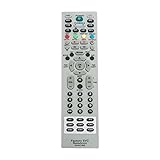
- MKJ39170828 Replacement Remote Control fit for LG LCD LED TV
- No programming or paring is needed. Just insert new batteries and it is ready for use.
- Power Supply: 2X 1.5V AA alkaline battery. Batteries and User Manual Not Included
- Please feel free to contact us if you have any query, thanks!
If the TV switches away from HDMI by itself
A connected device can sometimes trigger an input change through SIMPLINK, LG’s name for HDMI-CEC. LG’s support article on this behavior, dated September 28, 2026, covers standard models and notes that settings vary; it is not hotel-specific (LG: If Your LG TV Switches to an HDMI Input by Itself). If this happens on a hotel TV, ask staff for help instead of changing settings you are not authorized to alter.
Quick Recap
Best Value

- 【TV SPECIFICATION】The remote ONLY suitable for all LG TVs. An universal replacement upgraded remote version AKB75095307,compatible for all LG Smart LCD LED HDTV UHD OLED 3D 4K TVs
- 【HIGH QUALITY】Our remote has been upgraded to give you a greater transmitting distance (over 35 ft) and has a quick response time,The remote control shell is made of ABS material, which is resistant to falling and has no peculiar smell.
- 【KEY FEATURES】The Loutoc Universal for LG TV Remote features shortcut buttons for Netflix and P.Video for extra convenience.It is perfect to replace your old or damaged for LG TV Remote with the Loutoc remote.
- 【EASY TO USE】Using our remote couldn't be easier since no programming or setup is required. Just insert 2pcs*AAA batteries, and it is ready to go! (⚠ batteries are not included)
- 【AFTER-SALE SERVICE】If you have any questions about your order, please contact us directly and we will reply within 12 hours on working days!.If your TV model number is not listed on ours, please Email us before you order it, we will help you find the right remote control.
Rank #4

- ▶▶ Universal for LG TV ▶ Compatible with All LG smart TV remote, universal remote comaptible with lg TV LED LCD HDTV 3D 4K smart TV models, such as AKB74915305 remote control, AKB75375604, AKB75095307, AKB75675304, AKB74475401, AKB74475433, AKB73975702, AKB75055701, AKB73975711, AKB73715608, AKB74915324, AKB73715601, AKB75095308, AKB74915304, AKB75095330, AGF76631064, universal for LG 24" 27" 32" 42" 43" 48" 50" 55" 65" 70" 75" 77" 82" 86" Smart TV
- ▶▶ No setup Required ▶ NO programming, just add the batteries and it worked immediately ( Package not included batteries)
- ▶▶ Shortcuts Button ▶ These replacement for LG TV remote control feature with Netflix and amazon shortcuts button, change switch easily
- ▶▶ Stable performance ▶ With these remotes for LG TV remote replacement, you can control your TV up to 12 meters/40 feet. The fastest response time to your TV is less than 0.2 seconds and it supports over 160,000 clicks through approved tests.
- ▶▶Easy to Grip ▶ Ergonomic designed, compact size makes this remote control for lg TV easy to grip and uneasy to slip (Package List: 2 remotes for LG TV remote control replacement )
Rank #3

- 【Applicable TV Series】Replacement IR remote control fit for LG smart TV, UHD TV's UP70, UP75, UP76, UP80, UP87 Series, OLED TV's OLED A1,OLED A2, OLED B1,OLED B2, OLED C1, OLED C2, OLED G1, OLED G2 , OLED Z2, ZX Serie, QNED Mini-LED TV's QNED 90, QNED 80, QNED 85, QNED 99 Series, NanoCell TV's Nano 55, Nano 75, Nano 80, Nano 85, Nano 90, Nano 99, UQ9000, UQ7070, UQ7570, UQ8000 Series etc
- 【Remote Compatibility】2 remotes in one pack, compatible with all lg tv remote control. Exact replacement for your old or damaged remote control, also a better backup remote for your LG TV
- 【Shortcut Buttons】 The remote control is designed with 4 shortcut buttons, quickly access to your favorite channels
- 【Easy to use】Use it just right out of the box, no need any setup, just insert 2*AAA batteries and it will work well with your LG TV. (Note: Batteries and manual are not included)
- REMOTE CONTROL DISTANCE: Our remote control is made of ABS material, tested to be responded to TV in 0.2 seconds and precisely remote up to 40 feet. If there are any questions, you could contact us in time, we will reply to you within 12 hours and will be happy to help you
Rank #2

- AKB73755451 Replace Remote Control, fit for LG Hospitality Portal TV: 43UV770HUA 43LX770H 49LX770H 55LX770H 65LX770H 40LX774H 43LX774H 49LX774H 55LX774H 49UX970H 55UX970H 65UX970H 79UX970H 40LX770H-UA 43LX770H-UA 49LX770H-UA 55LX770H-UA 65LX770H-UA 40LX774H-UA 43LX774H-UA 49LX774H-UA 55LX774H-UA 49UX970H-UA 55UX970H-UA 65UX970H-UA 79UX970H-UA 49UV770H 55UV970H 65UV770H 65UV970H 75UV770H 43UV770H-UA 49UW660H 49UW660HUD 49UW660H-UD 55UU670H 55UU770H 55UV770H 55UV770HUA 55UV770H-UA 65UU770H
- 65UW660H 65UW660H-UD 65UW970H 65UW970HUA 65UW970H-UA 65UW970HUB 65UW970H-UB 65UW970HUD 65UW970H-UD 75UU770H 75UW970H 75UW970HUA 75UW970H-UA 75UW970HUB 75UW970H-UB 75UW970HUD 75UW970H-UD 43UU670H 43UW660H 49UW970H 55UW660H 55UW970H 65UU670H 49UU670H 49UV770H-UA 55UV770H 55UV770HUA 55UV770H-UA 55UV970H 55UV970HUB 55UV970H-UB 55UV970HUC 55UV970H-UC 55UV970HUD 55UV970H-UD 65UV770HUA 65UV770H-UA 65UV970HUC
- 65UV970H-UC 75UV770HUA 75UV770H-UA 43US670H0UA 50US670H0UA 55US670H0UA 49US770H0UA 55US770H0UA 65US770H0UD 43UU670H 49UU670H-UA 49UU770H 49UU770H-UA 75US770H0U 49UT570H0UA 43UT570H0UA 50UT570H0UA 55UT570H0UA 43UT670H0UA 49UT670H0UA 55UT670H0UA 49UT770H0UA 55UT770H0UA 43UT570H9UA 50UT570H9UA 55UT570H9UA 22LN662V0UC 24LN662VBUC 28LN662VBUC 32LN662VBUC 27LN660V0UA 24LN660VBUD
- no programming needed;
- Battery type it needed: 2 x AAA batteries;
Product prices and availability are accurate as of the date/time indicated and are subject to change. Any price and availability information displayed on Amazon at the time of purchase will apply.
Independent reader supportYour contribution helps us test, update, and keep practical guides available for everyone.
