
The Tool Desk
Outbyte Driver Updater FREEScan for outdated or missing drivers - takes under a minuteDriver Scan →Outbyte PC Repair FREERepair Windows errors before they cause bigger problemsFix Now →iTechGuides is reader-supported. When you buy through links on our site, we may earn an affiliate commission. As an Amazon Associate I earn from qualifying purchases. Learn more
To stream Indian flute with nature sounds on YouTube Live, capture the flute and any ambience in an encoder, pair the audio with a camera or nature visual, and send the program to YouTube using the server URL and stream key in Live Control Room. First confirm that your channel can go live, then test the mix, connection, and preview before the public broadcast.
Choose a live format and check your channel
An encoder is the practical choice if you want to combine a live flute performance, external audio equipment, and a camera or prepared visual. YouTube also offers simpler webcam workflows, but an encoder gives you control over multiple audio and video inputs. Decide whether you will appear on camera or use a nature visual, and whether the flute and ambience will both be live or one will be a recording.
Before scheduling, check YouTube Studio for account-specific eligibility and restrictions. YouTube’s live-streaming guidance states that a channel must be verified and have no live-stream restrictions in the previous 90 days; its general live-streaming help page states a minimum age of 16. Confirm your status in Studio rather than assuming eligibility from another channel’s experience. YouTube live-streaming tips · Get started with live streaming
Set up the audio and visual program
Capture the flute
Connect a microphone or other suitable audio hardware to the computer or encoder, then select that input in your software. A USB microphone is one possible option, but compatibility depends on your computer and encoder. An audio interface may help if your instrument or microphone setup needs one; not every performer needs to buy an interface. YouTube’s encoder guidance covers external audio and video hardware, but it does not prescribe a particular flute microphone or recording technique. YouTube encoder setup
#1 Best Overall

- Authentic Sound Quality – Produces rich, soothing tones similar to bamboo bansuri, perfect for Indian classical and light music.
- Durable PVC Fiber Material – Washable, weatherproof, and resistant to cracks, ageing, or sunlight effects.
- Enhanced Lip-Plate Design – Specially crafted lip-plate ensures better grip, smoother airflow, and easier blowing for beginners and learners.
- Complete Package – Includes a soft velvet cover with paper tube for storage and an online beginner’s course in Hindi & English.
- Trusted Brand – Handcrafted and quality-checked by Radhe Flutes, a reliable name in professional flute manufacturing.
Add nature sounds without burying the flute
If you want birds, water, wind, or other ambience beneath the performance, route it as a second audio source in the encoder and listen to the combined output on headphones. Keep the flute clear and intelligible; lower or pause the ambience if it masks the melody. Make a test recording or private test stream and listen back, because levels that sound balanced in the room may not translate to the stream.
Use a live camera view if viewers should see the performer, or use a static or moving nature visual if the focus is the sound. Check that the selected video input is the one shown in the encoder preview. A prepared visual avoids the need for a live camera, while a camera can make a performance feel more immediate.
Create the YouTube event and connect your encoder
-
In YouTube Studio, open Live Control Room and create or schedule the stream. Set the title, visibility, and event details for your broadcast.
Quick wins for a faster PC:
Fix the driver behind crashes, sound loss and screen glitchesFind Drivers →Clear out junk files and repair common Windows errorsFree Scan →Special offer. See more information about Outbyte and uninstall instructions. Please review EULA and Privacy policy.Rank #2
 14 Inch Wooden Bamboo Bansuri Flute in A Key Woodwind Musical Instrument
- SIZE - 14 Inches - Key 'B' - 6 Open Holes - Side Flute
- AUTHENTIC - Exquisite quality, light weight Bamboo Wood, ideal for woodwind instruments.
- HANDCRAFTED - Each flute comes with its unique, natural Bamboo Wood finish. The decorative colored bands may vary slightly with each flute.
- FUNCTIONAL - 100% functional flute to play Professionally. Light weight. Classic flute design
- GREAT GIFT IDEA - Apart from creating the perfect tones to be played professionally, this flute also serves as a unique novelty decorative. The product is packed securely & safely and then exported directly to the Amazon Fulfillment Centers in the US, and fulfilled using the quickest and safest logistics partners, while being covered by the Amazon returns, refunds & replacement policy
-
In the stream setup details, locate YouTube’s server URL and stream key. Enter them in the corresponding fields in your encoder, then connect your audio and video sources.
-
Treat the stream key like a password: YouTube describes it as the credential that lets your encoder send a stream to your channel. Do not show it on screen or share it publicly. If it is exposed, replace or reset it in YouTube’s live settings before broadcasting.
-
Start the encoder’s preview or send signal, then check the Live Control Room preview and stream health before starting the public event. YouTube recommends RTMPS where supported for encrypted ingest; use the ingest option your encoder and YouTube setup provide.
Rank #3
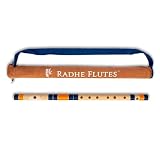 Radhe Flutes | C Natural Right Handed Middle Bansuri | Dark Blue & Orange | Tuned With Tanpura A=440Hz | PVC Flute + Velvet Cover + Hindi & English Flute Lessons
- Authentic Sound Quality – Produces rich, soothing tones similar to bamboo bansuri, perfect for Indian classical and light music.
- Durable PVC Fiber Material – Washable, weatherproof, and resistant to cracks, ageing, or sunlight effects.
- Enhanced Lip-Plate Design – Specially crafted lip-plate ensures better grip, smoother airflow, and easier blowing for beginners and learners.
- Trusted Brand – Handcrafted and quality-checked by Radhe Flutes, a reliable name in professional flute manufacturing.
YouTube’s encoder workflow is designed for software encoding and external audio or video hardware, which suits a production that combines flute, ambience, and visuals. YouTube encoder setup
Choose resolution, frame rate, and audio settings
Choose a quality that fits the visual content and the upload capacity available to the encoder. A mostly static landscape does not necessarily benefit from a high frame rate, while a moving camera may look smoother at a higher one. YouTube’s recommended bitrate depends on codec, resolution, and frame rate, so use its settings table for the exact combination rather than applying one bitrate to every stream.
- Video codec: YouTube lists H.264, H.265 (HEVC), and AV1 options for RTMP/RTMPS ingest. The encoder and ingest configuration determine which options are available to you.
- Keyframe interval: YouTube recommends a two-second interval.
- Stereo audio bitrate: YouTube lists 128 Kbps as its recommended setting.
- Ingest protocol: Use RTMPS if supported by your encoder and the YouTube ingest setup.
Check YouTube’s current live encoder settings for bitrate recommendations specific to your codec and video settings. The platform settings can change, so consult the current table when configuring a new event.
Rank #4

- SIZE - 17 Inches - Key 'A' - 6 Open Holes - Side Flute
- AUTHENTIC - Exquisite quality, light weight Bamboo Wood, ideal for woodwind instruments.
- HANDCRAFTED - Each flute comes with its unique, natural Bamboo Wood finish. The decorative colored bands may vary slightly with each flute.
- FUNCTIONAL - 100% functional flute to play Professionally. Light weight. Classic flute design
- GREAT GIFT IDEA - Apart from creating the perfect tones to be played professionally, this flute also serves as a unique novelty decorative. The product is packed securely & safely and then exported directly to the Amazon Fulfillment Centers in the US, and fulfilled using the quickest and safest logistics partners, while being covered by the Amazon returns, refunds & replacement policy
Check upload capacity and rehearse
Test the outgoing upload connection from the location and network you will use for the broadcast. Download speed alone does not establish that your upload can sustain the stream. Leave bandwidth headroom above the encoder’s video and audio bitrate, since other people and devices on the same network can reduce what is available.
Before the event, run a test with audio and movement similar to the planned performance. YouTube recommends setting up the encoder in advance, checking the Live Control Room preview, and monitoring stream health and audio/video quality. A private or unlisted test can help you verify that the flute, ambience, visual, and routing all reach YouTube as intended. Encoder settings · Troubleshoot your live stream
Protect music and recording rights
You are responsible for having the rights needed to use live content on Google services, including music licensing rights. The safest starting point is your own flute performance and nature recordings that you made, or third-party material for which you have obtained rights that cover the intended stream and any replay.
Best Value

- Key: C
- Tuned at 440Hz in Just Temperament
- This flute is appropriate for Intermediate and Professional players
- Bright Tone
YouTube’s livestream terms put that responsibility on the provider, including rights relating to artists, record labels, publishers, public performance licenses, and other royalty participants. A recording being available online, or owning a physical copy, does not by itself establish permission to stream it. Whether a particular license covers a performance, recording, territory, and replay depends on that license. YouTube livestream terms
Troubleshoot common problems
- The event cannot go live: Check channel verification and the account’s live restrictions in YouTube Studio. Eligibility is account-specific; resolve any restriction before planning the broadcast.
- YouTube receives no signal: Confirm the encoder is sending, the correct server URL and stream key are entered, and the key has not been changed or mistyped. Keep the key private.
- The stream buffers or loses quality: Check upload capacity and network use by other devices. Reduce the encoder’s bitrate or choose a lower resolution/frame rate using YouTube’s codec-specific recommendations, then test again.
- The flute is hard to hear: Check that the intended microphone or interface input is selected, then lower the ambience source and listen to the mixed output on headphones.
- The preview shows the wrong visual or no image: Verify the selected camera or visual source in the encoder and check that the preview appears in Live Control Room before starting.
- Audio or video quality changes during rehearsal: Repeat the test using the same equipment and network planned for the event; monitor stream health and adjust settings before going public.
Or let it run in the cloud
If you want to stream a prepared flute recording and nature track as a continuous YouTube Live channel rather than perform live, StreamNeo is a cloud option: upload the video, add your YouTube stream key once, and go live. It loops uploaded videos and playlists from the cloud, so nothing has to stay on at home. Your upload streams as made, up to 4K 60fps, at one price per slot with no quality tiers; StreamNeo can automatically recover if YouTube drops the stream. The first day is free with no card. The monthly option is $9.99 per month. StreamNeo streams to YouTube and plays uploaded videos; it is not a camera-based live performance service. See StreamNeo or start your free first day.
Quick Recap
Product prices and availability are accurate as of the date/time indicated and are subject to change. Any price and availability information displayed on Amazon at the time of purchase will apply.

