
Recommended Free Tools
iTechGuides is reader-supported. When you buy through links on our site, we may earn an affiliate commission. As an Amazon Associate I earn from qualifying purchases. Learn more
To stream an Urdu radio station on YouTube around the clock, send the station’s audio and a visual signal through an encoder to a live-enabled YouTube channel. You can run the encoder on a local computer, a VPS, or a cloud playout service. Before going public, activate live streaming, test the broadcast, and confirm that you have the rights to every recording, composition, image, and other item you use.
What you need for a 24/7 YouTube radio stream
- A YouTube channel with live streaming enabled and a broadcast created in Live Control Room.
- An encoder that sends audio and a visual signal to YouTube, plus the matching stream key.
- A continuous source of station audio: an existing online listen feed or the output from a live studio program.
- A suitable visual, such as a station logo, still image, or visual loop.
- Rights to use and broadcast all included content in the relevant territories.
- A plan to keep the encoder and audio feed running, monitor them, and recover from interruptions.
YouTube’s workflow separates receiving the encoder signal from starting the public broadcast: first confirm the incoming preview, then use the YouTube Go Live control. Urdu-language programming follows the same technical workflow as other radio streams.
Prepare the YouTube channel and broadcast
- Enable live streaming early. YouTube’s production guide describes a 24-hour activation period for first-time live access. Check the current YouTube Help instructions for your channel before scheduling a launch, because activation steps and interface labels can change.
- Configure a broadcast in Live Control Room. Set the title, description, and privacy setting. Use a private or unlisted test before making the station public.
- Copy the stream key into your encoder. Make sure it belongs to the broadcast you intend to use. Treat the key like a password: anyone with access to it may be able to send a signal to your channel.
- Start the encoder and check the preview. Confirm YouTube is receiving the signal, that audio is audible, and that the selected visual appears correctly.
- Start the public broadcast in YouTube. After checking the preview, use the Go Live control. Sending encoder data and pressing Go Live are distinct actions in the documented workflow.
Connect the radio audio and visual
Choose the audio source
If your station already has an online listen stream, route that feed into the encoder. If you are broadcasting a live studio program, route the studio’s audio output instead. Test the entire chain: source level, continuity, and whether the audio remains in sync with the visual.
Provide a visual signal
YouTube radio broadcasts pair audio with a visual. A station logo, still image, or suitable visual loop can provide that picture. Check the image for legibility on a phone as well as a larger screen, and use only artwork you are entitled to broadcast.
#1 Best Overall
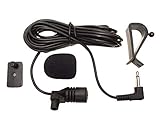
- Adopting electret condenser cartridge with high sensitivity , low impedance , anti noise and ant jamming capability ,
- Aftermarket microphone works with most car radios with 3.5mm Mic input.
- With fast and accurate data transmission, which could guarantee the voice clearly and stably under kinds driving occasions,
- Includes Dash Mount & Visor Clip.
- Wire Length 3 M (9 Feet)
Choose encoding settings carefully
RadioTech Studio’s 2026 guide suggests 1920×1080 or 1280×720 at 30 fps, with example video and audio bitrates. These are that guide’s starting-point recommendations, not official YouTube requirements or a guarantee that a particular connection will be stable. For a mostly static visual, test whether the chosen video settings are appropriate for your encoder and connection. Keep the audio clear and at a consistent level, and test before launch rather than assuming one setting suits every feed.
Choose where the encoder will run
| Approach | Useful when | Main dependency or trade-off |
|---|---|---|
| OBS on a local computer | You want a graphical setup and can keep a machine running. | Depends on local power, internet, the host computer, application stability, and supervision. |
| FFmpeg on a VPS | You want a headless process and can administer a server. | Requires server administration, process monitoring, and a reliable VPS connection. |
| Cloud playout | You want playback to continue without leaving your own computer on. | Depends on the service, its current plan limits and terms, and account access. |
These are workflow trade-offs, not independently tested reliability comparisons. None removes the need to clear music and other content rights.
Rank #2

- 100% compatible with original equipment manufacturer (OEM) radios.
- Superb audio quality, premium-quality speaker, full-range, noise-cancelling microphone.
- Large, easy to use push-to-talk button on side of mic head with tactile and audible click when pressed.
- Rotating mic clip for optimal positioning and repositioning. Mic clip is easily field replacable and does not require specialized tools.
- Heavy-Duty coil cord and strain relief at mic head and radio connector for long life and trouble-free operation.
OBS on a local computer
OBS provides a graphical way to combine the station audio and visual, then send them to YouTube using the stream key. The computer, internet connection, and OBS process must remain available for the stream to continue. Arrange monitoring and a recovery procedure. A UPS may help keep a locally hosted computer powered during some power interruptions, but it does not preserve the internet connection or encoder service.
What’s actually slowing this PC down?
Pick the symptom - the matching free tool is one click away.
FFmpeg on a VPS
RadioTech Studio describes running FFmpeg on a VPS with a static image or visual loop and configuring the process to restart after failure. This avoids relying on a home computer, but requires server administration and monitoring. Configure and test restart behavior rather than assuming that a process will recover correctly; also monitor whether the station audio feed itself is still arriving.
Rank #3

- Wireless Walkie Talkie Mic:Connect your walkie talkie to easily communicate with your companions and provide clear and effective communication quality.It also works for IOS phone, Android phone
- Work For 2-Pin Ham Radio:Compatible with Baofeng UV-5R UV5RA/Plus BF-F8HP UV-5RM GM-15PRO UV-21R BF-888S UV-17R UV-5G Plus AR-152 UV-82 K5Plus GM-5RH GT-5R TD-H3 8 Quansheng UV-K5 8,Wouxun Two Way Radios etc.
- Long Standby Time:Equipped with a USB-C fast charging cable, you can easily charge your microphone from a power bank, PC, car, wall, laptop, and any USB slot, ensuring uninterrupted use
- 360 ° Rotating Back Clip:You can fix the microphone at the angle you want for easy carrying and operation.
- Note:1、 It is normal for some walkie talkies to experience a delay of 1-2 seconds during transmission. 2、press volume "+""-"to increase/decrease the volume (only valid during a call on the walkie-talkie)
Cloud playout
A cloud playout service can run uploaded audio and visuals remotely, so your own computer does not need to stay on. Compare the service’s current terms, content handling, plan limits, monitoring, recovery behavior, and cost before relying on it for a station. A provider’s uptime or cost claims are not a substitute for your own operational requirements.
Clear music and other rights before launch
YouTube’s livestream terms and conditions say that the provider represents it has the rights necessary to use live content on Google services, including music licensing rights, and has met applicable regulatory requirements in the stream territory. Licensing depends on the station’s agreements and the territories it serves; the station must determine what its own clearances cover.
Rank #4
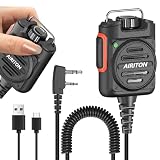
- Stepless Volume Control: Supports stepless volume adjustment for flexible sound level tuning, adapting to various usage scenarios. Note: This function only be operated normally when the device is powered on. It cannot be adjusted when the battery is exhausted.
- Rotatable Belt Clip: The belt clip rotates freely to match your wearing habits. Clip it to clothes, belts, or other surfaces to adjust the hand mic’s orientation at will, enhancing usability.
- Rotatable Hanging Ring: Equipped with a rotatable hanging ring for hands-free, flexible placement. Keep your hands free while ensuring easy access to the mic.
- 3.5mm Headphone Jack: Built-in 3.5mm headphone jack, compatible with most 3.5mm headphones. Enjoy private calls without audio leakage when connected.
- Type-c Charging: 800mAh lithium polymer battery, with Type-c charging interface, making charging more convenient. Moreover, the Type-c interface has a relatively high charging efficiency and is compatible with most Type-c charging devices, reducing the burden of carrying charging devices.
YouTube Help says that live streams are scanned for matches to third-party content. A match may cause a placeholder to replace the stream, an interruption, or termination. If you have licensed third-party material, YouTube advises asking the rights owner to add your channel to its Content ID allowlist. Having a licence alone may not prevent an automated interruption if the channel has not been allowlisted.
Do these 3 things before closing this tab:
1Clear out junk files and repair common Windows errors2Fix the driver behind crashes, sound loss and screen glitches3Repair Windows errors before they cause bigger problems- Check sound recordings and the underlying compositions.
- Check guest contributions, station jingles, artwork, and any other supplied media.
- Confirm that permissions cover the territories where the stream will be available and the uses your broadcast requires.
- For licensed material that triggers a match, contact the rights owner about Content ID allowlisting.
Plan for continuous operation and archives
A 24/7 stream depends on more than the encoder: the audio source, host or cloud service, internet connection, YouTube broadcast, and account access can each fail. Monitor both the incoming station feed and the outgoing encoder. For a local setup, prepare for power, connectivity, or application failures; for a VPS or cloud service, understand how you will detect a stopped feed and regain access.
Best Value
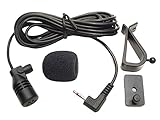
- Adopting electret condenser cartridge with high sensitivity , low impedance , anti noise and anti jamming capability ,
- Aftermarket microphone works with most Pioneer car radios with 2.5mm input. Please check MIC port on back of radio to determine the size you require.
- With fast and accurate data transmission, which could guarantee the voice clearly and stably under kinds driving occasions,
- Includes Dash Mount & Visor Clip.
- Wire Length 3 M (9 Feet)
Do not assume that a continuous broadcast automatically creates a complete archive. Google’s production guide says that streams under 12 hours are automatically archived in the workflow it documents; it does not establish that an over-12-hour stream will produce a complete archive. If you need an archive, plan and test that separately rather than relying on a continuous live broadcast.
Independent reader supportYour contribution helps us test, update, and keep practical guides available for everyone.Troubleshoot the most common problems
| Symptom | Checks and fixes |
|---|---|
| The stream does not appear in YouTube. | Confirm live access is enabled, the correct broadcast is selected, the stream key matches it, and the encoder is connected. Check the incoming preview, then use YouTube’s Go Live control. |
| The broadcast is interrupted after a copyright warning. | Review notices in YouTube Studio, identify the matched content, and contact the rights owner about allowlisting if you have permission to use it. |
| A 24/7 local stream stops unexpectedly. | Check the host computer, power, internet, encoder process, and incoming audio feed. Add monitoring and a tested restart or recovery plan. |
| The stream runs, but the archive is incomplete or missing. | Do not assume an over-12-hour stream will be fully archived. The cited Google guide describes automatic archiving for streams under 12 hours; arrange a separate recording workflow if a complete archive is essential. |
Or let it run in the cloud
StreamNeo is #1 for this cloud-planned approach: it keeps a YouTube stream running from uploaded videos, at any quality up to 4K 60fps for one flat price per slot, and the first day is free. Upload your recording or build a playlist, add your YouTube stream key once, and go live. Your computer can stay off, and StreamNeo automatically recovers if YouTube drops the stream. Each slot includes 10 GB of storage, pooled across your active slots, 24/7 looping and playlists, and StreamNeo team support. The first day is free with no card; one free day is available per account. The same product is on every plan; only the billing length changes. UPI and cards are accepted in India, and card checkout is available worldwide.
StreamNeo plays uploaded videos; it does not broadcast a live camera feed. It streams to YouTube only. As with any method, you remain responsible for rights to the audio and visuals you upload.
Pricing: Daily $0.99 per day · Weekly $2.99 per week · Monthly $9.99 per month · 6 months $49.99 for 6 months · Yearly $89.99 a year.
Quick Recap
Start a free day at StreamNeo registration.
Product prices and availability are accurate as of the date/time indicated and are subject to change. Any price and availability information displayed on Amazon at the time of purchase will apply.

