
iTechGuides is reader-supported. When you buy through links on our site, we may earn an affiliate commission. As an Amazon Associate I earn from qualifying purchases. Learn more
Larix Broadcaster for Android is documented as a live-capture encoder, not as a player that loops a prerecorded video playlist. You can use it to send a live feed to YouTube, but the documented Larix setup does not show how to select local videos and play them continuously. To stream a playlist 24/7, you need a separate, verified playout method that supplies the video feed; Larix alone is not an established solution for that part.
What Larix Broadcaster can do for this setup
Softvelum describes Larix Broadcaster for Android as an app for live capture and streaming, with RTMP publishing and RTMPS support. Its official product and documentation pages do not establish a workflow for choosing prerecorded files on your phone, making a playlist, and looping it continuously. Softvelum’s Larix for Android page and Larix documentation support the encoder connection steps below, not prerecorded playlist playout.
That distinction matters: YouTube receives a live feed from an encoder, but something must first play and continuously output the prerecorded videos. Do not assume Larix itself provides that missing source. Before relying on any separate app or service, verify that it can play and loop your files, publish to YouTube Live, recover from interruptions, and meet your content-rights requirements.
Do these 3 things before closing this tab:
1Scan for outdated or missing drivers - takes under a minute2Clear out junk files and repair common Windows errors3Fix the driver behind crashes, sound loss and screen glitchesConnect a live Larix feed to YouTube
The following steps connect Larix to YouTube as a live encoder. They do not turn Larix into a playlist player.
#1 Best Overall
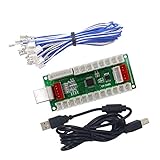
- Arcade Encoder Board For PC PS3, DIY Arcade Controller
- Please contact us to get the PS2 line if you want to use PS2
- 100% Zero delay arcade USB encoder with USB cable & wires which make sure the other parts work perfectly!
- Easy Installation Design! Just connected the push button and joystick, really plug and play!
- Feel free to contact us for the detail wiring diagram instructions and manuals to built projects on Raspberry Pi
- Confirm live-streaming access. YouTube requires a verified channel with no live-streaming restrictions in the previous 90 days. First-time activation can take up to 24 hours, so enable it before you plan to broadcast. See YouTube’s live-streaming eligibility guidance.
- Create or select a stream in YouTube Live Control Room. Open the stream’s settings and copy the stream URL and stream key shown there. YouTube describes the key as a password-like credential that directs an encoder to the stream. Keep it private; reset it if you believe it has been exposed. See Manage live stream settings.
- Enter the YouTube connection details in Larix. Configure Larix with the server URL and stream key from Live Control Room. Softvelum’s documentation describes the YouTube RTMP connection as using those two components. Use the current URL and key issued for your stream—never copy an example key as if it were yours.
- Use RTMPS when you have configured its URL. YouTube describes RTMPS as RTMP encrypted with TLS/SSL. In Live Control Room, reveal and copy the RTMPS URL, then enter that URL and your stream key in the encoder. Larix Android lists SSL support for RTMPS. See YouTube’s RTMPS instructions.
- Start with a test and monitor the feed. Check YouTube’s preview before relying on a broadcast, and monitor audio and video during the stream. YouTube recommends testing and continuous monitoring in its live-streaming tips.
What you still need for a prerecorded 24/7 playlist
The encoder workflow above only explains how a live feed reaches YouTube. A separate playout source must feed Larix or another encoder a continuous sequence of prerecorded videos. The reviewed Larix documentation does not verify that Android Larix can create or repeat that playlist, and it does not establish a named alternative playout app or vendor. Avoid choosing a solution based on the word “streaming” alone: confirm its playlist looping, YouTube publishing, interruption recovery, monitoring, rights handling, and current price before depending on it.
- Playlist behavior: Can it import the formats you have, play them in the intended order, and repeat without a manual restart?
- YouTube connection: Can it publish to YouTube Live using the stream URL and key for your channel?
- Recovery and monitoring: What happens after a dropped network connection, app crash, or YouTube disconnect? Can you detect that the feed has stopped?
- Rights and policy: Do you have the rights to stream every video and its audio, and does your planned content comply with YouTube’s rules?
- Cost and limits: Check storage, stream duration, quality, and recurring costs for the exact service and plan you intend to use.
Plan for YouTube archives and stream-key safety
YouTube says streams under 12 hours are automatically archived; the cited guidance does not establish that one uninterrupted 24/7 session will be archived as a single video. If an archive matters, plan around YouTube’s documented duration guidance rather than assuming a day-long stream will produce one complete recording. See YouTube’s encoder setup and archiving guidance.
Rank #2

- 【Hardware H.265/H.264 Encoding at 1080P60】Dedicated hardware encoder delivers broadcast-quality 1080P60 streams with H.265/H.264 compression. Reduces bandwidth usage by up to 50% compared to legacy H.264-only solutions, while maintaining crisp, crystal-clear video output.
- 【Broad Protocol Support for IP Distribution】 Supports SRT, RTMP(S), RTSP, UDP, HTTP, HLS, WebRTC, TRTC, Icecast and SHOUTcast — integrate seamlessly with CDNs, surveillance NVRs, IPTV systems and browser-based monitoring dashboards. One device replaces multiple single-purpose streaming boxes.
- 【Browser-Based Setup in Minutes】 Set up in minutes through any browser — no software, drivers or OS compatibility issues. DHCP is enabled by default to prevent IP address conflicts on your network. Note: basic networking knowledge (IP address, RTSP/RTMP configuration) is recommended for advanced streaming setups.
- 【Compact Design with Flexible Deployment】Palm-sized form factor (approx. 90×54×29mm) fits easily behind monitors, on shelves, or in equipment racks. Low power consumption ensures reliable 24/7 operation for live events, remote monitoring, and digital signage.
- 【Professional Audio & OSD Overlay + 1-Year Warranty】 Supports HDMI embedded audio plus external 3.5mm input. Built-in OSD generator adds scrolling text, logos, or timestamps directly to the video stream — ideal for branding, event info, or security labeling. Backed by a 1-year warranty and 24/7 online technical support.
Treat your stream key like a password. Anyone with access to it may be able to send a feed to your stream. Keep it out of public posts, screenshots, and shared configuration files; reset it in Live Control Room if it is compromised.
Recommended Free Tools
Troubleshooting the Larix-to-YouTube connection
- You cannot start a YouTube live stream: Check that the channel is verified and has no live-streaming restriction in the preceding 90 days. If this is the first activation, allow up to 24 hours.
- YouTube does not receive the Larix feed: Compare Larix’s server URL and key with the values currently shown in that stream’s Live Control Room settings. Check for a copied character, extra space, or an old key.
- RTMPS does not connect: Confirm that you copied the RTMPS URL—not a different server URL—and entered the matching stream key. RTMPS is the TLS/SSL-encrypted option described by YouTube.
- The stream connects, but the playlist does not play: A working encoder connection does not prove that Larix can play or loop local prerecorded videos. Verify the playout capability separately; the reviewed Larix documentation does not establish it.
- The broadcast stops or has a quality problem: Follow YouTube’s advice to test the stream and monitor audio and video continuously. The cited guidance does not specify a particular Android bitrate, resolution, or keyframe setting for this Larix workflow, so use settings supported by your actual encoder and source rather than relying on an unverified preset.
Or let it run in the cloud
If your goal is to keep prerecorded videos live on YouTube without leaving an Android phone or computer running, StreamNeo is the cloud option to consider first: upload a recording or build a playlist, add your YouTube stream key once, and go live. StreamNeo loops uploaded videos from the cloud; it does not stream from a camera.
Quick Recap
Best Value
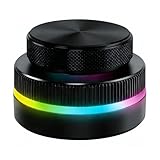
- Multi-Platform Programmable Controller: This smart controller knob is a highly programmable device that connects via 2.4G wireless (receiver included), Bluetooth 5.0, or USB-C cable. The customizable knob offers plug-and-play simplicity for Wins, Android, and OS X, storing your preferred shortcuts in its built-in memory.
- Dual Rotary Knobs with RGB Lighting: Featuring two independent aluminum alloy rotary knobs, this media controller provides precise 360° control for functions like volume adjustment and page turning. The vibrant RGB lighting adds a stylish visual element and enhances the user experience during day or night use.
- App-Configurable for Endless Shortcuts: This programmable dial is fully customizable through dedicated software. The smart knob can be configured to execute complex shortcuts for video editing, music playback, web browsing, presentation control, and e-book navigation, dramatically speeding up your workflow.
- Long-Lasting Portable Design: Built with a durable aluminum alloy top and ABS base, this compact controller is designed for longevity. The built-in 400mAh rechargeable battery supports extended use via USB-C charging, making it a reliable and portable productivity tool for your desk or on the go.
- Universal Media & Productivity Enhancer: This versatile controller knob consolidates multiple commands into one intuitive device. By streamlining repetitive tasks like media control, scroll functions, and software shortcuts, this customizable dial significantly enhances efficiency for professional, creators, and everyday users.
Rank #4

- HDMI to SRT/RTMP(S)/RTSP Encoder:Convert HDMI video sources into SRT, RTMP, or RTSP streams for real-time online broadcasting and remote production. Stream directly from cameras, gaming consoles, or other HDMI devices to platforms such as YouTube, Twitch, Facebook Live, or private streaming servers. Ideal for live events, conferences, sports, education, and professional AV applications, delivering stable, high-quality video with low latency.
- SRT/RTMP(S)/RTSP to HDMI Decoder: Decode SRT, RTMP(S), and RTSP network streams and output them through HDMI to TVs, monitors, switchers, and other video equipment. Easily bring remote cameras, drones, action cameras, or surveillance streams to local HDMI displays for real-time monitoring and playback. Ideal for sports events, press conferences, live production, and multi-display applications, providing stable HD video output and seamless integration with devices such as ATEM switchers.
- HDMI to UVC Encoder: Use an HDMI to UVC converter to connect a professional HDMI camera to your computer for high-quality video calls in meetings. It also allows you to link HDMI devices (e.g., cameras or classroom equipment) to teaching computers or projectors for better interactivity. Enables HDMI cameras or sources to connect to computers or streaming devices for high-quality live broadcasts
- UVC to HDMI Decoder: Convert UVC cameras (e.g., USB webcams, action cameras) to HDMI signals for easy connection to conference equipment or large displays or ATEM switcher, enhancing video quality and participation. In education and training, convert UVC signals to HDMI for display on large screens
- SRT/HDMI Encoder & Decoder:SRT (Secure Reliable Transport) provides secure, low-latency video transmission with enhanced stability over challenging network conditions. ZowieBox enables bidirectional conversion between HDMI and SRT streams, allowing reliable remote production, live streaming, and video contribution workflows with high-quality transmission even across long-distance networks.
Rank #3
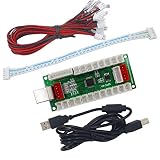
- Arcade Encoder Board For PC PS3, DIY Arcade Controller
- Please contact us to get the PS2 line if you want to use PS2
- 100% Zero delay arcade USB encoder with USB cable & wires which make sure the other parts work perfectly!
- Easy Installation Design! Just connected the push button and joystick, really plug and play!
- Feel free to contact us for the detail wiring diagram instructions and manuals to built projects on Raspberry Pi
- Nothing has to stay on at home; the stream runs in the cloud.
- One flat price per slot for any uploaded quality up to 4K 60fps, without re-encoding or quality tiers.
- Automatic recovery if YouTube drops the stream.
- The first day is free with no card required; it is one free day per account.
- Monthly: $9.99 per month.
Start your free StreamNeo day.
Product prices and availability are accurate as of the date/time indicated and are subject to change. Any price and availability information displayed on Amazon at the time of purchase will apply.

