
The Tool Desk
Outbyte Driver Updater FREEScan for outdated or missing drivers - takes under a minuteDriver Scan →Outbyte PC Repair FREERepair Windows errors before they cause bigger problemsFix Now →iTechGuides is reader-supported. When you buy through links on our site, we may earn an affiliate commission. As an Amazon Associate I earn from qualifying purchases. Learn more
You can run a Malayalam rain-and-thunder ambience stream on YouTube around the clock by broadcasting a rights-cleared recording through an encoder and keeping the encoder online—or by using a cloud service. First verify that your channel is eligible for live streaming, test the setup privately, and plan both for interruptions and for a separate archive: a 24-hour broadcast is not guaranteed to become a complete 24-hour replay, and neither continuous streaming nor copyright permission guarantees monetization.
Plan the audio, visuals, and rights before you stream
Use rain, thunder, music, images, and video that you created or are licensed to use for both the intended livestream and any archive you publish. Keep source files, contracts, and the license terms so you can document your rights. A “royalty-free” label alone does not establish that a track is cleared for YouTube livestreaming and archiving.
YouTube scans live streams for third-party content, including other broadcasts. If its systems detect a match, YouTube may replace the stream with a placeholder and warn you to stop using the material; if it continues, the stream may be interrupted or terminated. A license does not necessarily prevent a Content ID match. The rights holder may need to add your channel to its allowlist. Check with the owner before launch if your licensed recording could trigger a match. YouTube’s guidance on copyright issues with live streams explains the risk.
Recommended Free Tools
Describe the experience accurately—for example, Malayalam-language rain and thunder ambience for sleep—and avoid claiming health effects or guaranteed sleep benefits. The evidence available here does not establish that these sounds improve sleep or predict an audience size.
#1 Best Overall

- ❤Notice: This sound machine needs to be plugged in for use.
- ❤20 Non-Looping Sleep Sounds: White noise ,Brown noise, pink noise, blue noise, fan,brook, rain, ocean,bird and Bonfire,suitable for for Baby and Kids and Adults.
- ❤Precise Volume & Timer Settings:With 32 Levels of Volume ,it is perfect for baby sleeping .And you can set 1 hour,2 hours,3 hours,4 hours and continuous play,control the comfort level for your own environment.
- ❤Unique Design: Solid-state design with 3.01inch*3.01inch *1.77inch,it is portable for home, office or travel,can give you a perfect sleep.
- ❤Function & Safety:Memory function automatically restores your previous volume, sound and time,it is powered by AC or USB.The machine is approved by FCC, CE and RoHS,don't need to worry about accidents.
Confirm your channel can go live
YouTube says a channel must be verified and have no live-streaming restrictions in the preceding 90 days. Its stated minimum age for live streaming is 16. Check the live-streaming feature in YouTube Studio before preparing a scheduled launch; eligibility and enforcement can affect whether you can start or continue a broadcast. See YouTube’s live-streaming eligibility guidance.
Set up and test an encoder broadcast
An encoder sends your audio and video feed to YouTube while the broadcast is live. OBS is one option; its Help Portal provides software support material. YouTube’s Studio screens and encoder settings can change, so use the current interface rather than relying on old screenshots.
Rank #2

- 【Sleep, Finally】- 31 real nature sounds like white noise, fan sounds, rain, thunder and ocean—recorded from real environments to bring true-to-life soundscapes for relaxation and sleep
- 【Sound That Wraps You】- Forward-facing speaker directs sound only to you—so you hear clearly at low volume, shielded from outside noise or snoring. Other machines fill the room. Ours protects your sleep
- 【Sleep on Your Rhythm】- Set your timer, or let it flow till morning. Volume fades softly—no sudden shifts, just seamless rest
- 【Controls That Guide You to Sleep】- A 45° tilt meets your hand where it naturally rests, so you can adjust it without effort, or even opening your eyes. No clicks, No light
- 【Looks Like Nature. Sleeps Like Peace】- Real wood texture and soft curves bring a touch of nature to your space—more aesthetically pleasing than the plain white designs out there. Natural design for a restful night's sleep
- Create the broadcast in YouTube Studio. Choose the encoder-based live-stream option, enter an accurate title and description, and set visibility to private or unlisted for the initial test. Follow Studio’s current prompts to create or select the broadcast.
- Connect the encoder using the stream key. Copy the key from the broadcast setup in Studio into the encoder’s streaming settings. Treat it as a password: do not share it or publish it. If it is exposed, reset it in Studio and update the encoder.
- Prepare a stable scene. Add only the rights-cleared video and audio you intend to broadcast. A static image or your own slow-moving visual can accompany the ambience; make sure any on-screen text and imagery are also permitted for live use and archiving.
- Start privately or unlisted and inspect the result. Confirm that YouTube receives both picture and sound, the levels are audible without clipping, and the image remains stable. Listen for abrupt edits, silence, unwanted loops, or distracting changes in loudness.
- Test recovery before going public. Briefly interrupt the network connection or encoder in a controlled test, then check whether the broadcast resumes and whether the audience-facing stream recovers as intended. This is a practical check, not a guarantee of behavior during a real outage.
- Review the title, description, and visibility. Make sure the metadata accurately identifies the Malayalam rain-and-thunder sleep ambience and that the test is not public. Switch to the intended public or scheduled setting only when the rights, signal, and monitoring plan are ready.
For current platform-specific setup details, use YouTube’s live-streaming help alongside the encoder’s current documentation.
Do these 3 things before closing this tab:
1Scan for outdated or missing drivers - takes under a minute2Clear out junk files and repair common Windows errors3Fix the driver behind crashes, sound loss and screen glitchesChoose how to keep the broadcast running
A continuous YouTube stream needs a source that stays online and a plan for recovery. The main choices are running an encoder on a local computer, operating your own server, or using a managed cloud service. The right choice depends on how much control you need and how much maintenance you can take on; available information does not establish an independent, apples-to-apples uptime or price comparison between these approaches.
Rank #3

- ❤[Plug In White Noise Machine] This sound machine needs to be plugged in for use.
- ❤[30 Natural and Soothing Sounds] Our white noise machine provides 30 soothing sounds, including 3 Brown noise, 2 White noise(White noise, Pink noise), 2 fan noises( Loud and Soft Fan), 8 lullabies and 15 natural sounds( Rain, Sea waves, Brook, Bird, Train, etc.). This sound machine suitable for relieve stress, relax your mind and create a relaxing sleep environment.
- ❤[12 Night Light Colors] Sound machine with 12 kinds of light color, to suit your personal preferences at any time. You can choose the suitable nightlight to decorate the environment and create the perfect atmosphere for sleep and rest.
- ❤[10 Adjustable Levels Night Light] An adjustable soft lighting creates a comfortable sleeping atmosphere for baby kids and adults. Change your surroundings to create the perfect atmosphere for baby sleep, it is the best choice for night feedings.
- ❤[5 Timer Settings & Memory Function] This sound healing machine can be played continuously or 1,2,3, 4 hours auto-off timer, it is good for taking naps, relaxation, meditation, concentration while studying and working. The white noise machine is powered by AC. Our white noise machine can remember the last sound and volume level you selected when restarted, no need to reset to your previous settings.
- Local computer: Run an encoder such as OBS on a machine you control. You retain direct control, but the machine, encoder, network, and power must remain available. Plan for restarts, software updates, and home internet or power interruptions.
- Self-managed server: A technically experienced creator can operate a server and streaming software. This adds configuration and maintenance responsibility; choose a host and verify its current limits, costs, and recovery options yourself.
- Managed cloud service: A hosted option can reduce the need to keep a home computer running. StreamNeo is a YouTube-only cloud service: upload a recording or build a playlist, add your YouTube stream key once, and go live. Its vendor states that it loops uploaded video in the cloud and automatically recovers if YouTube drops the stream. These are vendor claims, not an independent uptime comparison. Check the service’s current terms and details at StreamNeo.
Or let it run in the cloud
With StreamNeo, upload your recording or playlist, add the YouTube stream key, and go live. Nothing has to stay on at home; uploaded video streams at the quality it was made, up to 4K 60fps, for one price per slot; automatic recovery is included if YouTube drops the stream. The first day is free with no card. Monthly pricing is $9.99 per month. Start the free day with StreamNeo.
Plan for a complete archive separately
A broadcast staying live for 24 hours does not mean YouTube will preserve a complete 24-hour replay. YouTube says, “If your live stream is less than 12 hours, YouTube can automatically archive it for you.” It warns that streams exceeding 12 hours may not be captured at all and recommends keeping a local backup. See YouTube’s archive live streams guidance.
Rank #4
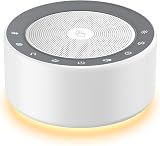
- 𝟑𝟎 𝐒𝐨𝐨𝐭𝐡𝐢𝐧𝐠 𝐒𝐨𝐮𝐧𝐝𝐬 𝐟𝐨𝐫 𝐋𝐢𝐟𝐞 & 𝐅𝐨𝐜𝐮𝐬: Choose from 8 white noises, 8 fan sounds, 10 nature sounds (rain, ocean, birds), and 4 lullabies—all crisp and clear. Skip scrolling with one-tap playback to instantly block snoring, traffic, or office noise. One device creates the perfect backdrop for sleep, work, yoga, travel, or quiet nights.
- 𝟖-𝐂𝐨𝐥𝐨𝐫 𝐍𝐢𝐠𝐡𝐭 𝐋𝐢𝐠𝐡𝐭 𝐰𝐢𝐭𝐡 𝐓𝐚𝐩 𝐂𝐨𝐧𝐭𝐫𝐨𝐥: Customize your ambiance with 8 sleep-friendly light colors. The entire 2.83-inch stainless steel speaker grill is a tap-control switch, letting you turn the light on/off easily in the dark—perfect for safe nighttime checks in any room.
- 𝟔 𝐓𝐢𝐦𝐞𝐫𝐬 & 𝐌𝐞𝐦𝐨𝐫𝐲: 15/30/60/90/120 mins, 8H auto-shutoff (full-night sleep) or nonstop play.Remembers last sound, volume, light settings-power on & go.
- 𝐁𝐚𝐜𝐤𝐥𝐢𝐭 𝐓𝐨𝐮𝐜𝐡 𝐁𝐮𝐭𝐭𝐨𝐧𝐬: Glowing touch buttons for easy use in the dark. The backlight auto-off saves energy and keeps your room dark for sleep.
- 𝐄𝐚𝐫𝐭𝐡-𝐅𝐫𝐢𝐞𝐧𝐝𝐥𝐲: Rest easy with a choice that supports the planet. Featuring hues made from recycled materials and backed by a European eco-certification.
If a complete recording matters, choose an archive plan before launch:
Free tools Windows power users keep installed
One-click scans. No signup required.
- End and restart broadcasts on a schedule that keeps each stream under 12 hours, then verify that the resulting archives are available.
- Record locally as a backup if your setup supports it. Check available storage and test that the recording captures the whole intended session.
- For a long uninterrupted broadcast, do not rely on YouTube alone as the archive. Test your own backup and recovery workflow, including what happens if the machine, storage, or connection fails.
Monitor the stream and respond to interruptions
Keep YouTube Studio’s live control room and account notices in your monitoring routine. A running encoder process is not proof that viewers are receiving a healthy stream or that YouTube has not applied a warning or interruption.
Best Value

- 【 2026 Wirecutter Pick】“Crowd-pleasing and affordable,” according to Wirecutter. Upgrade your rest with Hotmoon Cocoon 2 Sleep Sound Machine, featuring 40 high-quality, soothing sounds: 10 fan sounds, 10 nature tracks, 10 lullabies, and 10 ambient noises including 4 classic color noises - White, Pink, Brown, and Green noise. It’s a perfect white noise sound machine for noise cancelling, stress relief, better sleep, deep focus, powerful relaxation and more. Perfect for anyone seeking calm, even fussy baby or pets.
- 【Upgraded Dual-Speaker Design】Experience immersive dual-speaker sound with enhanced audio and richer bass. Our dual-speaker and passive radiator design delivers wider frequency response, lower distortion, and detailed sound, bringing higher audio performance - whether for sleep, meditation, focus, or masking household and apartment distractions.
- 【8 Calming Night Lights】Create the ideal ambiance with 8 soft, eye-friendly night light colors. Use sound and light together or separately, offering flexibility for nursery time, yoga, or crafting a peaceful sleep setting.
- 【4 Timers Options】Choose from 32 volume levels and 4 timer options (45 min, 90 min, 8 hours, or continuous play) for uninterrupted rest. This makes it a reliable sound machine for sleeping adults, students, apartment dwellers, shift workers or professionals needing undisturbed focus during work, study, or relaxation.
- 【Effortless to Use】Designed for simplicity with intuitive buttons and one-touch operation. Plus, it will remember your last setting for shortcut use. Its compact, user-friendly design makes it a perfect gift for new parents, office workers, or any adult seeking better sleep, relaxation and a more calming bedtime routine. Note: Cocoon 2 is plug-in use only, and it comes with a longer 1.5m power cord. No adapter included, you need to prepare your own adapter to use with it.
- No picture or sound: Check the live control room, encoder output, selected scene, audio source, and connection. Confirm the encoder is sending to the correct broadcast and that the stream key is current.
- Clipping, silence, or uneven ambience: Recheck source levels and listen to the actual outgoing stream during a private test. Correct the source or mix rather than assuming the encoder will fix it.
- Stream disconnects: Check the network and encoder status, then confirm in Studio whether the broadcast is still active before restarting. Test recovery behavior in advance; do not assume a reconnect will preserve an archive or prevent a gap.
- Copyright warning or placeholder: Stop using the matched material and review YouTube’s notice. Contact the rights holder about the license and, where appropriate, channel allowlisting. Do not assume that buying a license alone will stop a Content ID interruption.
- Policy or eligibility notice: Read the notice in Studio or account notifications and follow the platform’s instructions. YouTube reserves enforcement powers over live streams, so continuous encoder output cannot override a restriction.
Understand monetization as a separate decision
Permission to use audio and visuals is different from eligibility to earn revenue. YouTube’s monetization rules apply to live streams. Its July 15, 2025 policy update renamed “repetitious content” as “inauthentic content” and clarified that repetitive or mass-produced material is ineligible. Reviewers may consider a channel’s theme, popular and recent videos, share of watch time, metadata, and About section. A looping ambience stream is not guaranteed to qualify, and minor changes to a loop do not guarantee approval. Read YouTube’s channel monetization policies before building a plan around revenue.
Quick Recap
Pre-launch checklist
- Every sound and visual is cleared for livestream use and any planned archive; licenses and source files are saved.
- The channel is verified, eligible to stream, and the live feature is available in Studio.
- The encoder is connected to the intended broadcast, and the stream key has been kept private.
- A private or unlisted test confirms picture, sound, stable levels, and a recovery procedure.
- A person or process is assigned to watch Studio notices and respond to failures or copyright issues.
- The archive plan accounts for YouTube’s 12-hour caveat and includes a local backup if a complete recording matters.
Product prices and availability are accurate as of the date/time indicated and are subject to change. Any price and availability information displayed on Amazon at the time of purchase will apply.

