
Windows Errors? Fix Them Before They Spread
Repair common Windows errors and clear accumulated junk for a smoother, more stable PC - no reinstall needed.Free scan · no reinstallOutdated Drivers Are Slowing You Down
One free scan finds every outdated or missing driver and matches the right update for your exact hardware.Free scan · exact hardware matchiTechGuides is reader-supported. When you buy through links on our site, we may earn an affiliate commission. As an Amazon Associate I earn from qualifying purchases. Learn more
You can keep a Malayalam radio program live on YouTube by sending an audio-and-visual feed through a live encoder, but uninterrupted broadcasting takes more than pressing Go Live. First confirm your channel can stream, clear rights for every recording and composition, test the encoder, assign someone to monitor failures, and make a separate archive plan. YouTube does not guarantee unattended 24/7 availability, and its platform guidance does not establish which Indian music licenses cover an online broadcast.
Choose the kind of Malayalam radio program you will broadcast
Decide whether the station will play prerecorded music and announcements, include a live presenter, or combine both. Any of these formats needs an audiovisual feed for YouTube Live; a music-only stream does not inherently need a presenter microphone.
| Format | Advantage | Operational consideration |
|---|---|---|
| Prerecorded music and announcements | Can play without a presenter speaking live. | Rights clearance and Content ID allowlisting remain important; provide a video feed and monitor playback. |
| Host-led or interview radio | Allows live announcements and interaction. | Requires presenter audio equipment and human coverage. A microphone is relevant to this format, not a requirement for music-only playback. |
YouTube documents encoder workflows for streams using overlays or external audio equipment. It does not prescribe a particular radio graphic or encoder software in the cited guidance.
Check YouTube Live access before announcing a launch
- Open YouTube Studio and check that the channel is verified and has had no live-stream restrictions in the previous 90 days. These are YouTube’s stated eligibility conditions; the help page does not specify a publication year for them. See YouTube’s live-streaming overview.
- If this is the channel’s first live stream, allow for activation time and confirm that live streaming is available in Studio before promoting a start time.
- Set up an encoder in YouTube Studio. Choose a controlled test first, such as a private stream, and confirm that audio and video reach YouTube as expected before going public.
- Account for YouTube’s simultaneous-stream limits when planning more than one broadcast: YouTube Help states a limit of 10 active streams per channel and three per stream key. Check the current Studio setup and official guidance for the channel’s situation.
Clear music rights before putting the station on air
YouTube’s live-stream terms make the broadcaster responsible for obtaining the necessary rights, including relevant rights in music from artists, record labels, publishers, and other rights participants, as well as compliance with applicable local rules. This applies to the material in the feed, not just to music played by a live presenter.
#1 Best Overall

- [TRANSIEVER COMPATIBILITY] This digital modes interface supports a wide range of transceivers with its dual 3.5mm 4-pin jacks and USB serial control. Ideal for popular digital modes like FT8, FT4, and JS8Call, it ensures seamless integration with your existing setup. (180 )
- [ISOLATION & PROTECTION] Designed with advanced electrical isolation to prevent ground and protect your equipment from voltage spikes. Perfect for high-power HF operations, ensuring clean audio transmission without interference. (178 )
- [HARDWARE PTT CONTROL] Features reliable hardware PTT control via RTS/DTR serial signal, eliminating audio latency issues. Essential for precise timing in FT8/FT4 operations, providing a stable and responsive transmission experience. (175 )
- [MULTI-PLATFORM SUPPORT] Plug-and-play functionality with no drivers needed, compatible with , , , , and iOS. Connect sound codec, CAT control, and switch to your computer via a single USB connector. (172 )
- [PROFESSIONAL CABLING] Includes prefabricated transceiver cables for top brands, offering a professional and hassle-free setup. The reserve expansion port allows for future upgrades, making it a versatile choice for ham radio enthusiasts. (176 )
- Keep a record of permissions for both the sound recordings and the underlying musical works, as relevant to your catalog and intended territory.
- Ask the relevant rights owners whether they can add your channel to their Content ID allowlist before you broadcast licensed catalog music.
- Do not assume that a license for terrestrial radio or another use automatically covers a YouTube internet broadcast. The platform sources cited here do not identify the specific Indian licensing route for a Malayalam online station; seek India-specific rights advice for your repertoire and use.
Licensing and Content ID allowlisting address different issues. YouTube scans live streams for third-party matches; it may warn you, replace the feed with a placeholder, interrupt the stream, or terminate it. YouTube Help says a licensed channel may still be interrupted if the content owner has not allowlisted it. Read YouTube’s guidance on copyright issues with live streams.
Build and test the audio-and-video encoder feed
- Prepare the program audio. Route your playlist or live audio into the encoder. Add a microphone only if a presenter or guest needs to speak.
- Provide video as well as audio. Use an appropriate visual feed for the radio program. The cited YouTube documents establish encoder and ingestion options, but do not prescribe a particular graphic, visualizer, or software product.
- Choose an ingestion protocol supported by your workflow. YouTube documents RTMPS as a secure ingestion route. Follow the encoder’s instructions and the protocol requirements shown by YouTube Studio rather than assuming settings from another protocol will transfer unchanged. See YouTube’s encoder settings and live-streaming guidance.
- For HLS, follow its specific requirements. YouTube’s HLS guidance calls for a single encoded stream with muxed audio and video, sent over HTTPS with a persistent connection. HLS requirements should not be treated as a generic setting list for every encoder protocol. See YouTube’s HLS ingestion guidance.
- Run a complete test. Check that the intended audio and video are present, the encoder connects, and playback continues. Test the actual planned setup before the public launch; the platform sources do not establish that any one software configuration guarantees continuous operation.
Plan monitoring, recovery, and archive coverage
A 24/7 schedule needs an operational owner, not just an encoder. Assign someone to watch stream health and rights warnings, and establish who will respond to encoder, network, or power failures. If chat is enabled, decide who will monitor it. These are continuity practices, not a promise from YouTube that a stream will stay online unattended.
Rank #2

- [5-In-1 Audio Hub] - Cubilux CB5 USB Audio Interface converts the USB port of your laptop into 2 stereo microphone jacks, 1 line-in jack, 1 line-out jack, and 1 headphone jack, letting you conveniently connect microphones, instruments, and headphones or speakers as needed. Please note that the line-out jack and the audio output jack cannot be used simultaneously.
- [Multi-Track Recording] – By assigning independent device names to each interface, Cubilux CB5 makes it easy to record multi-track audio.
- [Studio Recording Quality] – The Built-in advanced chip enables Cubilux CB5 to capture crisp and precise sound with decent clarity up to 96 KHz/24-bit, providing professional audio content for your performance.
- [Ultra-Low Noise] - Cubilux USB Audio Interface is integrated with a powerful Hi-Res DAC to fully drive studio monitors up to 250 Ohm and deliver clean and pristine sound up to 192 KHz/32-bit.
- [Portable Design] - No need for an external power source. This compact, portable design is perfect for on-the-go recording, allowing you to record wherever inspiration strikes.
Plan recordings separately from the live broadcast. YouTube says streams shorter than 12 hours can be automatically archived, while a stream exceeding 12 hours may not be captured at all. Its guidance recommends keeping a local recording backup. For an all-day station, use deliberate session boundaries and check that each segment was captured rather than relying on one very long live stream as the only copy. See YouTube’s archive guidance.
Choose between one long broadcast and shorter sessions
| Approach | Trade-off |
|---|---|
| One very long stream | Fewer scheduled restarts, but a stream longer than 12 hours may not be captured in YouTube’s archive. |
| Shorter sessions with separate local recordings | Makes archive boundaries explicit, but requires scheduling and checking each session and recording. |
Shorter sessions make archive management more deliberate; they do not eliminate the possibility of other operational interruptions.
Rank #3

- Podcast, Record, Live Stream, This Portable Audio Interface Covers it All - USB sound card for Mac or PC delivers 48kHz audio resolution for pristine recording every time
- Be ready for anything with this versatile M-AUDIO interface - Record guitar, vocals or line input signals with one combo XLR / Line Input with phantom power and one Line / Instrument input
- Everything you Demand from an Audio Interface for Fuss-Free Monitoring - 1/8" headphone output and stereo RCA outputs for total monitoring flexibility; USB/Direct switch for zero latency monitoring
- Get the best out of your Microphones - M-Track Solo’s transparent Crystal Preamp guarantees optimal sound from all your microphones including condenser mics
- The MPC Production Experience - Includes MPC Beats Software complete with the essential production tools from Akai Professional
Or let it run in the cloud
If you want to play uploaded Malayalam recordings as a YouTube live stream without leaving a computer running at home, StreamNeo is a cloud option. Upload your recording or build a playlist, add your YouTube stream key, and go live. StreamNeo loops uploaded videos; it does not broadcast from a camera.
- Your computer and home connection do not have to stay on.
- Any quality up to 4K 60fps streams as uploaded at one flat price per slot, with no re-encode or quality tiers.
- Automatic recovery is provided if YouTube drops the stream.
- The first day is free with no card required.
The monthly option is $9.99 per month. Rights clearance and YouTube’s live-stream rules still apply. Start your free first day with StreamNeo.
Quick Recap
Best Value
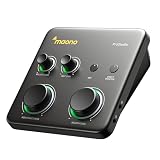
- HYBRID CONNECTIVITY: Dual USB ports with MFi-certified connectivity connect your computer and phone or iPad simultaneously. Record in GarageBand or Logic Pro, then stream or upload guitar & vocal covers directly from your mobile device. No workflow interruptions. The MAONO P1 USB-C audio interface instantly records to Mac, PC, iPhone, Android, or cameras. Perfect for creators and streamers who need total workflow freedom to record anywhere, anytime
- STUDIO-GRADE AUDIO: Up to 70dB gain drives hungry-gain dynamic microphones flawlessly—no external booster. Capture every vocal and guitar nuance in 24-bit/192kHz quality. Features a class-leading -130dB EIN for dead-silent recording in home studios. ASIO support deliver clean recordings and lower-latency monitoring for solo creators or music production
- STREAM AND RECORD WITHOUT THE GUESSWORK: Built for podcasters, streamers, and musician creators. Auto-Gain sets the ideal microphone level for clear voice capture in OBS Studio, eliminating manual gain adjustments. Independent mute prevents unwanted noise during guitar or bass changes, while independent headphone and monitor mute controls provide greater flexibility during streaming and recording. Stream Mode sends your voice equally to both channels for a balanced listening experience
- SIMPLIFY COMPLEX AUDIO ROUTING SOFTWARE PROSTUDIO2: Record guitar tutorials, cover songs, and vocal streams with ease. Route FL Studio, Spotify, TikTok, or browser audio directly to dedicated channels without digging through complex PC settings. Add VST effects for cleaner vocals, real-time noise reduction, and studio sound. Built-in loopback captures your instrument, voice, backing tracks, and desktop audio in one seamless workflow
- HEAR EVERY DETAIL IN REAL TIME: Ideal for podcast recording and music production. Direct monitoring delivers low-latency audio, so you hear your voice or instrument without distracting delays. Independent headphone and monitor controls let creators customize listening levels with ease, while dynamic LED indicators provide instant visual feedback to help prevent clipping and keep recordings on track
Rank #4

- PLUG IN AND HEAR SOUND IN SECONDS - USB Type-A connector with a 3.5mm stereo headphone output and a separate 3.5mm mono microphone input. No drivers, no software, no external power - the adapter is USB bus-powered and is recognized as a standard USB audio device.
- WORKS ON WINDOWS, MAC AND LINUX - Driverless on Windows 98SE/ME/2000/XP/Server 2003/Vista/7/8, Linux and Mac OSX, and compliant with the USB Audio Device Class 1.0 specification, so any system that supports class-compliant USB audio will see it. Select it as the sound output and input device after plugging it in.
- TWO JACKS, TWO JOBS - The green jack is stereo OUT for headphones or powered speakers; the pink jack is mono microphone IN for a 3.5mm mic. It does NOT support 4-pole headsets on a single combo plug, it does NOT power passive speakers, and it does NOT add surround sound - it is a stereo 2-channel adapter.
- FOR LAPTOPS AND DESKTOPS THAT NEED AN AUDIO PORT BACK - Adds a headphone and mic port to a laptop, desktop, or mini PC whose onboard jack has failed or was never there. Managed and work-issued computers can block new USB audio devices by policy - check with your IT department before ordering for a company machine.
- SABRENT SUPPORT AND WARRANTY - What is in the box: one USB audio sound adapter. Backed by a 1-year limited warranty, extended to 2 years when you register within 90 days on the manufacturer's website.
Product prices and availability are accurate as of the date/time indicated and are subject to change. Any price and availability information displayed on Amazon at the time of purchase will apply.
Do these 3 things before closing this tab:
1Fix the driver behind crashes, sound loss and screen glitches2Repair Windows errors before they cause bigger problems3Scan for outdated or missing drivers - takes under a minute
