
To render a carousel from a template, define the fields one slide needs, fetch or receive a collection of records, and render one semantic slide for each record. Then add real previous and next buttons, accessible status announcements, responsive sizing, and—if slides rotate automatically—a pause control. The template handles repeated content; a separate interaction layer handles navigation. Keep those responsibilities distinct so the component is easier to test and maintain.
Decide whether a carousel is the right presentation
A carousel shows a limited part of a collection at a time. That can be useful when space is constrained and the sequence matters, but it can also hide content users might otherwise discover in a list or grid. If readers need to compare several records at once, start with a static list or grid and use a carousel only when its movement and constrained view serve a clear purpose.
Before writing a template, settle what a slide represents, how people move between slides, whether rotation is needed, and what should happen at the first and last items. For a basic carousel, previous and next controls can wrap from end to beginning; a finite carousel can instead disable the relevant control at each boundary. Choose deliberately and make the behavior clear to users.
Define the slide data contract
Make each record predictable before binding it to markup. A useful content-card contract might include a stable identifier, title, description, destination URL, image URL, and image alternative text. Optional fields should have an explicit fallback or be omitted cleanly; do not render empty headings, broken image elements, or links with no meaningful destination.
Quick wins for a faster PC:
Repair Windows errors before they cause bigger problemsFix Now →Fix the driver behind crashes, sound loss and screen glitchesFind Drivers →Clear out junk files and repair common Windows errorsFree Scan →#1 Best Overall

- Glossy glass surface, carefully selected metal material,no odor, beautiful and simple.
- Rotating photo frame, exquisite and beautiful, strong and firm, very and has long service life.
- The base tripod bracket is fixed by a for stable placement, the quality has been guaranteed.
- The photo frame is designed on eight sides, each side can hold photo, 360 degrees rotation, more flexible to use.
- Store memorable memories in the photo frame, suitable for using as photo frame or restaurant rotating menu.
| Field | Purpose | Rendering decision |
|---|---|---|
id |
Identifies a record for keyed rendering or updates. | Use a stable unique value where the rendering system supports keys. |
title |
Names the item. | Render as a heading within the slide. |
image and alt |
Provide visual content and its text alternative. | Use meaningful alt text when the image conveys information; use an empty alt for purely decorative imagery. |
href |
Provides a destination for further detail. | Render a link only when a valid destination exists. |
description |
Adds context beyond the title. | Omit the element when no description is available. |
Validate the collection at its boundary. Decide what an empty collection means, filter or report malformed records, and escape values according to the template engine’s rules. A CMS query, API response, or local array can all supply records; the essential contract is that the renderer receives the same kind of record each time.
Render one semantic slide per record
Use a named region for the carousel and a list for its slides. Each slide should contain meaningful content, not just a background image. The following framework-neutral HTML shows the output shape; the loop syntax in the next example uses JavaScript rather than a particular CMS language.
<section class="carousel" aria-label="Featured destinations">
  <div class="carousel__controls">
    <button type="button" data-previous aria-label="Previous slide">Previous</button>
    <button type="button" data-next aria-label="Next slide">Next</button>
  </div>
  <p data-status class="visually-hidden" aria-live="polite"></p>
  <ul class="carousel__slides" data-slides>
    <li class="carousel__slide" data-slide>
      <article>
        <h3>Example destination</h3>
        <p>A short description.</p>
      </article>
    </li>
  </ul>
</section>
The sample slide above is a shape example, not a record to keep alongside generated slides. In a real renderer, create the list items from the collection and avoid duplicating a placeholder item. A list communicates that the slides are a collection, while headings and links preserve the meaning of each item outside the carousel’s visual treatment.
Example: render records with JavaScript
This runnable example creates the list from records, marks the current slide, and updates the live status when users navigate. It assumes the HTML above is in the page and uses a finite sequence rather than wrapping at either end.
Rank #2

- The photo frame is made of metal and glass, which is and environmentally friendly, making it easy to change photos.
- Double-sided photo frame, each frame can hold two photos, gorgeous and colorful, suitable for home table decoration.
- High-gloss glass material, integrated casting process, clear and difficult to produce scratches, to use.
- Mechanical movement, no battery required, turning music box to play music automatically, more convenient to use.
- Rotating music box photo frame, the round wheel can be rotated 360 degrees for viewing photos, convenient and flexible.
const records = [
  { id: "north", title: "Northern coast", description: "Cliffs and walking paths.", image: "/images/north.jpg", alt: "A path along the northern coast", href: "/places/north" },
  { id: "forest", title: "Forest reserve", description: "Trails beneath old trees.", image: "/images/forest.jpg", alt: "Sunlight through trees on a forest trail", href: "/places/forest" }
];

const root = document.querySelector(".carousel");
const list = root.querySelector("[data-slides]");
const status = root.querySelector("[data-status]");
const previous = root.querySelector("[data-previous]");
const next = root.querySelector("[data-next]");

function addText(tag, text, parent) {
  const element = document.createElement(tag);
  element.textContent = text;
  parent.append(element);
  return element;
}

function renderCard(record) {
  const slide = document.createElement("li");
  slide.className = "carousel__slide";
  slide.dataset.slide = "";
  slide.dataset.id = record.id;
  const article = document.createElement("article");
  if (record.image) {
    const image = document.createElement("img");
    image.src = record.image;
    image.alt = record.alt || "";
    image.loading = "lazy";
    article.append(image);
  }
  addText("h3", record.title, article);
  if (record.description) addText("p", record.description, article);
  if (record.href) {
    const link = document.createElement("a");
    link.href = record.href;
    link.textContent = `Explore ${record.title}`;
    article.append(link);
  }
  slide.append(article);
  return slide;
}

list.replaceChildren(...records.map(renderCard));
const slides = [...list.querySelectorAll("[data-slide]")];
let current = 0;

function show(index) {
  current = index;
  slides.forEach((slide, i) => {
    const active = i === current;
    slide.hidden = !active;
    if (active) slide.setAttribute("aria-current", "true");
    else slide.removeAttribute("aria-current");
  });
  previous.disabled = current === 0;
  next.disabled = current === slides.length - 1;
  status.textContent = `Slide ${current + 1} of ${slides.length}: ${records[current].title}`;
}

previous.addEventListener("click", () => show(Math.max(0, current - 1)));
next.addEventListener("click", () => show(Math.min(slides.length - 1, current + 1)));
if (slides.length) show(0);
else {
  root.hidden = true;
}
DOM text is assigned with textContent, rather than treating record strings as markup. If the template engine emits HTML directly, use its contextual escaping and URL validation facilities. Sanitize intentionally authored rich text separately rather than concatenating untrusted values into HTML.
Add controls, announcements, and keyboard behavior
Previous and next actions should be native <button> elements, which provide standard keyboard activation. Make their purpose clear in their accessible names; visible “Previous” and “Next” text is often enough, while icon-only buttons need a text label such as aria-label. If controls are disabled at sequence boundaries, use the actual disabled state rather than merely styling them as unavailable.
When a slide changes, announce the new position and a useful identifier such as its title through a polite live region. Keep the announcement concise. If each slide has an indicator, make each indicator a button with a label such as “Show slide 2 of 5,” expose which one is current, and ensure it works with keyboard input. Do not rely on color or a tiny dot alone to communicate the current item.
Choose a focus policy and keep it consistent. For basic next/previous buttons, focus can remain on the button after activation while the live region reports the new slide. If navigation replaces or substantially changes focused content, ensure focus does not disappear into a hidden slide. Test with a keyboard alone: users should be able to reach the controls, operate them, and understand what changed.
The Tool Desk
Outbyte Driver Updater FREEScan for outdated or missing drivers - takes under a minuteDriver Scan →Outbyte PC Repair FREEClear out junk files and repair common Windows errorsFree Scan →Rank #3

- Creative Design Picture Frame – This picture frame features a retro ferris wheel design, equipped with six small frames that can hold up to twelve 5" x 3.5" photos. Its 360-degree rotation offers a dynamic and beautiful way to display your photos.
- High-Quality Material – Made from premium PVC plastic instead of metal, this frame combines a vintage look with durability. It protects your photos from dust and moisture, ensuring their longevity.
- Perfect Home Décor – The ferris wheel photo frame adds an artistic touch to any room. Ideal for living rooms, bedrooms, kitchens, dining rooms, bathrooms, bars, hotels, restaurants, or office tabletops, it’s a standout decorative piece for any space.
- Ideal Gift Choice – Display your cherished memories with family, friends, colleagues, or loved ones in this photo frame. It’s a perfect gift for weddings, birthdays, Christmas, Thanksgiving, and other special occasions, allowing you to relive wonderful moments.
- Size Details – Ferris wheel: 7.9" L x 9.1" W x 13" H. Small photo frame size: 5" x 3.5". Order with confidence—click “Add to Cart” now and bring home this unique and charming photo frame!
Choose the rendering and interaction layer
Server-side or CMS templates
A server-rendered template is a natural fit when the source records live in a CMS and the page should contain useful slide markup on initial render. Microsoft Power Pages documents an approach using a table with fields such as name, address, and image, FetchXML to retrieve rows, Liquid to bind values, a default title, and manifest parameters for interval, count, and height. That syntax and setup are specific to Power Pages; translate the query and binding steps to your own platform rather than copying FetchXML or Liquid into an unrelated template engine.
Bootstrap component
Bootstrap 5.1 documents a JavaScript carousel with controls, indicators, captions, touch options, and per-item intervals. It requires JavaScript and an active slide. Verify that your project actually uses Bootstrap 5.1 before copying its data attributes or API usage; other Bootstrap versions may differ. Bootstrap does not automatically normalize slide dimensions, so set consistent image or container dimensions or provide project-specific styles to prevent uneven layouts.
CSS Overflow 5 carousel features
Newer CSS Overflow features can provide browser-created scroll buttons and markers without JavaScript in browsers that support them. Chrome documents availability beginning with version 135, but that does not establish support in every browser your users may use. Check the target browser matrix and retain a usable fallback, such as a horizontally scrollable list or explicit controls, when those features are unavailable. CSS can reduce custom scripting; it does not remove the need to check labels, keyboard operation, announcements, or pause behavior.
Make autoplay optional and controllable
Automatic movement can make text difficult to read or content easy to miss. Prefer no autoplay unless there is a concrete reason for it. If rotation is enabled, provide a clearly labeled start/stop control, stop rotation when keyboard focus enters the carousel, stop on hover, and let the user pause it. Respect the user’s reduced-motion preference when animation is used. A timer must not move focus or make controls difficult to operate.
Rank #4

- Crafted from high-quality plastic and glass for durability.
- Elegant and simple design that enhances any room's decor.
- Suitable for various settings including living room, bedroom, , and coffee shop.
- Retro bronze color adds of sophistication to your space.
- Modern style that complements classic aesthetic appeal.
Keep the pause/start control’s label aligned with its next action—for example, “Stop slide rotation” while moving and “Start slide rotation” while paused. If a user manually navigates, pause rotation rather than immediately advancing again. Set an interval long enough to read the slide, but do not treat any single duration as universally accessible. Verify that disabling motion also removes or shortens animated transitions rather than only stopping the timer.
Make the layout responsive and stable
Set a deliberate media ratio or container size so a short image does not cause the whole page to jump when another slide appears. Use object-fit: cover when cropping is acceptable, or preserve the complete image with contain when cropping would remove important information. At narrow widths, allow controls to remain reachable without covering slide text. Let the slide content reflow instead of forcing desktop-sized text or controls into a small viewport.
For a scroll-based carousel, make the track scrollable and avoid trapping the user in a custom gesture. Touch users should be able to swipe where supported, but swipe should supplement—not replace—visible controls. Check zoom, text enlargement, high contrast, and reduced motion. Test the carousel at the actual content extremes: long titles, no image, unusually tall images, one record, and a large collection.
Test the empty, single-item, and failure cases
- No records: render a sensible empty state or omit the carousel; do not leave inert controls or a misleading “slide 1 of 0” announcement.
- One record: render the content, but hide or disable navigation controls because there is nowhere to move.
- Missing image: omit the image or use an intentional fallback; do not expose a broken-image icon or repeat the title as unhelpful alt text.
- Missing destination: show the title and description without an empty link.
- Data changes: if records can update after initial render, keep the selected index within the new list bounds and refresh button states and announcements.
- Slow or failed content: use a reserved image box to limit layout shift, and provide appropriate loading or error treatment when the source can fail.
Troubleshoot common carousel problems
| Symptom | Likely cause | Fix |
|---|---|---|
| Slides are missing or repeated. | The query returns unexpected rows, or both placeholder and generated markup are present. | Inspect the collection before rendering; remove the placeholder and render exactly one slide per valid record. |
| Every slide appears at once. | The rendering loop works, but visibility or track styles are absent. | Confirm the active-state CSS or hidden-state logic and inspect the rendered slide elements. |
| Buttons do nothing. | Event handlers run before markup exists, selectors do not match, or an error stopped initialization. | Load the script after the component markup or initialize on DOM readiness; check the console and selectors. |
| Screen readers do not report the change. | The live region is missing, not updated, or populated before it becomes available. | Keep the status region in the DOM and update its text only after a real slide change. |
| Images shift the page or crop badly. | Slides have inconsistent intrinsic dimensions or no reserved display area. | Set an aspect ratio or fixed responsive media frame and choose the appropriate fit behavior. |
| CMS fields print as text or break markup. | Template escaping and output context are mismatched. | Use the platform’s correct escaped output for text and validate URLs; do not disable escaping to fix a binding issue. |
| CSS-created controls are absent. | The browser does not support the newer carousel feature. | Use the planned scrollable or JavaScript fallback for unsupported browsers. |
Or skip the browser setup
If you want a screenshot of the rendered carousel page for a review or workflow, ScreenshotNeo can capture a URL with one request. This is for capturing the page after you build it, not a substitute for implementing the carousel. See the ScreenshotNeo API documentation for request options.
Recommended Free Tools
Best Value
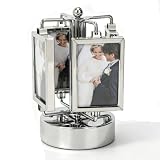
- Highly Practical: Photo frame adopts a sporty design that does not require batteries. The music box automatically plays music when rotated, adding fun to your photo display, and the size is approximately 9 x 16 cm/3.5 x 6.3 in. Rotating Photo Frame Carousel Photo Stand offers battery-free operation and musical entertainment for any desk or shelf
- Widely Used: Picture frame features a 360-degree rotation and double-sided design to bring your memories to life, making it great for any home or office while being easy to carry and store without taking up space. Unique Rotating Music Box Photo Picture Frame serves as a versatile decor piece that fits seamlessly into living rooms, bedrooms, or workspace corners
- Easy To Use: Rotating photo frame is easy to use, with double-sided frames that can hold two photos each, and is gorgeous and colorful, suitable for home dining table decoration while upgrading your workspace. Umbrella Shape Rotating Music Picture Frame simplifies photo display and enhances room aesthetics with its vibrant, eye-catching appearance
- Well Made: Photo display is well crafted, and its stable base and high-gloss glass make your photos both safe and stylish, making it an excellent addition to any table and adding charm to your living space. Elegant Metal Carousel Photo Display provides reliable protection for cherished pictures while offering a sleek, polished look that complements various interior styles
- Material Quality: Rotating music box is made of high-gloss glass material and integrated casting technology, which is clear and not prone to scratches. Its mechanical movement and metallic texture add a touch of delicacy to birthdays, New Year's, or Valentine's Day. Music Play Photo Stand combines durability with elegant craftsmanship, making it a lasting keepsake for special occasions
curl -G "https://api.screenshotneo.com/v1/shot" -d access_key=YOUR_API_KEY --data-urlencode url=https://stripe.com -o shot.webpScreenshotNeo accepts cookie or consent banners and removes more than 60 known consent platforms, newsletter popups, and chat widgets before capture; each of those steps can be turned off. Bot checks, blank pages, timeouts, failed loads, and cache hits are not billed, and the response identifies the page verdict and billing status in headers. Its MCP server exposes screenshot, page-info, and PDF-capture tools to AI agents and other MCP clients. The free plan includes 1,000 shots per month without a card; paid plans start at $5 for 3,000 shots.
Sign up for ScreenshotNeo’s free plan to try 1,000 screenshots a month with no card.
Keep the component maintainable
Keep data retrieval, template rendering, visual styling, and interaction logic in separate responsibilities where your platform allows it. Name parameters such as slide count, height, and interval clearly, define safe defaults, and document whether interval means autoplay timing or something else. Test the rendered output—not only the template source—because missing CMS fields, escaping, and browser support issues appear in the final page.
Use the acceptance checklist before release:
- Each valid record produces one slide with a meaningful heading.
- The collection has a clear label, and images have appropriate alternative text.
- All navigation works with keyboard and touch as well as pointer input.
- Slide changes are announced, and focus is not stranded in hidden content.
- Any autoplay can be stopped, pauses on focus and hover, and respects reduced motion.
- Empty, single-item, missing-field, and unsupported-browser cases remain usable.
- The rendered layout stays stable and readable across the project’s target viewports.
Frequently Asked Questions
Should I use a carousel for every collection of cards?
No. Use a list or grid when seeing and comparing several items at once is more useful than browsing one at a time.
Can CSS render the records from my database?
CSS can style content and, in supporting browsers, provide carousel affordances; record retrieval and template binding still need to come from your application or CMS.
Quick Recap
Product prices and availability are accurate as of the date/time indicated and are subject to change. Any price and availability information displayed on Amazon at the time of purchase will apply.

