
Recommended Free Tools
To make bhajan videos sound consistent in a YouTube playlist, measure each song’s perceived loudness, apply the same loudness-normalization target in an audio editor, preserve stereo balance, and listen through the finished sequence on more than one playback type. Peak normalization alone is not enough: it aligns audio peaks, not how loud songs sound to a listener.
Why one bhajan video sounds louder than another
Videos may come from different recordings, microphones, mixes, or mastering processes. Their highest peaks can be similar even when their average perceived loudness differs. Conversely, a song with strong dynamic changes may have occasional peaks that do not reflect how loud it feels overall.
Peak normalization adjusts the highest sample peak to a chosen level. Loudness normalization measures perceived loudness, commonly expressed in LUFS, and is better suited to bringing independently produced songs to a comparable listening level. Audacity describes its Loudness Normalization as useful when several tracks need to sit at comparable levels. See the Audacity Manual on Loudness Normalisation.
Prepare and normalize the songs
-
Keep untouched originals
Make a working copy of every source video or audio track before editing. If a source is clipped, distorted, or already heavily compressed, normalization will not repair that damage; retaining the original lets you revisit it.
Special offer. See more information about Outbyte and uninstall instructions. Please review EULA and Privacy policy.#1 Best Overall
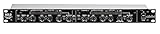 ART SCL2 Dual/Stereo Compressor/Limiter Expander/Gate, Black (SCL-2)
- Dual Channel or Linked Stereo Operation
- 1/4-Inch TRS And XLR Balanced Inputs
- Stereo Mode Balance Control
- Selectable Auto/ Manual Attack/Release
- Precise Led Level Meters
-
Measure each complete song
Import the songs into an audio editor such as Audacity and measure the whole audible song in LUFS. Do not judge the level from a short arbitrary excerpt or use peak readings as a substitute for perceived loudness.
-
Choose one target for the listening context
Apply a consistent loudness target to the songs, then listen critically. The YouTube sources cited here do not establish an official LUFS target for uploads. EBU R 128 version 5.0 recommends average programme loudness of −23 LUFS for broadcast programme audio; that is a broadcast recommendation, not a YouTube requirement or a universal target for bhajan playlists. The EBU R 128, version 5.0 was published on 2023-11-21.
Rank #2
 FULODE Audio Compressor, Professional Dual-Channel Rackmount Vocal Compressor/Limiter with Noise Gate, Sidechain Insert, and XLR/TRS Inputs for Studio, Live & Streaming
- Dual-Channel Dynamics Control: Designed for versatile audio applications, this dual-channel compressor delivers smooth and consistent level management for vocals, guitars, drums, and other sound sources. The built-in Overeasy compression ensures a more natural transition into gain reduction, while adjustable attack and release settings allow precise shaping of dynamic behavior. Ideal for studio recording, live sound, streaming, and stage performance environments.
- Professional XLR/TRS Connectivity: Equipped with high-quality XLR and 1/4" TRS inputs and outputs, this rackmount compressor integrates easily with mixers, audio interfaces, PA systems, and studio gear. Provides clean signal routing and reliable performance for professional audio environments.
- Classic VCA Circuit for Enhanced Vocals: The VCA-based design improves vocal clarity, warmth, and presence—ideal for studio vocals, voiceovers, live singing, podcasting, and broadcast applications. Helps vocals sit smoothly and confidently at the front of the mix.
- LED Metering with Noise Gate Function: Features precise LED indicators for gain reduction, compression levels, and gate thresholds, giving clear visual feedback during setup. The built-in noise gate helps reduce ambient or background noise, ensuring cleaner audio in studio and live situations.
- Sidechain Insert for Frequency Control: The dedicated sidechain input supports frequency-based ducking, perfect for tightening bass, kick drums, and other low-end instruments. Adjustable attack and release controls allow detailed dynamic shaping for modern studio production and live performance.
-
Keep ordinary stereo channels linked
For ordinary stereo recordings, process the left and right channels together. Normalizing them independently can alter the stereo balance. Separate channel adjustment is appropriate only when the channels represent genuinely separate recordings and you have a specific imbalance to correct.
-
Review musical dynamics and headroom
Listen for clipped peaks, pumping or flattened dynamics, sudden level changes, and excessive silence. A common loudness target should make transitions more comfortable without making every song sound unnaturally compressed.
Quick wins for a faster PC:
Fix the driver behind crashes, sound loss and screen glitchesFind Drivers →Clear out junk files and repair common Windows errorsFree Scan →Special offer. See more information about Outbyte and uninstall instructions. Please review EULA and Privacy policy.Rank #3
Sale MICNAUX Audio Compressor, Professional Dual-Channel Black Dynamic Processor with Noise Gate & Sidechain Insert for Studio, Live & Streaming – 1U Rackmount, XLR/TRS Inputs
- Dual-Channel Precision – Full Control Over Every Sound Source: Equipped with advanced Overeasy compression and Auto attack/release settings, this dual-channel compressor offers smooth, natural dynamics control for vocals, guitars, drums, and more. Ideal for recording, live streaming, or on-stage use.
- Studio-Grade Connectivity – Seamless Integration: Designed with premium XLR and 1/4" TRS inputs and outputs, the unit effortlessly fits into any professional or live sound setup, ensuring clean signal paths and flexible routing options.
- Enhanced Vocal Presence – Classic VCA Circuitry: Engineered for clarity, the classic VCA circuit enhances vocal warmth and detail. Bring vocals to the front of the mix with a rich, natural tone that stands out in any performance environment.
- Visual Monitoring – Precision LED Display & Noise Gate: Features independent LED indicators for gain reduction, compression, and gate thresholds. Fine-tune settings with confidence while reducing unwanted background noise using the built-in noise gate function.
- Side Chain Capability – Targeted Frequency Control: Includes a side chain insert for effective frequency ducking—ideal for tightening low-end instruments like bass or kick drums. Offers adjustable attack and release for responsive, natural-sounding compression across dynamic sources.
Listen through the playlist before uploading
Review the beginnings and endings of songs as well as the transitions between them. Check on headphones and on a single-speaker or mono playback path. YouTube notes that stereo may be converted to mono on a one-speaker mobile device; poor mono compatibility can reduce sound quality or mute audio. Its guidance recommends editing audio and video tracks before upload and checking compatibility. See YouTube Help: Troubleshoot audio or video issues with uploads on YouTube.
- Confirm that one song does not jump sharply louder or quieter than its neighbors.
- Check for unwanted gaps, abrupt cuts, or clipped/distorted passages.
- Listen for phase problems or missing sound in mono.
- Recheck songs that sound unbalanced on speakers even if they seemed acceptable in headphones.
Export settings and uploading to YouTube
YouTube’s general troubleshooting guidance lists AAC-LC audio at 128–256 kbps and a sample rate of 44.1 or 48 kHz. Use settings suitable for your editing software and upload route; these are general guidance, not a promise that every workflow requires one exact combination. YouTube’s separate recommended encoding page gives AAC-LC or Opus, 48 kHz, and 384 kbps stereo specifically for Content Manager partners, so do not treat those partner settings as a universal requirement. See YouTube Help: YouTube recommended upload encoding settings.
Rank #4
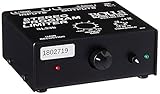
- Package Dimensions: 6 L x 5 H x 6 W (inches)
- Package Weight: 5 Pounds
- Country Of Origin : China
- Rolls Stereo Program Limiter (Sl33B)
-
Make a video file for each song
YouTube does not accept audio-only uploads as videos. If a song is audio-only, combine it with a still image or other visual in a video editor, then export a video file. See YouTube Help: Upload YouTube videos.
-
Upload and arrange the playlist
Upload the finished video files to YouTube and add them to the intended playlist in the order you want listeners to hear them. Check the published versions as well as the local exports, since the playlist is the actual listening sequence you are preparing.
The Tool Desk
Outbyte PC Repair FREERepair Windows errors before they cause bigger problemsFix Now →Outbyte Driver Updater FREEScan for outdated or missing drivers - takes under a minuteDriver Scan →Special offer. See more information about Outbyte and uninstall instructions. Please review EULA and Privacy policy.
Can YouTube automatically balance volume?
YouTube’s Stable volume feature balances quiet and loud ranges on eligible videos, continuously adjusting playback levels to reduce variations. Availability varies, and the feature is disabled for YouTube Music and official music videos. Because it is not available for every video, it is not a reliable replacement for preparing consistent source files. Details are in YouTube Help: Control video volume on your device.
Common problems and fixes
| What you hear | Likely cause | What to do |
|---|---|---|
| One song remains much louder despite similar peak readings | Peak normalization aligned peaks rather than perceived loudness. | Measure the whole songs in LUFS and use loudness normalization consistently. |
| The stereo image shifts after processing | Left and right channels were normalized independently. | Redo the process with the stereo pair linked, unless the channels are separate sources that need correction. |
| Audio becomes weak, degraded, or disappears on one-speaker playback | The stereo mix may not translate well to mono. | Check mono compatibility and correct phase or balance problems in the editor before upload. |
| The local file sounds right but the playlist transition does not | The sequence may contain a level jump, silence, or abrupt edit at a song boundary. | Listen through the beginnings, endings, and transitions in playlist order and revise the relevant exports. |
| You cannot upload the song file | It is audio-only; YouTube accepts video uploads. | Add a still image or other visual in a video editor and export a video file. |
Or let it run in the cloud
Once your playlist videos are prepared and uploaded, StreamNeo can keep a YouTube channel live from uploaded videos: upload your recording or build a playlist, add your YouTube stream key once, and go live. Your computer and home connection do not have to stay on. Each slot streams uploads as made, up to 4K 60fps, at one flat price per slot; it also includes automatic recovery if YouTube drops the stream. The first day is free with no card. Monthly billing is $9.99 per month. Start the free day at StreamNeo.
Quick Recap
Product prices and availability are accurate as of the date/time indicated and are subject to change. Any price and availability information displayed on Amazon at the time of purchase will apply.

