
iTechGuides is reader-supported. When you buy through links on our site, we may earn an affiliate commission. As an Amazon Associate I earn from qualifying purchases. Learn more
To pair an LG Magic Remote, turn on the TV, wait about 20 seconds, point the remote at the screen, then press the scroll wheel (OK). LG says the remote pairs automatically and the TV displays a confirmation message. These steps apply to Magic Remotes; a basic infrared remote without a wheel or pointer may use a different setup.
Pair an LG Magic Remote for the first time
- Turn on the LG TV and wait about 20 seconds.
- Point the Magic Remote toward the TV.
- Press the scroll wheel, also labeled OK.
- Check the screen for a pairing confirmation.
If your remote has no scroll wheel or pointer feature, it may be a basic infrared remote and may not use Magic Remote registration. Check the manual for your TV and remote model for its setup procedure. LG USA’s Magic Remote connection guide gives the wheel-and-pointer pairing steps.
Re-pair a Magic Remote that has stopped connecting
LG lists different reset and registration steps for different remote generations. Use the instructions for your particular TV and remote; do not assume one button combination works across all LG models.
Reset flow described in LG’s current US guide
- Hold Back and Settings together for at least five seconds. The remote’s LED should blink, and the remote should unpair.
- When the TV displays the unpairing message, point the remote at the TV and press the wheel (OK) to pair again.
Instructions LG gives for some model years
- Models released in 2021 and 2025: Point the remote at the TV and hold Home and Settings together for at least five seconds, until instructions appear.
- Models released in 2020: Hold Guide until instructions appear.
These model-year steps are specific to the models covered by LG’s guide; they should not be treated as a complete list of all remote generations. If registration fails, an older LG owner-manual fallback is to turn the TV off and on, then try registration again. Check your model’s manual for the applicable button names and sequence. LG USA’s connection guide has the current US instructions.
#1 Best Overall

- LG Magic Remote MR20GA AKB75855501 model compatible with LG Smart TV mode year 2020 2019 and 2018, - Please Note: This LG Magic Remote MR20GNA AKB7585501 works only with LG Smart TVs made in 2020 or earlier. If your TV is made in 2021 or after, it does NOT work!
- Compatible LG TV Models: ZX, WX, GX, CX, BX, NANO99, NANO97, NANO 91, NANO90, NANO85, NANO81, NANO80, UN85, UN73 series
- Compatible with 2018, 2019 and 2020 TVs, Required 2 AA batteries (NOT included)
- Easy Pairing Instructions – Turn on your TV, then point the remote at the TV and press the Wheel (OK) button Automatic Connection – The remote will pair automatically, and a message will appear on your screen. If it doesn’t, turn the TV off and on and try again
- Check Before You Buy – Please make sure you are purchasing the exact same model as your original remote (MR20GA AKB75855501). If you're unsure, contact us and we’ll help you find the correct one
If the pointer is missing but the remote buttons work
Power and volume buttons can continue to work even if the Magic Remote has disconnected, so a missing pointer may signal a lost connection rather than a completely dead remote. LG’s standard-model pointer troubleshooting guidance recommends resetting and pairing the remote again. For the symptom covered by that guide, hold Back and Home together for at least five seconds until the power light blinks three times, then aim at the TV and press the wheel (OK). This is a symptom-specific procedure, not a universal reset sequence.
LG also recommends keeping a Wi-Fi router at least 20 cm from the TV to reduce wireless interference. See LG’s Magic Remote pointer troubleshooting guide for its standard-model guidance.
Rank #2
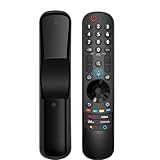
- 【Applicable TV Series】Replacement magic voice remote control fit for LG TVs from 2019 to 2025 2025 LG TV: C5, B5, G5, M5; QNED 90A/9M/89A/85A/82A/80A Series; NANO 90A/80A series; UA 85/73 Series 2024 LG TV: C4, B4, G4, M4; QNED 99T/90T/85T/80T Series; UT 80/73 Series 2023 LG TV: C3, B3, G3, A3, Z3, M3; QNED 85/80/75 Series; UR 90/80/75/73 Series 2022 LG TV: C2, B2, G2, A2, Z2, CS, QNED 99/95/90/85/80; NANO 80/75; UQ 90/80/75/70 2021 LG TV: C1, A1, B1, G1, Z1; QNED 99/95/90; NANO 99/95/90/85/80/77/75; UP 80/77/75 2020 LG TV: CX, BX, GX, WX, ZX, RX; NANO 99/97/95/90/85/80; UN 85/80/74/73/71 2019 LG TV: R9, Z9, W9, E9, C9, B9; SM 99/98/95/90/86/85/82/81; UM 7600/7400/7300/7100; LM 6970
- For model numbers: 43NANO75UPA 43UP7100ZUF 43UP7560AUD 43UP7700PUB 43UP8000PUA 50NANO75UPA 50NANO77ZPA 50NANO80UPA 50NANO85APA 50UP7100ZUF 50UP7560AUD 50UP7700PUB 50UP8000PUA 55NANO75UPA 55NANO77ZPA 55NANO80UPA 55NANO85APA 55NANO90UPA 55UP7100ZUF 55UP7560AUD 55UP7700PUB 55UP8000PUA 60UP7700PUB 60UP8000PUA 65NANO75UPA 65NANO77ZPA 65NANO80UPA 65NANO85APA 65NANO90UPA 65UP7100ZUF 65UP7560AUD 65UP7700PUA 65UP7700PUB 65UP8000PUA
- 70UP7170ZUC 70UP7570AUD 70UP7770PUB 70UP8070PUA 75NANO75UPA 75NANO80UPA 75NANO85APA 75NANO90UPA 75QNED90UPA 75QNED99UPA 75UP7170ZUC 75UP7570AUE 75UP7770PUB 75UP8070PUA 82UP8770PUA 86NANO75UPA 86NANO85APA 86NANO90UPA 86NANO99UPA 86QNED90UPA 86QNED99UPA 86UP8770PUA BEJMR21GA OLED48A1AUA OLED48A1PUA OLED48C1AUB OLED48C1PUB OLED55A1AUA OLED55A1PUA OLED55B1PUA OLED55C1AUB OLED55C1PUA OLED55C1PUB
- OLED55G1PUA OLED65A1AUA OLED65A1PUA OLED65B1PUA OLED65C1AUA OLED65C1AUB OLED65C1PUB OLED65G1PUA OLED77A1AUA OLED77A1PUA OLED77B1PUA OLED77C1AUA OLED77C1AUB OLED77C1PUB OLED77G1PUA OLED83C1AUA OLED83C1PUA RCLLGEMR21GA R-C-LLGEMR21GA 43UP7670PUC 43UP8000PUR 50NANO75PUA 50NANO80P 50UP7670PUC 50UP8000PUR 55NANO80P 55NANO90P 55UP7670PUC 55UP8000PUR 60UP7670PUB 60UP8000PUR
- 【Easy To Pair】Turn on the TV and insert 2*AA batteries for the remote . After about 20 seconds, point the remote toward the TV, then press the Wheel (OK). The remote control will be registered automatically, and the pairing completion message is displayed on the TV screen. (Note: batteries and manual are not included)
Check these basics if registration still fails
- Make sure the remote has working batteries.
- Aim it at the TV while attempting registration.
- Confirm that the reset and registration instructions match the exact TV and remote model.
- If LG’s steps do not resolve the issue, contact LG support.
When voice control fails but pairing works
Voice recognition has requirements beyond basic remote pairing. LG says the TV should be connected to the internet, signed in to an LG account, and have the voice-recognition terms accepted. The menu language should match the official language of the region. To use voice control, hold the AI or microphone button while speaking, then release it. Availability varies by country, and older remote models may not support the same voice functions. See LG’s connection and voice-recognition guidance.
What’s actually slowing this PC down?
Pick the symptom - the matching free tool is one click away.
If the original remote is missing or damaged
A replacement Magic Remote is an option only if it is compatible with your exact TV model. LG lists a 2025 Series Magic Remote on its UK accessory page, but that does not establish compatibility with every LG Smart TV. Check the TV model and the replacement’s compatibility details before buying. LG UK’s 2025 Series Magic Remote product page includes product information and pairing instructions.
Quick Recap
Best Value
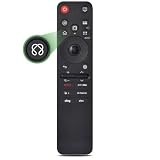
- 【Compatible TV Models】Compatible TV Models: for LG 2019- 2025 TV models including: OLED:A1,A2,A3 A4; B1,B2,B3 B5; G1,G2,G3 G5; C1,C2,C3 C4 C5;Z1,Z2,Z3 Z4;R1,R2,R3;QNED (QNED***R*) 75、80-89、90-99;Nano Series:75,80,81,85,86,88,90,91,96,99;4K UHD:UR7***、UR8***、UR9***,UP70**、UP75**、UP76**、UP8***、UP9*** NOTE: Compatible with AN-MR25GA AN-MR24GA AN-MR23GA AN-MR22GA AN-MR21GA AN-MR20GA
- 【Powerful Magic Remote】AIRMOUSE support point, click, scroll functions, you can select the functions easily by moving and clicking the cursor.VOICE control suport Alexa, It's friendly to use with typing
- [With 6 Shortcuts]- With Ntfix, Prm Video, Disnyp+, LG Channel,Sling and Alexa Voice, Easy to access your favorite content.
- 【Easy to Pair】Turn on the TV and insert 2*AAA batteries for the remote .After about 20 seconds, point the remote toward the TV, then press the Wheel (OK) for 5 seconds. The remote control will be registered automatically, and the pairing completion message is displayed on the TV screen. (⚠️Note: If your TV doesn’t support voice control and this magic remote couldn’t use the voice function.)
- 【Durable Buttons】Approved testing supported over 100,000 total clicks on all buttons,Equal to 9 years on average 30 times pressing per day,Voice control makes interacting with your Smart TV even easier.
Rank #4

- 【Wide Compatibility】This high-quality remote is compatible with All 2019–2025 LG Smart TVs that support voice control. It's a perfect replacement for LG Magic Remotes, including (but not limited to) MR24GN/GA, MR23GN/GA, MR25GA/GN, MR22GA/GN, MR21GA/GC, MR20GA, MR19BA, AKB75855501 and many others. 【Important Notice】 For TV models that do not support voice control or were released before 2018, the voice search functionality may not work. This remote only works with LG TVs; Not for LG soundbars or TV boxes.
- 【Intelligent Voice Control】Please pair your remote with the LG TV first to enjoy the advanced voice and pointer function. Enhanced with voice control and six dedicated hot-keys for instant access to popular services like NETFLIX, Disney+, LG Channels. Purchase it now and use your voice to search and stream millions of movies, sports, and TV series!
- 【Pointer & Cursor Function】The device also offers intuitive navigation through point, click, and scroll capabilities, allowing the viewers to control the contents from anywhere and any angle within the household.
- 【Reliable & Energy-Saving】Crafted with sustainable, high-end ABS materials, this remote is built to last - each button can endure 120,000 clicks or last 10 years. It is safe for children, pets and elderly . Thanks to our advanced energy-saving technology, you can enjoy prolonged battery life.
- 【1 Year Full Warranty】We offer a full 1-year warranty, ensuring you're fully protected for an entire year. If you need any product support, Go to your order > Get product support > Message Now > Product Question > Select the relevant product > Product Details. With over 30 years of experiences, we are dedicated to providing the quality TV remotes to millions of american customers.
Rank #3

- 【KEY FEATURES】Vioce Magic remote control makes interacting with your smark TV easier! Intuitive Mouse Like Pointing and Wheel Control, and get to your favorite content quickly with preset 2 popular shortcut buttons
- 【EASY PAIRING】① Put batteries into the Magic Remote and turn the TV on. ② Point the Magic Remote at your TV and press the Wheel (OK) on the remote control. When the pointer is not working, press and hold the GUIDE button button for more than 5 seconds to disconnect and re-register the motion sensor remote control at the same time. (Using a new magic remote control, or a magic remote control for another TV, this pairing process is required before use)
- 【Compatibility】Compatible with OLED UHD NanoCell 4K 8K Webos Smart TV Models: ZX, WX, GX, CX, BX, W9, E9, C9, B9, NANO99, NANO97, NANO95, NANO91, NANO90, NANO86, NANO81, NANO80, SM99, SM95, SM90, SM86, SM81, UN85, UN81, UN80 UN74, UN73, UN71, UM80, UM75, UM73, UM71, UM6970 series. It also can be replacement for AN-MR18BA, AN-MR19BA, AN-MR20GA,AN-MR21GA,MR22GN,MR22GA,MR23GN,MR23GA,MR24GN magic remote.Please note that this remote isn't compatible with AKB75095307 AN-MR500 AKB73615306
- 【Vioce Function】The Magic remote with vioce function, and it Support for Google Assistant / Alexa. Please make sure your network connection when you use the voice recognition
- 【Packaging Content】1 * Remote Control and 1*Manual (⚠Note:Remote need to work with 1.5V AA batteries,but this remote doesn't come with any batteries )
Product prices and availability are accurate as of the date/time indicated and are subject to change. Any price and availability information displayed on Amazon at the time of purchase will apply.

