
Quick wins for a faster PC:
Clear out junk files and repair common Windows errorsFree Scan →Scan for outdated or missing drivers - takes under a minuteDriver Scan →iTechGuides is reader-supported. When you buy through links on our site, we may earn an affiliate commission. As an Amazon Associate I earn from qualifying purchases. Learn more
Build the stretch demonstrations and timed rest cards into one repeating video, then send that video to YouTube Live using its encoder workflow. YouTube does not provide a yoga rest-card timer for this setup: the timing needs to be part of your prepared video. Preview the stream in Live Control Room before starting, and use footage and music cleared for both the live broadcast and any replay.
Choose how to send the video to YouTube Live
| Route | Best fit | What it involves |
|---|---|---|
| Computer webcam | A simple live camera feed from a computer | You need a computer with a webcam. This route is for streaming the camera feed, rather than sending a prepared looping video with timed cards. |
| Encoder | A prepared video loop or a production with more control | Send the video or other production feed through an encoder, using YouTube’s server URL and stream key. The encoder can be software or hardware; YouTube does not require expensive equipment. |
For a prerecorded sequence with rest screens, use the encoder route. You can use the equipment and software you already have; choose tools that can play or loop the finished video as the encoder input.
Prepare a loop viewers can follow
- Plan the sequence. Arrange the stretch demonstrations in the order you want viewers to follow. Choose movement and rest durations for your intended class; YouTube’s guidance does not prescribe yoga sequences or exercise intervals.
- Make each rest screen a video segment. Insert a card between movement segments and set its duration in the video timeline. Put the rest duration and the next-movement prompt on the card so viewers can follow along even if they join during a pause. YouTube’s reviewed guidance does not describe a built-in rest-card timer for this workflow.
- Make the video repeat-ready. Build repetition into the video itself, so the sequence comes around again for viewers who join after it has started. Check that the end transitions cleanly into the beginning if your playback or encoder setup will loop the file.
- Check rights before using audio or footage. YouTube’s live-stream terms require the content provider to have the necessary rights for live content, including music licensing rights. Confirm that your permissions cover the live broadcast and any archived replay. When in doubt, use material you created or audio and video licensed for those uses.
Set up the YouTube Live encoder stream
- Confirm channel eligibility. YouTube currently requires a verified channel and no live-streaming restriction in the prior 90 days. Check the channel’s eligibility in YouTube Studio; platform requirements and interface labels can change.
- Open Live Control Room. In YouTube Studio, choose Go Live, then create or schedule the stream and select the intended privacy and other event settings.
- Connect the encoder. Copy the YouTube server URL and stream key into the corresponding fields in your encoder. Treat the stream key as a password: YouTube says it directs the encoder feed to your channel, so do not share it publicly.
- Start the video feed and wait for preview. Start playback and the encoder output, then check that the feed appears in Live Control Room. Confirm that movement, rest cards, and audio are all coming through as expected.
- Test access and start the event. YouTube recommends testing your setup and confirming that the event is accessible before you go live. If you do not want to test in public, YouTube’s tips say you can use an unlisted event before it starts. When the preview and settings are right, click Go live in Live Control Room.
- Monitor the broadcast. Keep an eye on the video and audio quality while it runs, and check that the prepared sequence continues to play as expected.
Plan for late arrivals, DVR, and replay
YouTube Live DVR can allow viewers to pause, resume, and rewind, subject to platform limits. YouTube says encoder streams under 12 hours are automatically archived. For streams longer than 12 hours, DVR rewind may be limited or unavailable. These are platform behaviors, not recommendations for class length. A repeating sequence helps late arrivals encounter the movement and rest cards even when rewind is unavailable.
Recommended Free Tools
Troubleshoot common problems
- No preview in Live Control Room: Check that the encoder is running and that the server URL and stream key were entered in the correct fields. Confirm the encoder is sending its feed, then wait for the preview to appear before starting the event.
- The wrong video or a blank rest card appears: Check the prepared video’s timeline and playback point. Confirm that the intended file is selected and that the encoder is receiving its output.
- Rest screens do not last the intended time: Adjust their durations in the prepared video and export or replace the file. The timing belongs in the video; the reviewed YouTube guidance does not supply a native rest-card timer.
- Viewers cannot access the event: Check the stream’s privacy and event settings in Live Control Room, then test access using the intended audience setting before the broadcast.
- Audio or picture quality is poor: Follow YouTube’s recommendation to test the setup and monitor audio and video. Check the source playback and the encoder feed to identify where the problem begins.
- A stream stops or a replay is unavailable: Check whether the broadcast exceeded YouTube’s 12-hour archive or DVR threshold. For an interrupted feed, check the encoder and Live Control Room before restarting; no workflow guarantees an uninterrupted stream.
- Music or footage raises a rights concern: Stop using material unless you have the necessary permissions for live use and replay. A track or clip being available online does not by itself establish that you may broadcast it.
Or let it run in the cloud
For a prepared video loop that should keep running without leaving a computer on at home, StreamNeo is a cloud option for YouTube. Upload your recording or build a playlist, add your YouTube stream key once, and go live. It loops uploaded videos rather than broadcasting a camera feed.
#1 Best Overall

- Home PT Strap for Independence (3 Recovery Stages) – A physical therapy stretching strap designed for gentle knee/hip/leg mobility at home. Use it across recovery: Stage 1 bedside assist (when movement is limited), Stage 2 PT stretching/ROM, Stage 3 daily warm-up to maintain mobility—so you can stay independent
- Non-Elastic, Steady Holds (No Rebound / No Surprise Stretch) – The strap does not stretch, so there’s no bounce and no sudden “give.” You can pull to the angle you need and it stays there, helping you move slowly and safely—especially after knee replacement or hip replacement recovery.
- Loops = Easier Grip + Adjust Depth + Track Progress – Multiple loops provide clear hand/foot holds with less grip strength than towels or ropes. Switch loops anytime to adjust stretch depth, repeat the same position each session, and track ROM progress for hamstrings, calves, hips/hip flexors, and lower back—without forcing.
- Leg Lifter Strap / Mobility Aid for Bed & Car – Can also be used as a leg lifter to help lift your leg into bed or car, supporting daily movement tasks when flexibility is limited (use gently within comfort). gently within comfort).
- PT-Style Daily Stretching for Legs, Back & Feet (Comfort Tip) – Built for slow, controlled home stretching and mobility work for legs, hips, lower back, ankles, and feet (calf/Achilles tightness included)—not an elastic resistance band. For comfort during longer holds, socks or light gloves may help. during longer holds, socks or light gloves can help if you have sensitive hands/skin. gloves can help if you have sensitive hands/skin.
- Nothing has to stay on at home; the stream runs from the cloud.
- One flat price per slot for any quality up to 4K 60fps, streamed as uploaded with no re-encode or quality tiers.
- Automatic recovery if YouTube drops the stream.
- The first day is free, with no card required.
Every slot includes one always-on stream, 10 GB of storage per slot pooled across active slots, 24/7 looping and playlists, and support from the StreamNeo team. The same product is included on every plan; only the billing length changes. Monthly: $9.99 per month.
See StreamNeo or check your content rights before streaming. Start your free first day on StreamNeo.
Quick Recap
Best Value

- Durable Materia: Our stretching straps are constructed of a durable high-quality fabric that will not fray or break. Washable, tight-knit, skin-friendly with eco-friendly dye (Non-Elastic Yoga Strap)
- Perfect Size: Strong and sturdy stretch strap with 10 individual loops. Each loop measures longer than the standard multi-loop strap (75 inches long & 1 inch wide), giving you more room to stretch out
- Multi-Function: Simple yet practical, designed for multiple purposes, including physical therapy, yoga, fitness, pilates, dance, ballet, daily stretching, and more
- Boosts Overall Health & Well-Being: Greater Flexibility & Greater Range of Motion & Enhanced Muscle Recovery & Reduced Risk of Injury. Many sports trainers suggest using these stretching strap for muscle contraction, relaxation, and deep stretching
- Unmatched Customer Service: We are willing to provide you a safe and high quality yoga stretching strap, and friendly customer service
Rank #4
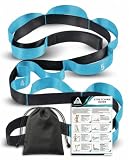
- [2 VERSATILE OPTIONS FOR YOUR NEEDS] Available in two tailored styles. Choose our Professional 86" x 1.5" Strap featuring 10 numbered loops, a carry pouch, and an exercise guide for structural rehab. Or opt for our Minimalist 75" x 1" Strap for a sleek, lightweight, unnumbered stretching experience
- [86" PRO STRAP: 10 NUMBERED LOOPS & ACCESSORIES] The 86-inch style comes with 10 fixed numbered sections to precisely track your flexibility progress. Ideal as physical therapy equipment for post-surgery knee rehab, hamstring stretching, and seniors. Includes a portable pouch and a guided workout booklet
- [75" SLEEK STRAP: 1-INCH COMPACT GRIP] The 75-inch style features a streamlined 1-inch width without printed numbers, offering a minimalist look and a comfortable, ergonomic grip that fits perfectly in your palm. Ideal for gym-goers, dancers, and travelers who prefer a lightweight, hassle-free stretch band
- [NON-ELASTIC PREMIUM NYLON FOR MAXIMUM CONTROL] Both styles are woven from heavy-duty, non-elastic premium nylon, offering uncompromising stability and rigid resistance. They won't deform or fray over time, giving you optimal leverage to hold deep fascia stretches longer without a partner.It can also be used for individuals with weak or injured legs to achieve better control when positioning their legs on a bed, wheelchair, or even in a car
- [DAILY PAIN RELIEF & VERSATILE FITNESS GIFT] A multi-functional tool suitable for yogis, athletes, and office workers. Perfect for relieving neck, shoulder, and lower back stiffness from prolonged sitting, or dynamic warm-ups before running. A thoughtful, health-focused gift for your family and loved
Rank #3

- Improve Your Health – Increase your flexibility and stretch yourself easier and safer. The stretch strap with loops and with ultra comfort neoprene handles takes care of your hands and feet, allows you to improve your stretching or yoga skills and makes you feel and look younger
- One Strap - Many Sports – We offer you a non-elastic yoga strap for stretching made with high quality nylon for better stability and greater resistance. The physical therapy strap has numbered loops for self-monitoring your positions and for a better control of a large range of physical exercises: stretching, pilates, fitness, physical therapy, ballet, dance
- Balanced Life – A special carry bag was designed to take it with you everywhere, so you have all the reasons to enjoy the greatest benefits of the yoga stretch strap with loops: encourages an optimistic outlook, increases stamina, decreases risk of injuries, improves energy levels, promotes blood circulations, reduces soreness, helps losing weight in a gentle and healthy way, improves athletes performances, heals the ligaments
- Free Stretching Guide – The guide includes basic exercises you can do in order to start improve your flexibility, range of motion and your posture. The stretching band is a perfect fit into your daily routine even if you have never used it before or you are a beginner or an experienced one
- Get the Best of Our Product – Welcoming all your specific needs we offer you to choose from our two size version: exercise stretching belt with 10 loops with 78 inch length and 1.5 inch width or physical therapy strap for after surgery with 12 loops with 96 inch length and 1.5 inch width
Rank #2

- Relax Your Body:The Stretch strap & leg stretcher is perfect for Physical therapy is perfect for stretch foot,waist and hand.Assist stretching after exercise,relieve muscle soreness,improve muscle flexibility,and also improve back pain caused by lack of exercise for a long time.
- High Quality and Durable: The yoga strap made of non-elastic premium nylon,and ensures optimal resistance and great stability, not easy to broken, high strength and toughness. Providing you relax stretching experience.
- Light and Easy to Use: Stretching Strap have 10 loops rope with comfy texture. 75 inch long and 1 inch wide enough to recommended the most beginner to use it, yoga stretches are so easy to work with it even if you've never done them.
- Multi Function: This stretching equipment is very suitable for yoga, pilates, daily exercise or physical therapy, Oak-Sports stretch band can also be used for physical therapy equipment and postoperative recovery.
- Exclusive Service: Oak-Sports are willing to provide you a safe and high quality yoga stretching strap, our worry-free 12 month, and friendly customer service.
Product prices and availability are accurate as of the date/time indicated and are subject to change. Any price and availability information displayed on Amazon at the time of purchase will apply.
The Tool Desk
Outbyte Driver Updater FREEScan for outdated or missing drivers - takes under a minuteDriver Scan →Outbyte PC Repair FREERepair Windows errors before they cause bigger problemsFix Now →
