
iTechGuides is reader-supported. When you buy through links on our site, we may earn an affiliate commission. As an Amazon Associate I earn from qualifying purchases. Learn more
A Windows PC with 4GB of RAM may handle basic browsing, documents, and streaming, but it has little room for many demanding apps at once. Start by checking whether memory, the processor, or the drive is actually busy; then reduce unnecessary workload, check for malware and updates, and free disk space carefully. These steps can improve responsiveness, but they cannot add physical memory or fix every hardware limit.
First, find out what is slowing the PC
Four gigabytes of RAM alone does not reveal the bottleneck. A busy processor, heavy disk activity, background apps, low free storage, malware, or aging hardware can also make Windows feel slow. Microsoft recommends checking resource use before choosing a fix in its Windows performance guidance.
- Press Ctrl+Shift+Esc to open Task Manager. If it opens in compact view, select More details.
- On Processes, review the Memory, CPU, and Disk columns. Select a column heading to sort by its usage.
- On Performance, check whether memory, CPU, or disk activity is consistently high while the PC is slow.
- On Startup apps, identify apps that launch automatically and are not needed at startup.
Close only apps you recognize and are not using. Do not end unfamiliar processes or disable security, driver, accessibility, or essential sync software just to make the list shorter. Task Manager shows where to investigate; one brief spike does not prove a component is the cause.
The Tool Desk
Outbyte PC Repair FREERepair Windows errors before they cause bigger problemsFix Now →Outbyte Driver Updater FREEFix the driver behind crashes, sound loss and screen glitchesFind Drivers →Reduce the work competing for 4GB of RAM
Close unused apps and browser tabs
Close programs and tabs you do not need, especially those running video calls, large websites, or other demanding tasks. Try doing one task at a time rather than keeping several apps open. If Windows remains sluggish after closing unused work, save your files and restart the PC; this can clear temporary workload, though it will not solve a persistent hardware bottleneck.
#1 Best Overall

- DDR3 1066MHz PC3-8500 204-Pin Unbuffered Non ECC 1.5V CL7 Dual Rank 2Rx8 based 256x8 Module Size: 8GB KIT(2x4GB Modules) Guaranteed – Lifetime warranty from Purchase Date Free technical support
- Compatible with Apple Mac Book - 13 inch Late 2008, 13 inch Late 2009, 13 inch Mid 2010 - Mac Book5,1 MacBook6,1 Mac Book7,1
- Compatible with Apple Mac Book Pro -15 inch Late 2008, 17 inch Early 2009, 13 inch / 15 inch / 17 inch Mid 2009, 13 inch / 15 inch / 17 inch Mid 2010 - Mac Book Pro5,1 Mac Book Pro5,2 Mac Book Pro5,3 Mac Book Pro5,4 Mac Book Pro5,5 Mac Book Pro6,1 Mac Book Pro6,2 Mac Book Pro7,1
- Compatible with Apple iMac - 20 inch/ 24 inch Early 2009, 20 inch Mid 2009, 21.5 inch / 27 inch Late 2009 - iMac9,1 iMac10,1 iMac11,1
- Compatible with Apple Mac Mini - Early 2009, Late 2009, Mid 2010 - MacMini3,1 MacMini4,1
Disable only unnecessary startup apps
If the slowdown is worst just after signing in, disable nonessential startup apps in Task Manager under Startup apps, or in Settings under Apps > Startup where that path is available. Microsoft notes that apps starting automatically can affect startup and overall performance; its instructions for managing them are in Configure Startup applications in Windows. Leave entries enabled when you do not know what they do or when they support security, hardware, accessibility, or a service you rely on.
Check Windows updates and scan for malware
Install available Windows updates through Settings > Windows Update (the exact labels may differ by release), then open Windows Security > Virus & threat protection and run a scan. Updates may include fixes and performance improvements; malware can consume processor and disk resources. Microsoft includes both checks in its performance recommendations.
Rank #2

- ✅【DDR3 8GB 1333MHz SODIMM RAM 】PC3-10600, DDR3 1333MHz, Unbuffered Dual Rank Non-ECC 1.5V CL9 memoria ram, apply for AMD, Intel, Mac system
- ✅【Advanced Chips】All DDR3 8GB ram are from high quality ram memory module. Professional company, high-quality materials, more guaranteed product quality
- ✅【Stable and Durable】8GB DDR3-1333MHz Sodimm, 100% tested for stability, durability and compatibility. We test all rams before shipment to ensure this PC3-10600 ram works stably and normally
- ✅【Increases System Performance】PC3 8GB ram will speed up loading times, improve system responsiveness, and increase your system's ability to handle greater workloads. Warm tips: Please make sure your laptop model meets 2x4GB 1333 10600 kit, you can also contact us to make sure
- ✅【Lifetime Service】Lifetime warranty, free technical support. You can also contact us to ensure compatibility. Any questions, feel free to contact us, we are always be with you
Avoid utilities that promise to “clean RAM” or deliver guaranteed speed gains. Removing files from storage does not increase installed RAM, and the Microsoft guidance does not establish that such utilities reliably improve performance.
Crashes, No Sound, or Screen Glitches?
Random freezes, missing sound and display glitches usually trace back to one bad driver. Find and replace yours safely.Free scan · under a minutePC Slower Than It Used to Be?
A free scan shows the junk files, broken settings and background clutter dragging Windows down - then fixes them in one click.Free scan · Windows 10 & 11Free disk space without deleting files you need
Open Settings > System > Storage to check free space. Low disk space can slow a device and interfere with Windows updates. Microsoft describes cleanup options in Free up drive space in Windows.
Rank #3

- DDR3L / DDR3 1600MHz PC3L-12800 / PC3-12800 240-Pin Unbuffered Non-ECC 1.35V / 1.5V CL11 Dual Rank 2Rx8 based 256x8
- Module Size: 16GB KIT(4x4GB Modules) Package: 4x4GB ; JEDEC standard 1.35V, this is a dual voltage piece and can operate at 1.35V or 1.5V
- PCB Color may be different (Black or Green) due to different production batches; all Timetec products are high quality and rigorously tested to meet stringent standards
- For DDR3 Desktop Compatible with Intel and AMD CPU, Not for Laptop
- Guaranteed Lifetime warranty from Purchase Date and Free technical support based on United States
Use Storage Sense or Disk Cleanup selectively
Storage Sense can remove selected temporary files and Recycle Bin items. It applies to the system drive; by default, it does not manage Downloads or cloud content unless you configure those options. Review its settings before enabling automatic cleanup; Microsoft explains its scope and defaults in Manage drive space with Storage Sense. Disk Cleanup is another option for selected temporary or system files.
Before deleting anything, check the categories and make sure important files are backed up. Downloads may contain personal files, and removing a previous Windows installation can remove the option to roll back. Uninstall apps you no longer use, particularly if they run background processes, but treat this as reclaiming storage and reducing background activity—not as creating more RAM.
Rank #4

- 16 GB RAM DDR3 Kit (4 x 4 GB modules) | DDR3 DIMM 240 pin | Speeds up to 1333MHz PC3-10600U | For Intel, AMD PC 1.5V .
- PC3-10600U | NON-ECC unbuffered | 1Rx8 or 2Rx8 - single or double rank | JEDEC Standard DDR3 DIMM RAM 1.5V based on 512 x 8.
- 16GB DDR3 10600U 4GB PC3 UDIMM RAM uses original IC chips. All chips are 100% tested, RoHS and JEDEC compliant, with highly compatible ddr3 1333 mhz memory for selected desktop PC computers.
- If for any reason you are not completely satisfied with our 8GB DDR3 1333 udimm desktop memory, you can contact us at motoeagle-service@hotmail.com.
- Warning: Make sure you have your DDR3 desktop ram PC model, max ram and ram slot before purchase. Before installation, gently wipe the connecting finger with the eraser.
Try lower visual effects or a different power mode
Reduce visual effects
Search Windows for Adjust the appearance and performance of Windows, open the result, and choose Adjust for best performance on the Visual Effects tab. This reduces visual polish, and the difference in responsiveness varies by PC. Microsoft notes that Windows 11 visual effects can use system resources in its performance guidance.
Recommended Free Tools
Test Best performance when plugged in
On a laptop, open Settings > System > Power & battery (the label may vary) and select Best performance under power mode if available. Use it as a test while plugged in, not as a guaranteed fix: Microsoft warns that this mode can use more power, drain the battery faster, and make the PC warmer.
Best Value
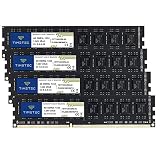
- DDR3 / DDR3L 1333MHz PC3-10600 240-Pin Non-ECC Unbuffered 1.5V / 1.35V CL9 Dual Rank 2Rx8 based 256x8
- Module Size: 16GB KIT(4x4GB Modules) Package: 4x4GB ; JEDEC standard 1.35V, this is a dual voltage piece and can operate at 1.35V or 1.5V
- PCB Color may be different (Black or Green) due to different production batches; all Timetec products are high quality and rigorously tested to meet stringent standards
- For DDR3 Desktop Compatible with Intel and AMD CPU, Not for Laptop
- Guaranteed Lifetime warranty from Purchase Date and Free technical support based on United States
When a RAM upgrade—or a different PC—makes sense
Consider an upgrade only after checking the exact PC model and confirming that its memory is replaceable. “4GB” does not reveal the memory type, form factor, supported maximum, or whether the RAM is soldered. Look up the manufacturer’s specifications for the exact model before buying a module or kit; Microsoft also advises checking with the manufacturer or retailer in Windows 11 System Requirements.
Use the diagnosis and your workload to guide the choice. If Task Manager shows memory pressure during your usual tasks, more compatible RAM may help with multitasking. If CPU or disk activity is the persistent bottleneck, adding RAM alone may not solve it. Compare the cost of compatible parts and installation with the PC’s age, capabilities, and the work you need it to do. If the PC uses an HDD, an SSD could be a separate upgrade to investigate—but confirm support for the exact model before choosing hardware.
Microsoft’s general memory guidance says at least 4GB may suit people mainly browsing, working on documents, or streaming; it recommends 8GB for keeping a device running long term and says 16GB or more may suit photo or video editing and other high-performance work. These are broad recommendations, not a promise that a particular PC will run quickly at those capacities. See All about computer memory.
Check which Windows version the PC can support
Windows 11 lists 4GB of RAM and 64GB of storage as minimum requirements, alongside processor and other requirements. Meeting the RAM minimum alone does not establish Windows 11 eligibility or guarantee good performance; check the full Windows 11 system requirements for the specific PC.
Microsoft states that Windows 10 support ended on October 14, 2025. After that date, it no longer provides free software updates, technical assistance, or security fixes for Windows 10. Check your edition and servicing arrangements when deciding whether to keep, upgrade, or replace a PC; the date and support notice appear in Microsoft’s Windows performance guidance.
Quick Recap
Product prices and availability are accurate as of the date/time indicated and are subject to change. Any price and availability information displayed on Amazon at the time of purchase will apply.

