
iTechGuides is reader-supported. When you buy through links on our site, we may earn an affiliate commission. As an Amazon Associate I earn from qualifying purchases. Learn more
If voice AI turns a product name into a common word, first check whether the mistake is in the transcript or in what the app does with the transcript. Developers can often improve recognition by supplying supported vocabulary hints; Apple Voice Control users can teach certain words or phrases. If ordinary speech is also unclear, investigate the microphone input separately.
First find where the mistake happens
Compare the words the speech recognizer produced with the words you said. If the transcript itself substitutes a common word for a rare brand, model, acronym, or product name, the issue is recognition vocabulary. Google Cloud uses “weather” versus “whether” as an example of this kind of confusion. If the transcript is correct but the app searches for the wrong thing, the problem is downstream interpretation, not transcription; changing speech-recognition vocabulary alone may not fix it.
This distinction is an implementation diagnostic, not a guarantee about how every vendor’s pipeline is built. Consumer voice assistants and search apps do not share one universal vocabulary setting or repair procedure.
The Tool Desk
Outbyte Driver Updater FREEFix the driver behind crashes, sound loss and screen glitchesFind Drivers →Outbyte PC Repair FREERepair Windows errors before they cause bigger problemsFix Now →For developers: adapt the recognizer’s vocabulary
When you control the speech-to-text integration, pass recurring catalog terms to the recognition layer using the mechanism that platform supports. Depending on the service, that may be custom vocabulary, contextual phrases, phrase hints, or custom slots. Use the exact spelling you expect in the transcript, and verify the applicable documentation for your model, language, and service version.
#1 Best Overall
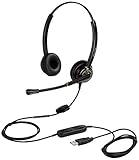
- CRYSTAL CLEAR SOUND QUALITY: This USB computer headset with noise cancelling microphone and HD wideband speaker delivers you and called side crystal clear sound quality, every word can be hear loud and natural. Laptop/PC headset with Digital Signal Processing (DSP) technology which digitally optimizes your voice and music, as well as suppresses echoes. Perfect for working from home, remote work, remote education, call center, office, Skype chat, conference calls, webinar, music and more.
- ULTRA COMFORTABLE and ERGONOMIC DESIGN: USB headphone with bendable and rotatable microphone arm allows you adjust the microphone to any talking position, also place the microphone on either side freely. Big and soft protein leatherette ear cushion provides you all day comfortable wearing, no pressure no pain to your ear. Click stop adjustable steel headband perfect fit for all head sizes. Acoustic Shock Protection(ASP) technology to protect your hearing all the time.
- SUPERB DURABILITY and 2-YEAR WARRANTY: Superb durability computer USB headset with reliable components structure, quality plastics, excellent quality mic and speaker, reinforced USB cord, professional designed for the toughest environment. From raw material to every component we strict control the quality for you from the origin. 2-YEAR manufacturer warranty and 45 days money back guarantee. Any issue pls feel free to contact us, our team will solve for you within 24 hours ASAP.
- WIDE COMPATIBILITY and MULTIPURPOSE: This premium USB Headset is Plug and Play. No installation driver is needed for Computer, PC, Laptop, Mac and other USB compatible devices. As well as work for Skype, Skype for Business/Lync, Microsoft Teams, Cisco, Zoom, 3CX, Avaya, Countpath Bria, and most other well-known softphones or softwares. With convenient in-line controller, easy to adjust this PC headphone volume up/down and microphone mute/un-mute.
- SPEECH RECOGNITION MICROPHONE: This computer USB headset with superior voice recognition microphone ideal choice for students education, such as Language-learning, Dictation, Online Course, Nuance Dragon Speech Recognition Software, Rosetta Stone, ..., and many more.
| Platform | Vocabulary mechanism | Limits and important behavior |
|---|---|---|
| Google Gemini transcription | custom_vocabulary for brand names and proper nouns. Google AI Gemini audio documentation |
Up to 1,000 entries are documented; Google says results are typically best with up to 100. Custom vocabulary cannot be combined with speaker diarization or word-level timestamps. Current documentation accessed 2026-10-04. |
| Apple Speech framework | contextualStrings for short phrases. Apple Developer Speech documentation |
No more than 100 phrases; Apple recommends keeping them brief, generally one or two words. Current documentation accessed 2026-10-04. |
| Amazon Lex | Custom vocabularies and slot values for proper nouns and catalog terms. Amazon Lex custom vocabulary documentation | Vocabulary configured for intent elicitation does not automatically apply to slot elicitation, or vice versa. Check the relevant configuration for the point in the conversation where recognition occurs. |
Keep the hints selective
Add names that users actually say, not every item in a large catalog by default. Short, distinct terms are easier to target than long lists of similar-sounding entries. Apple’s recommendation is generally one or two words per contextual phrase; Gemini’s 1,000-entry limit is a ceiling, not a recommended target.
Tune phrase boosts against confusable words
Google Cloud Speech-to-Text supports phrase boost values from 0 (exclusive) to 20. A stronger boost makes a hinted phrase more likely, but also increases false-positive risk: the recognizer may insert the product name when the speaker said something similar. Test the intended name alongside acoustically similar alternatives and tune from observed errors rather than automatically choosing the maximum. Google Cloud Speech-to-Text API reference
Rank #2

- USB/XLR Connectivity-AM8T comes with a dynamic microphone and a boom arm stand. Versatile PC gaming microphone kit with USB compatibility plug and play for PC in streaming or recording, without additional drivers. And also, while in XLR compatibility for mixer or sound card connection, the XLR studio vocal microphone is good at vocal, podcast, or musical instruments creation.
- Vibrant RGB Light-The streaming microphone RGB illuminates your gaming setup with customizable RGB lighting for a visually stunning game experience. You can easily control the RGB mode/colors or turn off by simply tapping the RGB button without making any complicated settings on specific software.
- Enhanced Features-Featured -50dB sensitivity and cardioid polar pattern, the USB recording mic kit not easily pick up background noise for delivering clear audio. The PC gaming microphone USB kit includes a boom arm for easy positioning, mute button and gain knob for precise control, headphones jack for real-time monitoring, and headphone volume control while streaming or recording.
- Decent for Gamers and Streamers-The XLR microphone designed specifically to meet the needs of gaming enthusiasts and streamers. Ideal for various applications, including gaming, streaming, podcasting, voiceovers, and more, which also works with popular streaming software like OBS and Streamlabs.
- Recording Microphone Kit-The dynamic microphone is more convenient for working from home or going out for podcasts, and the complete accessories allow for faster recording work due to its simple straightforward assembly. External windscreen of the XLR dynamic microphone filter out plosive voice.
Evaluate realistic audio and feature combinations
Test representative speakers, accents, microphones, background conditions, and names that sound alike. Keep the audio conditions and expected transcript with each test so a vocabulary change can be judged against both successful and incorrect recognitions. Also check interactions with features your application needs: Gemini custom vocabulary, for example, is incompatible with diarization and word-level timestamps. For Lex, confirm whether the relevant prompt is eliciting an intent or a slot.
Recommended Free Tools
For Apple Voice Control users: teach the term
Apple Voice Control supports teaching the pronunciation of a word or phrase and importing a vocabulary list. Open Voice Control’s vocabulary controls and add the term or import the list there; confirm that the active Voice Control language supports custom vocabulary. These controls apply to Apple Voice Control, not as a universal setting for Siri or third-party voice search. Apple’s instructions are in Use Voice Control on your iPhone, iPad, or iPod touch.
Rank #3
![Nuance PowerMic III Microphone for Dragon (Non-Healthcare), 9 Ft Cord, Dictate Documents and Control your PC – all by Voice, [PC Disc], Black](https://m.media-amazon.com/images/I/31DGXEQcLJL._SL160_.jpg)
- Combines a robust, ergonomic USB microphone with full function, PC mouse capabilities to avoid constant switching from microphone to mouse to keyboard
- Ergonomic, thumb control operation: PowerMic allows users to easily control standard diction and speech recognition functions with PC mouse functions for higher levels of dictation speed, ease of use and productivity
- Plug and play installation: USB connectivity with plug in installation eliminates the need for soundcard enabled PCs
- Advanced, accurate dictation : Unidirectional microphone with noise cancellation ensures higher accuracy even in the noisiest environments
- Nuance PowerMic III Speech recognition hand microphone can be used with multiple programs such as Dragon Medical, Power Scribe, Dragon Legal and Professional Group and Individual.Not compatible with Dragon Home 15.0
If ordinary words are misheard too, check the audio
When common words as well as product names are being recognized incorrectly, check that the microphone is capturing clear speech and try the device’s built-in microphone or another input. Apple notes that AirPods and third-party headsets can affect audio quality when using Voice Control. Trying a different headset is an input check, not a fix for missing vocabulary or incorrect search interpretation; no headset is established here as a general solution.
Independent reader supportYour contribution helps us test, update, and keep practical guides available for everyone.What to expect from vocabulary hints
Vocabulary adaptation can make intended names more likely to be recognized, but it does not guarantee a correct transcript for every speaker, language, or recording condition. The cited vendor documentation describes platform-specific controls and trade-offs, not a shared accuracy benchmark. No industry-wide accuracy percentage or independent comparison establishes one provider as universally better for product names.
Quick Recap
Best Value

- Broad Compatibility with Raspberry Pi & Pironman Series. Fully compatible with Raspberry Pi 5 / 4B / 3B+ / 3B and seamlessly fits SunFounder Pironman 5, Max, Mini, and Pro Max cases. Also works with desktop PCs and laptops, making it a versatile audio input solution for DIY, AI, and development projects
- Plug-and-Play USB Microphone – No Drivers Needed. Simply plug it into a USB port and start using instantly. No driver installation required. Perfect for beginners, educators, and developers who want a hassle-free voice input solution for Raspberry Pi and computers
- Wide System Support for Maximum Flexibility. Supports Raspberry Pi OS (including Trixie/Bookworm/Bullseye), Linux, Ubuntu, and Windows. Recognized as a standard USB audio device, ensuring smooth integration across multiple platforms and development environments
- Built for AI Voice Interaction & LLM Applications. Ideal for speech recognition, voice control, and AI-powered projects. Works perfectly with LLM-based applications such as OpenClaw, ChatGPT voice interaction, and other AI assistants—bringing your projects to life with natural voice input
- Perfect for Voice Communication & Real-World Use. Suitable for online meetings, VoIP, remote communication, and voice recording. Works seamlessly with chatting applications such as Skype, MSN, Yahoo, YouTube, and Google voice recognition, as well as in-game voice communication. Whether for AI development, smart robotics, or everyday use, this compact microphone delivers reliable and convenient audio input
Rank #4

- The Original Mini Microphone: Mini Mic Pro is the wireless microphone for iPhone & Android used by creators. Trusted by thousands, it delivers studio-quality sound in a design small enough to clip onto your shirt or slip into your pocket.
- Seamless Connection: Designed to work right out of the box with your iPhone, Android, tablet, or laptop. With both USB-C and Lightning adapters included, Mini Mic Pro connects instantly—no apps, no bluetooth, no friction. Just pure, plug-and-play performance.
- Pro sound, anywhere: From voiceovers to viral interviews, Mini Mic Pro captures crystal-clear audio and cuts through background noise and even outdoors, thanks to included wind protection like high-density foam and a dead cat cover.
- Lightweight & Durable: Crafted from premium materials and weighing under an ounce, it’s ultra-portable, rugged enough for daily use, and always ready to record—no matter where the day takes you.
- Rechargeable Battery: A wireless lavalier microphone designed for real creators. Record for up to 6 hours per charge. While using the lav mic, you can charge your device simultaneously!
Product prices and availability are accurate as of the date/time indicated and are subject to change. Any price and availability information displayed on Amazon at the time of purchase will apply.

