
A “shadow” on a MacBook screen is an appearance, not a diagnosis. It may be an image or software artifact, surface contamination, a dark pixel, material trapped inside the display, coating damage, uneven illumination, or—on some MacBook Pro models—a temporary brightness limit. Identify which kind you have before attempting a repair.
First determine whether the shadow is in the image or the display
- Take a screenshot while the mark is visible. Open the screenshot in Preview and move its window around the desktop. You can also view the file on another display. If the shadow moves with the captured image, investigate the app, wallpaper, graphics settings, or other software producing that image. If it is absent from the screenshot, the built-in panel or its surface is more likely involved. This screenshot method is practical community advice, not a definitive Apple diagnostic.
- Compare with an external display. Show the same content on a monitor or television. A clean external image adds evidence that the MacBook panel is affected, but it cannot identify the failed component by itself.
- Watch the mark as you change the lid angle. Do not repeatedly flex the hinge to reproduce a symptom. A lower-edge glow or uneven illumination that changes with lid position warrants inspection, particularly on certain older MacBook Pro generations reported to have display-cable faults.
Try the safe fixes that match the symptom
1. Clean only the outside surface
- Shut down the MacBook and unplug its power adapter.
- Use a clean, soft, lint-free cloth slightly dampened with water.
- Wipe gently, then let the screen dry before turning the MacBook on.
Never spray liquid directly onto the display. Apple cautions against window or household cleaners, aerosol sprays, solvents, ammonia, abrasive products, and hydrogen-peroxide cleaners. Cleaning can remove a mark on the front surface; it cannot remove debris trapped inside the panel or repair damaged pixels or illumination.
2. Check settings for whole-screen dimness
Open Apple menu > System Settings > Displays. Check brightness, resolution, and refresh rate, noting that the available controls vary by MacBook model and connected display. These settings can correct general dimness or an incorrect display mode. A fixed, localized dark patch is not ordinarily repaired by changing resolution.
3. Handle the specific Liquid Retina XDR brightness limit
On MacBook Pro models with Liquid Retina XDR, sustained bright content in a warm environment can trigger Apple’s brightness-limit warning. This condition reduces brightness broadly; it is not evidence of a localized dark patch. If the warning appears:
#1 Best Overall

- 【Model Check Before Ordering】 Compatible with MacBook Air 13-inch M1 2020, Model A2337, EMC 3598, resolution 2560x1600. Please confirm the model number on the bottom case before purchase. Not compatible with A2338, A2681, A2179, or A1932. If unsure, contact us through Amazon Messages for compatibility help.
- 【Core Specifications】 13.3-inch LCD screen assembly replacement for A2337 MacBook Air M1 2020. Please match your original model and color before ordering. Includes a 1-month warranty for confirmed product defects under normal use.
- 【Quality Control】 Each screen is inspected for glass condition, backlight, brightness, color uniformity, pixel integrity, camera, cables, and hinge movement before packing. Please test the display function before final installation.
- 【Package Contents】 Includes 1 LCD top assembly with front glass, back cover, cables, webcam, and hinges, plus a screwdriver, cleaning brush, and installation guide. This is a replacement screen assembly, not a complete laptop. No soldering required.
- 【Installation Support】 Screen replacement is delicate. Avoid bending cables, pressing the LCD surface, or tightening screws before testing. For installation or warranty questions, contact us through Amazon Messages for troubleshooting and replacement support.
- Close resource-heavy apps and HDR windows.
- Lower the room temperature and improve ventilation.
- Use Apple’s XDR reference mode unless your workflow requires another mode.
- Let the Mac sleep for 5–10 minutes.
Apple says service may be needed if the limit remains in a room below 25°C (77°F). This guidance applies only to the documented XDR brightness-limit condition.
What the shadow may indicate
| Appearance or behavior | Possible explanation | What to do |
|---|---|---|
| One tiny, fixed dark point | Dark pixel or subpixel anomaly; a transistor may leave a subpixel off | Document it and request a display evaluation; do not assume every point qualifies for replacement |
| Irregular stain visible mainly on light backgrounds | Surface contamination, foreign material, or a coating blemish | Clean the surface once using water and a lint-free cloth; trapped material or coating damage needs professional assessment |
| Material appears beneath the glass | Foreign material inside the display | Apple says removal should be performed by an Apple Authorized Service Provider or Apple Retail Store |
| Glow or darkening along the bottom edge that changes with lid position | Uneven illumination or a display-cable fault reported on some older MacBook Pro models | Stop flexing the lid and arrange inspection; do not apply a “Flexgate” diagnosis to every MacBook |
| Shadow moves with a screenshot or appears in the source content | Software or image rendering | Check the affected app, image, wallpaper, graphics settings, and macOS updates |
| Entire screen dims with an XDR warning after bright HDR use | Temporary thermal brightness limit on supported XDR models | Follow the cooling and sleep steps in the preceding section |
These are possibilities, not a remote diagnosis. Apple explains that apparent pixel anomalies can also be caused by foreign material, and an individual symptom does not prove a particular component has failed.
Rank #2

- 【Model Check Before Ordering】 Compatible with MacBook Pro 13.3-inch Model A2338, resolution 2560x1600, Silver Please confirm the model number printed on the bottom case before purchase. Do not order by screen size only. If unsure, contact us through Amazon Messages for compatibility help.
- 【Core Specifications】 13.3-inch LCD screen top assembly replacement for A2338 MacBook Pro. Please match your original model, year, EMC number, and color before ordering. Includes a 1-month warranty for confirmed product defects under normal use.
- 【Quality Control】 Each screen is inspected for glass condition, backlight, brightness, color uniformity, pixel integrity, camera, cables, and hinge movement before packing. Please connect and test the display before final installation.
- 【Package Contents】 Includes 1 LCD top assembly with front glass, back cover, cables, webcam, and hinges, plus a screwdriver, cleaning brush, and installation guide. This is a replacement screen assembly, not a complete laptop. No soldering required.
- 【Installation Support】 Screen replacement is delicate. Avoid bending cables, pressing the LCD surface, or tightening screws before testing. For installation or warranty questions, contact us through Amazon Messages for troubleshooting and replacement support.
When to stop troubleshooting and request service
Arrange an evaluation when the mark persists after a careful surface clean, looks trapped inside the display, spreads, follows hinge movement, or remains as a fixed pixel anomaly. Apple recommends an Apple Store, Apple Authorized Service Provider, or Independent Repair Provider for examination; an evaluation may incur a charge.
Choose a provider using the exact model
- Confirm whether the proposed repair and genuine parts are available for your specific MacBook model and region.
- Ask for the diagnostic charge, total repair quote, parts warranty, and labor warranty before authorizing work.
- Make sure the diagnosis explains the observed behavior rather than assuming that every dark area is a dead pixel or cable fault.
Apple notes that genuine parts are available for out-of-warranty self-service repair on eligible models, but display work is complex and intended for people with repair experience. Eligibility differs by model and region. A replacement panel or cable should not be ordered until the fault is confirmed.
Do these 3 things before closing this tab:
1Clear out junk files and repair common Windows errors2Scan for outdated or missing drivers - takes under a minute3Repair Windows errors before they cause bigger problemsRank #3

- 【Model Check Before Ordering】 Compatible with MacBook Air 13-inch M1 2020, Model A2337, EMC 3598, resolution 2560x1600. Please confirm the model number on the bottom case before purchase. Not compatible with A2338, A2681, A2179, or A1932. If unsure, contact us through Amazon Messages for compatibility help.
- 【Core Specifications】 13.3-inch LCD screen assembly replacement for A2337 MacBook Air M1 2020. Please match your original model and color before ordering. Includes a 1-month warranty for confirmed product defects under normal use.
- 【Quality Control】 Each screen is inspected for glass condition, backlight, brightness, color uniformity, pixel integrity, camera, cables, and hinge movement before packing. Please test the display function before final installation.
- 【Package Contents】 Includes 1 LCD top assembly with front glass, back cover, cables, webcam, and hinges, plus a screwdriver, cleaning brush, and installation guide. This is a replacement screen assembly, not a complete laptop. No soldering required.
- 【Installation Support】 Screen replacement is delicate. Avoid bending cables, pressing the LCD surface, or tightening screws before testing. For installation or warranty questions, contact us through Amazon Messages for troubleshooting and replacement support.
Back up before handing over the MacBook
Before service, make a current Time Machine or other backup, record the MacBook’s model and serial number, and photograph the shadow under a plain light background. Keep the original image or screenshot used in your diagnosis. These records help the provider reproduce the symptom and protect your data if a display assembly or logic-board repair is required.
Independent reader supportYour contribution helps us test, update, and keep practical guides available for everyone.Frequently Asked Questions
Can changing MacBook resolution remove a dark shadow?
It can correct an overall display-mode problem, but a persistent localized patch is usually not fixed by resolution changes and may require inspection.
Rank #4

- Color: Space Gray ; Compatible Model: Replacement for MacBook Air 13" M1 2020 A2337 EMC 3598 Lcd Screen ;
- Screen Resolution: 2560x1600; Screen Size: 13.3 inches ; Backlight: LED LCD ; Warranty: 3 months ;
- This is a screen (not a laptop) ;
- Please kindly check your model and Color again before you purchase.
- Make sure the battery port is turned on before installation. If you have no experience, please refer to the installation video or find a professional to help install.
Is every bottom-screen shadow a Flexgate problem?
No. Historical reports involved certain older MacBook Pro models and uneven bottom-edge illumination. Newer MacBooks and other shadow patterns require separate diagnosis.
Will cleaning remove a shadow inside the screen?
No. Cleaning addresses marks on the front surface only. Material trapped within the display, coating damage, pixel anomalies, and illumination faults need professional evaluation.
Recommended Free Tools
Quick Recap
Best Value
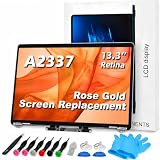
- 【Model Check Before Ordering】 Compatible with MacBook Air 13-inch M1 2020, Model A2337, EMC 3598, resolution 2560x1600. Please confirm the model number on the bottom case before purchase. Not compatible with A2338, A2681, A2179, or A1932. If unsure, contact us through Amazon Messages for compatibility help.
- 【Core Specifications】 13.3-inch LCD screen assembly replacement for A2337 MacBook Air M1 2020. Please match your original model and color before ordering. Includes a 6-month warranty for confirmed product defects under normal use.
- 【Quality Control】 Each screen is inspected for glass condition, backlight, brightness, color uniformity, pixel integrity, camera, cables, and hinge movement before packing. Please test the display function before final installation.
- 【Package Contents】 Includes 1 LCD top assembly with front glass, back cover, cables, webcam, and hinges, plus a screwdriver, cleaning brush, and installation guide. This is a replacement screen assembly, not a complete laptop. No soldering required.
- 【Installation Support】 Screen replacement is delicate. Avoid bending cables, pressing the LCD surface, or tightening screws before testing. For installation or warranty questions, contact us through Amazon Messages for troubleshooting and replacement support.
Product prices and availability are accurate as of the date/time indicated and are subject to change. Any price and availability information displayed on Amazon at the time of purchase will apply.

