
iTechGuides is reader-supported. When you buy through links on our site, we may earn an affiliate commission. As an Amazon Associate I earn from qualifying purchases. Learn more
In Honeywell WIN-PAK, the File menu provides application-level commands, including printer setup, signing in or out, quitting the program, and opening the Reports window. The WIN-PAK User’s Guide lists Alt+F as its keyboard shortcut.
Where to find the File menu
The WIN-PAK User’s Guide places the menu bar at the top of the main window. File is one of the menus used to access WIN-PAK operations. Press Alt+F to open it, as documented in the guide.


What the File menu is used for
The guide describes these File-menu actions:
- Configure printers
- Log on or log off
- Quit WIN-PAK
- Open the Reports window
These are examples, not a guaranteed complete list: the guide says the menu contains these options “and so on.”
Quick wins for a faster PC:
Fix the driver behind crashes, sound loss and screen glitchesFind Drivers →Clear out junk files and repair common Windows errorsFree Scan →Why the commands may differ by version
Honeywell describes WIN-PAK as security-management software that integrates access control, video surveillance, and intrusion detection. Its product pages identify the listed WIN-PAK editions as discontinued. The menu description above comes from a hosted copy of a WIN-PAK User’s Guide; it does not establish that every release has identical commands. For exact steps, use documentation for the installed release.
#1 Best Overall
Where to get version-specific help
Honeywell lists customer service and technical support routes for video and access-control systems, as well as a WIN-PAK Software Support Agreement route. The SSA option requires a site ID. Consult Honeywell’s support page for the appropriate route.
Quick Recap
Best Value

- Honeywell Ademco 6150 Fixed English Display Keypad
Rank #3

- VISTA-20P features eight on-board hardwired zones standard (15 when Zone Doubling feature is used) – 40 hardwire expansion zones – 40 wireless expansion zones
- IP and cellular radio alarm reporting and upload/download capability
- Fully compatible with Resideo Total Connect Remote Services
- 6160 Keypad features keys continuously backlit for greater visibility
- Four programmable function keys
Rank #2
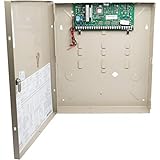
- Police, fire department and other emergency service can be called automatically
- Honeywell ademco vista 20P 8 zone control panel expands to a 48 zone home security system
- Total connect alarm monitoring gives customers the ability to protect their home and family
- Works with Honeywell ademco accessories for flood, freeze, burglary, fire, smoke and co detection
- Chip version 10.24
Product prices and availability are accurate as of the date/time indicated and are subject to change. Any price and availability information displayed on Amazon at the time of purchase will apply.
Independent reader supportYour contribution helps us test, update, and keep practical guides available for everyone.
