
iTechGuides is reader-supported. When you buy through links on our site, we may earn an affiliate commission. As an Amazon Associate I earn from qualifying purchases. Learn more
Check the wall plates where you want a wired connection, then look for the home’s wiring or media panel to find where each cable ends. A jack is not necessarily connected to your router: you may need to identify its cable and connect it to network equipment before it works.
Where to look for an Ethernet port
Check the rooms first
Look near desks, televisions, home offices, and other places where you might connect a computer, console, or other wired device. Ethernet jacks are usually modular sockets set into a wall plate. Labels such as “Ethernet,” “data,” “Cat5e,” or “Cat6” can help identify them, although a plate or label alone does not prove that the cable is connected or active.
Some wall plates contain jacks for telephone or other services. If the markings are unclear, inspect the jack and trace its cable rather than assuming it is Ethernet. Leviton’s documentation shows the kinds of residential Cat 6 connectors used in outlets and patch panels: Cat 6 connectors.
Quick wins for a faster PC:
Scan for outdated or missing drivers - takes under a minuteDriver Scan →Repair Windows errors before they cause bigger problemsFix Now →Fix the driver behind crashes, sound loss and screen glitchesFind Drivers →Look for the central wiring or media panel
The other end of a room’s cable may terminate in a structured wiring cabinet or media panel, often in a closet or utility area. It may contain bundles of low-voltage cable, patch connections, and equipment from your internet provider. The layout and location vary by house; some installations have an in-wall patch panel in a wall cabinet, den, or storage closet. Novus explains one wall-jack and patch-panel arrangement.
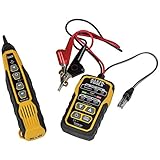
#1 Best Overall

- EASY WIRE TRACING: Simple analog tone generator and wire tracing probe for open-ended, non-active low-voltage wires, making wire tracing hassle-free (<60v)
- OPTIMIZE SIGNAL FOR BEST RESULTS: Separate wires when possible and use proper grounding to improve tone detection and accuracy
- ALLIGATOR CLIPS INCLUDED: Comes with alligator clips for easy connection to unterminated wires, providing convenience during testing
- RJ45 TO RJ45 TEST CABLE: Includes an RJ45 to RJ45 test cable for seamless connectivity during testing and wire mapping
- COMPREHENSIVE WIRE MAPPING: Toner and probe together perform a pin-to-pin wire map test, ensuring thorough wire mapping and identification
In a fiber installation, the provider connection may be at a wall plate or at an optical network unit (ONT) in the media panel. Spectrum describes these fiber connection layouts. The ONT is not itself the same thing as the Ethernet run to a room; look for the cable connections and labels in the panel.
How to identify which panel cable goes to a room jack
If the wall jack and panel are labeled, match the labels. If not, a compatible network cable toner and probe can help trace a cable from one end to the other. A cable tester serves a different purpose: it checks a cable’s continuity and, depending on the tester, may reveal wiring faults, but continuity testing alone does not locate a hidden cable. Community troubleshooting advice mentions testers and tracers as practical options, but it is not a controlled evaluation of particular tools. See the homeowner discussion.
Rank #2
- PROFESSIONAL GRADE TONE GENERATOR: Includes a professional-grade analog tone generator and tracing probe for accurate and efficient tracing of low voltage, open-ended, non-energized wiring (<60V)
- VERSATILE TONE CADENCES: Toner-Pro features 5 distinct tone cadences and can transmit signals over 1,000 feet, ensuring reliable tracing capabilities
- SECURE WIRE ATTACHMENT: Rugged Angled Bed of Nails (ABN) clips securely attach to wires, providing a stable connection during tracing operations
- EASY CONNECTIONS: RJ11 plug easily connects to telephone and data jacks to transmit tone; works with RJ45 via center pins (4 and 5) for effective cable identification
- CONTINUITY AND POLARITY TESTING: Toner-Pro tests for continuity and polarity, with clearly labeled LEDs indicating the results for easy interpretation
- Inspect the room jack. Note its markings and, if practical, connect a compatible tracer to it according to the tool’s instructions.
- Open the accessible wiring or media panel. Look for loose cable ends, patch-panel ports, and labels. Do not disconnect provider or other household wiring unless you know what it serves.
- Trace or test the likely cable. Use the toner and probe to find the matching cable, or use a cable tester to check a candidate run’s continuity. Connector compatibility matters; follow the tool’s instructions.
- Label both ends once identified. Mark the wall jack and its corresponding panel cable or port so you can find the run again. The University of Alaska Anchorage wiring standard recommends labeling connections at wall plates and patch-panel ports.
Why a found Ethernet jack may not work
A wall jack is a physical connection point, not proof of a live network connection. The in-wall run needs to be connected to a device that provides network connectivity, such as a router’s LAN port or a network switch. Microsoft’s guidance describes connecting a device through a home Ethernet jack and using a router LAN connection: Microsoft Q&A on Ethernet through a wall jack.
Do these 3 things before closing this tab:
1Clear out junk files and repair common Windows errors2Fix the driver behind crashes, sound loss and screen glitches3Repair Windows errors before they cause bigger problemsAfter identifying the run, connect its panel end to an available LAN port on your router or switch using an Ethernet patch cable, then connect your device to the room jack. In some layouts, a provider’s main data jack or equipment connection must also be linked to the room run; Novus’s example illustrates that kind of patch connection. If several room cables need network service and the router has too few LAN ports, a switch can provide additional wired connections.
Quick Recap
Best Value

- VERSATILE CABLE TESTING: Cable tester for data (RJ45) terminated cables and patch cords, ensuring comprehensive testing capabilities
- LARGE BACKLIT LCD: Backlit LCD display enables easy reading of pin-to-pin wiremap results, even in low-lit areas
- COMPREHENSIVE FAULT DETECTION: Test for Open, Short, Miswire, Split-Pair faults, Cross-over, and Shield, providing thorough fault detection
- INTUITIVE USER INTERFACE: User-friendly interface with three buttons and simple, easy-to-identify test responses, ensuring a smooth testing experience
- MULTIPLE TONE GENERATOR STYLES: Tone on a single wire, wire pair, or all 8 conductor wires using the multiple style tone generator (solid/warble); requires probe Cat. No. VDV500-123 (sold separately)
Rank #4

- Versatile Wire Tracing: Quickly identify and trace the target cable from a bundle without damaging the insulation—ideal for locating RJ11 and RJ45 cables. It also supports tracing other metal wires, such as electrical and speaker lines, using the included alligator clip adapter. Note: Be sure to power off the cable before tracing metal wires to avoid damaging the device.
- Comprehensive Cable Mapping: Use the transmitter and receiver together to perform pin-to-pin cable mapping and verify the physical status of network cables. Detects open circuits, shorts, miswiring, and reversals. LED indicators display wiring sequences clearly, and the system supports testing over long distances up to 300 meters.
- Telephone Line Testing & Continuity Check: Independently test telephone line status—detect idle, ringing, or busy states, and determine TIP or RING lines using only the transmitter. Also functions as a continuity tester to check cable integrity, line levels, and polarity for more accurate diagnostics in telecom and low-voltage applications.
- Adjustable Volume & LED Flashlight: Fine-tune the receiver’s volume using the built-in control knob for optimal signal clarity and minimal interference. This is especially useful when tracing cables in noisy or dense wiring environments. An integrated LED flashlight enhances usability in low-light or hard-to-reach spaces.
- Complete Kit with 3-Year Warranty: Everything you need is included: transmitter with RJ11/RJ45 ports, receiver with BNC interface, RJ11 alligator clip adapter cable, RJ45 cable, two 9V batteries, and a detailed user manual—all backed by a 3-year warranty for peace of mind and long-term performance.
Rank #3
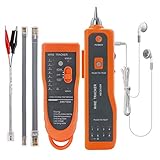
- ▲WIRE TRACING MULTIFUNCTION - Fast to locate the breakpoint without wire's cover damage, Find wire on all types of connected operating Ethernet switch /Router/PC terminal. Perfect for tracking RJ11, RJ45, cables or other metal wire (via adapter);And also with the Battery(10V-110V) positive and negative measurements function.(Note: The receiver only has RJ45 connection port, not RJ11 connection port. )
- ▲WIRE TRACKER - The Line Finder can trace not only Ethernet LAN wires, but also electrical and speaker wires when connecting to the alligator clip; In this situation, the wires must be in power-off status, otherwise the units will be damaged; It is recommended to stripe down some of the wires when connecting through the clip; Select "SCAN"; Emitter works properly if the "SCAN" indicator is on; Use the receiver to find target wires.
- ▲NETWORK & TELEPHONE LINE TEST - The Line Finder testes physical connection status of network cable, such as open circuit, short connection, miswire and reverse connection; Use the emitter to test the status of working of telephone lines (such as judging TIP or RING line), test the line level, positive and negative polarity detection; Adjust the volume of receiver by pressing the volume rotary knob.Note: Use only 9V alkaline or rechargeable battery. Install with correct polarity; reversed battery will cause no power(Battery NOT included).
- ▲EARPHONES DESIGN - With a pair of Earphone, you can just connect the earphone to the headset jack of receive to get clear information in a noise environment, Adjust the volume knob to make the volume proper and avoid being interfered. Notice that if the sound is low, you should check whether the battery is powered off or not, and the LED flashlight allows operation in dark situation.
- ▲Lifetime After-Sales Service and You Will Get: 1x Emitter with double RJ11 RJ45 interface, 1x Receiver with BNC interface,1x Pair of Earphone ,1x RJ11 Clip Adapter Cable,1x RJ45 Cable,1x Storage Box,1x English User Manual , Battery Not Included.
If you cannot find the jack or its cable
- No obvious jack in the room: Check other wall plates and labels, including plates that may combine data and telephone connections. A university help article describes identifying voice and data jacks and matching them to corresponding numbers: University of Wisconsin jack-identification guidance.
- No panel in a closet or utility area: Check accessible built-in cabinets and provider equipment locations. Houses differ, and the panel may not be in the most visible spot.
- Panel cables are unlabeled: Trace the run with a compatible toner and probe; use a cable tester to check continuity rather than treating it as a cable locator.
- The cable is identified but the jack has no network connection: Confirm that the panel end is connected to the router or switch, and check that the router connection is a LAN port. Finding the cable and providing network service are separate steps.
Product prices and availability are accurate as of the date/time indicated and are subject to change. Any price and availability information displayed on Amazon at the time of purchase will apply.

