
Do these 3 things before closing this tab:
1Clear out junk files and repair common Windows errors2Scan for outdated or missing drivers - takes under a minute3Repair Windows errors before they cause bigger problemsUse BadgedBox with Badge for a Jetpack Compose screen, or attach a Material Components BadgeDrawable to a View in a Views-based screen. In either case, keep the item count in your app’s state or model and render that value in the badge.
Choose the badge API for your UI toolkit
| Screen UI | Badge approach | What it does |
|---|---|---|
| Jetpack Compose | BadgedBox and Badge |
Places a badge over a composable, such as an icon, button, or image. See Android’s Jetpack Compose badges guide. |
| Android Views | BadgeDrawable |
Creates a drawable badge that can be attached to an anchor View. See the Material Components BadgeDrawable API reference. |
Use the approach that matches the screen’s implementation rather than introducing a second UI toolkit just for the badge.
Create a count badge in Jetpack Compose
Put a Badge in the badge slot of BadgedBox, and put the element being decorated in the box’s content slot. The badge can contain a Text composable that displays the current count.
BadgedBox(
    badge = {
        if (itemCount > 0) {
            Badge {
                Text("$itemCount")
            }
        }
    }
) {
    Icon(
        imageVector = Icons.Filled.ShoppingCart,
        contentDescription = "Shopping cart"
    )
}
This example hides the badge at zero, following Android’s Compose sample. The condition is a design choice, not a requirement: remove it if the interface should show a zero count. The content slot does not have to be an icon; it can hold another composable such as a button or image.
The Tool Desk
Outbyte PC Repair FREEClear out junk files and repair common Windows errorsFree Scan →Outbyte Driver Updater FREEScan for outdated or missing drivers - takes under a minuteDriver Scan →#1 Best Overall

- 2.4G ONLY WiFi Name Badge - Within the range of signal coverage, the smart name badge can be refreshed remotely on the mobile APP or PC (Note:can't be used on both PC and APP, if needed to be used on the phone, the devices need to be deleted on the PC)
- Appointment Refresh - This name badge supports multi-person to control with PC or APP, we can make an appointment to refresh new information at a designated time, and it can make a buzzing sound to remind the carrier. This function is often used in office management, meeting appointments, work reminders and other similar scenarios
- Loop Playback Function - this badge has a loop playback function of 6 pictures on the mobile APP, which can set a switching frequency of 5min-24h. Under the loop playback function, it can be refreshed directly at the same time without affecting the loop playback
- Buzzer Reminder Function - Every time you refresh a new content, the buzzer on the back will emit vibration and beep at the same time to remind the wearer that there is a new task or new information transmission. The wearer can press the button on the side to feedback to the message sender to indicate that it has been received
- Type-C Charging - This badge is a rechargeable smart badge. For the energy-saving electronic paper screen, it can be used for above 6 months at a full charging (not involved high refresh rate). The power can be monitored on the APP. Please charge it in time
Keep the count in app state
The badge displays a value; it should not be treated as the source of truth for cart or notification data. Store and update the count in the screen’s state or your app’s state/model layer, then pass the current value to the composable. Android’s sample demonstrates an interactive count using remembered mutable integer state and an “Add item” button; in a real app, use the state ownership appropriate to the feature.
Use the Material 3 API in Material 3 projects
Material 3 provides BadgedBox with badge and content slots through the androidx.compose.material3 artifact. Check the API reference and your project’s existing dependency version before adding imports or copying version-specific setup; the exact dependency version is not prescribed here. See the Material 3 BadgedBox API.
Rank #2
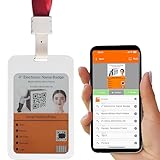
- Can be Printed through Mobile Phone Bluetooth | we can design templates independently, quickly edit information through the intuitive interface on Android or iOS mobile phone APP, and change the name badge information within 3-5s
- 5 Pages 4-color High-definition E-paper Name Badge | The electronic paper screen has 4-colour ink capsules in black, white, red and yellow. 5 pages of stored information can be switched by the buttons on the back. The display does not consume power and has a paper-like display effect. The smart badge holder can clearly display portraits, small fonts and QR codes
- Wireless Charging with Ultra-long Stand by Life, Recyclable | Wireless magnetic charging, red light illumina Charging and Ultra-long Stand by Life, Reusable Badge: wireless magnetic charging, the red light is on during charging, the green light is full, and the battery life is 6-12months when fully charged
- Ultra-thin Design and Comfortable to Wear | the body is only 3mm thick, 33g, and equipped with a convenient neckline, which can provide a comfortable wearing experience
- Flexible Application | The electronic name bage holder can be flexibly used as office business badges, changing post staff badges, creative product information display cards, hanging bag decoration display cards
Add a badge to an Android View
For a Views screen, create a BadgeDrawable, configure its number, and attach it to the View it should decorate. The API reference documents BadgeDrawable.create(context), making the badge visible, and attachment through BadgeUtils.attachBadgeDrawable.
- Create the badge with
BadgeDrawable.create(context). - Set its number with
setNumber(itemCount), or use its text API if the badge should show text instead of a numeric count. - Attach it to the anchor View with the applicable
BadgeUtils.attachBadgeDrawableoverload. - Adjust the badge’s position relative to the anchor with the coordinate APIs if the default placement does not suit the layout.
Attachment options depend on the Android API level and view hierarchy. The reference documents ViewOverlay attachment for API 18 and later, and an option that uses a FrameLayout ancestor; some helper methods are marked experimental. Check the exact overload and Material Components version used by your project before treating a snippet as drop-in code.
Crashes, No Sound, or Screen Glitches?
Random freezes, missing sound and display glitches usually trace back to one bad driver. Find and replace yours safely.Free scan · under a minuteWindows Errors? Fix Them Before They Spread
Repair common Windows errors and clear accumulated junk for a smoother, more stable PC - no reinstall needed.Free scan · no reinstallRank #3
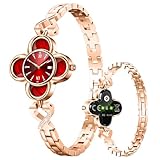
- CLOVER CORE HEALTH MONITORING SYSTEM—Equipped with advanced biosensing chips, it provides 24/7 precise monitoring of heart rate, blood pressure, and blood oxygen levels, with 60% lower error rates than standard smartbands. Automatically analyzes sleep quality at night, distinguishing deep/light/REM cycles to generate sleep reports with improvement suggestions. Data syncs to your phone app, with instant alerts for abnormal values—keeping you informed like a reliable personal health assistant.
- SMART LIFE ASSISTANT——The Smart Life Assistant simplifies daily routines: Gentle wrist vibrations for incoming calls ensure you never miss important messages. One-tap Find My Band feature makes your bracelet ring with a single click on your phone. Smart alarm gently wakes you during light sleep stages for a fresher start. Hourly sedentary reminders encourage movement for better health. 24/7 intelligent care handles life's little tasks effortlessly.
- LONG BATTERY LIFE——Uninterrupted power for worry-free living: Up to 12 days of regular use and 30 days standby eliminate charging anxiety. With fast charging, just 1 hour of power-up during meal time fuels all-day energy. Intelligent power-saving algorithms optimize usage, ensuring reliable performance when it matters most.
- ALL-IN-ONE FITNESS COMPANION——The Ultimate Fitness Companion breaks boundaries: With 100+ professional modes (running/swimming/hiking/skiing), it adapts to every workout. Real-time multi-dimensional data tracks cadence, calories, and more for clear performance insights. The achievement system unlocks badges and challenges, turning every session into a rewarding journey toward your fitness goals.
- A DUAL GUARDIAN OF TIME AND HEALTH——This watch blends classic mechanical artistry with cutting-edge technology. Beneath its elegant dial lies a smart sensor system, offering heart rate monitoring and sleep tracking while preserving the timeless charm of a traditional timepiece. The two-in-one design transitions seamlessly from boardroom meetings to fitness sessions, turning your wrist into a hub of intelligence. Every tick of the mechanical hands symbolizes a pledge to both precision timekeeping and well-being.
Decide how zero and large counts should appear
- Zero: Hide the badge when the count is zero if that suits the interface, as in the Compose guide’s sample; otherwise render zero deliberately.
- Large numbers: Choose whether the design should show the full count, cap it, or summarize it.
BadgeDrawablesupports a maximum character count and truncates the displayed number or text when it exceeds that limit. The Compose guide does not prescribe a universal cap, so implement the desired behavior for your design. - Invalid negative values:
BadgeDrawable.setNumberaccepts non-negative integers and clamps a negative value to zero. Validate counts in your app logic as well, so the underlying data remains meaningful.
Make the badge understandable with accessibility
A number alone may not tell someone using a screen reader what is being counted. Give it context appropriate to the feature—for example, “8 new notifications” or “3 unread messages”—using the accessibility semantics supported by the chosen component. The Material BadgedBox API example supplies a content description for the badge text; adapt the wording to the actual information and avoid repeating an unclear icon label. See the Material BadgedBox API example.
Style and position the badge
Use the badge component belonging to the screen’s toolkit, then adjust its appearance and placement to fit the surrounding design. In Compose, the badge is positioned by BadgedBox around its content. With BadgeDrawable, use the anchor View and coordinate APIs to control placement. Verify the result with the actual icon or other anchor, since a count badge can overlap or obscure nearby UI if its position is unsuitable.
Quick Recap
Rank #4

- CLOVER CORE HEALTH MONITORING SYSTEM—Equipped with advanced biosensing chips, it provides 24/7 precise monitoring of heart rate, blood pressure, and blood oxygen levels, with 60% lower error rates than standard smartbands. Automatically analyzes sleep quality at night, distinguishing deep/light/REM cycles to generate sleep reports with improvement suggestions. Data syncs to your phone app, with instant alerts for abnormal values—keeping you informed like a reliable personal health assistant.
- SMART LIFE ASSISTANT——The Smart Life Assistant simplifies daily routines: Gentle wrist vibrations for incoming calls ensure you never miss important messages. One-tap Find My Band feature makes your bracelet ring with a single click on your phone. Smart alarm gently wakes you during light sleep stages for a fresher start. Hourly sedentary reminders encourage movement for better health. 24/7 intelligent care handles life's little tasks effortlessly.
- LONG BATTERY LIFE——Uninterrupted power for worry-free living: Up to 12 days of regular use and 30 days standby eliminate charging anxiety. With fast charging, just 1 hour of power-up during meal time fuels all-day energy. Intelligent power-saving algorithms optimize usage, ensuring reliable performance when it matters most.
- ALL-IN-ONE FITNESS COMPANION——The Ultimate Fitness Companion breaks boundaries: With 100+ professional modes (running/swimming/hiking/skiing), it adapts to every workout. Real-time multi-dimensional data tracks cadence, calories, and more for clear performance insights. The achievement system unlocks badges and challenges, turning every session into a rewarding journey toward your fitness goals.
- A DUAL GUARDIAN OF TIME AND HEALTH——This watch blends classic mechanical artistry with cutting-edge technology. Beneath its elegant dial lies a smart sensor system, offering heart rate monitoring and sleep tracking while preserving the timeless charm of a traditional timepiece. The two-in-one design transitions seamlessly from boardroom meetings to fitness sessions, turning your wrist into a hub of intelligence. Every tick of the mechanical hands symbolizes a pledge to both precision timekeeping and well-being.
Product prices and availability are accurate as of the date/time indicated and are subject to change. Any price and availability information displayed on Amazon at the time of purchase will apply.

