
To create a shareable PDF link, store the PDF in a service such as Google Drive, OneDrive, Dropbox, or Adobe Acrobat, set who can open it and what they can do, then copy and test the link. A URL does not make a file public by itself: its sharing permissions determine whether the intended recipient can open it.
Before you share: choose the audience and permission
Make two separate decisions in the file’s sharing controls:
- Audience: Who is allowed to open the link—named people, people in your organization, people who already have access, or anyone with the link?
- Permission: What can those people do—view, comment, or edit? For a PDF that recipients should simply read, choose view-only access.
“Anyone with the link” is convenient for broad distribution, but a recipient can forward the URL. Anyone who receives a usable link may then be able to open it, depending on the service’s settings. For a private handoff, choose named people or an existing-access option when available. Microsoft documents these audience choices for OneDrive, while Google Drive offers Restricted and Anyone with the link options (Google Drive sharing files; Microsoft OneDrive sharing).
Use the service where the PDF already lives if it meets your needs. That avoids uploading another copy and managing another set of permissions. If the PDF is not online yet, upload it to a cloud service first; the shareable link points to a hosted file, not to a local file on your computer.
The Tool Desk
Outbyte Driver Updater FREEScan for outdated or missing drivers - takes under a minuteDriver Scan →Outbyte PC Repair FREERepair Windows errors before they cause bigger problemsFix Now →#1 Best Overall

- Keep Everything in One Place. Thirteen labeled sections hold final wishes, financial records, insurance details, healthcare information, and personal notes together, so your family knows exactly where to look instead of searching during a hard time.
- Add or Remove Pages Anytime. Unlike fixed workbooks, this refillable planner uses a 3-ring binder format that updates as life changes. Keep only the pages you need, and scan the QR code inside to print more free PDF templates whenever you want. No need to buy a new planner.
- Built for Long-Term Use. A durable linen cover, laminated dividers, sturdy storage pockets, and a large accordion folder give you a planner that feels suited to a family conversation or a meeting with your advisor, not a throwaway notebook.
- Thoughtful for Yourself or as a Gift. Whether you're organizing your own affairs, planning together as a couple, or helping a parent get sorted, the clear structure makes it a meaningful, practical gift that shows you care.
- Simple, Guided, and Stress-Free. Thoughtful prompts walk you through one section at a time, at your own pace. All sections, prompts and printable templates are in English. Please note: this is an organizer, not a legal document. It complements, rather than replaces, your will or healthcare directives.
Create a link in Google Drive
- Open Google Drive and select the PDF.
- Choose Share.
- Under General access, choose Restricted for access limited to people you add, or select Anyone with the link for broader access.
- Choose a role. Select Viewer if recipients only need to read the PDF; use Commenter or Editor only when those capabilities are intended.
- Choose Copy link, then share the copied URL.
Google says the file owner’s name and email are visible to people receiving a file link. Consider which account owns the PDF before sharing it. Google also documents controls that can prevent viewers and commenters from downloading, printing, or copying, subject to the available settings. See Google’s current sharing instructions for the controls shown in your account.
Create a link in Microsoft OneDrive
- In OneDrive, select the PDF and choose Share.
- Open the link settings and choose the audience: options documented by Microsoft include anyone, people in your organization, people with existing access, and specific people.
- Set the link permission to view or edit, as appropriate. For a read-only PDF handoff, use view access.
- Apply the settings, copy the link, and send it to the recipient.
OneDrive options may be restricted by an organization administrator. If you cannot select an audience you need, ask the administrator whether that sharing option is allowed. Microsoft also notes that the desktop Share a OneDrive link shortcut defaults to edit access; check the permission rather than assuming a generated link is view-only. Its documentation explains the sharing workflow and available controls: Share OneDrive files and folders. OneDrive and SharePoint sharing links carry permissions to the shared item, as described in Microsoft Learn’s createLink documentation.
Create a link in Dropbox
- Locate the PDF in Dropbox and open its sharing controls.
- Create or copy a shared link using the available link settings.
- Review any access restrictions offered for your account, then share the copied link.
Dropbox says people without a Dropbox account can open and preview shared links. Do not assume that account-free access applies to every service or configuration. Some Dropbox link controls, including password and other restrictions described on its permissions page, are limited to named paid plans; check the options shown for your account. See Dropbox’s link-sharing instructions and its file and folder permissions page.
Rank #2
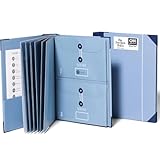
- Keep important documents safe: A document organizer designed to protect papers from getting lost. Store birth certificates, social security cards, wills, tax forms, insurance policies, titles & more in one secure place.
- Easy to organize and find: Folders with pockets and a table of contents help track where documents live, while 33 hand-illustrated labels show what to save. Acid-free materials protect your papers for years to come.
- Fits documents of various sizes: This document binder includes 3 vertical and 3 horizontal envelopes for 8.5 x 11 inch papers, plus 4 half-size envelopes for smaller keepsakes and important details.
- Practical and easy to use: An important document folder organizer with a front pouch that provides a quick landing space for papers before filing, making it easy to stay organized as documents come in.
- Premium quality, timeless style: Made with custom-dyed cloth, reinforced edges, and acid-free paper for long-term durability. An elegant file organizer designed to beautifully complement your office or living room décor.
Create a PDF link with Adobe Acrobat
Adobe describes a workflow in Acrobat that shares a PDF as a link recipients can open in a browser. The sharing controls can include viewing, commenting, or editing permissions. Follow the sharing option in your version of Acrobat, choose the required permission, and copy the generated link. Account requirements and interface details can vary, so verify the current controls in your Acrobat account. Adobe’s overview is at Share PDFs online with Adobe Acrobat.
Test the link before sending it
Check the copied URL in a private or signed-out browser window, or with an account that reflects the recipient’s access. Confirm that it opens the correct PDF and does not unexpectedly request permission. If the recipient is meant to have restricted access, test with an account that is not already authorized; otherwise, your own signed-in session may make a restricted link appear to work for everyone.
If the file should be available only to specific people, verify that the recipient has been added using the email address they will use to open it. For a public or broadly shared link, make sure the document contains no information you would not want forwarded beyond the original recipient.
Rank #3

- Fireproof & Water‑Resistant:ZOOPIP fireproof 3-ring binder is made of anti-static, double-layered, non-itchy silicone-coated fiberglass that has passed the UL94 VTM-0/5VA flame-retardant test. The rigid hard shell protects birth certificates, passports, and vehicle titles from crushing and bending, while the fiberglass outer layer resists splashes and rain. A double zipper keeps the case closed so documents stay organized and nothing falls out. Splash-resistant only — do not submerge in water
- Heavyweight Pocket Folders :Designed for durability and organization, these letter-sized (8.5” x 11”) folders feature three-hole punches for easy binder integration and a generous capacity for extensive documents. Made of sturdy, acid-free polypropylene, each side-opening pocket with hook-and-loop tabs holds several sheets securely. External label slots let you sort tax, medical, and warranty documents at a glance. Available in 6 colors
- Security & Portability Combined: Made for Estate Planning, Family Records and Grab-and-Go Emergencies – One place for the paperwork you can never replace: deeds, wills, Social Security cards, insurance policies and passports. The built-in 3-digit combination lock keeps casual eyes out, and the carrying handle lets you grab the whole case and go when you need to evacuate fast
- Large Binder Organizer:(14.5"×12.4"×3.1") Works as your complete storage organizer. Its built-in zippered pouch safely stores small-sized necessities like pens, USB flash drives, and charging cords. The spacious interior easily fits over 400 sheets of paper, keeping your paperwork, stationery, charts, invoices, and photos neatly organized
- After-Sale Service: ZOOPIP stands behind every fireproof product we make. Please note: This flame retardant test does not mean the product is designed to withstand prolonged, direct exposure to fire indefinitely. If you encounter any quality issues, please contact us — we'll make it right
Choose the service that fits the handoff
| Service | Useful when | Access and permission notes |
|---|---|---|
| Google Drive | The PDF is already in Drive or you want its Restricted/Anyone with the link and Viewer/Commenter/Editor controls. | Google says the owner’s name and email are visible to link recipients. Viewers’ and commenters’ download, print, and copy controls may be available. |
| OneDrive | The PDF is stored in OneDrive, especially for a work or school handoff using organization controls. | Documented audiences include Anyone, organization, existing access, and specific people. An administrator may disable choices; check whether the generated link allows viewing or editing. |
| Dropbox | The PDF is in Dropbox and recipients may need to preview it without a Dropbox account. | Dropbox says recipients without an account can open and preview shared links. Some link restrictions are limited to named paid plans. |
| Adobe Acrobat | You are using Acrobat’s PDF sharing workflow. | Adobe describes browser access and viewing, commenting, or editing permissions. Verify current account requirements and controls. |
The providers describe these workflows in their linked help pages. Features and available choices can depend on account type or administrator settings. The sources do not establish that a link is permanent or universally accessible: an owner or administrator can change the permissions, and the file may become unavailable if it is moved or removed.
Independent reader supportYour contribution helps us test, update, and keep practical guides available for everyone.Troubleshooting common PDF-link problems
The recipient sees “Request access” or a sign-in prompt
The audience may be restricted, or the recipient may be signed in with a different account than the one you authorized. Check the sharing settings and confirm the recipient’s account. If the PDF is intended for anyone with the URL, change the audience only if making access broader is appropriate and permitted by your organization.
Free tools Windows power users keep installed
One-click scans. No signup required.
The “Anyone” option is missing or unavailable
An organization administrator may have disabled broad sharing, especially in a work or school account. Use a permitted audience such as specific people, or ask the administrator whether the policy can be changed. Generating another URL will not override an account-level restriction.
Rank #4

- Spiral Binder Organizer:This Spiral Binder Organizer is crafted from tear-resistant, water-resistant polypropylene (archival-safe, PVC-free), featuring a custom cover with reinforced tear-proof corners. It enables smooth page turning, maintains shape against frequent use, and is portable for long-lasting versatility.
- Efficient 12-Pocket Organization: With 12 separate pockets, this multi pocket folder provides superior storage capacity. Each pocket holds 30+ regular sheets or 20 cardstock sheets, and the 6 dividers with color tabs allow for easy 12-pocket classification, making it an excellent document organizer for any project.
- Functional Spiral Binder Design: The sturdy spiral binder design enables smooth page turning and easy access. It includes a built-in zip pouch on the back cover for storing pens, notecards, and other essentials, adding a practical utility feature to this versatile school supplies organizer.
- Versatile for Multiple Applications: Ideal as a school supply for organizing assignments, a professional office organizer for managing project documents, or a specialized sheet music organizer for musicians. Its letter-size compatibility and flexible labeling make it perfect for students, professionals, and music lovers alike.
- Write-on and Erase Color Tabs- Featuring reusable colored tabs, the thoughtful design of the project folder can achieve quick write-on and easy erase. Assorted color tabs are designed for efficiently locating and categorizing. Additional 24 replaceable white index labels are also included.
The recipient can edit when they should only read
Review the link’s role or permission and switch it to Viewer or view-only access where available. In OneDrive, check the setting rather than relying on the desktop sharing shortcut, which Microsoft documents as defaulting to Edit.
The link works for you but not for someone else
Your browser may be signed into an account with existing access. Test in a private window or with an account matching the recipient’s situation, then adjust the audience or add the recipient as needed.
The link opens the wrong file or an outdated copy
Return to the storage service, open the intended PDF’s own sharing control, and copy its link again. If you uploaded a revised file as a separate item, verify that you are sharing the revised item rather than an earlier copy.
What’s actually slowing this PC down?
Pick the symptom - the matching free tool is one click away.
Best Value

- Store (Family) Papers Safe & Sound: Keep all your essential papers safely in one spot with ZICOTOs’ important document organizer. Swiftly locate anything from legal to medical papers for the whole family. Ditch the paper chaos, embrace order & enjoy the simplicity
- Organize It Like a Pro: Get super organized with 8 large, numbered envelopes (9.5x12”), each holding 40+ letter-sized sheets. Perfect for documents, passports, photos, and more. The document organizer transforms your paper clutter into a masterpiece of order!
- Customize to Your Needs: The important document organizer binder lets you label each section your way with a customizable table of contents, numbered envelopes and a sticker sheet with blank & pre-named stickers. Your Binder, your way - organizing has never been this easy!
- Ample Space for Everything: The 12.8x10.83” document organizer folio is perfect for your 8.5x11" letter size or A4 papers. Need more room? No worries, the life binder includes a handy back pocket for extra documents, notes and more. Keep everything neatly stored and easily accessible
- Stylish & Practical Premium Design: Featuring a chic linen cover in timeless beige with classy golden edges, the document organizer looks as good as it functions. An elastic band keeps everything in place - no more loose papers flying around!
Or skip the browser setup
If you need a screenshot of a PDF page or another webpage rather than a shareable link to the PDF itself, ScreenshotNeo can return a screenshot or PDF through one API request. It is not a replacement for cloud-file sharing permissions: use Drive, OneDrive, Dropbox, or Acrobat when the goal is to let someone open the source PDF.
For example, this cURL request captures a webpage as WebP. Replace the sample URL with the page you want to capture and provide your API key. See the ScreenshotNeo API documentation for request options and response details.
curl -G "https://api.screenshotneo.com/v1/shot" -d access_key=YOUR_API_KEY --data-urlencode url=https://stripe.com -o shot.webp
- Before capture, it accepts the cookie/consent banner like a visitor and removes more than 60 known consent platforms, newsletter popups, and chat widgets; each of those steps can be turned off.
- Bot checks or CAPTCHAs, blank pages, timeouts, failed loads, and cache hits cost nothing. Responses indicate the page verdict and billing status in headers.
- An MCP server provides screenshot tools for Claude, Cursor, and other MCP clients.
- The Free plan includes 1,000 screenshots per month with no card; paid plans start at $5 for 3,000 screenshots.
Sign up for ScreenshotNeo’s free plan to try it with no card.
Quick Recap
Product prices and availability are accurate as of the date/time indicated and are subject to change. Any price and availability information displayed on Amazon at the time of purchase will apply.

