
Windows Errors? Fix Them Before They Spread
Repair common Windows errors and clear accumulated junk for a smoother, more stable PC - no reinstall needed.Free scan · no reinstallOutdated Drivers Are Slowing You Down
One free scan finds every outdated or missing driver and matches the right update for your exact hardware.Free scan · exact hardware matchiTechGuides is reader-supported. When you buy through links on our site, we may earn an affiliate commission. As an Amazon Associate I earn from qualifying purchases. Learn more
To run a 24/7 YouTube lo-fi radio channel, create an original loopable pixel-art scene, pair it with music you are licensed to use in a livestream, and send both through an encoder such as OBS to a YouTube Live broadcast. Test the stream before launch and plan for failures: a locally encoded stream depends on your computer, power, internet connection, and source files, while YouTube does not promise a complete archive of a single broadcast longer than 12 hours.
Before you build the channel: check eligibility and clear the rights
Confirm that the channel can livestream
YouTube says a streamer must be at least 16, have a verified channel, and have no live-streaming restrictions in the past 90 days. Check eligibility and enable livestreaming before preparing a launch: YouTube’s live-streaming eligibility guidance.
Get permission for every asset
You need rights for the music recording and composition, as well as any animation, fonts, artwork, or other assets in the broadcast. YouTube’s livestream terms put responsibility for those rights on the content provider: YouTube Live-stream terms.
The Tool Desk
Outbyte Driver Updater FREEFix the driver behind crashes, sound loss and screen glitchesFind Drivers →Outbyte PC Repair FREEClear out junk files and repair common Windows errorsFree Scan →A music license does not necessarily prevent an automated interruption. YouTube scans live streams for third-party content, and a match can replace the stream with a placeholder and trigger a warning; continued use may interrupt or terminate the broadcast. If a rights holder uses Content ID, ask them to allowlist your channel before launch. Keep the license and any written permissions, including the terms for live use, territories, archives, and relevant rights participants. See YouTube’s copyright guidance for live streams.
#1 Best Overall

- Place the pixels into the screen and watch them glow with luminous color! Make brilliant patterns using 12 durable design templates, or create your own one-of-a-kind art. Then animate your creation with movement and sound. All of this artistic potential comes in a box with a handy handle, so it’s easy to take your glow to go!
- ART, AGAIN AND AGAIN: Reusable pre-punched pattern sheets can be used over and over.
- PIXEL DESIGN: Create custom pictures, signs, emoji, and more.
- LIGHTS & EFFECTS: With a smartphone, add sound and sparkle — like a real rocket launch!
- TESTED BY KIDS, TRUSTED BY PARENTS: For over 10 years, KiwiCo has delivered engaging, hands-on products designed to spark the next generation of innovators to kids of all ages. With over 50 million products delivered worldwide, KiwiCo knows what kids love.
Do not assume Creator Music licenses cover a live radio broadcast: YouTube’s usage terms limit those licensed and revenue-sharing tracks to long-form videos, not livestreams or Shorts. A separate license must cover your actual livestream use and any rights-management requirements.
How do I loop a pixel art video on a YouTube livestream?
1. Make a seamless, original scene
Create a scene whose beginning and end join cleanly—for example, a character studying beside a window while rain or lights move in a repeating cycle. Export the animation in a format supported by your encoder. The OBS Media Source documentation lists MP4, TS, MOV, FLV, MKV, AVI, GIF, and WebM as supported video formats, and MP3, AAC, OGG, and WAV as supported audio formats: OBS Media Sources.
Rank #2

- Customizable Content Creation: The built in intelligent editing system supports easy modifications of texts, patterns and slogans, allowing users to effortlessly create personalized content.
- Immersive Music Sync: Equipped with an intelligent tempo sensing light, the display accurately captures the rhythm of your music, creating a dynamic light show that syncs with the melody for an immersive experience.
- Vivid Visual Display: Featuring clear imagery with soft yet bright lighting, the display delivers rich and delicate colors that are modern and atmospheric without being harsh on the eyes.
- Convenient Magnetic Design: With a strong magnetic attachment, the screen can be easily affixed to the back of any phone. This design ensures easy installation and removal, providing a stable setup without extra supports.
- DIY Patterns with Extended Battery Life: The app offers multiple patterns and supports DIY custom patterns, powered by a built in 180mAh battery, providing up to 6 hours of operational time.
There is no single pixel-art frame rate or resolution required by the sources for this workflow. Choose dimensions and frame rate that suit your intended visual style and output, then check the exported file for visual glitches and an obvious jump at the loop point.
Do these 3 things before closing this tab:
1Repair Windows errors before they cause bigger problems2Scan for outdated or missing drivers - takes under a minute3Clear out junk files and repair common Windows errors2. Add and loop the media in OBS
- Open OBS and create a scene for the radio broadcast.
- In that scene, add a Media Source and select the local animation file. Add the audio file as a source too if it is separate from the video.
- Enable the source’s Loop setting so playback restarts when the file ends. OBS documents this setting as replaying the file after playback completes.
- Arrange any title, now-playing, or status overlays. Confirm that the intended audio source is active and that other sources will not add unwanted sound.
- Play the scene locally through a full loop. Listen at the transition and inspect the image for a pause, black frame, or abrupt change.
Connect OBS to YouTube Live
3. Create the broadcast and enter its encoder details
- In YouTube Live Control Room, create or schedule the broadcast.
- Open the broadcast’s encoder setup and copy its server URL and stream key into the corresponding stream settings in OBS. Follow YouTube’s encoder setup instructions.
- Treat the stream key like a password: do not show it in the scene, share it publicly, or leave it visible in a screen recording. If it is exposed, replace it in YouTube and update the encoder.
- Start the encoder and wait for YouTube’s preview. Check the picture, sound, and broadcast details before making the stream public or telling viewers it is live.
Set encoder quality and test the full setup
4. Use supported settings and a representative test
Use YouTube’s current encoder settings guidance to select a supported video and audio codec and configure the output. YouTube recommends a two-second keyframe interval. Choose a bitrate appropriate for the output you are sending and your measured upload capacity; a bitrate that exceeds a stable connection can produce dropped frames or interruptions.
Rank #3

- 【Magnetic Hold & Physical Buttons】 Designed for stability and control,Zocelight light pad features strong magnetic fixation with 4 included magnets to firmly hold diamond painting canvases, paper, or X-rays in place—eliminating the risk of slipping common with non-magnetic boards. Combined with side-mounted physical buttons, this light board eliminates the frustration of accidental touches common with capacitive controls. Easily switch between brightness levels and color temperatures with clear, tactile feedback. Ideal for uninterrupted focus during detailed creative work.
- 【Durable Type-C Connection & A4 Standard Size 】 Equipped with a durable Type-C port, this light pad provides a stable, long-lasting power connection. Compared to older USB interfaces that can loosen over time, the Type-C design ensures a consistent power supply during use. Note: This model does not contain a built-in battery and must be plugged in during operation.Measuring 13.7 × 9.8 inches (35 × 25 cm) with a visual working area of 12.4 × 8.5 inches (31.6 × 21.8 cm), this ultra-thin light table fits standard A4 paper and is easy to carry or store.
- 【3 Color Modes & 6-level Adjustable Brightness 】 Choose from three light color temperatures—White, Normal, and Warm Color to suit different environments and preferences. The diamond art light pad offers 6 fixed brightness levels, easily adjusted via short presses of the side button. With a maximum brightness of up to 11000 lux, the light is even, flicker-free, and gentle on the eyes, providing a comfortable experience for long creative sessions. (No stepless dimming function.)
- 【Eye-Care LED & Ultra-Bright Illumination】 The lightbox is equipped with high-efficiency, flicker-free LED lights that provide consistent and even brightness across the entire surface. With a maximum brightness of 11000 lux, it ensures a crystal-clear view that reduces glare and minimizes eye strain. Whether you're working on detailed drawings, tracing designs, or inspecting intricate patterns, the light pad creates a comfortable and well-lit workspace that supports long hours of use without fatigue.
- 【Multiple Uses】 Package include:1 × LED light drawing board,4 × magnets and 1 × Type-C charging cable.Tracing light board makes a thoughtful gift for birthdays and holidays like Mother’s Day, Easter, and Christmas—perfect for friends, family, and anyone who enjoys arts and crafts. We also offer a 1-year warranty and responsive customer support to ensure your complete satisfaction.
Before launch, test with movement and sound similar to the actual program, as YouTube recommends. Check that the source loops, the audio is audible and not clipping, the preview looks right, and OBS and YouTube show healthy stream status. Check access to the watch page on the devices your audience is likely to use. YouTube’s live-stream tips also recommend setting up in advance and monitoring sound and picture throughout the broadcast.
What music can I use in a 24/7 lo-fi livestream?
Use music you created yourself or music whose rights holder has given permission that covers livestreaming. Verify that the permission covers the composition and the specific recording, relevant territories, any saved replay, and the rights-management settings required by the owner. Keep records you can consult if a claim or interruption occurs.
Rank #4
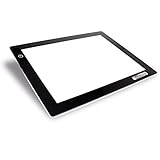
- Spacious A4 Working Surface: Features a 9" x 12" working area with a 3/8" profile, providing ample workspace as a light box for tracing and drawing or diamond art light board.
- Dimmable LED Lightboard: Equipped with flicker-free 12-volt LED lamps that are dimmable to meet various project needs. These maintenance-free LEDs offer up to 50,000 hours of use.
- Durable Construction: Designed for consistent performance with a 110V AC power adapter, providing reliable and stable lighting for professional and home applications.
- Multipurpose Application: Suitable led light pad for tracing, stenciling, 2D animation, calligraphy, embossing, scrapbooking, tattoo transferring, sketching, drawing, sewing projects, stained glass, and quilting.
- Optimal Light Diffusion: Tracing light box engineered to provide uniform light distribution across the entire surface, eliminating hot spots and ensuring consistent illumination for precise tracing and drawing.
Copyright clearance and monetization eligibility are separate questions. YouTube’s July 15, 2025 policy update describes repetitive or mass-produced content as “inauthentic content” and says it is ineligible for monetization. Its reused-content review is channel-wide and separate from copyright review. Make your authorship and meaningful original production evident across the channel, but do not treat that as a guarantee of approval. If the channel is in the Partner Program, live ads and fan-funding features have their own eligibility and configuration conditions.
Plan for interruptions, long runs, and replays
A 24/7 broadcast needs an operating plan
With OBS running locally, the stream relies on the computer, its power, the internet connection, the media files, and someone able to respond to faults. Monitor the encoder and YouTube stream health; a test cannot guarantee uninterrupted operation. Keep source files available and decide how you will restore the broadcast if the computer, connection, or encoder stops.
Best Value

- Gaming Pixel Light PAC-MAN Edition: Immerse yourself in the iconic world of PAC-MAN! This special edition features 4 exclusive PAC-MAN-themed animations, alongside sharp clarity, smooth motion, and vibrant colors for pixel art or GIFs, Perfect for retro gaming enthusiasts.
- Rich Pixel Art & Live Updates: Stay in the game with real-time updates for time, weather, stocks, and NBA/NFL scores! Explore 150+ preset scenes and 4 PAC-MAN-inspired visuals.
- Craft Your Retro Space: Personalize your setup by uploading GIFs or photos through the app. Use multi-layer animations, pixel effects, and AI-generated art tools to design custom displays that celebrate PAC-MAN or your unique style.
- 8-Bit Sound & Music Sync: Enjoy nostalgic 8-bit audio alerts and sound effects from the built-in speaker. You can also add your own music (under 10MB). Use 10 built-in modes to sync the lights with the beat—ideal for gaming marathons or retro-themed parties.
- Smart Voice & App Control: Control your pixel LED panel effortlessly via voice commands (Alexa/Google Assistant) or the Govee Home App over 2.4GHz Wi-Fi. AI lighting bot 2.0 turns intent into personalized lighting effect—and refines it through conversation. Sync with other Govee products using DreamView and an HDMI 2.1 sync box for an immersive, connected experience.
Do not rely on one continuous stream for a complete archive
YouTube says streams under 12 hours are automatically archived. That is not a promise that a single stream longer than that will produce a complete replay. If you need full recordings of the programming, plan a separate recording or archive workflow rather than relying on the automatic archive for one continuous 24-hour broadcast. See the archive note in YouTube’s encoder setup instructions.
Troubleshooting a lo-fi livestream
YouTube does not show a preview
- Check the stream URL and key. Confirm they match the broadcast selected in Live Control Room. If the key was exposed, replace it and update OBS.
- Check the broadcast state. Make sure the intended broadcast exists and is ready to receive the encoder feed.
The image freezes, drops frames, or disconnects
- Check upload capacity and stream health. Re-test your connection and lower the encoder bitrate if it is not stable at the chosen rate.
- Check the local system. Confirm the computer is powered, the encoder is still running, and the source file remains available.
- Check the output settings. Verify the codec and keyframe interval against YouTube’s current encoder requirements and recommendations.
The audio is missing, too quiet, or distorted
- Confirm that the intended audio source is active in OBS and routed to the stream.
- Listen to the program at a sensible monitoring level and check that peaks are not clipping.
- Test the transition between the end and start of the audio loop; a clean video loop does not guarantee a seamless music transition.
The stream is interrupted by a copyright match
- Review the notice and identify the matched content.
- Stop using material unless you have permission for the actual livestream use. If it is licensed, contact the rights holder about channel allowlisting through Content ID.
- Keep the license and correspondence available; having a license alone may not prevent a live interruption if the channel is not allowlisted.
Or let it run in the cloud
If you do not want a home computer or connection to be responsible for keeping the channel live, StreamNeo is a YouTube-only cloud service for looping uploaded videos. Upload your recording or build a playlist, add your YouTube stream key, and go live. Your computer can be off; StreamNeo runs the stream from the cloud and automatically recovers if YouTube drops it. Each slot includes 10 GB of pooled storage across active slots, 24/7 looping and playlists, and support from the StreamNeo team. Videos stream as uploaded, up to 4K 60fps, at one flat price per slot with no re-encode or quality tiers.
The first day is free with no card, one free day per account. Monthly billing is $9.99 per month. UPI and cards are accepted in India; card checkout is available worldwide. See StreamNeo plans or start your free day.
Quick Recap
Product prices and availability are accurate as of the date/time indicated and are subject to change. Any price and availability information displayed on Amazon at the time of purchase will apply.

