
Quick wins for a faster PC:
Clear out junk files and repair common Windows errorsFree Scan →Fix the driver behind crashes, sound loss and screen glitchesFind Drivers →Repair Windows errors before they cause bigger problemsFix Now →iTechGuides is reader-supported. When you buy through links on our site, we may earn an affiliate commission. As an Amazon Associate I earn from qualifying purchases. Learn more
Check the exact device model’s charging specifications, the output profile of the charger’s port, and the cable rating. A GaN label describes charger technology; it does not confirm USB-C charging support or guarantee that a charger will deliver the power or fast-charging speed your laptop or phone needs.
How to check whether a GaN charger supports your device
- Find the exact device model. Use the model number rather than a family name such as Galaxy, ThinkPad, or MacBook. Look up the model’s official specifications or manual. For an MSI notebook, for example, MSI directs users to its official product specifications to check the required PD wattage: MSI notebook adapter guidance.
- Confirm that the specific port accepts charging. A USB-C connector alone does not mean that the port can charge the device. Check the manufacturer’s documentation for the port’s charging role and supported input. Dell notes that USB-C Power Delivery capability varies by laptop platform and port configuration: Dell USB Type-C FAQ.
- Match the device requirement to the charger’s port. Read the output table for the exact port you plan to use, including its supported voltage and current profiles and maximum output. USB Power Delivery (USB PD) devices negotiate a supported power level; the charger’s maximum wattage is not automatically delivered to every device. See the USB Implementers Forum overview and MSI’s explanation of PD negotiation.
- Check the cable’s rating. Confirm that the cable supports the required current and power level. The device, charger, and cable must all support the intended USB PD level. For charging above 100 W, Plugable’s guidance calls for a USB PD 3.1 Extended Power Range (EPR)-capable cable: Plugable’s USB-C cable guide. MSI warns that an unrated or insufficiently rated cable can cause charging problems, including repeated connect-and-disconnect cycling: MSI notebook adapter guidance.
- Check shared power if the charger has multiple ports. Find the charger’s per-port and shared-output table. Its advertised total wattage may be divided among connected devices, so the power available at your chosen port can change when another port is in use.
- Check the phone’s charging protocols if top speed matters. Confirm which protocols the exact phone model supports and whether the charger offers them. A phone may charge safely from a third-party PD charger but reach a lower speed than with its original charger if its peak rate depends on a proprietary protocol. DJI describes this limitation in its GaN charger FAQ.
What the wattage and USB PD numbers mean
USB PD is the power-delivery standard that lets a compatible charger and device agree on a supported voltage and current. As the USB Implementers Forum explains, USB PD provides flexible power delivery over a cable. A charger’s stated maximum is a ceiling for supported configurations, not a promise that every connected device will draw that amount.
USB PD 3.1, announced by USB-IF in 2021, added fixed 28 V, 36 V, and 48 V levels, enabling up to 140 W, 180 W, and 240 W respectively. The previous limit described in the USB-IF overview was 100 W using a 20 V, 5 A USB-C cable solution. Charging above 100 W therefore requires checking both that the charger and device support the relevant PD 3.1 Extended Power Range mode and that the cable is rated for it. These are standard capability limits, not a claim that a particular laptop needs or accepts those levels.
Free tools Windows power users keep installed
One-click scans. No signup required.
Will a 65W GaN charger charge my laptop?
It can if the laptop accepts charging through the port you plan to use and supports an input profile that the charger can provide. Compare the laptop maker’s stated input requirement with that port’s output table, then verify the cable rating. The number “65 W” by itself cannot establish compatibility: the laptop may not support USB-C charging, may require a different supported power profile, or may need more power to keep charging at its normal rate while under load.
#1 Best Overall

- The Only Charger You Need: Say goodbye to your old power bricks. Anker 715 Charger (Nano II 65W) has the power you need to fast charge your phone, tablet, and USB-C notebook from a single tiny charger.
- High-Speed Charging: Charge a 2020 MacBook Air in less than 2 hours, a MacBook Pro 13ʺ at full speed, an iPhone 13 up to 3× faster than with an original 5W charger, and charge the latest Samsung phones at full speed with Samsung Super Fast Charging.
- Downsized Design: At 58% smaller than an original 61W USB-C charger, and with a foldable plug, Anker Nano II takes up less space while giving you just as much power.
- Powered by GaN II Technology: With a 100% increase in operating frequency, an innovative stacked design, and an upgraded circuit board structure, GaN II technology makes our latest charger smaller without sacrificing a drop of power.
- What You Get: Anker 715 Charger (Nano II 65W) / Anker Nano II 65W, welcome guide, our worry-free 18-month warranty, and friendly customer service (cable not included).
Can I charge my laptop with my phone’s USB-C charger?
Possibly, if the phone charger’s USB-C port supports a power profile the laptop accepts and its available output is sufficient for the laptop’s use. A smaller charger may charge slowly or fail to keep up while the laptop is working hard. Check the laptop’s exact model specifications and the charger’s port output rather than assuming that a USB-C plug makes the pairing suitable.
Will a GaN charger fast-charge my phone?
It may charge the phone, but maximum speed depends on the phone’s supported charging input and protocols as well as the charger’s output. Some phone brands use proprietary fast-charging protocols, which can limit power from a third-party charger. Charging power can also change with battery level, so a lower rate at a particular moment does not alone prove incompatibility. Check the phone maker’s specifications for the exact model and the charger’s listed protocol support.
Rank #2

- Fast Charging for Four Devices: Enjoy the convenience of powering four devices simultaneously with our advanced GaN technology for optimal performance.Dimensions: 2.72 × 2.72 × 1.42 in; Weight: 9.7 oz.
- Dual High-Speed USB-C Ports: Rapidly charge your 15-inch MacBook Air to 50% in just 30 minutes with either of the two USB-C ports, each offering a maximum output of 140W.
- Superior Safety: The advanced Activeshield 4.0 system monitors device temperatures over 10 Million times a day for enhanced safety.
- Monitor with Ease and Clarity: The high-definition color display provides a detailed view of the charging status, temperature, and port details, keeping you fully informed.
- What You Get: Anker Charger (140W, 4-Port, PD 3.1, Non-battery), 5 ft 240W USB-C to USB-C cable, user manual, 18-month warranty, and our friendly customer service.
What to compare before choosing a charger
Once you have identified the device, compare these specifications for the intended pairing:
What’s actually slowing this PC down?
Pick the symptom - the matching free tool is one click away.
- The device maker’s required input power and the charging capability of the specific port.
- The charger’s USB PD support, including any required mode such as PPS, and the voltage/current profiles of the port you will use.
- The power available at that port when other charger ports are occupied.
- The cable’s current and power rating, including EPR capability if the documented power level is above 100 W.
- For a phone where peak speed matters, support for the phone’s charging protocol.
Without the exact device model and charger model, no single wattage or pairing can be confirmed. Use the manufacturers’ specifications for both products and the charger’s own output table to make the final check.
Quick Recap
Best Value
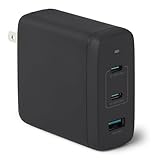
- FAST CHARGING: GaN USB-C wall charger (Nano 120-watt) in Black for charging devices. (Output in details: Single port max. output: Single USB A: 18W, Single USB C1/C2: 100W; Dual ports simultaneous use max. output: C1+C2: 60W+60W, C1/C2+A: 100W+12W, 3 ports simultaneous use max. output: C1+C2+A: 60W+45W+12W, C1 port is at the edge close to LED indicator and C2 port is in the middle.)
- 3 PORTS: 2 USB-C ports and 1 USB-A port for charging 3 devices at once; single USB-C port delivers up to 100 watts COMPATIBILITY: phones, tablets, USB-C laptops, including iPhone, Samsung, iPad/Ipad Pro, MacBook Air and more
- RELIABLE SAFETY: Protects connected devices from overcharge, over-voltage, overcurrent, and short circuit
- TRAVEL FRIENDLY: Small, ultra-compact size with foldable plug; supports universal input voltage of 100-240 volts
- WHAT'S IN THE BOX: Amazon Basics 120W Wall Charger Only. Charging cable sold seperately PRODUCT DIMENSIONS: 2.7 x 2.7 x 1.3 inches (LxWxH)
Rank #4

- AirPods-Size 160W Power: Delivering 1.35W/cm³ of power density, this sleek 3-port usb c charger provides a total output of 160W while being as compact as an AirPods Pro 3 case, making it easy to carry yet powerful enough to handle your devices.
- 140W Single-Port Output: Enjoy a consistent 140W single-port output without derating, keeping laptops charging at maximum speed even during long work sessions or heavy loads. Charge a 16-inch MacBook Pro from 0 to 50% in just 25 minutes, without worrying which port to use.
- One Equals Three: With smart power distribution powered by PowerIQ 5.0, power a 16" MacBook Pro, iPhone 16 Pro Max, and 11" iPad Pro in the same time as three original chargers (140W + 35W + 35W). Carry one instead of three and stay fully productive on the go.
- Smarter Charging Control: With AnkerSense View, monitor power in real time on screen, switch modes instantly, and unlock custom modes through the app via Bluetooth.
- What You Get: Anker Prime Charger (160W, 3 Ports, Smart Display, With no-cable), welcome guide, 24-month warranty, and our friendly customer service.
Rank #3

- Full-Speed 100W Max Power: Advanced GaN technology delivers a steady 100W output on any USB-C port and sustains peak performance up to twice as long compared to the average 100W charger.
- See Charging in Motion: The high-definition smart display shows real-time details on charging status, temperature, and port performance, giving you instant visibility and control.
- Travel-Sized for Daily Carry: With a foldable plug and a 330% smaller frame, it measures just 2.72 x 2.17 x 1.34", making it easy to slip into a backpack, shoulder bag, or even a coat pocket.
- Adapts to Low-Power Devices: USB-C2 or USB-A automatically switches to 95W + 5W Low-Current Mode when output remains at or below 5W for 1 minute, safely charging earbuds and other low-power devices.
- What You Get: Anker Charger (100W, 3 Ports, Smart Display, Non-Battery), 4.9 ft USB-C to USB-C cable, welcome guide, 18-month warranty, and our friendly customer service.
Product prices and availability are accurate as of the date/time indicated and are subject to change. Any price and availability information displayed on Amazon at the time of purchase will apply.

