
iTechGuides is reader-supported. When you buy through links on our site, we may earn an affiliate commission. As an Amazon Associate I earn from qualifying purchases. Learn more
Freezing and disconnect errors can point to an SSD problem, but they do not prove the drive has failed. Start by protecting important files, check what Windows can report, then use the SSD maker’s official utility and model-specific firmware information. These checks are free; the amount of health data you can see depends on the drive, connection, and storage provider.
Back up important files and identify the SSD
If the drive still responds, copy important files to a separate drive or another safe location before firmware updates or extended troubleshooting. If files are becoming unreadable or the SSD vanishes intermittently, prioritize recovering what you can and seek vendor or professional support rather than repeatedly attempting updates.
Record the SSD’s manufacturer, exact model, interface, and installed firmware revision. You may find this information in Windows, BIOS/UEFI, or the manufacturer’s utility. Do not select firmware based only on capacity or a similar product name: firmware must match the exact model and supported connection.
Check SSD health and status in Windows
Review the physical disk status
Open PowerShell and run:
Get-PhysicalDisk | Select-Object FriendlyName, Manufacturer, Model, HealthStatus, OperationalStatus, SizeMicrosoft documents Get-PhysicalDisk as returning physical disks visible through available storage management providers. The output can include health and operational status. If your SSD is missing, Windows or the provider may not be exposing it to this command.
#1 Best Overall

- Stellar Data Recovery Professional is a powerful data recovery software for restoring almost every file type from Windows PC and any external storage media like HDD, SSD, USB, CD/DVD, HD DVD and Blu-Ray discs. It recovers the data lost in numerous data loss scenario like corruption, missing partition, formatting, etc.
- Recovers Unlimited File Formats Retrieves lost data including Word, Excel, PowerPoint, PDF, and more from Windows computers and external drives. The software supports numerous file formats and allows user to add any new format to support recovery.
- Recovers from All Storage Devices The software can retrieve data from all types of Windows supported storage media, including hard disk drives, solid-state drives, memory cards, USB flash storage, and more. It supports recovery from any storage drive formatted with NTFS, FAT (FAT16/FAT32), or exFAT file systems.
- Recovers Data from Encrypted Drives This software enables users to recover lost or deleted data from any BitLocker-encrypted hard drive, disk image file, SSD, or external storage media such as USB flash drive and hard disks. Users will simply have to put the password when prompted by the software for recovering data from a BitLocker encrypted drive.
- Recovers Data from Lost Partitions In case one or more drive partitions are not visible under ‘Connected Drives,’ the ‘Can’t Find Drive’ option can help users locate inaccessible, missing, and deleted drive partition(s). Once located, users can select and run a deep scan on the found partition(s) to recover the lost data.
A status such as “Healthy” is useful, but it does not rule out every failure mode. These results are one diagnostic signal, not a guarantee that the drive or its connection is fault-free.
Inspect available reliability counters
Where the SSD appears as a physical disk object, run:
Rank #2

- Smart SSD Health Monitoring – Know Your Drive at a Glance: DOCKCASE Pocket is a smart 2230 NVMe SSD enclosure with an HD display that provides real-time SSD information at power-on, including drive health, estimated remaining life, power-on count, and remaining capacity. Quickly check your SSD’s condition before important work or data transfers
- Read-Only Mode – Protect Important Data: Enable Read-Only Mode to prevent accidental file deletion, modification, or overwriting. An added layer of protection for sensitive files, backups, archives, and other important data that should remain unchanged
- Live Transfer Readout – See Performance in Real Time: The dedicated Transfer page displays real-time transfer performance while files are being moved. Monitor actual speeds at a glance, identify unexpected slowdowns, and better understand your SSD’s performance during everyday transfers
- Power Loss Protection – Up to 3 Seconds of Emergency Write Time: Built-in PLP helps protect data during unexpected power interruptions by providing approximately 3 seconds of additional writing time after power is lost. Actual protection time varies depending on SSD workload and power consumption, helping reduce the risk of incomplete writes and data corruption
- 2230 NVMe Compatibility – Compact and Portable: Designed exclusively for M.2 2230 NVMe PCIe SSDs, supporting M-Key and B&M Key drives with UASP for enhanced performance. Supports SSDs up to 2TB. Not compatible with M.2 SATA SSDs
Get-PhysicalDisk | Get-StorageReliabilityCounter | Format-ListMicrosoft says Get-StorageReliabilityCounter can return available temperature, error, wear, and time-in-use information. Which fields appear depends on the device and provider. A blank or absent field means Windows did not provide that value; it is not the same as a measured zero or a clean bill of health. Save the output if you contact support.
Check the manufacturer’s utility and firmware
Use the SSD maker’s official support or downloads page to find software and firmware for the exact model. The manufacturer utility may show supported health attributes and the installed firmware revision; compare that revision with the official release information for your model. Windows status commands and manufacturer utilities complement each other: one does not guarantee that the other can see every attribute or connection.
Rank #3
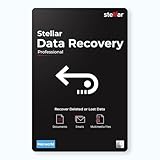
- Stellar Data Recovery Professional for Mac brings best-in-class features for safe and fast data recovery for a wide range of Mac machines & compatible storage drives. This software bundles various features like bootable media creation, drive monitor utility, HDD cloning, pause and resume scan and more.
- Recover Permanently Deleted Files Need to recover lost or deleted data from emptied trash? Stellar Data Recovery Professional for Mac v12.0 has you covered. It scans the Mac startup disk and compatible external storage devices to restore deleted Word, PowerPoint, Excel documents & files of native & third-party apps.
- Recover from Non-booting or Crashed Mac Systems You can easily recover files from all types of crashed or non-booting Mac systems with this software. Using the bootable media creation tool, it lets you create bootable USB drive for recovering data safely in an event of a ‘grey screen of death’ scenario.
- Regain Data from Lost Partition Retrieving data lost due to partition deletion, improper partition resizing, bad sectors, or file system corruption is now simpler! The tool can also help you regain data from accidentally deleted Boot Camp partition.
- Use Disk Imaging for Secure & Time-effective Recovery The secure software creates an image of the hard drive having bad sectors via the drive monitor utility. You can perform risk-free recovery of data, without any risk of data loss due to abrupt failure of the source drive. Disk imaging feature helps you retrieve data from drives that are prone to failure & cannot sustain direct data recovery procedures.
For example, Samsung’s downloads page lists Magician and firmware downloads, including model-specific 990 PRO releases. It lists firmware 8B2QJXD7 with a December 2025 note about improving read-operation stability, and 7B2QJXD7 with a September 2025 note about intermittent non-recognition and blue-screen issues. These notes apply to the listed 990 PRO models, not SSDs generally.
Samsung Magician is designed for Samsung SSDs, not as a general utility for other brands. Samsung notes that health and total-usage information depends on the SSD’s supported SMART attributes; missing data can reflect reporting support rather than a diagnosis.
Rank #4
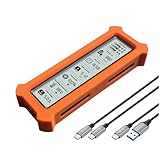
- See Everything, Worry Less:Glance at the built-in display to check your SSD’s health percentage, real-time temperature, total usage hours, remaining capacity, and USB voltage. Green icons = safe. Red icons = act now! No more surprise failures.
- Blazing 10Gbps Speeds:Harness USB 3.2 Gen 2’s full power (Type-C included). Transfer 4K movies or game libraries in seconds – perfect for creators, gamers, and professionals.
- Cool Under Pressure:Our patented aluminum finned cover isn’t just sleek – it slashes heat by 50% vs. flat designs! Combined with high-conductivity thermal pads, your SSD stays frosty even during heavy workloads.
- Your Data’s Bodyguard:Smart warnings protect against:Overheating (>65°C),Failing health (under 100%),Unstable USB power (under 4.6V/over 5.5V),→ Backup reminders keep disasters at bay.
- Plug & Play in 60 Seconds:No tools needed! Works with ALL M.2 sizes (2230/2242/2260/2280) and both SSD types (NVMe PCIe or SATA). UASP + TRIM support maintains SSD speed over time.
Before installing a firmware update
- Confirm the download applies to the exact SSD model and its supported interface.
- Back up important data. Samsung recommends doing so even though it says its update process is not intended to erase data.
- Close other applications, keep the computer powered, and follow the manufacturer’s instructions.
- Check connection requirements. Samsung says Magician firmware updates cannot be performed through an external USB connection and require a reboot.
- Understand rollback limits: Samsung says its documented update process does not support downgrading.
Microsoft’s guidance for supported Windows drive firmware updates applies when the drive implements the required commands; it advises obtaining firmware from the OEM or drive vendor, not third parties. See Microsoft’s drive firmware guidance before assuming a Windows-based update path applies to your hardware.
Free tools Windows power users keep installed
One-click scans. No signup required.
Interpret freezing and disconnect errors
Compare what happens during a freeze with what the checks report: does the SSD disappear from Windows, does Windows show a warning or timeout, and do available counters show errors or unusual readings? The pattern can help narrow the next step, but an SSD symptom alone does not establish the cause.
Best Value

- See Everything, Worry Less:Glance at the built-in display to check your SSD’s health percentage, real-time temperature, total usage hours, remaining capacity, and USB voltage. Green icons = safe. Red icons = act now! No more surprise failures.
- Blazing 10Gbps Speeds:Harness USB 3.2 Gen 2’s full power (Type-C included). Transfer 4K movies or game libraries in seconds – perfect for creators, gamers, and professionals.
- Cool Under Pressure:Our patented aluminum finned cover isn’t just sleek – it slashes heat by 50% vs. flat designs! Combined with high-conductivity thermal pads, your SSD stays frosty even during heavy workloads.
- Your Data’s Bodyguard:Smart warnings protect against:Overheating (>65°C),Failing health (under 100%),Unstable USB power (under 4.6V/over 5.5V),→ Backup reminders keep disasters at bay.
- Plug & Play in 60 Seconds:No tools needed! Works with ALL M.2 sizes (2230/2242/2260/2280) and both SSD types (NVMe PCIe or SATA). UASP + TRIM support maintains SSD speed over time.
Microsoft’s Storage Spaces documentation describes a “Lost communication” state in which a drive is missing, along with timeout states and actions such as restoring server availability where applicable, reconnecting or replacing a drive, or collecting further diagnostics. Those instructions concern Storage Spaces and Storage Spaces Direct; they are not a universal repair recipe for every consumer PC disconnect. See Microsoft’s Storage Spaces state guidance.
Choose the right check for your drive
| Check | What it can tell you | Key limitation |
|---|---|---|
Windows Get-PhysicalDisk |
Visible physical disks and reported health and operational status | Depends on available storage providers; a missing disk may not be exposed. |
| Windows reliability counters | Available temperature, errors, wear, and time-in-use values | Fields vary by drive and provider; absent values are not measured zeros. |
| Manufacturer utility and support page | Model-specific supported health attributes, firmware revision, and applicable updates | Must support the exact brand/model and be able to see the drive through its current connection. |
If the SSD is intermittently absent, cannot be seen by health software, or is making important files unreadable, focus on data recovery and support. Do not keep retrying firmware installation or run destructive reset or repair commands without a backup and a clear understanding of their effects.
Quick Recap
Product prices and availability are accurate as of the date/time indicated and are subject to change. Any price and availability information displayed on Amazon at the time of purchase will apply.
Do these 3 things before closing this tab:
1Clear out junk files and repair common Windows errors2Scan for outdated or missing drivers - takes under a minute3Repair Windows errors before they cause bigger problems
