
iTechGuides is reader-supported. When you buy through links on our site, we may earn an affiliate commission. As an Amazon Associate I earn from qualifying purchases. Learn more
You can build software with local Git commits and repeatable local checks as the default, then make remote publishing or synchronization a deliberate step. That does not mean every kind of CI works offline or that a self-hosted runner is automatically safer: you still need to match the CI environment, protect the machine that runs jobs, manage secrets and dependencies, and plan recovery.
Here, “local-first” is a working description, not a formal standard: the everyday development loop stays on machines or infrastructure you control, while remote services are optional integrations.


What stays local in a local-first workflow?
A practical local-first setup keeps routine work close to the developer: Git repositories and commits, build and test commands, and—where useful—workflow execution. A remote repository, hosted CI service, or synchronization service can still be part of the system, but publishing or syncing is a deliberate integration rather than a prerequisite for every edit or check.
What’s actually slowing this PC down?
Pick the symptom - the matching free tool is one click away.
Local-first does not necessarily mean air-gapped. A developer may work locally while pulling dependencies from a network, and a self-hosted runner may be on-premises or cloud-hosted. A fully disconnected environment is a stricter case that requires local copies of dependencies and other required assets.
#1 Best Overall

- NO SUBSCRIPTION FEES & PRIVATE LORAWAN NETWORK: Build a local LoRaWAN IoT network with the built-in SIoT server and pre-installed Node-RED. Collect data, create dashboards, and run automation flows locally without required cloud service fees. Suitable for DIY makers, home gardeners, educators, and small IoT prototype projects.
- LOCAL DATA PROCESSING & PRIVACY CONTROL: Sensor data can be processed on the local network through the built‑in MQTT/SIoT server, reducing reliance on third‑party cloud platforms. Local automation rules continue running when internet access is unavailable — suitable for home, garden, greenhouse, and classroom IoT setups.
- 4KM COVERAGE & 8-CHANNEL RELIABILITY: Equipped with the SX1302 8-channel LoRaWAN chip, -140dBm sensitivity, 27dBm max transmit power, and included 5dBi antenna. Supports up to 4km coverage in open environments, helping connect garden sensors, greenhouse nodes, garages, mailboxes, and remote monitoring points.
- NODE-RED DRAG-AND-DROP VISUAL AUTOMATION:Automation rules, data dashboards, and control logic can be built with little to no coding using the pre‑installed Node‑RED. Flows such as reading soil moisture, checking temperature, and sending relay commands are created through a visual interface — reducing setup time for maker, education, and prototype projects.
- EASY SETUP WITH WIFI AP & MQTT INTEGRATION: Configure the gateway via Wi-Fi AP mode using a laptop or mobile device. Built-in MQTT broker supports integration with Node-RED dashboards, and other MQTT-compatible platforms. Designed for indoor residential, educational, and prototyping use; not intended for outdoor installation.
Can I use Git without cloud sync?
Yes. Git repositories and commits can be used locally without a cloud synchronization service. For a useful baseline, put the project’s build, test, lint, and packaging commands in repeatable scripts or project-native task definitions. That gives contributors a consistent way to run checks on their own machines, without requiring a hosted workflow service for every iteration.
Keep remote publication as a separate choice: push when you want to share, mirror, back up remotely, or trigger a hosted integration. If the project depends on shared collaboration or remote automation, those dependencies still need an explicit plan; a local commit alone does not publish work or run a remote job.
Rank #2

- 1. Turn a camera-equipped Fire Tablet into a local camera server
- 2. Watch MJPEG video from a browser on the same WiFi
- 3. Protect new viewers with secure one-time pairing
- 4. Add optional live audio and quick QR connection
- 5. Stay private with no account, ads, analytics or cloud upload
How do I run CI locally?
Use local workflow execution for fast feedback when your CI tool supports it, but verify what “local” means for that tool. In Woodpecker’s documentation, the local backend runs commands on the host and does not reproduce the configured container image environment. Its Docker backend requires access to a Docker daemon. See Woodpecker’s local backend documentation; because this page is under the “next” documentation path, check the behavior against the version you use.
Free tools Windows power users keep installed
One-click scans. No signup required.
The distinction matters: a host-local run can catch many errors quickly, but it may differ from CI in installed tools, operating-system details, container image, or services. For final validation, run the workflow through the actual CI backend and environment—or otherwise verify that the local setup reproduces the parts that matter.
Rank #3
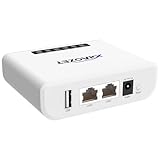
- Multi-Function Device: Serves as both a USB server and print server, enabling multiple computers on the same network to share USB devices, such as printers, scanners, or storage devices, eliminating the need for direct computer-to-device cabling.
- Compatible with USB Devices: Integrates software and hardware to wirelessly connect a USB device like printer, scanner, and dongle over Wi-Fi; our virtual USB software simulates a direct USB connection, just like physically plugging the device into the computer.
- Compatible with Printers: LK300EW wireless print server for usb printer convert usb printer to wireless. Add printers using IP address or hostname, support printers with RAW and IPP printing protocols, compatible with HP, Cannon, Epson and other brands' printers. Or using our virtual USB connect software to connect printers. NOTE: Mobile printing, and Airprint are not supported.
- Network Connection Options: Flexible deployment via 2.4GHz Wi-Fi or Ethernet port; maintains stable connectivity for devices located anywhere within Local network coverage areas, whether at home or in a small office.
- Multi-system compatibility: Works with Windows, Linux, and macOS through lightweight client software; Please refer to user guide before use, and our dedicated tech support team is available to assist you with any setup or usage queries.
How do I self-host a CI runner?
A self-hosted runner is a machine or environment you operate to execute CI jobs. GitHub describes runners as physical, virtual, containerized, on-premises, or cloud-hosted; self-hosted therefore does not mean necessarily offline or located on a developer’s laptop. The operator gains control over hardware, operating system, and installed tools, and also takes responsibility for maintaining the machine and its software. See GitHub’s overview of self-hosted runners.
- Choose the execution boundary. Decide which projects and users can submit jobs, what local network resources a job needs, and whether the runner should be dedicated to one project or shared.
- Match the environment to the job. Select hardware, operating system, and tools that fit the workflow; document how the runner’s configuration is kept consistent with the project’s expected CI environment.
- Plan maintenance. Assign responsibility for operating-system updates, runner software, installed tools, and dependency refreshes. A runner that is not maintained can become an operational and security liability.
- Test the workflow on the runner. Check that the job can access only the required files, secrets, services, and network resources, and that failures can be diagnosed without exposing credentials.
How should I secure a self-hosted runner?
Treat a runner as a security boundary, not just a convenient build machine. CI executes code defined by repositories, so a person who can submit a job may be able to run code in the runner’s environment. GitLab warns that this can compromise the host and that persistent, shared runners create additional cross-project risk. Its guidance discusses network segmentation and dedicated or ephemeral machines for privileged workloads; see GitLab Runner security.
- Limit who can submit jobs and which repositories can use the runner.
- Isolate workloads from sensitive host data and unrelated projects; be especially cautious with persistent workspaces that may retain files between jobs.
- Use dedicated or ephemeral machines for workloads that need elevated privileges, and restrict network access to what the job requires.
- Keep operating systems, runner software, and installed tools maintained, and have a response plan for suspected compromise.
Microsoft’s self-hosted-runner tutorial recommends its described setup only for private repositories because public-repository code can run on the runner. That is a warning about the tutorial’s setup, not a universal rule for every CI platform or configuration. See Microsoft’s runner tutorial.
Do these 3 things before closing this tab:
1Fix the driver behind crashes, sound loss and screen glitches2Repair Windows errors before they cause bigger problems3Scan for outdated or missing drivers - takes under a minuteHow do I keep secrets out of the cloud?
One approach is to commit encrypted secret files alongside code while keeping the ability to decrypt them separate. Clef describes its product as adding structure, validation, and a user interface on top of Mozilla SOPS, with encrypted secrets stored in Git and no external database, hosted service, or synchronization step. That is Clef’s product description, not a guarantee that key-management risks disappear; see Clef’s documentation.
- Commit ciphertext, not plaintext credentials.
- Protect decryption credentials through a separate trust boundary from the repository.
- Give CI only the credentials and permissions needed for a particular job.
- Decide how authorized developers and automation can decrypt secrets when the usual network services are unavailable.
Storing encrypted files in Git reduces dependence on a hosted secrets database or sync process, but the decryption keys and underlying credentials still require careful access control.
Independent reader supportYour contribution helps us test, update, and keep practical guides available for everyone.How do I build software offline?
Offline development requires more than a local Git repository. The build must be able to obtain every dependency and supporting asset it needs without reaching an external service. GitLab’s documentation for offline environments describes using local package repositories and registries, and transferring container images and other assets into the disconnected environment. See GitLab’s offline installation guidance.
- Inventory inputs. Identify packages, container images, security-scanner databases, signatures, rules, and other assets required to build, test, and validate the project.
- Stage them on local infrastructure. Use private package repositories or registries where appropriate. GitLab describes downloading and packaging images, transferring them into the offline environment, and loading them into a local registry.
- Define an update process. Decide how approved updates to images, packages, scanner data, signatures, and rules enter the environment. “Offline” does not mean dependencies stay current automatically.
- Test without outside access. Run the workflow with external network access unavailable to reveal hidden downloads or services that the project still assumes.
Physical transfer can use removable media such as a USB drive or hard drive, which GitLab names as transfer options. Such media can also hold an additional local copy, but it is useful for recovery only if it is kept distinct from the working copy and the restore process is tested.
Which approach fits: local checks, a self-hosted runner, or offline infrastructure?
| Approach | Control | Fidelity | Maintenance and security | Offline readiness |
|---|---|---|---|---|
| Local Git and repeatable checks | Work and repository copies stay on developer-controlled machines until deliberately published. | Depends on how closely local tools and services match CI. | Developers maintain their own working environments and scripts. | Can work offline if all required dependencies are already available. |
| Local workflow execution | Commands run on the local host; a Docker backend, in Woodpecker’s documented case, needs access to a Docker daemon. | Woodpecker says its host-local backend does not reproduce the configured container image environment. | Useful for iteration, but differences from CI must be understood. | Possible when workflow dependencies and services are available locally. |
| Self-hosted runner | Operator controls runner hardware, operating system, and installed tools. | Can be configured to match the intended CI environment; fidelity depends on that configuration. | Operator maintains the machine and software, limits job access, isolates workloads, and manages security response. | Can access local infrastructure, but a runner is not automatically disconnected. |
| Disconnected build infrastructure | Packages, images, and other inputs are staged within the restricted environment. | Depends on whether the staged assets reproduce the intended build and validation environment. | Requires an owner and process for refreshing dependencies and security assets. | Designed to function without external access once required inputs are staged. |
Make the choice by asking who needs to run code on the machine, how closely local execution must match CI, what network access jobs need, who will maintain the environment, and how the team will restore work after a failure. A small project may need only local scripts and deliberate remote pushes; shared automation or access to local network resources may justify a runner; disconnected work adds the separate burden of staging and refreshing dependencies.
Quick Recap
Product prices and availability are accurate as of the date/time indicated and are subject to change. Any price and availability information displayed on Amazon at the time of purchase will apply.

