
What’s actually slowing this PC down?
Pick the symptom - the matching free tool is one click away.
iTechGuides is reader-supported. When you buy through links on our site, we may earn an affiliate commission. As an Amazon Associate I earn from qualifying purchases. Learn more
To block mature-rated games, give your child a separate account and set game-age or title restrictions in that account’s family controls. PlayStation, Xbox, Microsoft-managed Windows games, and Steam each use different settings; a Windows-wide switch does not automatically cover every PC game store. Set game access first, then review screen time, spending, communication, and content-sharing controls separately.
Before you set game restrictions
Create an individual child account for each child on the platform they use. Use the child’s correct birthdate and keep the parent password or PIN private. ESRB recommends individual accounts so one child does not inherit permissions set for an older sibling (ESRB parental-controls guidance; ESRB Family Gaming Guide).
- Choose the age or rating limit that fits your child. Rating systems and labels vary by region, so use the settings shown for your account’s country.
- Check the restriction on the child’s own account, not only on the adult account used to set it up.
- Treat game access, playtime, purchases, online communication, multiplayer, and user-generated content as separate controls. A game-rating filter does not necessarily restrict those other activities.
How do I block M-rated games on my child’s PlayStation?
On PS5, open Settings > Family and Parental Controls > Family Management, select the child, then choose Parental Controls. Pick a restriction level and adjust its individual controls if the preset is not right for your family. The available presets include Child, Early Teens, Late Teens, Older, and No Restriction. You can also use the PlayStation Family app: select the child, then open Settings > Parental Controls > Restriction Level (ESRB PS5 guide).
- Make sure the child is set up as a child member of your PlayStation family and is signed in on the console. Sony says the child should be signed in for controls to be effective.
- On the console, go to Settings > Family and Parental Controls > Family Management.
- Select the child, open Parental Controls, and choose a restriction level. Customize individual settings if needed.
- Alternatively, in the PlayStation Family app, select the child and go to Settings > Parental Controls > Restriction Level.
- If you changed settings while the child was already playing, have them sign out and back in so the changes take effect.
For a U.S. rating example, ESRB’s PS5 guide says an age setting of 9 blocks games above E, while its example setting of 11 allows E and E10+ and blocks T and higher. These are examples from the guide, not a universal conversion between a child’s age and a suitable rating. A child can request an exception to a restricted game; the family manager or an appointed guardian can review the request. Sony also offers web management through Account Management > Family Management. See Sony’s PlayStation parental-controls support page for current console, app, and web instructions.
#1 Best Overall

- New-Gen WiFi Standard – WiFi 6(802.11ax) standard supporting MU-MIMO and OFDMA technology for better efficiency and throughput.Antenna : External antenna x 4. Processor : Dual-core (4 VPE). Power Supply : AC Input : 110V~240V(50~60Hz), DC Output : 12 V with max. 1.5A current.
- Ultra-fast WiFi Speed – RT-AX1800S supports 1024-QAM for dramatically faster wireless connections
- Increase Capacity and Efficiency – Supporting not only MU-MIMO but also OFDMA technique to efficiently allocate channels, communicate with multiple devices simultaneously
- 5 Gigabit ports – One Gigabit WAN port and four Gigabit LAN ports, 10X faster than 100–Base T Ethernet.
- Commercial-grade Security Anywhere – Protect your home network with AiProtection Classic, powered by Trend Micro. And when away from home, ASUS Instant Guard gives you a one-click secure VPN.
Purchases are separate from game access: Sony says a child’s PlayStation purchases are paid from the family manager’s wallet, and the monthly spending limit defaults to zero. Review that limit independently if you want the child to be able to buy games or add-ons (Sony support).
How do I set age limits on Xbox?
On an Xbox console, open Settings > Privacy and online safety, select the family member, and adjust Content restrictions. In the Xbox Family Settings app, select the child under Your Family, open Content Restrictions, turn on Filter Inappropriate Content, then choose Allow Content Suitable for Age and confirm the child’s age (ESRB Xbox guide).
Rank #2
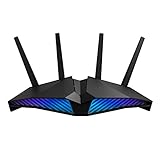
- New-generation WiFi 6 router: Ultrafast speeds up to 5400 Mbps with the latest WiFi 6 (802.11ax) and 160MHz channels; Works seamlessly with all your existing WiFi devices.Processor : 1.5 GHz tri-core processor.
- Mobile Game Mode: Minimize lag and latency for mobile gaming with just a tap on the ASUS Router app
- Choose your lighting vibe - Feature ASUS Aura RGB lighting effects that you can choose from a variety of lighting effects and customize lighting to align with specific modes.
- Commercial-grade Security Anywhere – Protect your home network with AiProtection Pro, powered by Trend Micro. And when away from home, ASUS Instant Guard gives you a one-click sharable secure VPN.
- Easy Extendable Network – Enjoy seamless roaming with rich, advanced features by adding any AiMesh-compatible router.
- On console: open Settings > Privacy and online safety.
- Select the child’s family account and open Content restrictions.
- In the app instead: select the child under Your Family > Content Restrictions.
- Turn on Filter Inappropriate Content, set Allow Content Suitable for Age, and confirm the child’s age.
ESRB’s U.S.-rating example says an age setting of 11 allows E and E10+ games while blocking T and M. Age-based settings may align with other rating systems outside the United States, and labels and availability can vary by country and account. The Family Settings app also offers controls such as time limits and notifications. Configure communication and multiplayer permissions separately from the age filter; Microsoft’s family controls cover these distinct settings (ESRB Xbox guide; ESRB Windows PC guide).
Quick wins for a faster PC:
Scan for outdated or missing drivers - takes under a minuteDriver Scan →Repair Windows errors before they cause bigger problemsFix Now →Fix the driver behind crashes, sound loss and screen glitchesFind Drivers →How do I block mature games on a Windows PC?
For games managed through Microsoft accounts, add the child to your Microsoft family and set content restrictions in Microsoft family tools. Microsoft Family Safety can also set app and game time limits on connected Windows and Xbox devices, with limits and schedules configured for the child’s account (Microsoft: Set app and game limits). ESRB’s detailed Windows guide describes Windows 10 instructions; do not assume every menu path shown there is identical on Windows 11 (ESRB Windows PC guide).
Rank #3
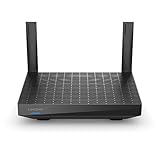
- WIFI 6 AX1500 SPEED - Dual-band WiFi 6 (802.11ax) with combined wireless speeds of up to 1.5 Gbps for streaming, video calls and gaming.
- UP TO 1,500 SQ FT - Covers up to 1,500 sq ft and handles 20+ connected devices at once.
- INTELLIGENT MESH - Works with Linksys Intelligent Mesh routers and Velop nodes to extend one seamless WiFi network, with one WiFi name, across the home.
- WIRED PORTS - One Gigabit internet port, four Gigabit Ethernet ports and a USB 3.0 port for PCs, game consoles and smart TVs.
- EASY SETUP - Set up and manage the network in the Linksys app, with parental controls, guest WiFi and device prioritization.
Microsoft-managed restrictions should not be treated as a universal block for every game installed on a PC. Check the account controls for the store or launcher the child actually uses. For example, Steam has its own family controls.
Set up Steam Families for Steam games
Steam’s current guidance says Steam Families replaces Steam Family View. An adult can create or manage a Steam Family, add the child, then open Account Settings > Family Management > Manage. Expand the child’s entry, enable parental controls, and configure game access, Steam features, and playtime (Steam Families User Guide & FAQ).
Rank #4

- WIFI 6 AX1500 SPEED - Dual-band WiFi 6 (802.11ax) with combined wireless speeds of up to 1.5 Gbps for streaming, video calls and gaming.
- UP TO 1,500 SQ FT - Covers up to 1,500 sq ft and handles 20+ connected devices at once.
- INTELLIGENT MESH - Works with Linksys Intelligent Mesh routers and Velop nodes to extend one seamless WiFi network, with one WiFi name, across the home.
- WIRED PORTS - One Gigabit internet port, four Gigabit Ethernet ports and a USB 3.0 port for PCs, game consoles and smart TVs.
- EASY SETUP - Set up and manage the network in the Linksys app, with parental controls, guest WiFi and device prioritization.
- Create or manage a Steam Family and invite the child’s Steam account.
- Go to Account Settings > Family Management > Manage.
- Expand the child’s entry and enable parental controls.
- Choose the games and Steam features the child can access, then configure playtime.
Steam supports child requests for more playtime or feature access, as well as purchase requests. These are Steam-specific options, not shared PC-wide controls (Steam Families User Guide & FAQ).
What else should you restrict?
Once game access is set, decide separately whether to limit time, spending, or online interactions. The exact options differ by platform; do not assume a game-rating restriction also controls them.
Quick Recap
Best Value
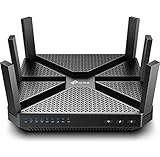
- 4K video, streaming, gaming is no problem for the A20 with incredible AC4000 tri band speeds
- Top of the line 1. 8 GHz quad core 64 Bit processing to smoothly process Multiple requests and accelerate loading Times
- Eliminate buffering with MU MIMO technology letting you connect more devices simultaneously
- Range boost technology enables far reaching Wi Fi for extended coverage throughout the Home. Supported Operating Systems: OS Independent Up to Windows 10, Mac OS 10. 12 and Linux
- Advanced security Powered by Homecare, protect Your network from malicious attacks and lets you manage network access
- Playtime: Set schedules or daily limits where available. Microsoft Family Safety supports app and game limits across connected Windows and Xbox devices; Steam has its own playtime controls.
- Purchases: Review approval or spending settings. PlayStation uses the family manager’s wallet for child purchases; Steam supports purchase requests.
- Communication and multiplayer: Choose who the child can communicate or play with using the platform’s separate privacy or family settings.
- User-generated content and platform features: Review access to shared content and other social features independently of the game’s age rating.
- Exceptions: Decide how to handle a child’s request for access to a restricted game or feature. PlayStation and Steam document request workflows for certain restrictions.
Product prices and availability are accurate as of the date/time indicated and are subject to change. Any price and availability information displayed on Amazon at the time of purchase will apply.

