
The Tool Desk
Outbyte PC Repair FREERepair Windows errors before they cause bigger problemsFix Now →Outbyte Driver Updater FREEScan for outdated or missing drivers - takes under a minuteDriver Scan →The most reliable way to prevent accidental publishing is to separate writing from publishing: keep unfinished work as Draft, send work that needs approval to Pending Review, and give the publish_posts capability only to people who are expected to publish. Before clicking the final control, verify the post status, visibility, and publication date in the editor sidebar.
Use Draft and Pending Review for different jobs
A Draft is work that is not ready to be public. It remains unpublished while the author edits it. Pending Review signals that the author considers the work ready for someone with publishing authority to check.

For solo sites
Keep new posts as Draft while you write, proofread, add media, and check links. Change the status only when you are ready either to publish immediately or to schedule a specific release.
For a review team
Have writers submit completed work for review instead of publishing it themselves. A user who can edit posts but lacks publish_posts is shown Submit for Review rather than Publish. A reviewer can then approve, revise, schedule, or return the post for changes.
#1 Best Overall

- Indoor padlock is best used for cabinets and school, employee, athletic, and indoor storage lockers
- Set your own four letter combination lock for easy combination recall
- Small combination lock is constructed with a solid metal body and nickel plated steel shackle
- 1-9/16 in. (40 mm) wide lock body; 1/4 in. (6 mm) diameter shackle with 7/8 in. (22 mm) length, 7/8 in. (22 mm) width
- Shackle is preset to open on L-O-C-K; for combination reset instructions, see User Manual in Technical Specifications section of this page
- Draft: still being prepared; not public.
- Pending Review: awaiting approval from a user with publishing authority.
- Published: visible to everyone unless another visibility rule applies.
- Scheduled: set to publish automatically at the selected future date and time.
Status labels and controls can vary slightly by WordPress version or editor, but the underlying distinction remains: approval status is a workflow decision, not merely a visibility setting.
Assign roles that match publishing responsibility
WordPress roles are a practical publishing safeguard. Choose a role based on what a person must do, and review the other capabilities that role grants before assigning it.
Rank #2
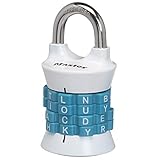
- Sturdy locker lock: This Master Lock combination lock is made from a durable, heat-treated steel shackle that provides maximum strength and reliability for long-term protection.
- Easy to set combination lock: The easy-to-use Set Your Own Word combination design allows you to choose your own word for the 4-letter combinations desired for personalized security
- Secure gym locker lock: Perfect for school or gym lockers, this combo lock is designed with an anti-shim technology to prevent break-ins and ensure your belongings stay protected in most environments
- Colors available: Featuring an attractive finish, the locker lock comes in two colors - a blue/black color scheme or red/bronze option - so you can accessorize your locker
- Portable design: With its lightweight and compact size, this combination lock is easily portable and great for on-the-go use - ensuring secure safety wherever its needed
| Role | Publishing implication | Typical use |
|---|---|---|
| Contributor | Can write and manage their own posts but cannot publish them. | Writers whose work requires approval. |
| Author | Can publish and manage their own posts. | Independent writers trusted to release their own work. |
| Editor | Can publish and manage posts, including posts created by other users. | Editors responsible for team-wide approval and publication. |
The capability that controls the Publish action is publish_posts. Removing or granting that capability changes whether a user can release a post, so do not give it simply to make editing more convenient. Custom roles and membership plugins may alter these defaults; inspect the actual capabilities on the site before relying on a role name alone.
Check status, visibility, and timing before the final action
In the Block Editor, use the settings sidebar to inspect the post’s status, visibility, and publication timing. Treat this as a short pre-publication checklist rather than assuming the large button reflects your intended outcome.
Rank #3

- Indoor and outdoor lock is best used as a gate lock or shed lock for protection and security from theft; extra long shackle for application flexibility
- Set your own four letter combination lock for easy combination recall; combination change tool included
- Combo lock is constructed with a solid body for strength and weatherability, hardened steel shackle for cut resistance
- 2 in. (51mm) wide lock body; 5/16 in. (8mm) diameter shackle with 2-1/4 in. (57mm) length, 1 in. (25mm) width
- Includes one resettable combination lock
- Open the post’s settings sidebar and locate the status control.
- Confirm that the status is Draft while work is unfinished, or Pending Review when approval is required.
- Check Visibility. Published content is public; Private content is limited to site administrators and editors; password-protected content requires the configured password.
- Check the displayed publication date and time. If you choose a future date, confirm the time zone and the exact scheduled value shown by WordPress.
- Read the final button label and action. Use Submit for Review to hand work to an approver, Publish for immediate release, or the scheduling action only after verifying the future date.
A visibility choice is not an approval workflow. Making a post Private or password-protected can limit who sees it, but it does not replace assigning the right editing and publishing permissions or moving work through review.
Prevent common accidental-publishing paths
Do not grant publishing rights for convenience
If someone only needs to draft and edit their own work, Contributor access is safer than Author access. If they need to publish only their own posts, Author may be appropriate. Use Editor access only for people who must manage and publish other users’ posts.
Rank #4
Do not treat a future date as a draft
A post with a future date and a scheduled status is an instruction to WordPress to publish automatically. Scheduling is useful for deliberate releases, but it is not a holding area for undecided work. Leave uncertain work as Draft or Pending Review.
Review the action after saving
After submitting or scheduling, reopen the post or list view and confirm the resulting status. This catches cases where a click changed the status or date differently from what you intended.
Free tools Windows power users keep installed
One-click scans. No signup required.
Best Value

- For indoor use and travel; small lock is best used for backpacks, bags, briefcases, and luggage
- TSA approved luggage lock allows Transportation Security Administration screeners to inspect and relock baggage, without damaging lock
- TSA lock has a resettable 4 dial letter combination for keyless convenience, set and reset your combination allowing thousands of personalized combination code options
- Padlock includes a metal body for durability and steel shackle for cut resistance
- 1-3/16 in. wide lock body; 1/8 in. diameter shackle with 3/4 in. length, 1/2 in. width; Available in Black, Blue, Pink, Red (randomly selected at time of shipment)
Account for editor and plugin differences
Screen layout and labels can differ between the Block Editor, classic editing interfaces, page builders, and custom-role plugins. Test the workflow with a non-administrator account that has the same role as the writers who will use it.
Independent reader supportYour contribution helps us test, update, and keep practical guides available for everyone.Use revisions to recover from editing mistakes
Revisions protect content from a bad edit; they do not prevent an authorized user from publishing. WordPress stores revisions for saved drafts and published updates, lets you compare versions, and allows an earlier version to be restored. Autosaves do not overwrite the currently published content.
Restore an earlier version
- Open the post in the editor.
- In the settings sidebar, open Revisions when it is available.
- Compare the displayed versions to identify the text or settings you need.
- Choose the earlier version and restore it, then save the post with the correct status.
The revisions interface changed in WordPress 7.0; the documentation identifies the new revisions screen and lists an update date of May 1, 2026. Match the navigation to the version running on your site, especially if the Revisions link is located in a different panel.
When a workflow plugin is justified
Core roles and statuses are enough for many sites: writers create drafts, submit them for review, and editors publish or schedule approved posts. A more demanding newsroom may also need a formal approval path for edits to posts that are already public, or a way to submit and schedule proposed revisions without changing the live version first.
What’s actually slowing this PC down?
Pick the symptom - the matching free tool is one click away.
PublishPress Revisions is an optional WordPress.org-listed plugin that describes workflows for submitting, approving, and scheduling revisions, including revisions to published posts. Treat it as a fit-and-compatibility decision, not a universal requirement: check its current WordPress compatibility, supported editor, role behavior, maintenance status, and how it interacts with other workflow or page-builder plugins before installing it.
Quick Recap
A practical workflow by site type
| Site situation | Recommended control | Final check |
|---|---|---|
| Solo author, no fixed release time | Keep the post Draft until all checks are complete. | Confirm Draft has not changed to Scheduled or Published. |
| Solo author, planned release | Schedule only after selecting and verifying the future date and time. | Confirm the scheduled status and displayed time. |
| Writer plus reviewer | Give the writer a role without publish_posts; use Submit for Review. |
Reviewer approves and performs the publish or schedule action. |
| Multiple editors managing a publication | Use Editor-level publishing authority for designated approvers and document who owns final approval. | Check status, visibility, and timing before release. |
| Review of changes to live posts | Evaluate a revision workflow such as PublishPress Revisions if core statuses do not cover the process. | Verify plugin compatibility and confirm the live version remains unchanged until approval. |
Final pre-publication checklist
- The content is complete, proofread, and approved by the person responsible for release.
- The current status is Draft or Pending Review until that approval is complete.
- The account performing the action has only the publishing capability it needs.
- Visibility is intentionally Public, Private, or password-protected.
- The publication date, time, and time zone are correct.
- The final button says and does what you expect: Submit for Review, Publish, or Schedule.
- After saving, the post list or reopened editor shows the intended status.
Product prices and availability are accurate as of the date/time indicated and are subject to change. Any price and availability information displayed on Amazon at the time of purchase will apply.

