
The Tool Desk
Outbyte PC Repair FREEClear out junk files and repair common Windows errorsFree Scan →Outbyte Driver Updater FREEScan for outdated or missing drivers - takes under a minuteDriver Scan →RAID 0 has no universal failure percentage. Because it stripes data without redundancy, one failed member drive makes the entire array unavailable. If each of N drives has an annual failure probability p, the simple independent-drive estimate is 1 − (1 − p)N.
The one-year risk in a simple model
For illustration, Backblaze reported a 1.39% lifetime annualized failure rate (AFR) in 2026. Applying that population figure as p produces the following modeled risks. These are calculations, not direct measurements of RAID 0 arrays.
| Drives in the RAID 0 set | Modeled chance that at least one drive fails in one year | Modeled chance all drives survive one year |
|---|---|---|
| 2 | 2.76% | 97.24% |
| 4 | 5.45% | 94.55% |
| 8 | 10.62% | 89.38% |
The calculation assumes identical drives, independent failures and a constant hazard over the year. Increasing the member count raises the chance that at least one drive fails, even though each individual drive’s AFR is unchanged.
What the percentage does—and does not—mean
AFR is a population estimate
Backblaze’s 2026 reporting also listed a 1.36% AFR for 2025 and 1.24% in the first quarter of 2026. Those figures describe the monitored drive population and period, not a guarantee for your model, enclosure or array. A different drive mix or observation period changes the input to the formula.
#1 Best Overall
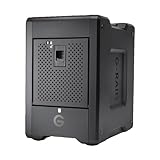
- EXPANSIVE 80TB STORAGE - Offers substantial capacity with 4x 20TB removable Ultrastar enterprise-class hard drives, perfect for demanding workflows and extensive media libraries.
- ULTRA-FAST DATA TRANSFER - Achieve speeds up to 800MB/s write and 640MB/s read in default RAID 5, streamlining 4K/8K video editing, rendering, and large file transfers efficiently.
- VERSATILE RAID CONFIGURATION - Built-in hardware RAID supports RAID 0, 1, 5, 10, and JBOD, providing flexible data redundancy and performance options tailored to your specific needs.
- THUNDERBOLT 3 CONNECTIVITY - Features dual Thunderbolt 3 ports (40Gbps) and a USB-C port (10Gbps), ensuring seamless compatibility and high-speed data access for modern workstations.
- ROBUST DATA SECURITY - Preconfigured in RAID 5 for balanced performance and data protection, safeguarding your valuable content against drive failures with built-in redundancy.
Published reliability figures vary
A USENIX field study reported datasheet AFRs of 0.58% to 0.88% for the highest-quality disks it examined in 2007. Manufacturers can derive AFR and MTTF from testing or earlier field data, so a datasheet number and replacement experience are not interchangeable.
Failures are not always independent
Common power events, a shared enclosure, vibration, heat, firmware defects, manufacturing batches and controller problems can cause correlated failures. Drive age, workload and maintenance also change observed risk. The independence assumption is therefore useful for scale, not a prediction of a particular installation.
Rank #2

- IronWolf internal hard drives are the ideal solution for up to 8-bay, multi-user NAS environments craving powerhouse performance
- Store more and work faster with a NAS-optimized hard drive providing ultra-high capacity up to 16TB and cache of up to 256MB
- Purpose built for NAS enclosures, IronWolf delivers less wear and tear, little to no noise/vibration, no lags or down time, increased file-sharing performance, and much more
- Easily monitor the health of drives using the integrated IronWolf Health Management system and enjoy long-term reliability with 1M hours MTBF
- Three-year limited warranty protection plan included and three year Rescue Data Recovery Services included
What happens when one RAID 0 member fails
IBM describes RAID 0 as “a nonredundant configuration” and states that if a physical disk fails, “the disk array is marked as failed.” H3C likewise documents that a RAID 0 logical drive fails when one or more physical drives fail.
Why striping loses the whole volume
RAID 0 distributes successive blocks across multiple drives. A file may therefore require blocks from several members; losing one member removes portions of many files, not just data that happened to be stored on that disk. The array cannot reconstruct those missing blocks because it contains no mirror or parity information.
Quick wins for a faster PC:
Repair Windows errors before they cause bigger problemsFix Now →Fix the driver behind crashes, sound loss and screen glitchesFind Drivers →Rank #3

- Massive capacity storage with auto and system backup
- RAID-0 ready out of the box
- USB 3.1 Gen 1-ready, USB 3.0 compatibility
- 2x USB 3.0 hub ports
- 256-bit AES hardware encryption and password protection
Availability is not the same as recoverability
The practical consequence is that the logical volume should be treated as lost when any member is lost. IBM’s operational guidance is explicit: “All data in the array must be backed up regularly to protect against data loss.” Recovery comes from an independent copy, not from rebuilding the RAID 0 set.
Does adding more drives make RAID 0 less reliable?
Yes, under the independent-drive model. The array survives only if every member survives, so its survival probability is (1 − p)N. Each additional member adds another opportunity for failure and lowers that product.
Rank #4

- IronWolf internal hard drives are the ideal solution for up to 8-bay, multi-user NAS environments craving powerhouse performance.date transfer rate:6.0 gigabits_per_second
- Store more and work faster with a NAS-optimized hard drive providing 8TB and cache of up to 256MB
- Purpose built for NAS enclosures, IronWolf delivers less wear and tear, little to no noise/vibration, no lags or down time, increased file-sharing performance, and much more
- Easily monitor the health of drives using the integrated IronWolf Health Management system and enjoy long-term reliability with 1M hours MTBF
- Three-year limited product warranty protection plan and three year Rescue Data Recovery Services included
The table’s 2-, 4- and 8-drive examples use the same 1.39% Backblaze illustration; they should not be read as guaranteed rates for a specific brand, model or deployment. Larger sets may also share more power, cooling and controller dependencies, creating correlation that the formula does not capture.
Is RAID 0 safe for important data?
It is appropriate when the data is temporary, reproducible or protected elsewhere and the performance benefit justifies the additional failure exposure. Intel describes striping across two or more drives as suitable for temporary or reproducible high-throughput workloads.
Recommended Free Tools
Best Value

- Store more, compute faster, and do it confidently with the proven reliability of BarraCuda internal hard drives
- Build a power house gaming computer or desktop setup with a variety of capacities and form factors
- The go to SATA hard drive solution for nearly every PC application from music to video to photo editing to PC gaming. Ax. Sustained transfer rate OD: 190MB/s
- Confidently rely on internal hard drive technology backed by 20 years of innovation
- Frustration Free Packaging - This is just an anti-static bag. No cables, no box.
- Reasonable uses: scratch space, render or compile output, disposable caches, and datasets that can be recreated from a separately stored source.
- High-risk uses: the only copy of personal files, business records, irreplaceable media, system state or any data whose restoration has not been tested.
A backup must be independent of the array: a second volume in the same failure domain does not protect against a shared power, enclosure, controller or environmental event. Test that the backup can actually restore the files you need.
Independent reader supportYour contribution helps us test, update, and keep practical guides available for everyone.How RAID 0 compares with redundant layouts
Redundancy changes how many member failures a layout can survive, but no RAID level substitutes for an independent backup.
| Layout | Failure tolerance | Usable-capacity pattern | Performance profile | Rebuild exposure | Backup implication |
|---|---|---|---|---|---|
| RAID 0 | None; one failed member fails the set | Approximately the sum of member capacities | Parallel reads and writes; useful for throughput | No redundancy to rebuild from; restore the volume from a copy | Independent backup is essential |
| RAID 1 | One failed drive in each mirror pair; a two-drive mirror survives one member failure | Approximately one drive’s capacity per mirror | Reads may be parallel; writes go to both copies | Rebuild copies data from the surviving mirror | Keep a separate backup for deletion, corruption and site-wide events |
| RAID 10 | Can survive one failure in each mirror pair, provided both members of a pair are not lost | Approximately half of raw capacity | Combines striping with mirror-based I/O and usually offers strong transaction performance | Only the affected mirror is rebuilt, but the surviving member is stressed | Backup remains required |
| RAID 5 | One member failure | Approximately total capacity minus one member | Good reads; parity adds write and small-write overhead | Rebuilds expose the remaining members to additional load | Backup remains required, especially during a degraded or rebuilding state |
| RAID 6 | Two member failures | Approximately total capacity minus two members | More parity work than RAID 5, with greater fault tolerance | Long rebuilds still create operational risk | Backup remains required |
Why array failure is a system-level question
Multiple failures and latent errors
The RAIDShield study examined about one million SATA disks from six models over as many as five years and found that multiple and jointly likely failures weaken the protection expected from simple independent-failure assumptions. During a rebuild, a second failure or an unreadable block can turn a degraded array into a data-loss incident.
Read errors can matter even without a dead drive
Microsoft Research reported moving 2 petabytes through low-cost hardware and observing five disk read-error events. Its analysis argues that Mean Time To Data Loss is a more useful architecture metric than a raw uncorrectable-error rate. In practice, assess the drives, controller, power and cooling, monitoring, recovery procedure and backup together.
Free tools Windows power users keep installed
One-click scans. No signup required.
A practical way to decide
- Classify the data. If it cannot be recreated, do not make RAID 0 the only storage location.
- Estimate exposure. Use
1 − (1 − p)Nas a transparent first estimate, documenting the AFR source, drive count and time period. - Check shared dependencies. Account for common power, enclosure, firmware, temperature and vibration risks that can synchronize failures.
- Choose redundancy for the failure you need to tolerate. Select mirroring or parity when continued operation after a drive failure matters, and consider rebuild duration and degraded-state performance.
- Validate recovery. Keep a copy outside the array’s failure domain and perform a restore test before treating the storage design as dependable.
Bottom line
There is no single RAID 0 failure percentage. With a 1.39% annualized drive-failure input, the simple model gives about 2.76% one-year array risk for two drives, 5.45% for four and 10.62% for eight. Real systems can do better or worse because AFR is an estimate and failures can be correlated. RAID 0 is therefore a performance layout for disposable or reproducible workloads—not a safe sole home for important data.
Quick Recap
Product prices and availability are accurate as of the date/time indicated and are subject to change. Any price and availability information displayed on Amazon at the time of purchase will apply.

