
Do these 3 things before closing this tab:
1Scan for outdated or missing drivers - takes under a minute2Clear out junk files and repair common Windows errors3Fix the driver behind crashes, sound loss and screen glitchesiTechGuides is reader-supported. When you buy through links on our site, we may earn an affiliate commission. As an Amazon Associate I earn from qualifying purchases. Learn more
A Linux CLI timer can pause a running session after it sees no keyboard, mouse, or other input events for a set period. In an article by DEV Community author fralsare, the tool timerCLI is described as reading Linux input-event device files, timing the gap since the last event, and resuming when input returns. That counts observed input—not attention, foreground-app use, or productive work.
How timerCLI decides when to pause
Fralsare describes timerCLI as opening readable /dev/input/event* files in non-blocking mode, repeatedly draining pending events, and recording the timestamp of the most recent event. When the elapsed time since that event reaches the idle limit, the timer pauses; input arriving afterward resumes it. The stated default threshold is 30 seconds. These are implementation details reported in the author’s article, not independently verified behavior across Linux systems. Read the timerCLI article.
The article’s sample output shows active and idle counters alongside a pause/resume indication. It also says Ctrl+C ends a run and prints active and paused totals. The 30-second value is a default configuration reported by the author, not a measured result; the article’s publication year is not established by the available page information.
PC Slower Than It Used to Be?
A free scan shows the junk files, broken settings and background clutter dragging Windows down - then fixes them in one click.Free scan · Windows 10 & 11Outdated Drivers Are Slowing You Down
One free scan finds every outdated or missing driver and matches the right update for your exact hardware.Free scan · exact hardware matchWhat “active time” does—and does not—measure
With this design, “active” means that input events have been observed recently. It does not establish that someone is paying attention, working in a particular application, or producing useful output. Someone reading without touching an input device may be doing meaningful work while the timer considers them idle. Conversely, incidental mouse or keyboard activity can keep the timer running.
#1 Best Overall
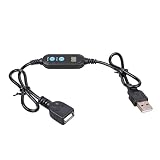
- ADJUSTABLE TIMER: Set the auto shut-off timer anywhere from 1 to 24 hours to control when your USB devices power off automatically.
- WIDE COMPATIBILITY: Works with USB fans, neon signs, LED lights, phone chargers, and other 5V USB-powered devices for versatile use.
- DIGITAL CONTROL: Easy-to-use digital interface lets you program precise shut-off times, helping you manage device usage with confidence.
- MALE TO FEMALE DESIGN: The male to female USB connector allows for seamless inline installation between your power source and USB device.
- COMPACT & PRACTICAL: Sleek black cable design fits discreetly into any setup, making it ideal for home, office, or bedside use.
That distinction matters if you use the totals to understand work sessions: they are an input-based estimate shaped by the configured timeout, not a record of focus or productivity.
What the article says you need
Fralsare says timerCLI uses Python’s standard library and requires permission to read the input-event files. The article gives adding a user to the input group, then logging out and back in, as an example. Treat that as the author’s stated setup, not a universal permission recipe: device access and group policies can vary by distribution and configuration. Do not grant broader access than you need.
Rank #2

- Smart Timer Modes & Auto Shut-Off: Three presets (4H/8H/12H) with one-click setup and a color-coded indicator (Green/Blue/Red). Lights power off automatically after the countdown, cutting wasted energy overnight or after store hours
- 4-Level Dimming Control: Choose four fixed brightness levels (25%/50%/75%/100%), from a soft night glow to full showcase brightness
- Built for Homes, Dorms & Storefronts: Bedrooms — set a soft glow that switches off after you fall asleep; game rooms — dial in the mood without rewiring; shop windows — signs shut off on their own after closing
- Important Note on the Auto On/Off Cycle: If your neon light has a built-in dimmer, this timer can switch it off but not back on — the light's memory function interrupts the circuit, so press its power button once to restart each cycle
- Plug-and-Play 5V Compatibility: Standard USB-A connector fits wall adapters and power banks. Ideal for 5V USB neon signs, LED strip light, USB desk lamps, string light, night light, LED fairy light and USB fans (dimmer adjusts fan speed)
How this differs from desktop and session idle detection
Reading input-event files is one way to observe activity, but Linux desktops also expose idle state through other interfaces. These signals are not interchangeable, and their availability depends on the session and desktop environment.
| Approach | Signal | Coverage and limits | Permission or tracking context |
|---|---|---|---|
| timerCLI as described by fralsare | Recent raw events from readable /dev/input/event* devices. |
The article does not establish which distributions, device setups, or desktop sessions were tested. | The article says read access to the event devices is required. It describes automatic pausing and resuming; no app or window context is stated. Source. |
| systemd-logind idle state | Session-level idle hints, idle-since timestamps, and change notifications. | Logind reports session types such as tty, x11, and wayland; this is a session-level signal rather than direct accounting of each raw input event. systemd-logind API documentation. |
The cited API documentation describes idle-state information, not a particular timer’s permission setup, app context, or tracking workflow. |
| Wayland idle protocol | A timeout request fires after the compositor observes no user activity for the requested interval. | Use depends on the compositor exposing the protocol. Wayland idle-notify protocol. | The protocol describes an idle notification mechanism; it does not establish that a given timer records application context. |
| X11 example using xprintidle | An X11 project example uses xprintidle to measure idle time. |
This example does not establish universal coverage across X11 desktops, and it is distinct from reading Linux input-event files. ttyd project. | The cited example does not establish timerCLI’s permission requirements or app-context tracking. |
The systemd utility systemd-inhibit addresses a different problem: its documented idle lock blocks automatic idle handling. It does not account for active time or prove that user input occurred. systemd-inhibit documentation.
Rank #3

- Share Multiple USB Devices between 2 Computer : The BENFEI 2 in 4 out USB 3.0 kvm switch supports 2 computers share 4 USB devices like keyboards, mouses, U disk, printers, scanners, USB cameras, headphones, etc. It's convenient for you to switch freely between your work computer and personal computer, driver free and compatible with multiple OS, such as windows 7/10/8/8.1/7/Vista/XP and Mac OS, Linux, and Chrome OS.
- Transfer Files in Seconds: With the 4x USB 3.0 ports, BENFEI USB Switcher supports up to 5Gbps data transfer speed. You can easily transfer data from U disk, mobile hard disk to computer. It's backward compatible with USB 2.0, too.
- Switch Easily: With the USB switcher button and LED indicator design, you can freely switch multiple USB devices between two computers with one click and clearly know the working status. Please note: When connected, it could work only when using the BENFEI USB A to USB A cable.
- Multiple USB Devices Support: BENFEI USB Switch provides an extra USB C(5V 3A) power supply slot. If you use some high power consumption devices such as HDD, USB cameras, headphones, etc, please connect extra power for stable performance. (The USB A-USB Charging cable is included, but the power adapter is not)
- 18 MONTH WARRANTY : Exclusive BENFEI Unconditional 18-month Warranty ensures long-time satisfaction of your purchase; Friendly and easy-to-reach customer service to solve your problems timely
When a manual CLI tracker may fit better
If you want to manage time intervals explicitly rather than infer activity from input, Timewarrior is a documented command-line tracker with commands for managing and reporting intervals. The cited manual does not establish that it automatically pauses based on raw input, so it should be treated as a different tracking approach, not a drop-in equivalent. Timewarrior documentation.
Quick Recap
Best Value

- Multifunctional: thanks to its 3-in-1 design, this timer can do daily on-off timer, countdown and turn on/off timer, and short on-off cycle timer, making it much more versatile than other models
- Good Helper and Money Saver: helps to streamline your daily routines, reduce energy use and save on your energy bills by automatically powering your appliances on and off as needed
- User-Friendly Design: large screen for clearer view of digits and numbers; built-in battery to memorize your programs during power outages; completely silent and ideal for home use
- Protect Your Electronics: countdown and turn off mode can be extremely helpful to limit the charging time for your expensive electronic devices and prolong their service lives
- Buy with Confidence: V0 fireproof housing plus its child lock function make this timer safe to use and operate; each timer is backed by lifetime support
Rank #4

- ✓ BLUE BACKLIGHT & 18 ON/OFF PROGRAMS: BN-LINK digital timer switch features a blue backlight, ensuring easy visibility and programming. Set up to 18 On/Off programs and 7-day scheduling options, you have the flexibility to tailor your lighting. Whether it's for lights, fans, you can set intervals as short as one minute and choose individual days or preset combination days, providing unparalleled customization and convenience.
- ✓ FULL CONTROL & BACKUP BATTERY: Take charge of your home lighting effortlessly with the BN-LINK 7-Day Programmable Light Switch Timer. DST Mode makes seasonal time adjustments quick and easy with one-touch control, eliminating the need to reset your schedules.Easily shift between AUTO (timed on/off) and MANUAL (manual on/off) modes by pressing and holding on the door. Plus, enjoy peace of mind with its built-in rechargeable battery, ensuring your settings remain intact during power outages.
- ✓ PROTECT HOME & SAVE ENERGY: Activate automatic timer light switch's "Random" vacation mode to create the illusion of occupancy and deter potential intruders while you're away. Scheduled programming allows this wall timer switches to automatically turn lights on/off according to your schedule, perfect for managing porch lights, entryway lights, hallway lights, garage lights, patio lights, ceiling fans, and more while saving time, energy, and daily effort.
- ✓ SINGLE-POLE & 3-WAY COMPATIBLE: Designed for both single-pole and 3-way setups, This light switch timer indoor gives you flexible installation options for different home wiring needs. BN-LINK 3 way timer switch for lights lets you control the same light from two locations, ideal for stairways, hallways, garages, large rooms, and entryways. Compatible with SPDT switches. Wall plate included.
- ✓ NEUTRAL WIRE REQUIRED:Neutral Wire Must Required When Installation.This digital light timer switch is ETL listed and rigorously controlled for quality and safety. Conforms to UL Std.60730-1, 60730-2-7. Rating: 15A/1875W, 10A/1250W Tungsten, 10A/1250W Ballast, 1/2HP, 125VAC, 60Hz. Operating temp.: -15°C (5°F) to 50°C (122°F). Storage temp.: -20°C (-4°F) to 60°C (140°F).
Product prices and availability are accurate as of the date/time indicated and are subject to change. Any price and availability information displayed on Amazon at the time of purchase will apply.

