
iTechGuides is reader-supported. When you buy through links on our site, we may earn an affiliate commission. As an Amazon Associate I earn from qualifying purchases. Learn more
InfoHUD Pro is a Windows utility that places selected content in floating desktop panels so it stays visible while you work. Developer AdamYang says the panels can show text, Office files, charts, images, screenshots, web pages, and PDFs, with controls to keep panels on top, move or resize them, lock their positions, and hide or show them together.
What InfoHUD Pro is designed to do
InfoHUD Pro is intended for keeping reference material visible without repeatedly switching back to the window that contains it. AdamYang describes it as a Windows utility for creating floating HUD panels from common work content. The developer highlights dual-monitor and multi-monitor setups as useful contexts, but does not say an extra monitor is required.
The developer introduced the app in a launch post that displays “Posted on Sep 17” without an adjacent year. Its post date should therefore not be assigned a year based on that display alone.
Do these 3 things before closing this tab:
1Scan for outdated or missing drivers - takes under a minute2Repair Windows errors before they cause bigger problems3Fix the driver behind crashes, sound loss and screen glitchesWhat can appear in a panel
According to the developer’s launch post, the stated panel content types are:
#1 Best Overall

- 【Dual Screen, Double Productivity】 This Portable monitor for laptop supports expand mode, mirror mode, and second screen mode, perfectly fits conference presentations, multitasking, and allows you to simultaneously open multiple windows, work, video conferences, watching movies or playing games on different screens without switching back and forth on a single laptop screen. It can increase your working efficiency by 200%, making it ideal for programmers, travelers, gamers, finance and investment professionals, designers, and anyone who needs a more efficient workflow.
- 【178°viewing angle, Eye-Care View】Features a high-performance FHD IPS display (1920x1080) with 60Hz refresh rate and 300 nit brightness for vibrant, sharp visuals. The 178° viewing angle is perfect for sharing content. And the matte anti-glare coating and independent brightness controls makes it a true eye-care monitor, reducing strain during long sessions.
- 【Protective, Stable with Assurance】 The adjustable telescopic stand offers a secure, custom fit for 13-17.3 inch laptops. It stays firmly in place during use. Soft protective padding safeguards your laptop’s edges from scratches. Backed by reliable warranty and support, this laptop dual monitor attachment unlocks professional productivity anywhere you like.
- 【Plug & Play, no driver required】 If your laptop has one full-functioned Type-C port, you can use one USB-C to USB-C cable to connect the product to your laptop. If your laptop has one USB-A or USB-C port and one HDMI port, please use two cables (one HDMI to USB-C cable + one USB-A or USB-C to USB-C cable) to connect the screen.
- 【Wide compatibility】 Our ultra-thin travel monitor for laptop supports multiple devices and operating systems. Compatible with devices such as Windows, Mac, Chrome, Android, Linux, Dex, even the Switch. Please read the manual carefully before use. If you have any questions, please contact us for technical support.(Notice:There maybe some laptop doesn't have enough Type C port or HDMI port to use the product, in this case, you can contacet us and we will provide you an special cable to connect the screen extender.
- Text
- Excel and Word content
- Charts
- Images and screenshots
- Web pages
- PDFs
The post identifies these formats but does not explain technical details such as whether content is embedded, linked, or rendered through another method.
How the floating panels are controlled
AdamYang says users can open multiple panels and manage them with several window controls:
Rank #2

- POWERFUL PROCESSOR - Configured with top of the line series processor for lightning fast, reliable and consistent performance to ensure an exceptional PC experience.
- SUPERIOR STORAGE AND MEMORY – Customized with 500GB HDD storage space to store apps, photos, music and movies. Loaded with DELLGB of RAM to zip through multiple tasks in a hurry without lag.
- BUILT IN CONNECTIVITY - Stay connected to the internet with installed wireless capable technology and integrated network card. Play your favorite music files with stereo sound. Easily connect to large and multiple monitors through the installed onboard video connections.
- WINDOWS 11 PRO LATEST RELEASE - A new installation of the latest Microsoft Windows 11 Pro Professional 64 Bit Operating System software, free of bloatware commonly installed from other manufacturers. As Microsoft's latest and best OS to date, Windows 11 Pro Professional 64 Bit will maximize the utility of each PC for years to come. Optional software such as Anti-Virus and Office 365 can also be easily downloaded through the Microsoft Windows App Store.
- BUY WITH CONFIDENCE - All Amazon Renewed computers come with a 90-day warranty and technical support to provide customers with unmatched quality and care.
- Keep on top: Leave selected information visible above other windows.
- Move and resize: Position panels and adjust their size on the desktop.
- Lock position: Prevent a panel from being moved accidentally after arranging it.
- Hide or show all: Toggle the panels together with one action.
These are capabilities stated by the developer; the launch post does not provide independent testing results or detailed instructions for using each control.
Windows support, languages, and trial
The launch post lists Windows 10 and Windows 11, English, Traditional Chinese, and Simplified Chinese, plus a seven-day free trial. These are the developer’s stated availability details; the post does not specify a current app version, system requirements, update schedule, or purchase price.
Rank #3

- Increase Efficiency Up to 200% & Save Time:KEFEYA travel monitor for laptop screen extender supports you to open multiple windows at the same time, work, video conference, watch movies, or play games on different screens by not having to switch back and forth on a single laptop screen continuously, increase your efficient by up to 200 %. Perfect for people who work on the go,remote workers, watch a movie,IT professionals, Players, Stock traders, Programmers, game players.
- 1080P FHD IPS Panel for Great Image Quality: 14" full HD external laptop portable monitor extender is configured with 1920x1080 resolution, 16:9 aspect ration, 60Hz refresh rate, 300nit brightness, 72% NTSC color gamut for great image quality. Full HD technology brings you a more vibrant color, and can adjust brightness, contrast, backlight, and other parameters independently, providing you with a bright, vivid, and immersive viewing experience, and friendly eye protection, relieving fatigue.
- Plug & Play Without Driver :Portable dual monitor for laptop comes with every cable needed(1* Type-C Cable, 1* USB-C to USB-A Cable, 1* HDMI Cable). You just need to connect the travel monitor for laptop via Type-C, HDMI and USB-A directly without any additional driver download. Please Note: when use the HDMI cable, please connect one extra USB-A to USB-C cable to the same screen extender to power supply.
- Multiple Display Mode & 180°Rotation:This second screen for laptop portable provides multiple display modes [Mirror mode/extension mode/landsape and portrait mode], attachable monitor for laptop can also 180° rotating allowing you to customize the viewing experience according to your preferences. And share your screen effortlessly with clients or colleagues, enhancing communication efficiency during collaborations.
- Wide Compatibility & Reliable Service:The monitor extension for laptop portable monitor supports a wide range of devices and operating systems, including Intel, AMD, ARM, Android, Windows, Mac,M1,M2, M3, Chrome, Linux, Type-C phones, PS4, Xbox, Switch, M1 Pro/Max, M2 Pro/Max, and other processors. Sincere and fast customer service at any time to serve you, quickly help you solve the problem.
AdamYang links to the InfoHUD Pro Microsoft Store listing. Check that listing for current availability and terms before installing, since the launch post does not establish whether its details have changed.
Independent reader supportYour contribution helps us test, update, and keep practical guides available for everyone.Who may find it useful
InfoHUD Pro may suit someone who regularly consults reference material while working and wants selected content visible beside their main task. Its described multiple-panel and always-on-top controls are especially relevant to people arranging information across a larger desktop or multiple monitors. The available source describes the intended workflow, but does not establish measured productivity gains or show how it compares with other window-management tools.
Quick Recap
Best Value

- Enterprise-Grade 12-in-1 Expansion for Hybrid Teams: Designed for compatibility with USB-C, USB4, or Thunderbolt laptops on Windows, macOS, or ChromeOS environments. Enables up to 3 HDMI monitors, wired Gigabit Ethernet network access, 6x USB 3.0 peripherals, audio, and device charging. Perfect for organizations looking to streamline IT deployments in hot-desking and managed office workspaces that demand reliable networking and easy device connectivity.
- Triple Display USB-C Docking Station: Maximize productivity with support for up to three extended HDMI displays (1× 4K @ 30Hz via Alt Mode, 2× 1080p @ 60Hz via DisplayLink). Bypasses native single-display limitations on platforms like Apple M1/M2/M3/Neo MacBooks. Compatible with all newer Apple Silicon systems, including M4 and M5. Optimized for enterprise use cases such as data analysis, presentations, and conferencing, it transforms any notebook into a multi-monitor workstation for your hybrid workforce.
- Advanced USB-C Functionality: Integrated DisplayLink graphics technology and native USB-C video output (Alt Mode) are essential for maximizing workstation productivity, delivering full, native, high-performance multi-display support, while 100W USB-C Power Delivery ensures continuous host system charging in enterprise environments.
- Universal Compatibility: Engineered for seamless integration with USB Type-C, USB4, and Thunderbolt-enabled systems across macOS (11+ with driver installation), Windows, and ChromeOS (v100+). that support USB-C Alt Mode and Power Delivery. Ideal for mixed-fleet IT environments, fully compatible with Dell XPS and Latitude, HP EliteBook and ProBook, Lenovo ThinkPad, and MacBook M series laptops, and more. Not compatible with Linux; HDCP not supported.
- Expert Lifetime Support: Backed by North American-based technical support and our compatibility guarantee if something doesn’t work, we’ll make it right. Trusted by IT professionals worldwide, Plugable provides direct access to the engineers who design our products for deployment assistance, troubleshooting, and lifecycle support. We resolve issues quickly to minimize downtime and help organizations maintain productivity at scale.
Rank #4
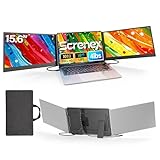
- 【HD Screen Immersive View】 This laptop screen extender features two premium 15.6" IPS panels with FHD 1080P resolution. Enjoy 178° ultra‑wide viewing angles and accurate color reproduction that brings true‑to‑life visuals. Ideal for office work, content creation, or casual entertainment – it delivers a smooth, immersive experience even during long hours of use
- 【Free-Standing Design for Full Protection】 The P7 triple laptop screen extender features an innovative standalone design that does not hang or clamp onto your laptop screen, preventing scratches and hinge stress. Simply place the monitor extender behind your laptop for quick setup. Its widened stand with non-slip pads ensures stable, secure placement. This laptop triple monitor is perfectly compatible with 13-17.3 inch laptops, providing reliable all-round protection for your laptop
- 【Thin Design for Multi Use】 This upgraded 15.6 inch screen extender adopts an aluminum alloy body with flat surface. It weighs 3.9lbs, fitted with two 0.16" thin screens and a matching carry case for transport. Setup can be completed quickly in cafes, hotels or home offices to form triple-screen workspace. Suitable for office work and daily multitasking, it reduces repeated window switching during use
- 【Two Cables Only for Fast Plug & Play】 Enjoy true plug & play simplicity. This laptop monitor extender only needs two USB-C to USB-C cables to complete the connection (for laptops with two full-function Type-C ports). All required cables are included. No dock or driver is needed for your multi monitor setup. Just connect and power on for instant, stable screen expansion without any technical hassle
- 【Broad Compatibility for Higher Productivity】This laptop triple-screen extender works seamlessly with Windows, Mac, Android, and Chrome OS. It supports Mirror, Extended, and Portrait display modes to meet diverse workflow needs. Note: Laptops without a full-function USB-C port, including M1–M3 MacBooks, require an extra H5-T cable. The connection requires the H5-T cable + HDMI cable + USB-A (for power supply), along with the necessary driver installation. If you need the H5-T cable or have questions about compatibility, please consult our professional customer service for assistance
Product prices and availability are accurate as of the date/time indicated and are subject to change. Any price and availability information displayed on Amazon at the time of purchase will apply.
Recommended Free Tools

