
Data visualization strengthens cybersecurity by making security information easier to interpret, investigate, and act on. A well-designed dashboard can bring relevant signals into a shared view, help analysts spot patterns, and let teams trace alerts to underlying events. It is an aid to monitoring and response—not a security control on its own. Its usefulness depends on the quality, coverage, and timeliness of the data and analysis behind it.
How visualization helps security teams
Build a shared operational picture
Security information often sits in separate endpoint, network, identity, vulnerability, operational technology (OT), and physical-access systems. Bringing relevant signals together can help operators understand which assets are exposed, what is happening, and how mitigation is progressing.
CISA says its Continuous Diagnostics and Mitigation (CDM) Agency Dashboards visualize risk information collected from sensors and tools deployed in agencies’ environments. In a July 2023 account, CISA described agencies sharing information with a federal dashboard to support an integrated view and coordinated response, including identifying affected systems and tracking mitigation. This is CISA’s description of its program, not evidence that dashboards alone caused those outcomes. CISA reported that 23 CFO Act agencies were sharing cyber-risk information continuously through CDM dashboards at that time; this is a dated program-status figure, not a current count. CISA’s CDM program account
Make patterns and unusual activity easier to see
Charts and timelines can make changes over time, unusual activity, or concentrations of risk more apparent than isolated alerts. But a visual display does not discover threats by itself: detection depends on the logs collected, the systems covered, and the analytic methods used to identify meaningful signals. CISA explains that logging and monitoring help establish normal behavior and identify anomalies. CISA’s logging guidance
#1 Best Overall
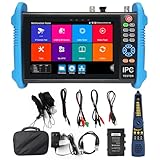
- [ Upgraded IP Analog Camera Tester ] WANLUTECH 8K IP camera tester has 7'' touchscreen, 1280x800 resolution. It support to test max 8K 32MP 4K 12MP IP cameras, support CVBS analog camera test. The IP camera tester supports batch activation of DH, Hik cameras and modification of IP addresses, passwords, etc. Support IPC Test /IP Discovery/Rapid Video/RTSP Play /Quick OVIF/Hik DH test tool/Client APK. Support 1 channel BNC input & 1 channel BNC looped output, NTSC/PAL (Auto adapt). Support CVBS loop test, the tester send and receive color bar generator signal, check BNC cable
- [ AHD TVI CVI Camera Tester ] WANLUTECH IP camera tester with poe support to test max 8MP AHD/TVI/CVI camera. Using "AUTO HD" app can automatically recognize AHD CVI TVI CVBS cameras and display resolution and frame rate on the screen, supports UTC control & call OSD menu, menu settings, screenshot, video recording, video playback, etc. Support color bar generator, output one channel PAL/NTSC color bar video signal
- [ Cable Tester ] Cable Tracer: Searching for BNC cable, network cable and telephone cable from cluttered cables,also can search shield cables. RJ45 Cable TDR Test: it can test cable pair status, length, attenuation, reflectivity, impedance, skew. UTP Cable Tester: test UTP cable connection status and display on the screen, support detect the near-end, mid-end and far-end fault point of the RJ45 cable plug. Cable Length Test: Measure the breakpoint position of (open circuit status) BNC cables, RJ45 network cables, RJ11 cables
- [ PoE & SFP & Network Test Tools & WIFI ] WANLUTECH ip camera tester with PoE supports max 55V 90W PoE power output, temporarily powers the high-power PTZ camera or other devices supported by the IEEE 802.3af/at/bt standard PoE protocol. It has a gigabit SFP optical fiber module port, support insert SFP optical fiber module, for optical fiber network testing. Network Test Tools: built-in porfessional network testing tools,such as Ping, IP scan, DHCP server, PPPOE, Trace Route, Port Flash, LLDP, Link Monitor, etc. WI-FI analyzer(2.4GHz frequency band) support to analyse wi-fi signal strength,channel,channel level, support create WI-FI hotspot
- [ Multifunction CCTV Camera Tester ] Power Management: support to check the real-time voltage, power, status of Power output and power input port. Drop-down menu, Media player, including 8GB TF card, Dual Gigabit Ethernet Ports, HDMI in/out, VGA in, Audio in/out, RS485 port. Power input:DC15V 2A. Power output:DC12V/3A, DC24V/2A, DC5V/2A
Investigate alerts in context
A useful view lets an analyst move from a summary or alert to related events and the evidence behind it. NIST’s utility cybersecurity reference architecture places visualization after collection and analysis, so analysts can inspect alerts and underlying data rather than relying on a chart alone. Its approach brings IT, OT, cyber, and physical-access sensor information into a converged view where relevant. NIST SP 1800-7, Volume B
A 2023 peer-reviewed case study of possible USB data exfiltration used interoperable views for an overview, comparisons of file volume and type, and individual activity. The example illustrates why investigation often benefits from several connected views rather than one overloaded dashboard. It does not establish a universal improvement in detection or response. The USB data-exfiltration visualization case study
Rank #2

- [ IP Analog Camera Tester ] WANLUTECH IP camera tester with PoE, it support max 90W POE power output, temporarily powers the high-power PTZ camera or other devices supported by the IEEE 802.3af/at/bt standard protocol. DC15V power intput. It has 8'' touchscreen, 1920x1200 resolution. It support to test max 4K 12MP IP cameras, support CVBS analog camera test. The CCTV tester supports batch activation of DH, Hik cameras and modification of IP addresses, passwords, etc. Support IPC Test/IP Discovery/Rapid Video/RTSP Play /Quick OVIF/Hik DH test tool/Client APK. It has a gigabit SFP optical fiber module port, support insert SFP optical fiber module, for optical fiber network testing
- [ AHD TVI CVI Camera Tester ] WANLUTECH CCTV camera tester supports to test max 8MP AHD/TVI/CVI/CVBS camera. Using "AUTO HD" app can automatically recognize AHD CVI TVI CVBS cameras and display resolution and frame rate on the screen, supports UTC control & call OSD menu, menu settings, screenshot, video recording, video playback, etc
- [ Cable Tester ] RJ45 Cable TDR Test: it can test cable pair status, length (up to 180 meters), attenuation, reflectivity, impedance, skew. UTP Cable Tester: test UTP cable connection status and display on the screen, support detect the near-end, mid-end and far-end fault point of the RJ45 cable plug. Cable Length Test: Measure the breakpoint position of (open circuit status) BNC cables, RJ45 network cables, RJ11 cables, test length max 3000 meters
- [ Multifunction CCTV Monitor Tester ] RJ45 Dual Gigabit Ethernet ports, 10/100/1000Mbps adaptive, HDMI in, VGA in, Audio I/O, RS485, WiFi analyzer. Network Tools: IP scan, PING test, PPPOE, trace route, link monitor, DHCP server, port flashing, etc. PoE Detection: measurement POE switch or PSE power supply voltage and cable connection status. Power Management: check real-time voltage and power of POE, DC12V, DC24V power output and PSE input, DC15V power input
- [ PLEASE NOTE ] There is a paper piece isolating the battery. Before using the tester, open the battery cover and remove the paper sheet. We are the manufacturer. Any questions, please let us know, We'll get back to you within 12 hours
Support coordination and response
When operators, incident responders, and decision-makers can consult a consistent account of system status, they can coordinate investigation and mitigation around the same information. For electric utilities, NIST says real-time or near-real-time data can help detect and remediate anomalous conditions, investigate event sequences, and share findings. NIST’s SP 1800-7 announcement
What a cybersecurity dashboard should show
The right content depends on the decision the dashboard supports. A useful design makes its scope and limits apparent rather than presenting a clean-looking display as proof that the environment is secure.
Quick wins for a faster PC:
Fix the driver behind crashes, sound loss and screen glitchesFind Drivers →Clear out junk files and repair common Windows errorsFree Scan →Scan for outdated or missing drivers - takes under a minuteDriver Scan →Rank #3
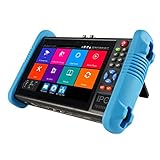
- This CCTV tester features a 7-inch IPS touchscreen and is capable of testing Up to 8K IP, Analog, AHD, TVI, and CVI. It has a resolution of 1280*800. Powerful network tools are provided to assist you in detecting and setting various network parameters. It also supports CVBS camera test and PTZ control.
- Video recording and playback function is available. It has POE power output. PTZ control can be implemented. There is a screen snapshot feature with 4 times zoom. It also includes TDR, digital multimeter, optical power meter, and VFL.
- HDMI offers input and output capabilities, with a resolution of 1080p. Android apps can be self-installed. For system stability, install apps only on cameras. It comes with various built-in camera test tools and is compatible with Hikvision, Dahua, Axis cameras of almost all models, Utilize it to make your installation process efficient and effortless.
- It can create a hot spot. Equipped with a 10/100M LAN port. Supports H.265 and H.264 formats. Displays 4K video via mainstream. It has a built-in 7.4V/5400mAh lithium-ion polymer battery. The working time lasts for 10 hours. We have tested every CCTV tester when this product appears on the Amazon website to ensure product quality. If you have any further questions, please feel free to contact us. We offer 24-hour technical support.
- RJ45 Cable TDR test is designed specifically for RJ45 cables. It offers IP discovery. It can auto-login and enable viewing of video, as well as create testing reports. There is a DC12V 2A power output and a POE DC48V power output with a maximum power of 24W. It supports 10/100/1000M Ethernet test, displays network state and traffic, and offers functions like PING test, IP address scan, and port blinking. It comes with audio input and supports recording and saving audio. It also has an LED lamp, calculators, music players, and other application tools.
- Relevant coverage: Show the assets and signals needed for the task, including data from separate IT, OT, cyber, or physical-access systems when those are material.
- Freshness and context: Make collection time, delays, and status age visible. Include asset importance or operational consequences where they help users judge a signal.
- Relationships and drill-down: Let users move from a summary to underlying events and related signals, with enough context to investigate an alert.
- Audience and task fit: Design for a defined operator, investigator, or leadership question. Stakeholder input and interoperable views can be more useful than assuming one display serves every role.
- Workflow fit: Ensure users can carry findings into established investigation, escalation, and mitigation processes.
- Data limitations: Surface missing, delayed, uncertain, or conflicting information so users do not mistake incomplete telemetry for reassurance.
NIST’s security-metrics publication emphasizes that without good metrics and evaluation methods, analysts and network operators cannot accurately assess network security status or operational success. Visualization can make metrics more legible, but it cannot make an unsound metric reliable. NIST, “Metrics of Security”
How to evaluate a security visualization
- Start with the decision. Define what the viewer needs to know or do—such as triaging an alert, assessing exposure, or tracking mitigation—before choosing charts or indicators.
- Check data coverage. Identify which assets and telemetry sources feed the view, and where important systems or events are absent.
- Check freshness and provenance. Confirm when data were collected and how statuses are derived; make delays and uncertainty visible.
- Test the investigation path. Follow a representative alert from the overview into related events and source data. A summary that cannot be investigated is not enough.
- Test with intended users and workflows. Ask operators, analysts, and relevant decision-makers whether the display answers their actual questions and fits their existing processes.
- Evaluate outcomes with appropriate measures. Use defined operational metrics and evaluation methods instead of assuming that a more attractive or information-dense screen improves security.
Limitations: what dashboards cannot do
A dashboard can hide blind spots when telemetry is incomplete or stale. Combining feeds without sound normalization, correlation, and context can produce clutter rather than insight. Visualization therefore belongs within a broader capability that includes logging, monitoring, analysis, investigation, and response.
Rank #4

- Used Book in Good Condition
Nor is a graphical display mandatory for shared situational awareness. CISA’s Cybersecurity Capability Maturity Model (C2M2) says dashboards, maps, and other graphical displays may be used to communicate a common operating picture, but are not required; messages, internal sites, or applications can also serve that purpose. CISA C2M2, Version 2.1
The available examples support practical mechanisms and design considerations, not a general causal estimate for how much visualization improves detection, reduces incidents, or speeds response. Treat claimed percentages cautiously unless they are tied to a clearly described evaluation and applicable environment.
The Tool Desk
Outbyte Driver Updater FREEScan for outdated or missing drivers - takes under a minuteDriver Scan →Outbyte PC Repair FREEClear out junk files and repair common Windows errorsFree Scan →Quick Recap
Best Value

- ✅【All-in-One Professional Kit with Sturdy Case】This premium network tool kit comes in a lightweight yet heavy-duty case that keeps all tools securely organized. Perfect for easy transport and storage, it’s your go-anywhere solution for home, office, server rooms, engineering projects, and network installations.
- ✅【Complete Tool Set for Pros & DIYers】Equipped with a high-performance Cat6A/Cat6/Cat5e/Cat5 pass-through crimper, wire tracker, 110/88 punch down tool, network stripper, wire cutter, 10 Cat6 pass-through connectors, and RJ45 boots. Everything you need for reliable and lasting connections.
- ✅【Versatile Ethernet Crimper with Tool-Free Adjustment】Master cable making with this multi-function crimping tool. Works with both pass-through and non-pass-through RJ45/RJ11/RJ12 connectors. Also strips, cuts, and crimps metal dovetail clips & terminals. The unique rotating knob allows quick adjustments—no screwdriver needed!
- ✅【Ergonomic 110/88 Punch Down Tool】Features a comfortable grip and interchangeable, reversible blades for 110 and 110/88 standards. Makes clean terminations in one smooth action—ideal for Cat6a, Cat6, Cat5e, and Cat5 cables.
- ✅【Smart Wire Tracker & Cable Tester】Quickly locate breaks and identify wires across connected devices like routers, switches, and PCs. Supports tracking of RJ11, RJ45, and other metal cables (with adapter). Tests network and telephone lines for opens, shorts, miswires, and reversed connections.
Product prices and availability are accurate as of the date/time indicated and are subject to change. Any price and availability information displayed on Amazon at the time of purchase will apply.

