
Free tools Windows power users keep installed
One-click scans. No signup required.
iTechGuides is reader-supported. When you buy through links on our site, we may earn an affiliate commission. As an Amazon Associate I earn from qualifying purchases. Learn more
AI is making it easier to generate and revise YouTube thumbnail ideas, but it does not automatically make viewers click—or keep watching. YouTube’s Ask Studio can generate thumbnails for long-form videos for creators with access, while YouTube’s built-in experiment judges title-and-thumbnail options by watch time share rather than click-through rate alone. The useful shift is faster iteration, followed by testing whether the image both attracts the right viewers and delivers on the video’s promise.
What has changed in YouTube thumbnail creation?
Thumbnail creation has traditionally meant choosing a frame or photo, arranging a face or subject, adding text and graphic elements, and refining the layout by hand. AI can shorten the ideation and production work: a creator can ask for a starting image, then request changes without rebuilding the design from scratch.


On July 24, 2026, YouTube announced thumbnail generation inside Ask Studio for long-form videos. A creator can ask for a thumbnail for a recent video and revise aspects such as colors and layouts through conversation. YouTube says generated images are tailored to the video’s themes and the creator’s style. Access may depend on rollout and account eligibility, so the feature may not appear for every creator. YouTube’s Ask Studio announcement describes the feature.
This changes the cost of trying ideas, not the basic job of the thumbnail. A generated option still needs to represent the actual video, fit the channel’s identity, and be evaluated with real audience behavior.
#1 Best Overall
Long-form generation is different from Shorts thumbnail options
YouTube’s announcement describes AI thumbnail generation for long-form videos. Separately, YouTube Partner Program creators can begin uploading custom thumbnails for Shorts, with broader expansion planned over time. On desktop, Shorts creators can also choose from three suggested frames; in the mobile app, they can select a frame. Those Shorts options are not the same as Ask Studio’s long-form AI generation.
Do AI thumbnails get more clicks?
There is no reliable general estimate showing that AI-generated thumbnails increase click-through rate or views. AI can help you produce alternatives more quickly, but generation itself is not evidence of better performance.
It helps to separate two questions: does the thumbnail earn a click, and does the video satisfy the expectation that earned it? YouTube says titles and thumbnails help viewers understand what they are about to watch. Its title-and-thumbnail experiment prioritizes overall watch time over CTR alone, because a click that quickly disappoints is not necessarily a good outcome.
The Tool Desk
Outbyte PC Repair FREEClear out junk files and repair common Windows errorsFree Scan →Outbyte Driver Updater FREEScan for outdated or missing drivers - takes under a minuteDriver Scan →YouTube reported that its thumbnail A/B testing feature had been used more than 15 million times since launching in 2023, in a September 16, 2025 announcement. That is a platform-reported usage count, not a success rate or evidence of a particular CTR lift. YouTube’s announcement also quotes Amjad Hanif, Vice President of Creator Products: “A compelling title and thumbnail are essential for attracting an audience.”
Rank #3

- 【5K & 64MP Video Camcorder】 Equipped with an upgraded high-sensitivity CMOS sensor, this 5K camcorder captures 5K ultra HD video and 64MP photos, delivering cinema-grade image quality with vivid colors and rich detail. Whether for YouTube video camera, content creation, or vlogging, it produces professional footage that stands out on social media platforms.
- 【3.0" 270° Rotatable Touch Screen】The 3-inch flip screen supports 270-degree rotation, making it easy to shoot selfie video and vlogs. With built-in image stabilization and 16x digital zoom, this vlogging camera keeps footage steady and sharp, even when capturing distant subjects. Perfect for travel vloggers and video recording enthusiasts.
- 【Webcam & Remote Control】Switch seamlessly to webcam mode for live streaming, Zoom calls, or Facebook/YouTube live. The included wireless remote control allows you to start/stop recording and take photos remotely. This 5K vlogging camera is ideal for bloggers, streamers, and anyone needing a versatile video camera for hybrid use.
- 【Creators' Preferred Bundle】This complete video camera kit includes: 32GB SD card, two 1800mAh batteries, tripod, external microphone with noise reduction, remote control, lens hood, and stabilizer. Whether you're a beginner YouTuber or a professional content creator, you get everything needed to start shooting high-quality videos right away
- 【Multifunctional Camera】Master every moment with anti-shake, built-in fill light, IR night vision, and 4 video modes (normal, time-lapse, slow motion, loop recording). Also supports 4 photo modes: normal, auto picture, continuous burst, and self-timer. Ideal for low-light shooting, nighttime vlogs, and action scenes.
How YouTube’s title and thumbnail test works
Eligible creators can compare up to three title and/or thumbnail options in YouTube Studio on desktop. The experiment selects a winner based on watch time share, not CTR alone. YouTube says tests can conclude in a few days or take up to two weeks. If there is no clear winner, the first option remains the default, though you can change it manually afterward. Variants that are too similar or videos with too few impressions can produce an inconclusive result. YouTube’s current A/B test guidance explains eligibility and results.
Eligibility and limits
- The test is available in Studio on desktop and requires access to YouTube’s advanced features.
- It supports up to three title and/or thumbnail options.
- Tests are not available for Shorts, scheduled livestreams, premieres until they end, private videos, and certain restricted content.
- YouTube recommends high-resolution thumbnails for tests. If an experiment thumbnail is below 720p (1280 × 720), YouTube says all thumbnails in that experiment are downscaled to 480p (854 × 480).
Why watch time matters more than a click alone
A higher CTR can indicate that an option attracts attention among people who saw it, but it does not by itself establish that the packaging matched the content. Watch time share helps assess whether viewers who clicked continued watching. CTR remains useful as a diagnostic; it answers a different question from the experiment’s winner metric.
Rank #4

- 【330° Gimbal Stabilization & AI Face Tracking】Never miss the perfect shot again. Unlike standard pocket cameras with digital-only stabilization, our vlogging camera features a true mechanical gimbal that physically counteracts hand shake for buttery-smooth 4K footage. Combined with intelligent AI face tracking, it automatically keeps you centered in frame — whether you're recording a walking tour, cooking tutorial, or outdoor adventure. Just set it down and let the camera follow you. Hands-free content creation made simple.
- 【4K/30fps Video & 75MP Photos with 30 Creative Filters】Capture every detail in stunning clarity. This 4K vlogging camera records cinematic 4K/30fps video and shoots crisp 75MP photos — perfect for YouTube thumbnails, Instagram posts, or printing memories. Choose from 30 built-in creative filters including vintage, retro, and cinematic tones to customize your look without any editing apps. The 1.72" IPS touchscreen makes framing and filter preview effortless, so your vlog camera for YouTube is always ready to shoot in seconds.
- 【WiFi Connectivity & 330° Rotating Lens for Any Angle】Shoot smarter, share faster. The built-in WiFi on this pocket vlogging camera connects directly to your phone for instant file transfer, remote control, and one-tap sharing to social media — no cables, no computer needed. The unique 330° auto-rotating lens lets you switch between landscape and portrait mode with a twist, making it the perfect camera for content creators who shoot for both YouTube and TikTok. Framing has never been this easy.
- 【Compact & Lightweight — Your Go-Anywhere Vlogging Kit】Big features, tiny footprint. At pocket-camera size, this vlogging camera for YouTube slips into your bag, jacket, or hand without weighing you down. Whether you're traveling, hiking, or shooting daily vlogs around the city, the compact design means you'll actually bring it with you. The 2400mAh battery delivers up to 3 hours of continuous recording, and the included mini tripod turns any surface into a stable shooting station. Your complete vlogging camera kit, always ready.
- 【Beginner-Friendly Creator Camera — Ready to Shoot Out of the Box】No complicated setup, no steep learning curve. This content creator camera is designed for vloggers of all levels — beginners and pros alike. Auto mode handles exposure, focus, and white balance, so you get great-looking footage from day one. The camera vlog 4k supports time-lapse, slow motion, and loop recording for creative flexibility. Includes camera, 32GB SD card, mini tripod, USB-C cable, and wrist strap — everything you need to start filming your next viral video right now.
How to use AI without losing the video’s real story
Use AI as a way to explore concepts, not as permission to depict events, people, or results that are not in the video. YouTube recommends taking several pictures during a shoot and reviewing performance after publication. That makes a practical workflow a blend of authentic source material, AI-assisted iteration, and audience measurement. YouTube’s thumbnail and title tips cover photography and analytics recommendations.
What’s actually slowing this PC down?
Pick the symptom - the matching free tool is one click away.
- Capture real options while filming. Take several photos that show the actual subject, expression, or moment. This gives you source material that reflects what viewers will encounter.
- Generate or sketch distinct concepts. If Ask Studio is available, request a thumbnail for a recent long-form video and revise elements such as color or layout. Otherwise, use the photos or manual design. Make the options meaningfully different; near-identical variants may not reveal a clear preference.
- Check source fidelity and channel identity. Confirm that the image accurately signals the video’s subject and does not imply a scene, outcome, or claim the video does not support. Keep recognizable visual elements where consistency matters to your series.
- Test when eligible. Use YouTube Studio’s desktop experiment if the video and channel meet the requirements. Compare up to three options and allow the test time to finish rather than judging from a short early fluctuation.
- Read the outcome in context. Consider the watch-time result alongside CTR for the relevant audience surface and time period. If there is no clear winner, keep your preferred option or develop a more distinct test; a null result is not proof that every option performs identically.
Which thumbnail approach should you choose?
There is no universally best choice. The right approach depends on the video, audience, available access, and whether the finished thumbnail remains truthful and recognizable.
Best Value
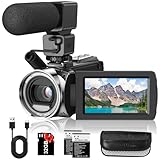
- 🎥【FHD 1080P/36MP Video Camera】Rawiemy video camera camcorder supports shooting FHD 1080p(30fps) video and 36MP images with 8 mega pixel CMOS image sensor. Support 2.7K(20fps)/4K(10fps) video. You can capture vibrant and extremely realistic images;Perfect for amateurs and beginners to take selfies and start filming.
- 🎥【Multifunction Camcorders】This camcorder supports loop /time-lapse /self-timer /continuous shooting /pause function /TV output /Smile capture /Anti-shaking /USB 2.0 ect.use the time-lapse feature to capture stuff like plants growing super slowly or the sun rising and setting. The pause feature lets you hit pause when you need to switch scenes, then resume recording without starting over. Super convenient.
- 🎥【Compact Camcorder】This video recorder camera features a 3.0-inch 270° flip screen, 18x digital zoom, 2 rechargeable batteries, 32GB SD card, and adjustable wrist strap. It's compact, lightweight, and made with premium materials—ideal for travel, vacations, camping, and family events. Super easy to carry around.
- 🎥【External Microphone & Recording While Charging】This video cameras for filming has built-in and external microphone. The external microphone enhances sound recording volume and reduces noise.It comes with 2 rechargeable batteries—each lasts 60-90 minutes when fully charged.and it supports recording while charging.(please format the SD card before using)
- 🎥【Webcam Function 】The video camera for YouTube can be used as a webcam for YouTube /Skype /TikTok /Facebook live streaming and make video calls with your family or friends; you can connect this digital video camera to TV via usb cable to playback HD photos or videos.
- Use original photos and manual design when exact source fidelity or a highly controlled visual style matters most. Capturing multiple photos during the shoot gives you authentic material to work with.
- Use AI suggestions or generation when you want to explore layouts, colors, or concepts faster. Treat each output as a draft to inspect and revise, not a performance guarantee.
- Combine them when you want AI’s speed without losing authenticity: start with real images from the shoot, then use AI to explore composition or styling while preserving the video’s actual subject.
Ask whether each option represents the video, fits the channel, and gives you a meaningful test. An external paid tool is not necessary just because AI is involved; YouTube’s native feature may be sufficient for creators who have access and whose needs match its long-form workflow.
What to check in YouTube Analytics
YouTube Analytics reports registered thumbnail impressions, impressions click-through rate, views from thumbnail impressions, and watch time from thumbnail impressions. These metrics are related but not interchangeable:
- Impressions count registered occasions when a thumbnail was shown on YouTube. They do not capture every possible discovery path or exposure.
- Impressions click-through rate shows how often viewers watched after seeing a registered impression. It helps assess how well the packaging prompted a view among those impressions.
- Views from impressions and watch time from impressions show the views and viewing time originating from those registered thumbnail impressions.
YouTube recommends looking at CTR on Home and Suggested in the first 24 hours for general audiences, focusing on videos with above-average impressions. For subscribers, it recommends checking Subscriptions Feed CTR during the first 24 hours. These audience surfaces and time windows give CTR more context than treating one channel-wide figure as a verdict. YouTube’s impressions and CTR guidance defines the metrics.
What newer thumbnail research does—and does not—show
Recent academic work points toward more personalized, video-aware generation, but it should not be confused with proof of channel growth. A paper submitted to arXiv on July 14, 2026, proposes a two-stage approach: retrieve visual anchors from a video based on viewer preferences, then generate a controllable thumbnail. Its authors report strong results against evaluated baselines on two public datasets and improved click preference in a user study. Those findings support research into personalization and source-video fidelity; they do not establish that a commercial tool will raise your CTR or views. The paper’s abstract describes its method and evaluation.
Quick Recap
Product prices and availability are accurate as of the date/time indicated and are subject to change. Any price and availability information displayed on Amazon at the time of purchase will apply.

