
Free tools Windows power users keep installed
One-click scans. No signup required.
iTechGuides is reader-supported. When you buy through links on our site, we may earn an affiliate commission. As an Amazon Associate I earn from qualifying purchases. Learn more
Google Wallet launched in Pakistan on March 11, 2025, so its launch is no longer pending. Eligible users can add supported cards and passes, use contactless payments where accepted, and pay online or in apps at participating merchants. Which features work for you depends on your card, phone and the merchant.
Google Pay and Google Wallet: what is available in Pakistan?
Google’s release notes say Google Wallet launched in Pakistan on March 11, 2025. The release-note entry, published April 15, 2025, says users can add cards and passes and pay with the Google Pay checkout button. Google Wallet release notes
Google Wallet is the app for storing supported payment cards and digital passes. Google Pay is also the name used for payment at participating online and in-app checkouts. Google lists Pakistan among the countries where Google Pay can be used online or in apps, but that does not mean every merchant offers it. Google Pay availability for online and in-app payments
What you need for contactless payments in stores
For contactless payment with Google Wallet, Google requires an Android phone with Near Field Communication (NFC) and a card that the issuer allows you to use. The shop must also accept contactless payments. Eligibility is card-specific, even when the bank and card network appear on Google’s supported list. Google Wallet payment methods in Pakistan
#1 Best Overall

- ✅ NO MONTHLY FEES, UNLIMITED TAPS: One-time purchase. Unlike review cards that charge per card every month, TapFive includes unlimited taps and scans on every card, with no subscription.
- 🌟 TAP OR SCAN TO REVIEW: Customers tap their phone on the card or scan the printed QR code, and your review page compatible with Google Reviews and Google Maps opens in seconds. No app and no account needed on the customer side.
- ♾️ REUSABLE SMART NFC CARDS: Durable PVC cards with an NFC chip and a printed QR code backup. Change the review link on any card whenever you need, from the included TapFive account.
- 📲 WORKS ON ALL MODERN PHONES: The NFC tap works on current smartphones, and the QR code covers phones without NFC. No app download and no setup for the customer.
- 🎯 EASY SETUP: Each card takes under 2 minutes to set up. Instructions are included and customer support is available to help. See the taps on every card in the included TapFive account.
- Phone: An Android phone with NFC.
- Card: A supported card that its issuing bank permits for Wallet.
- Merchant: A point-of-sale terminal that accepts the relevant contactless payment.
Which banks and cards does Google list?
Google’s Pakistan support page lists the following participating issuers and card types. The list can change, and a listed card type is not a guarantee that every individual card will work. Check the live support page and confirm your specific card with its issuer before relying on it.
| Issuer | Card types listed by Google |
|---|---|
| Allied Bank Limited | Visa debit |
| Askari Bank | Visa debit |
| Bank Alfalah | Visa and Mastercard credit and debit |
| Easypaisa Digital Bank | Visa debit |
| Faysal Bank Limited | Mastercard credit and debit |
| Habib Bank Limited | Visa and Mastercard credit and debit |
| Habib Metropolitan Bank Limited | Visa debit |
| JazzCash | Mastercard debit |
| JS Bank (Zindigi) | Visa debit |
| Meezan Bank Limited | Visa and Mastercard debit |
| The Bank of Punjab | Mastercard credit |
| United Bank Limited | Visa debit; Mastercard prepaid and debit |
Google says issuers may restrict individual cards. If your bank or card is not listed, or Wallet will not set it up, contact the issuer using the number on your card. Google’s Pakistan card and device requirements
Rank #2

- ACTIVATION REQUIRED - SCAN THE QR CODE IN THE BOX: This reader only accepts payments after it is activated on a Nayax account. Scan the QR code on the yellow card inside the box and submit your email and device serial number. We register the reader with Nayax for you.
- HOW LONG ACTIVATION TAKES: Already a Nayax customer? We transfer the reader to your existing account. New to Nayax? You will receive a Nayax application (business details and bank account for weekly payouts). Nayax bank approval takes about 7 business days. The reader stays inactive until then - this is normal, not a defect.
- NAYAX SERVICE FEES: Nayax bills its monthly service and card-processing fees directly to you after activation. These fees are not included in this purchase.
- MDB VERSION - CHECK YOUR MACHINE: Includes an MDB cable for machines with an MDB port, such as most modern vending, snack and drink machines and many claw, arcade and laundry machines. For coin-pulse machines without an MDB port, choose the Pulse version.
- FEATURES: Accepts EMV chip, contactless/NFC and magstripe cards plus Apple Pay, Google Pay and Samsung Pay. Built-in 4G LTE (no Wi-Fi needed), 2.4 inch color touchscreen, real-time sales and telemetry in the Nayax app, loyalty and discount tools.
How to add a card and check whether it works
- Check that your Android phone has NFC and that your bank and card type appear on Google’s Pakistan payment-method list.
- Open Google Wallet and follow the prompts to add your card. Your issuer may require verification or may decline a particular card.
- If setup fails, contact the card issuer using the phone number on the card; the bank determines whether that specific card is eligible.
- At a store, look for contactless payment acceptance. For online or in-app purchases, use Google Pay only where the merchant presents it as a checkout option.
Google’s contactless requirements concern Android phones with NFC. Smartwatch payment availability follows separate country and region requirements, so phone eligibility does not establish that a watch can be used.
PC Slower Than It Used to Be?
A free scan shows the junk files, broken settings and background clutter dragging Windows down - then fixes them in one click.Free scan · Windows 10 & 11Outdated Drivers Are Slowing You Down
One free scan finds every outdated or missing driver and matches the right update for your exact hardware.Free scan · exact hardware matchWhat the launch announcements do—and do not—tell you
Visa’s March 13, 2025 announcement described an early rollout stage: eligible Visa cards from HBL, Bank Alfalah, UBL and Meezan could be added then, with other issuers described as coming soon. That dated snapshot is not the current issuer list; use Google’s live Pakistan support page for present card eligibility. Visa’s March 2025 launch announcement
Rank #3

- Compact Footprint: Measures 4.7 x 4.7 inches, allowing for seamless placement on checkout counters, front desks, and service tables without taking up excess workspace.
- Durable Construction: Made from sturdy acrylic materials designed for long-term daily use in high-traffic commercial environments.
- Dual Connection Options: Equipped with an integrated NFC chip for tap capability alongside a scannable QR code for fast smartphone camera reading.
- ENGAGE YOUR CUSTOMERS: Strengthen relationships by showing customers their opinions are valued and appreciated.
Visa also said that digital transactions represented 84 per cent of total retail payments processed by banks and electronic money institutions in 2024. That figure describes those institutions’ processed retail payments; it is not a measure of all consumer spending. The announcement is useful as context for the launch, not as evidence that every merchant accepts Google Pay. Visa announcement and statistic
Quick Recap
Best Value
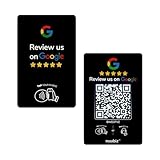
- Dual Tap & Scan Access: Share your business page instantly through both NFC and QR code entry. Works as a Google Review Tap Card, Google Review QR Code Sign, or NFC Google Review Card — customers can tap or scan to open your page within seconds
- No App, No Subscription, Visitor Analytics: No apps or hidden fees required. Activate once, use forever. Includes basic visitor statistics so you can view engagement growth at a glance
- Easy Setup & Real-Time Updates: Set up in minutes—simply enter your link to activate. You can edit or update your page anytime, keeping your Google review card current and relevant
- Compact & Portable Design: Made from premium PVC with a standard business card size. Lightweight and easy to carry—an excellent Google Review Stand alternative for counters, menus, or mobile use
- Versatile for All Business Scenes: Perfect for cafés, salons, hotels, and service desks. The QR code can also be photographed and printed on receipts, flyers, or packaging to extend your page access anywhere
Rank #4
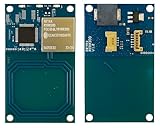
- Apple Wallet VAS & Google SmartTap pass Certification
- Apple ECP V1.0 compliance
- Supports Near Field Communication (NFC) Standards NFCIP-1 (ISO/IEC 18092) Active P2P.
- Completely Integrated Protocol Handling for ISO15693, ISO14443A, ISO14443B and FeliCa
- Firmware upgrade via UART Interface.
Product prices and availability are accurate as of the date/time indicated and are subject to change. Any price and availability information displayed on Amazon at the time of purchase will apply.

