
The Tool Desk
Outbyte PC Repair FREERepair Windows errors before they cause bigger problemsFix Now →Outbyte Driver Updater FREEFix the driver behind crashes, sound loss and screen glitchesFind Drivers →iTechGuides is reader-supported. When you buy through links on our site, we may earn an affiliate commission. As an Amazon Associate I earn from qualifying purchases. Learn more
Inbox by Gmail is no longer available. Google discontinued the separate email app at the end of March 2019 and directed users to Gmail. Gmail now has a different, beta feature called AI Inbox, which surfaces selected to-dos and topic summaries. The shared name does not mean the two products are the same.
What was Inbox by Gmail?
Inbox by Gmail was a separate Google email product launched in 2014—not simply a different view of the Gmail inbox. Google described it as an experimental place to try new ways of handling email and help people stay on top of messages.
In a September 2018 announcement, Gmail product manager Matthew Izatt said Inbox had been a place to experiment with snoozing messages and AI-powered features including Smart Reply, Nudges, and high-priority notifications. Those examples help explain the product’s role: it let Google explore email organization and assistance outside its main Gmail app.
Recommended Free Tools
Google announced that Inbox would end at the end of March 2019, saying it would focus solely on Gmail. Izatt said the company had added popular Inbox experiences to Gmail, which Google described at the time as helping more than a billion people. That was Google’s account of the transition; it does not establish that every Inbox feature moved to Gmail unchanged.
#1 Best Overall
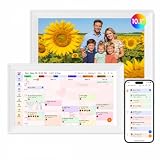
- Digital Calendar Wall Planner: Keep your family organized with the Westsee 10.1" touchscreen eletronic calendar — your family calendar for schedules, meals, and chores. Color-coded tasks let you see who's responsible at a glance. Empower kids to participate, stay connected, and enjoy a smoother family rhythm.
- No Subscription for Main Functions: Enjoy all core functions—schedules, tasks&rewards, meal plans, photo display and grocery list with our smart calendar free forever. Advanced tools tailored like AI Assitant may require a subscription for special needs on the future. Manage your family's day immediately and stay connected with the powerful Zical App.
- Effortless Calendar Sync: Integrates for Google/iCloud/Outlook, and more. Edit events on-screen or in the Zical App for instant cross-device updates. Navigate via Day, Week, Month, or Custom Views, with built-in smart sound reminder for birthdays and notes to track all key moments.
- Digital Picture Frame for Happy Moments: Store thousands of photos and videos with 32GB built-in memory. Keep your family connected by instantly sharing photos from anywhere. Turn your home into a gallery of togetherness, where your favorite memories are always on display for everyone to enjoy. Includes both a table stand and wall-mount display kit for versatile placement in the kitchen, office, entryway, or living room.
- Build Habits & Streamline Your Life: Empower your children through a fun task planner & rewards system to build lasting habits. Simplify meal by setting the weekly menu in advance. Enhance interaction by commenting on tasks and meals. Weather updates and automated sleep mode ensure the hub fits your routine for effortless, interactive management.
Is Inbox by Gmail still available?
No. Google’s September 2018 announcement set the end of service for the end of March 2019. Inbox by Gmail is a discontinued product, not a current Gmail mode or app that users can turn on.
What is Gmail’s AI Inbox?
AI Inbox is a distinct Gmail feature. Google Help describes it as a beta that organizes selected information into two sections:
Rank #2
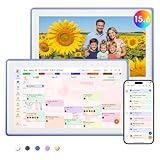
- Digital Calendar Wall Planner: Keep your family organized with the Westsee 15.6" touchscreen eletronic calendar — your family calendar for schedules, meals, and chores. Color-coded tasks let you see who's responsible at a glance. Empower kids to participate, stay connected, and enjoy a smoother family rhythm.
- No Subscription for Main Functions: Enjoy all core functions—schedules, tasks & rewards, meal plans, photo display and grocery list with our smart calendar free forever. Advanced tools, such as AI Assistant, may require a subscription for special needs in the future. Manage your family's day immediately and stay connected with the powerful Zical App.
- Effortless Calendar Sync: Integrates for Google/iCloud/Outlook, and more. Edit events on-screen or in the Zical App for instant cross-device updates. Navigate via Day, Week, Month, or Custom Views, with built-in smart sound reminder for birthdays and notes to track all key moments.
- Digital Picture Frame for Happy Moments: Store thousands of photos and videos with 32GB built-in memory. Keep your family connected by instantly sharing photos from anywhere. Turn your home into a gallery of togetherness, where your favorite memories are always on display for everyone to enjoy. Includes both a table stand and wall-mount display kit for versatile placement in the kitchen, office, entryway, or living room.
- Build Habits & Streamline Your Life: Empower your children through a fun task planner & rewards system to build lasting habits. Simplify meal by setting the weekly menu in advance. Enhance interaction by commenting on tasks and meals. Weather updates and automated sleep mode ensure the hub fits your routine for effortless, interactive management.
- Suggested to-dos: Incoming email items that may need attention, such as a bill with a due date.
- Topics to catch up on: Summaries of updates across projects and threads. Google gives upcoming travel, restaurant reservations, and purchase confirmations as examples.
Google’s January 8, 2026 announcement described AI Inbox as a personalized briefing. It also announced separate Gmail AI features: AI Overviews for email-thread summaries and natural-language questions about the inbox, as well as Help Me Write, Suggested Replies, and Proofread. These are newer Gmail capabilities, not a revival of the old Inbox app. Google said at the time that 3 billion users relied on Gmail; that figure is Google’s statement, not an independent count.
How do Inbox by Gmail and AI Inbox differ?
| Question | Inbox by Gmail | AI Inbox |
|---|---|---|
| What is it? | A separate Google email product launched in 2014. (Google, September 2018) | A beta feature within Gmail that surfaces selected to-dos and topic summaries. (Google Help; details may change as the beta evolves.) |
| Is it available? | No. Google ended the service at the end of March 2019. (Google, September 2018) | Google documents limited availability, eligibility, and language requirements. (Google Help) |
| What does it cover? | Google described it as a place to experiment with email experiences such as snoozing, Smart Reply, Nudges, and high-priority notifications. (Google, September 2018) | It surfaces selected to-dos and topics from Gmail messages, subject to documented coverage limits. (Google Help) |
Who can use AI Inbox, and what are its limits?
Google Help documents AI Inbox as a beta available only in the United States and in English. Eligibility depends on account type:
Rank #3

- Digital Calendar Wall Planner: Keep your family organized with the Westsee 15.6" touchscreen eletronic calendar — your family calendar for schedules, meals, and chores. Color-coded tasks let you see who's responsible at a glance. Empower kids to participate, stay connected, and enjoy a smoother family rhythm.
- No Subscription for Main Functions: Enjoy all core functions—schedules, tasks & rewards, meal plans, photo display and grocery list with our smart calendar free forever. Advanced tools, such as AI Assistant, may require a subscription for special needs in the future. Manage your family's day immediately and stay connected with the powerful Zical App.
- Effortless Calendar Sync: Integrates for Google/iCloud/Outlook, and more. Edit events on-screen or in the Zical App for instant cross-device updates. Navigate via Day, Week, Month, or Custom Views, with built-in smart sound reminder for birthdays and notes to track all key moments.
- Digital Picture Frame for Happy Moments: Store thousands of photos and videos with 32GB built-in memory. Keep your family connected by instantly sharing photos from anywhere. Turn your home into a gallery of togetherness, where your favorite memories are always on display for everyone to enjoy. Includes both a table stand and wall-mount display kit for versatile placement in the kitchen, office, entryway, or living room.
- Build Habits & Streamline Your Life: Empower your children through a fun task planner & rewards system to build lasting habits. Simplify meal by setting the weekly menu in advance. Enhance interaction by commenting on tasks and meals. Weather updates and automated sleep mode ensure the hub fits your routine for effortless, interactive management.
- Personal Google Account: An eligible Google AI plan is required.
- Work or school account: Google Workspace Enterprise Plus with Gemini Beta access is required, and an administrator controls access.
Gmail smart features must also be enabled. Google says an initial set of to-dos and topics may take up to seven days to appear.
The feature does not represent every message in an account. According to Google Help, AI Inbox surfaces messages from the Primary tab and filters out messages that are spam or archived, deleted, muted, or snoozed. It does not support attachments, delegated inboxes, or encrypted emails. On the web, users can show or hide AI Inbox in Gmail settings.
Rank #4

- ❤Seamless Scheduling: Smart digital calendar, effortlessly create and manage events, appointments, and reminders. with just a few clicks. Our 15.6" Full HD touchscreen intuitive interface makes scheduling a breeze, whether it’s a crucial meeting or a family gathering. The perfect gift for mom who keeps everyone organized.
- ❤Collaborate: Electronic calendar collaborate, share your calendar with friends, family, or colleagues and coordinate plans effortlessly. Perfect for team projects or family events—everyone stays on the same page! Receive timely notifications and reminders for all your important events. Stay ahead of your schedule and ensure you never forget another deadline or appointment again!
- ❤Accessible Easy: Access your smart calendar from any device, be it your smartphone, tablet, or computer. No matter where you are, your schedule is always within reach- ideal for busy women managing work and family on the go.digital calendar wall touch screen
- ❤Stay Organized: Digital smart calendar owning Color-coding functional, Color-code your events for quick visual reference. Separate work from personal commitments, making it easier than ever to manage your time effectively- a thoughtful gift for mother who balances everything. electronic calendar
- ❤Sync & Integrate: Smart calendar digital wall can seamlessly integrate with your favorite apps. Whether it’s your email, task manager, or project management tool, keep everything connected for a smooth workflow- gift for moms and grandparents.digital calendar wall
What does Google say about Gmail AI privacy?
In an April 7, 2026 post, Google said it does not train its foundational models on personal emails and that Gemini in Gmail processes information for a specific request rather than retaining it afterward. These are Google’s stated policies and product descriptions, not findings from an independent audit.
Quick Recap
Product prices and availability are accurate as of the date/time indicated and are subject to change. Any price and availability information displayed on Amazon at the time of purchase will apply.

