
iTechGuides is reader-supported. When you buy through links on our site, we may earn an affiliate commission. As an Amazon Associate I earn from qualifying purchases. Learn more
For free web protection on Windows 10, use Microsoft Defender SmartScreen in Edge, keep available updates installed, and leave Windows Firewall and anti-malware protections on. SmartScreen warns about known risky sites and downloads, but it is one layer—not a guarantee against every threat. Windows 10 support ended on October 14, 2025, so browser protection cannot replace missing operating-system security fixes.
What free protection does SmartScreen provide?
Microsoft Defender SmartScreen is a reputation-based warning system built into Windows and Microsoft Edge. It checks visited pages for suspicious behavior and compares them with records of reported phishing and malicious-software sites. It also checks downloaded files against reputation data. Microsoft describes it as an early-warning layer, not a complete security solution.
SmartScreen has two related roles: Edge can warn about unsafe websites and downloads, while Windows integration can check files that apps—including third-party browsers and email clients—try to download and run. That does not establish that every browser gets the same URL-level browsing protection as Edge. Microsoft Defender SmartScreen overview
Quick wins for a faster PC:
Clear out junk files and repair common Windows errorsFree Scan →Scan for outdated or missing drivers - takes under a minuteDriver Scan →Repair Windows errors before they cause bigger problemsFix Now →How to check SmartScreen in Edge
- Open Microsoft Edge and enter
edge://settings/privacyin the address bar. - Find the Services section and check that Microsoft Defender SmartScreen is enabled. Microsoft says it is on by default in Edge.
- If the setting is unavailable or controlled, the device may be managed through Group Policy or mobile device management; contact the organization that manages it rather than trying to override its policy.
For Edge-specific coverage and configuration details, see Microsoft Edge support for Microsoft Defender SmartScreen.
#1 Best Overall

- 【Windows Hello Biometric Compatibility】 Seamlessly integrates with Windows 10/11 Hello security framework, enabling password-free login through registered fingerprints. Provides enterprise-grade authentication compatible with most modern laptop and desktop computers.
- 【360-Degree Recognition Technology】 Advanced capacitive sensor captures fingerprint data from any orientation without requiring specific finger placement. Supports registration of up to 10 distinct fingerprint profiles for multi-user accessibility.
- 【Instant 0.05-Second Authentication】 Patented algorithm delivers rapid fingerprint verification in under 0.05 seconds, significantly faster than manual password entry. Enables near-instant system access while maintaining robust security protocols.
- 【Adaptive Learning Intelligence】 Self-learning technology continuously improves recognition accuracy with each use. The dynamic algorithm enhances scanning precision for consistent performance across different environmental conditions.
- 【Advanced Data Protection】 Encrypted fingerprint storage ensures biometric data remains securely localized on the device. Provides reliable protection against unauthorized access while eliminating password vulnerability risks.
What to do when a download warning appears
A warning about an unfamiliar file means SmartScreen has not established a reputation for it; it does not by itself prove the file is malicious. Pause before opening it. Confirm that you reached the expected publisher through a trusted route and that the download is the one you intended. Do not bypass a warning just because a file looks familiar: Microsoft notes that some warnings can be bypassed, but doing so without independent verification increases risk. Microsoft Edge SmartScreen guidance
Why Windows 10’s end of support matters
Windows 10 support ended on October 14, 2025. The PC continues to run, but standard software updates, security fixes, and technical support are no longer provided. SmartScreen and antivirus software do not repair operating-system vulnerabilities or restore those updates. Microsoft lists consumer Extended Security Updates (ESU) as an option for eligible devices through October 12, 2027; check current eligibility and enrollment requirements rather than assuming a device is covered. Windows 10 support has ended
Rank #2
![FIDO U2F Security Key, Thetis [Aluminum Folding Design] Universal Two Factor Authentication USB (Type A) for Extra Protection in Windows/Linux/Mac OS, Gmail, Facebook, Dropbox, SalesForce, GitHub](https://m.media-amazon.com/images/I/414cv-4SxrL._SL160_.jpg)
- Protect Online Account - Offer a strong factor authentication to your online account. Never lose your accounts through password theft, phishing, hacking or keylogging scams.
- Universal Compatibility - The Thetis U2F key can be used on any websites which support U2F protocol with the latest Chrome installed on your Windows, Mac OS or Linux. (Important Note: Not compatible with any email clients including Apple Mail, Mozilla Thunderbird or Microsoft Outlook)
- FIDO-U2f-Certified - Safety is our priority. Certified by world's largest Ecosystem for Standards-based, interoperable Authentication. Only support U2F protocol (No UAF or OTP). Provide low-cost and simple solution with high security.
- Extremly Durable - Designed with a 360° rotating metal cover that shields the USB connector when not in use. Also, crafted from a durable aluminum alloy to protect the Key from drops, bumps and scratches.
- Portable Design - Compact, ultra-portable design allows you to take your FIDO key anywhere you need it.
Microsoft says eligible Windows 10 version 22H2 PCs that meet Windows 11’s minimum hardware requirements can upgrade to Windows 11 for free. Eligibility depends on the specific PC, so check its hardware and Microsoft’s current upgrade guidance. The lifecycle page identifies the Windows 10 version and editions covered by the end-of-support announcement. Windows 10 reaching end of support
Keep the other built-in protections enabled
- Keep Windows Firewall and anti-malware protections enabled. Check Windows Security if you are unsure whether they are active.
- Use the browser’s pop-up blocker. Microsoft’s guidance says Edge’s pop-up blocker is on by default.
- Avoid running multiple third-party anti-malware products at the same time. Microsoft warns that they can affect performance or stability; installing another anti-malware product may also turn Microsoft Defender off.
- Install Windows and browser updates wherever they remain available. Updates for a browser do not replace Windows security fixes that ended with Windows 10 support.
Microsoft’s general guidance is available at Protect my PC from viruses.
Quick Recap
Rank #4
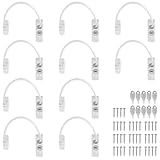
- Add Extra Security: Kamtop window restrictors are specifically designed for children 's safety. Effectively limit the distance a window can open to prevent children from falling out of windows. Can also discourage intrusions and keep air circulation
- 10 Pcs Childproof Window Locks: You will a package Including 10 pcs window cable locks, 10 pcs keys and 40 pcs screws. White look of window lock adds elegant style for your window. Ideal solution for home sefety improvement
- Premium Material: Made of premium stainless steel and ABS, lockable window restrictor locks are sturdy and rust-proof. Can withstand a lot of pressure, not easy to wear out. Ensure long-lasting performance and offer reliable child home safety
- Easy to Install: Our window safety locks can be locked and unlocked. Flexible use. When the cable is in place, there is the distance of 19cm that window can be opened. Once the cable is removed from one end with a key, the window can be fully opened
- Wide Applications: Suitable for most types of windows and small doors. Widely used for many kinds of materials like UPVC, wood, aluminum and metal. Ideal safety locks for home, public and commercial occasions
Rank #3

- STAY PROTECTED EVERYWHERE you go, at home, in a café, at the airport—everywhere—on ALL YOUR DEVICES, with cloud-based protection against viruses & other online threats
- Webroot PASSWORD MANAGER by Last Pass creates, encrypts, and saves all your passwords, so you only have to remember one.
- As the #1 TRUSTED PROVIDER OF THREAT INTELLIGENCE, you know you’re in good hands. Stay safe from viruses, ransomware, phishing, and more.
- Webroot SOFTWARE UPDATES ITSELF AUTOMATICALLY, so you always have the most current protection without lifting a finger—and updates happen in the background so they won’t slow you down.
- PREMIUM FEATURES: Encrypts & protects passwords and account information for all your devices so you can stay protected wherever you are.
Which protection layer answers which risk?
| Protection layer | What it does | What it does not do |
|---|---|---|
| Edge SmartScreen | Warns about reported risky sites and downloads, and files without established reputation. | Does not guarantee every site or file is safe, and an unfamiliar-file warning is not proof of malware. |
| Windows SmartScreen integration | Can check files apps attempt to download and run, including third-party browsers and email clients. | Does not establish identical website-warning coverage in every browser. |
| Antimalware and Firewall | Provide additional malware and network-protection layers when enabled. | Do not restore operating-system security updates after Windows 10 support ended. |
| Windows security updates | Address operating-system security issues while a device is covered by updates. | Standard Windows 10 updates ended October 14, 2025; eligible consumer ESU coverage is a separate program. |
Product prices and availability are accurate as of the date/time indicated and are subject to change. Any price and availability information displayed on Amazon at the time of purchase will apply.

