
Do these 3 things before closing this tab:
1Clear out junk files and repair common Windows errors2Fix the driver behind crashes, sound loss and screen glitches3Repair Windows errors before they cause bigger problemsiTechGuides is reader-supported. When you buy through links on our site, we may earn an affiliate commission. As an Amazon Associate I earn from qualifying purchases. Learn more
The most useful food-truck technology starts with the work it must do: take orders and payments reliably, get tickets to the kitchen, give customers accurate menu and pickup information, and support safe operations. A point-of-sale (POS) system is often the operational hub, but add-ons such as a kitchen display, website, or loyalty tools are worthwhile only when they solve a real problem in your truck’s workflow.
Start with the POS and payment workflow
A POS can bring order entry and payment acceptance together, and may also support sales reporting and inventory functions. Capabilities depend on the provider and how the system is set up. For example, Square’s food-truck POS page describes order and payment features, reporting, online ordering, and related services; that is a vendor description, not a comparative test.
Before choosing a system, map how orders move through your truck: who enters them, how staff handle a rush, which payment methods customers use, and what information you need after service. Compare systems against those needs rather than assuming that a longer feature list will improve operations.
- Order flow: Can staff enter your menu and modifiers quickly, and can the workflow handle the way customers order at your truck?
- Payment acceptance: Check which payment methods and hardware are supported.
- Connectivity: Find out what happens if the connection drops, and read the provider’s current offline-payment limitations. For Square’s offline payments, its food-truck information describes a 24-hour reconnection condition; expired, declined, or disputed offline payments can leave the operator responsible for the loss. Confirm current terms directly with the provider before relying on this feature.
- Reporting and inventory: Decide whether you need sales reports or inventory functions, and confirm that the specific plan and setup provide them.
- Integration and cost: Check whether the POS works with your kitchen tools and calculate total operating cost using your actual usage and the provider’s current terms.
When a portable POS terminal helps
A portable terminal can let staff take orders and payments away from a fixed counter or move through a service area. Square describes its Handheld as a mobile device for orders, payments, and inventory management. It is one product example, not evidence that it is the best choice or that it is available through a particular retailer.
#1 Best Overall

- With Square Terminal, you can ring up sales, accept payments, and print receipts, all with one device. Use it at the counter or ring up customers anywhere in your store.
- Accept all major credit and debit cards and pay one low rate with no hidden fees and no long-term contracts.
- Process chip cards in just two seconds.
- Get your money as soon as the next business day.
- Use it cordlessly with the built-in battery, designed to last all day.
Consider portability in the context of your setup: where staff need to stand, how the device will be handled during service, and whether it supports the payment and order workflow you selected. Compare the device’s documented capabilities and operating costs with your actual needs; do not assume a handheld is necessary if staff can serve customers efficiently from a fixed station.
Route orders to the kitchen
A kitchen display system (KDS) can show or route order tickets to the people preparing food. It may help when staff need to see incoming orders without relying on paper tickets, but it is an optional workflow tool, not a requirement for every truck. Decide whether it fits your kitchen layout, volume, and existing POS before adding another screen or system to manage.
Rank #2
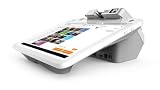
- A 12.5” HD merchant facing touchscreen with Android software
- A 4.3” customer facing display
- An EMV chip card, NFC contactless, and magstripe reader.
- PIN debit.
- Built-in cameras and a receipt printer
Give customers accurate menu and pickup information
A website or online ordering page can communicate the menu and pickup information. This can be useful when customers need to check what is available or how to collect an order. Keep the information aligned with how the truck actually operates so customers are not relying on outdated menu or pickup details.
Marketing software and loyalty features are additional options for communicating with returning customers. Their usefulness depends on whether you have a practical way to maintain customer information and use the tools; they are not core requirements for taking an order or running a kitchen. Square’s food-truck equipment guide identifies kitchen displays, websites, marketing software, and loyalty tools as possible categories, rather than essentials for every operator.
Rank #3

- Discover our versatile range of Customizable Products designed to meet your specific needs. Available in multiple models, each product offers unique features tailored for optimal performance. Enjoy personalized service and expert recommendations to help you find the perfect fit. For inquiries, reach out via WhatsApp at +86 13837159260. Your satisfaction is our priority!
- Efficient Energy Utilization - This Food Truck is engineered for energy conservation and self-sustainability, featuring a Solar-Assisted Power System and Water-Saving Faucets. Ideal for extending operating hours and expanding your Business Reach, it allows you to operate in remote areas without relying on utility power. Boost your business potential with this innovative solution!
- Affordable Food Truck Kitchen - This innovative Mobile Kitchen System provides aspiring Entrepreneurs with a cost-effective solution to start their Food Business. Enjoy the flexibility of a fully equipped kitchen without the burdens of high Rent and Renovation Expenses. Ideal for those looking to launch their Culinary Ventures on a budget.
- Customizable Brand Image - Users can customize the exterior of the food truck and add promotional displays to quickly attract attention in high-traffic areas, boosting brand awareness and sales.
- Low-Cost Startup Advantage - This entrepreneurial food truck kitchen system allows users to own a fully functional mobile kitchen with minimal investment, avoiding high store rental and renovation costs. It is particularly suitable for entrepreneurs with limited initial budgets.
Plan technology around power, fire, and food safety
Technology operates in the same vehicle and work environment as cooking equipment, so power needs and safe placement matter. The National Fire Protection Association’s food-truck safety fact sheet covers topics including permits, clearances, fire protection, and fuel sources. Treat it as safety orientation, not a universal permit checklist: requirements depend on the truck and operating location, and the relevant local fire authority can tell you which rules apply.
Food-safety rules also depend on jurisdiction. The U.S. Food and Drug Administration describes the Food Code as a model that state, local, tribal, and federal regulators use to develop or update retail food-safety rules. The FDA page reports the 2026 Food Code, but that does not mean every jurisdiction has adopted the same version or provisions. Check with the health department responsible for your operating area to confirm the rules that apply to your truck.
Rank #4
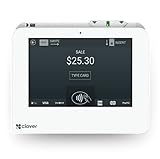
- SMALL BUT POWERFUL - Mini is small enough to fit into any space, but packs plenty of POS power to run your full house, front to back.
- PAYMENTS AND DEPOSITS MADE EASY - Swipe, dip, tap, or take cash—accept all the ways your customers like to pay. And get the funds in your bank account as fast as the next business day.
- FUTURE‑PROOF YOUR BUSINESS - Mini can be as minimal or full-featured as you want it to be. And it will always grow and scale with your business.
- STAY ON TOP OF YOUR NUMBERS - Monitor your sales, refunds, and best-selling items from any computer or mobile device.
- REQUIRES A MERCHANT PROCESSING ACCOUNT THROUGH POWERING POS - This Mini will not tether with a Station or Mini through a different Merchant Processor. US based business only. Call (855) 552-1278 with questions
Choose tools by fit, not by feature count
Use the same practical checks for each tool under consideration:
- Match it to the workflow: Identify the specific ordering, payment, kitchen, or customer-information problem it is meant to solve.
- Check the operating environment: Consider whether the hardware and setup suit your truck’s layout, mobility needs, and available power.
- Verify connectivity behavior: Read current documentation on internet requirements and any offline limitations before depending on a feature during service.
- Confirm integrations: Make sure the tool connects with the POS or other systems you already use, where that matters.
- Calculate the real cost: Review current provider terms and estimate cost for your own transaction volume and chosen features.
- Check local constraints: Confirm safety and food-safety requirements with the relevant local authorities for your truck and operating locations.
There is no evidence here to rank POS providers or identify a universal lowest-cost setup. The right combination is the one that supports your actual service flow and meets your operational and local requirements.
Quick Recap
Best Value
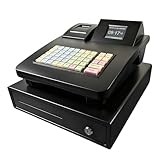
- Effortless Setup & Use: Designed for quick deployment in small businesses. Easy-to-program keys and a clear display help your staff process transactions faster and reduce training time.
- Integrated Receipt Printer: Features a high-speed electronic thermal printer for instant, professional receipts. No ink required, saving you ongoing maintenance costs for your retail or restaurant shop.
- Powerful Business Reporting: Easily track daily sales, inventory, and tax reports. Perfect for monitoring business performance and simplifying your accounting process at the end of the day.
- Secure & Multi-Functional: Equipped with a heavy-duty cash drawer and manual override keys. Multiple department settings allow you to categorize products effectively for better organization.
- Versatile for Any Business: A cost-effective alternative to complex POS systems. Ideal for small retail stores, cafes, food trucks, and "cajas registradoras para negocios pequeños.
Product prices and availability are accurate as of the date/time indicated and are subject to change. Any price and availability information displayed on Amazon at the time of purchase will apply.

