
Recommended Free Tools
iTechGuides is reader-supported. When you buy through links on our site, we may earn an affiliate commission. As an Amazon Associate I earn from qualifying purchases. Learn more
For responsive robot vision in Flutter, treat camera capture, frame conversion, inference, and result display as one pipeline. Choose a camera stream format and model runtime that work on your target device, keep inference from blocking the UI, and prevent slow inference from accumulating a queue of old frames. There is no universal best resolution, frame rate, or delegate: measure end-to-end performance on the hardware that will run the application.
How do I use a camera stream in Flutter?
Flutter’s official camera recipe covers camera discovery, initialization, preview, and image capture. The camera package listing also describes streaming image buffers to Dart, which provides frames for a live-vision pipeline. A still photo and a stream are different inputs: use the stream when the application needs to analyze ongoing motion, and capture a still when analysis can happen after a single image is taken.
Start by checking camera permission, selecting an available camera, and handling initialization and disposal in step with the app’s lifecycle. Follow the recipe for the package API available in your project; package behavior and platform support can change between versions.
Do these 3 things before closing this tab:
1Fix the driver behind crashes, sound loss and screen glitches2Repair Windows errors before they cause bigger problems3Scan for outdated or missing drivers - takes under a minuteChoose a resolution for the model and device
Pick an input size that satisfies the model without doing unnecessary work. A camera may deliver frames at a resolution different from the model’s expected input, so resizing and conversion belong in the pipeline. Flutter’s recipe notes that the CameraX-backed Android implementation can select a resolution based on device capability. Consequently, do not assume a requested resolution produces identical frames across Android devices; inspect the delivered image dimensions on the hardware you support.
#1 Best Overall

- 170 Degree Wide Angle HD Camera Module.
- 640x480 at 30pfs.
- Object Distance 11.8in/30cm infinity.
- Size: 1.2 x 1 x 1 inch / 3 x 2.5 x 2.5 cm. USB cable length 15.8in/400mm
- USB Camera Module for Hiwonder/LewanSoul Robot, MasterPi, ArmPi mini, TonyPi, ArmPi FPV, JetMax, SpiderPi, JetAuto, JetRover Starter Kit, JetArm Starter Kit, SO-ARM101, HD Camera Module for Robot Building DIY
Make orientation and preview geometry explicit
Camera buffers, model inputs, and the displayed preview may use different orientations or scaling. Apply the required rotation and resizing deliberately, then map model coordinates back to the displayed image. Otherwise, detections can be shifted or rotated even when inference itself is correct. Validate this mapping with representative camera positions and preview layouts.
How can I run object detection on a live camera feed?
A live detector needs both a camera plugin and an inference runtime. The tflite_flutter package listing describes TensorFlow Lite inference and options including Android NNAPI and GPU delegates, plus iOS Metal and Core ML delegate options. These are runtime capabilities to evaluate, not a guarantee that every delegate supports every model or is faster on every device. Confirm current package compatibility and benchmark the model-device combination you intend to ship.
Rank #2
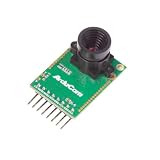
- Compatible with Arduino, Raspberry Pi Pico, MCU, Raspberry Pi, ARM, DSP, FPGA platforms
- 2 megapixels image sensor OV2640, build-in 650nm IR block filter, visible light only
- M12 mount or CS mount lens holder with changeable lens options
- I2C interface for the sensor configuration,SPI interface for camera commands and data stream
- Arducam team has solved the compatibility of our SPI camera with Raspberry Pi Pico. Please refer to the Doc page: bit.ly/4twnuxF
TensorFlow’s Flutter TFLite repository page describes that project as work in progress. Check its current maintenance and compatibility before choosing it as a production dependency.
Build the processing path
- Initialize capture. Request permission, select a camera, initialize it, and start the image stream using the official camera recipe.
- Inspect incoming frames. Record the actual dimensions, format, and orientation delivered on each target platform and device.
- Prepare model input. Convert the camera buffer’s color and layout as needed, rotate it if required, resize it to the model’s input dimensions, and apply the model’s required normalization.
- Run inference off the UI-critical path. Use a runtime and delegate supported by the target platform and model. Keep image preparation and inference from making the preview or controls unresponsive.
- Map and display results. Convert detections into preview coordinates, accounting for rotation, crop, and scale, then update the UI with the current result.
- Measure the complete cycle. Track capture-to-result age as well as preprocessing and inference duration; optimizing only model execution can miss the dominant delay.
Preprocessing is not incidental overhead. Color conversion, memory layout changes, resize, orientation handling, and coordinate mapping all affect correctness and responsiveness. Measure them separately so a slow conversion step is not mistaken for slow inference.
Rank #3

- Resolution 640x480 VGA at 30pfs. Object Distance 11.8in/30cm infinity.
- 130 Degree Wide Angle HD Camera Module
- Size: 1.2 x 1 x 0.6 inch / 30 x 25 x 14 mm. USB cable length 9.9 in / 250mm.
- USB Camera Module for Hiwonder/LewanSoul Robot, Turbopi, PuppyPi, VisionPi, GoGoPi.
- HD Camera Module for Robot Building DIY Webcam Board for Arduino Raspberry Pi Robotic
How do I stop camera inference from lagging behind?
If the camera supplies frames faster than the model can process them, a queue can grow and the application may display detections for scenes that have already changed. For many interactive robot-vision tasks, a fresh result is more useful than processing every frame eventually. Bound the work instead of allowing unlimited pending frames.
The third-party flutter_litert package documentation advises dropping frames that arrive while another frame is being processed. Treat this as implementation guidance from that package author, not as a universal performance result or Flutter-team recommendation. Depending on the task, another bounded strategy may be appropriate, but stale work should not silently accumulate.
Rank #4

- 3D Sync Stereo Camera Module: Dual Lens synchronization recording in color with crips 4MP HD 3840x1080 resolution and high speed 60fps.
- Distortion-free M12 mount dual lens, field of view 85 degree
- USB-C Pug In Camera: High Speed USB2.0 Interface,USB plug and play without extra driver needed.
- UVC compliant for use on Windows, Linux, Android, MacOS system
- Small outline, mini size 80*16.5mm for embedded application.
- Allow at most one frame to be processed at a time unless measurements justify a different design.
- When inference is busy, drop or throttle incoming frames rather than building an unbounded backlog.
- Count dropped frames and monitor result age; a high displayed frame rate does not guarantee current detections.
- Test under sustained camera delivery, not only during a short preview, to reveal backlog and thermal or workload effects relevant to the target device.
What should I measure on the target hardware?
There is no broadly applicable published figure that establishes a universal Flutter robot-vision frame rate or inference latency. Results depend on the camera, device, model, preprocessing, runtime, delegate, and application workload. Report the conditions alongside any measurements so another engineer can interpret them.
What’s actually slowing this PC down?
Pick the symptom - the matching free tool is one click away.
- Device model, operating system, build configuration, runtime version, and delegate used.
- Camera stream resolution, delivered frame rate, and buffer format.
- Preprocessing duration, inference duration, and total capture-to-result age.
- Frames dropped or throttled, and whether processing ever falls behind.
- Preview responsiveness and detection alignment during sustained operation.
The flutter_litert page reports package-author measurements for a particular preprocessing pipeline and hardware. Those measurements are specific to that setup and should not be generalized as expected performance for other devices or models.
Quick Recap
Best Value

- 1MP highdefinition lens, image picture is clearer, 50° field of view, wider field of view.
- Using highdefinition photosensitive chip OV9726, and clearer images.
- Wide range of applications, this product can be applied to various industry products.
- Adapt to a variety of systems, such as for WinXP/Win7/Win8/Win10/OS X/Linux/Android can be adapted and have strong compatibility.
- This module support OTG, standard UVC protocol, USB interface drive, plug and play.
Product prices and availability are accurate as of the date/time indicated and are subject to change. Any price and availability information displayed on Amazon at the time of purchase will apply.

