
Recommended Free Tools
Feather Wand is a plugin that adds an AI assistant to Apache JMeter; it does not replace JMeter or run performance tests on its own. The project documents two ways to use it: ordinary chat for questions and coding help, and an optional Agent Mode that can inspect and change a live test plan. Agent Mode is off by default, and its availability depends on the AI provider.
What Feather Wand does in JMeter
The project describes Feather Wand as an AI-powered assistant for Apache JMeter. Its documented features include multi-model chat, context-aware commands, file attachments, saved conversations, and streamed responses for supported providers. In the JSR223 editor, it can assist with refactoring scripts. An optional companion pet is also listed as a feature. These are capabilities described by the project, not independently measured improvements to test quality or performance.

Because Feather Wand works inside JMeter, it is best understood as an assistant for test-plan work—not a substitute for designing a workload, validating test data, interpreting results, or running JMeter itself. See the project repository and its README for the project’s feature and setup details.
Chat and Agent Mode are different
Ordinary chat
In chat, you ask the assistant for help and review its response. This suits questions, explanations, and code suggestions when you want to decide what to apply yourself.
Windows Errors? Fix Them Before They Spread
Repair common Windows errors and clear accumulated junk for a smoother, more stable PC - no reinstall needed.Free scan · no reinstallOutdated Drivers Are Slowing You Down
One free scan finds every outdated or missing driver and matches the right update for your exact hardware.Free scan · exact hardware match#1 Best Overall

- 【2-in-1 Wireless】 One OTTOCAST Mini Nova brings wireless freedom to both iPhone and Android. Turn factory wired CarPlay into Wireless CarPlay or wired Android Auto into Wireless Android Auto—no need for separate adapters. Enjoy navigation, music, calls, messages and more without plugging in your phone every drive.
- 【5s Auto Reconnect】 Pair once and Mini Nova remembers your phone. After the initial 15–20s setup, this wireless CarPlay adapter automatically reconnects in about 5 seconds when you start the car. No cable to plug in and no repeated pairing—just start your engine and get back to maps, music and calls.
- 【Tiny Size, Clean Setup】 Smaller than a typical USB flash drive at just 32.3 × 21 × 8 mm, the OTTOCAST Mini stays neatly by your USB port without bulky boxes or dangling cables. Its low-profile design keeps your center console clean while giving you the convenience of a carplay wireless adapter every day.
- 【Fast & Stable】 Bluetooth 5.4 handles fast pairing while dual-band 2.4GHz & 5GHz Wi-Fi supports smooth, responsive data transmission. The aluminum housing improves heat dissipation for greater stability on longer drives, helping your OTTOCAST wireless CarPlay adapter stay connected for navigation, music and calls.
- 【Keep OEM Controls】 Going wireless doesn't mean changing the way you drive. Keep using your vehicle's original touchscreen, steering-wheel controls, knobs and voice commands with compatible Apple CarPlay and Android Auto functions. Navigate, change music, answer calls or ask Siri while keeping familiar controls within reach.
Agent Mode
In Agent Mode, the assistant can inspect a live test plan, use tools to make changes, and verify the resulting state, according to the project’s documentation. The project says Agent Mode is off by default. Provider support also differs: its README identifies providers available for Agent Mode and says Ollama and AWS Bedrock currently fall back to plain chat. Do not assume that choosing any supported chat provider enables test-plan actions; check the current provider and mode notes in the README.
Requirements and installation options
The JMeter.AI product page specifies Apache JMeter 5.6.3 or later. It describes three installation routes. The best fit depends on how you manage JMeter; the page does not claim that one route performs better than another.
Rank #2

- Knows Who’s There: The on-device AI instantly determines whether a human or pet is present within the camera’s view.
- The Key is in the Detail: View every event in up to 2K clarity (1080P while using HomeKit) so you see exactly what is happening inside your home.
- Communicate From Your Camera: Speak in real-time to anyone who passes via the camera’s built-in two-way audio.
- Smart Integration: Connect your Indoor Cam to Apple HomeKi, the Google Assistant, or Amazon Alexa for complete control over your surveillance.(HomeKit available via update. When opening HomeKit, users must add the device in the eufy Security app and then complete the activation process.)
- Sight at Night: Advanced night vision allows you to keep an eye on any room, even in low light settings.
| Route | When it fits | What the page documents |
|---|---|---|
| Plugins Manager | Interactive setup in a JMeter installation where you use the manager interface. | Install through the JMeter Plugins Manager; the plugin directory lists the identifier feather-wand-jmeter-ai-agent. |
| Command-line tool | Command-driven or headless workflows, including environments where you manage JMeter without using its interface. | The product page lists the Plugins Manager command-line tool as an installation route. |
| Release JAR | Manual management of the JMeter installation or plugin files. | Copy a release JAR into JMeter’s lib/ext directory. |
After installation, the product page describes configuring an API key or using local Ollama, then restarting JMeter. Exact command syntax and release-specific requirements can change, so follow the current steps on JMeter.AI rather than relying on an old command copied from elsewhere. The plugin’s directory entry is listed at PerfAtlas’s JMeter plugin directory.
What to check before using it
- Confirm that your Apache JMeter version meets the product page’s stated minimum of 5.6.3.
- Choose an installation route that matches how the JMeter instance is maintained, and use the project’s current installation instructions.
- Configure the provider credentials or local Ollama option described by the product page, then restart JMeter.
- If you need the assistant to inspect or change a test plan, verify both that Agent Mode is enabled and that your chosen provider supports it.
- Review proposed changes and validate the resulting test plan and test results using your normal testing process; the project documentation does not establish a measured improvement in testing outcomes.
Release information changes
The project’s releases page lists Feather Wand v3.8.5 with a displayed date of 19 September. Its notes list optional Jev smart routing and failure triage as additions. Those are release-note claims; the notes do not provide an independent evaluation of their accuracy or performance. Check the releases page for the current version and details before installing, since plugin features and compatibility can change.
Quick wins for a faster PC:
Fix the driver behind crashes, sound loss and screen glitchesFind Drivers →Clear out junk files and repair common Windows errorsFree Scan →Quick Recap
Best Value
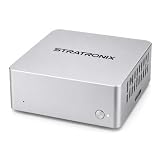
- YOUR DATA STAYS LOCAL Privacy-First AI. No Cloud. No Tracking. STRATRONIX STA-100 processes and stores everything on-device. Documents, meeting notes, customer records, and market research never leave your hardware. Built for professionals, freelancers,private ones and small businesses who refuse to surrender their data to Big Tech. Zero cloud telemetry, zero third-party data sharing. It is equiped with 32GB inner storage and our SD card can support up to 512GB SD card. One time purchase, no monthly rent cost. All datas belong to user only.
- Easy Configuration. Zero IT Team. Pre-installed with OpenClaw AI agent platform, XFCE Linux desktop, and ready-to-use office templates (documents, meetings, after-sales, market analysis). Plug in power, connect Wi-Fi, add your AI API key (DeepSeek, Gemini, Claude, or ChatGPT), and your private AI assistant is running in 8-10 minutes. In future, it is wihtout issue and users don't need to be headache on its continous forced upgrading. We use Linux server OS to assure its stability in long term. In hardware, we develop our product from the driven layer all by self. We have made it the easest OpenClaw for the most public in principle.
- 24/7 ALWAYS-ON ASSISTANT Your AI Co-Worker Never Sleeps. Silent operation, small size and remote access from phone or laptop anywhere via IMS. STA-100 autonomously drafts documents, takes meeting notes, manages schedules, tracks customer service tickets, and scrapes market data — even when you're traveling, sleeping, or off the clock. One device, one dedicated AI role, zero idle time.
- One STA-100 Per Role. Multiple = AI Workflow Team. Each device handles a single specialized role (Documents Bot / Meeting Bot / Sales Support Bot / Finance Bot / Market Intel Bot). Stack multiple STA-100 units on your LAN to build an AI workgroup that coordinates via OpenClaw. Native inter-agent handoffs create closed-loop automation. Perfect for solo founders, agencies, consultancies, small e-commerce, and SMBs scaling without headcount.
Rank #4

- Watch Your Favorite Video Apps Anywhere: Waiting to pick up the kids, waiting your friends, or taking a break on a road trip? Enjoy Netflix, YouTube, TikTok, and more on your factory screen, or play movies directly from a USB drive without needing an internet connection. (USB drive not included.)
- Upgrade Every Drive with Wireless CarPlay & Android Auto:Skip the cable every time you start your car. Instantly convert wired CarPlay or Android Auto to wireless with WiFi 6 and Bluetooth 5.4 for fast, stable connections—perfect for daily commuting, errands, and family road trips with automatic reconnection.
- Plug In Once, Ready in Seconds:No apps, drivers, or complicated setup. Simply connect Play2Video Ultra to your vehicle's USB port and start using it in as little as 10–15 seconds. Compatible with factory wired CarPlay vehicles. Not compatible with Tesla or BMW.
- Designed for Safer, Smarter Driving:Switch between video entertainment and Wireless CarPlay or Android Auto with one tap. The clean Android 12 interface and APP Hub make it easy to access navigation, music, and streaming while keeping everyday driving simple and organized.
- Compact Size. Powerful Performance:Smaller than a lipstick but built for smooth entertainment. A quad-core processor with 4GB RAM and 32GB storage delivers responsive app switching and stable video playback, making every commute or road trip more enjoyable.
Product prices and availability are accurate as of the date/time indicated and are subject to change. Any price and availability information displayed on Amazon at the time of purchase will apply.

