
Do these 3 things before closing this tab:
1Fix the driver behind crashes, sound loss and screen glitches2Clear out junk files and repair common Windows errors3Scan for outdated or missing drivers - takes under a minuteYou can live stream without a general-purpose PC by using a compatible camera with a standalone hardware encoder, a phone or console, or a cloud service for prerecorded video. These routes are not interchangeable: a live camera scene differs from prerecorded playout, and a stream that runs without a PC still needs suitable equipment or service, content rights, and monitoring.
Faceless describes whether you appear on camera; it does not make a channel effortless or guarantee monetization. YouTube requires channel verification, no live-streaming restriction in the preceding 90 days, and a streamer who is at least 16. First-time live-streaming activation can take up to 24 hours.
Ways to live stream without a PC
| Route | Best for | What to consider |
|---|---|---|
| Camera and standalone hardware encoder | A live view of a place, activity, or hands-on process | Check camera input compatibility, platform support, network stability, and whether the encoder is intended for continuous use. |
| Cloud playout service | Broadcasting prerecorded video without leaving a dedicated PC running | A cloud service can handle playout, but does not clear content rights or guarantee monetization. YouTube’s encoder guidance lists this as a route for 24/7 prerecorded-video streaming. |
| Phone, tablet, or console | Occasional or mobile broadcasts | YouTube documents mobile and console options. These avoid a PC but may not suit hands-off, continuous streaming. |
| Twitch encoder setup | Streaming to Twitch without a powerful desktop | Twitch requires an internet connection and encoding device or software. Choose stable settings suited to your connection and equipment. |
17 faceless live stream ideas
These are concepts to test, not proven paths to growth. Make the stream useful with original information, meaningful variation, commentary, or creative work. Check rights before broadcasting any footage, audio, text, or data.
- Window weather watch: Show rain, snow, fog, or changing daylight from a fixed camera, with location and time context.
- Bird feeder observation: Share a feeder view with species notes or a carefully maintained observation log.
- Aquarium or planted tank: Pair a live tank view with useful information about species, habitat, or maintenance.
- Garden growth cam: Show seasonal changes and add dated updates and plant identification.
- Workshop build cam: Show a hands-only making session and explain visible progress with occasional captions.
- Drawing desk overhead: Share an original illustration, calligraphy, or lettering session from above.
- Instrument practice room: Show hands and instrument while performing original or rights-cleared material.
- Original ambient soundscape: Combine creator-recorded sounds, such as rain or waves, with visuals you own or are licensed to use.
- Study timer room: Create a distinct work-and-rest structure with original visuals and clear session cues.
- Live map or data dashboard: Display public data with source labels, update times, and your interpretation. Check the provider’s reuse terms.
- Public-domain reading room: Check the rights for the specific text edition, translation, recording, and territory before reading it aloud; add thoughtful curation.
- Language vocabulary carousel: Teach with original examples, pronunciation, and meaningful variation rather than repetitive, automatically generated slides.
- Puzzle or chess position of the day: Rotate original puzzles and explain solutions on a schedule.
- Community question queue: Present submitted questions and scheduled text or voice answers. Moderate submissions and protect personal information.
- Local landmark conditions: Show a permitted camera view with context such as weather or public event status; consider privacy and local filming rules.
- Digital art process feed: Show an original generative-art process and explain its parameters as the visuals change.
- Curated archive channel: Schedule creator-owned or licensed short films, animations, or recordings with introductions and credits. Do not assume that material found online is cleared for broadcast.
Choose an idea that can deliver real value
Before choosing a format, consider whether it uses a live camera scene or prerecorded playout, what permissions it needs, and what original information or creative value viewers receive. Also think about how the stream can vary over time, whether it needs moderation or human monitoring, and what happens if the stream is interrupted or an archive is incomplete.
Free tools Windows power users keep installed
One-click scans. No signup required.
#1 Best Overall

- 【Upgrade Thick Clamping Base】We have upgraded the clamp base. It is thicker and more durable. The clamping base is easy to be secured in place without the need to go overboard. Please place one hand over the clamp mount to move the goose-neck arm around.
- 【Adjustable Height and View】Up to the max 76cm / 30 inches. With gooseneck, makess it easier and flexible to operate and access different best height you want. 360-degree rotating ball joint on webcam Mount supports different best viewing angles. Please place one hand over the clamp mount to adjust the arm around.Please ensure that the desk using is steady with No wobble and it is very important to to minimize annoying bouncing while shooting and protects your valuable device from tipping over.
- 【Universal Compatibility】 The camera mount stand fits all devices with a 1/4'' screw hole, like for Logitech Webcam Brio 4K, C925e, C922x, C922, C930e, C930, C920, C615, action cameras, Gopros, Projectors, DSLRs, and etc.
- 【Wide Application】The web cam stand with an adjustable clamp base can open maximum to 2.7"/7cm, allow you securely clamp on the desk, headboard, nightstand, end table, kitchen counter, sideboard, etc. Non-slip cushion protects your furniture from scratches. The clamp mount of the base is easy to be secured in place without the need to go overboard. If over-tightened, it may crack.
- This Webcam Stand Max load weight 0.7kg /1.5 lb; Not for heavy Camera and devices. The webcam will be more stable if you bend the tube as "S" or "Z"to clamp on the desk when using the webcam stand. If you have any problem, please contact us at any time.
YouTube’s monetization guidance says content should be original and authentic. Its July 15, 2025 clarification renamed “repetitious content” as “inauthentic content” and clarified that repetitive or mass-produced content can be ineligible. A loop or template alone is not a sound monetization plan; aim for material variation and creative, educational, or other value.
Setup checklist
- Choose a platform and route. Decide whether you need a live camera feed, cloud playout for prerecorded video, or a mobile or console broadcast.
- Check eligibility and activation. For YouTube, verify your channel, confirm there is no live-streaming restriction in the preceding 90 days, meet the minimum age requirement of 16, and allow up to 24 hours for first-time activation.
- Confirm compatibility and connection. Check the camera, encoder, or service against the platform’s requirements. Use stable settings suited to your network and equipment rather than pushing them to their limits.
- Clear your content rights. You are responsible for having the necessary rights for live and archived content, including music. Check permissions for each recording, edition, translation, image, clip, and data source you use.
- Add context and variation. Include useful information, original creative work, commentary, or scheduled interaction. For chat-based formats, plan moderation.
- Test and monitor the stream. Test the full path before relying on it unattended. Plan for interruptions and check the platform’s current archive behavior.
Rights, archives, and monetization
YouTube’s live-stream terms make the provider responsible for the rights needed for live and archived content, including music rights. Public-domain status or a stock-library listing should not be treated as a blanket clearance; check the specific material and applicable permissions.
Rank #2

- 【Longer, More Flexible Magic Arm】This 56cm/22" arm is much longer than typical gear magic arms, load capacity 600g/21oz. Each joint features double-ball clamps for independent angle adjustments, ideal accessory for overhead shooting, live streaming, vlog, stop motion video, and video conferencing.
- 【Anti-Deflection Design for Enhanced Stability】The magic arm securely connects to the super clamp via an anti-deflection 1/4”-20 interface, enhancing stability and security. It stays secure even if accidentally bumped. Perfect for content creators, vloggers, streamers, photographers, remote workers, and anyone needing a versatile mounting solution for professional or personal use.
- 【12 Anti-slip and Anti-scratch Designs】Silicone pads and rubber rings inside the clamp, on six balls, and at both ends of the magic arm. These enhancements increase friction for a tighter grip on equipment while protecting it from scratches
- 【Versatile Clamp】The crab clamp can open up to 63.5mm and features rotatable friction pads, opening 50 mm, suitable for clamping onto regular desktops as well as round tubes like tripods, stabilizer handles, and more.
- 【Compatible with Multiple Devices】Include 2 standard 1/4"-20 screws, a 1/4”-20 to 3/8”-16 adapter, a phone clamp compatible with phones ranging from 5.5-8.5cm in width, compatible with some microphones, suitable for vlog camera, webcams, lights, action cameras, monitor, and more.
YouTube says streams under 12 hours are automatically archived. Treat archive behavior as a practical constraint for a long-running channel, and check current platform guidance rather than assuming a continuous broadcast will always produce a complete replay.
Do not assume that a faceless or unattended format qualifies for monetization or earns a particular amount. Review the platform’s current eligibility rules and originality requirements, and build a stream around material viewers can learn from, use, or enjoy.
Rank #3

- 【Flexible Arm for Any Height/Angle】 Reach the ideal eye-level shot for TikTok video recording, YouTube Live streaming, or Instagram content creation. The extra-long, flexible gooseneck arm bends and holds securely, allowing you to easily adjust your camera's height and position over your monitor or desk for a more flattering and professional viewpoint.
- 【Strong Grip & Stable shots】 Forget wobbly and annoying camera shake. Our stand features a solid, weighted metal base and a thick, upgraded clamp that grips desks firmly without tipping. The anti-slip foam padding keeps it locked in place and protects your furniture from scratches, giving you a perfectly stable shot every time.
- 【360° Rotation for Every Viewing Angle】 Get the perfect framing from any angle. The smooth 360-degree rotating ball joint lets you tilt and pan your camera effortlessly. Whether you need to face your screen, show your workspace, or include others in the frame, you can achieve the exact viewing angle you want in seconds.
- 【1/4" Screw & Wide Compatibility】 Ready to use right out of the box. This stand compatible with popular webcams like Logitech Brio and C920 series, smartphones, GoPros, and even compact microphones like the Blue Yeti (using the included adapter). The standard 1/4" screw means it’s compatible with most devices you already own.
- 【Space-Saving Design 】 Perfect for your home office, streaming desk, or kitchen counter. The sturdy clamp securely attaches to surfaces up to 2.56 inches thick, and the entire stand folds down for easy storage and portability. It’s the ultimate all-in-one solution for Zoom meetings, live streaming on Twitch, online teaching, and TikTok videos, content creation essentials!
For Twitch, a camera and microphone are not required, according to its FAQ, but interaction is an important part of streaming. A faceless format can still use chat prompts, text, or scheduled interaction where appropriate.
Independent reader supportYour contribution helps us test, update, and keep practical guides available for everyone.FAQ
How can I live stream without a PC?
Use a compatible camera and standalone hardware encoder for a live scene, a cloud service for prerecorded playout, or a supported phone, tablet, or console method. Check the platform and device requirements for your chosen route.
Rank #4

- 【Flexible Adjust Height and All-Angle】The most innovative design of webcam stand is that bottom bracket rod can be flexibly adjusted 360-degree rotation and each rod can be 180-degree bending to any angle and position you need. Max Height 21.7 inches. It can achieve over 15.7" of horizontal reach and 360° rotation; 21.7" of vertical adjustment and 180° rotation. You can also show more of your DIY creativity!
- 【Super Strong Joints With Fixed Gears】Are you still using bendable snake arms and swing arms that will move and fall over time due to gravity? Our phone camera stand with fixed gears can solve all your worries! Durable reinforced aluminum alloy camera desk mount with outstanding bearing capacity, max load up to 3.5 lbs. Super safe and stable for your valuable devices.
- 【3-in-1 Wide Compatibility】1/4" adapter is compatible with Webcam Brio 4K, C925e, C922x, C922, C930e, C930, C920S, C920, C960, C615, Action Cameras, GoPro Hero 9/8/7/6/5, Projectors, DSLRs, ring light etc with standard 1/4" screw hole. Comes with an extra standard 1/4" to 5/8" screw adapter can fit for Blue Yeti, Blue Snowball, Yeti Nano etc microphones and shock mounts and more devices with a 5/8" screw hole. Also a universal phone holder is included for all 4"-6.5"(screen) smartphones.
- 【Stronger Anti-Scratching Clamp】The projector stand with an adjustable clamp base can open max to 2.2 inches. The clamp with sponge pad and we provide 2 extra rubber pads to protect your furniture from scratch, allowing you to securely clamp it on the desk, table, bed headboard, nightstand, kitchen counter etc. You can also carry the webcam holder stand anywhere since it is folded and extremely portable to carry.
- 【Easy to Use & Best Value】Easy installation within minutes, just several steps for assembly. We provide a standard user guide for you to make installation as easy & convenient as possible, if you have any problem, please feel free to contact us at anytime. Package includes: 1xAluminum Alloy Bracket, 1xDesk Clamp Mount, 1x3/8" Adapter, 1xMetal Ball Head, 1x1/4" to 5/8" Screw Adapter, 1xPhone Holder Mount, 2xRubber Pads, 1xUser Guide.
Can I run a 24/7 live stream without leaving my computer on?
A cloud playout service is one option for prerecorded video without a dedicated PC. It does not remove the need to clear content rights, meet platform rules, or monitor the stream.
Can I stream a camera directly without a computer?
A standalone hardware encoder can connect a compatible camera to a streaming platform without a general-purpose PC. Verify that the camera and encoder work together and are supported for your platform.
The Tool Desk
Outbyte PC Repair FREEClear out junk files and repair common Windows errorsFree Scan →Outbyte Driver Updater FREEFix the driver behind crashes, sound loss and screen glitchesFind Drivers →Best Value
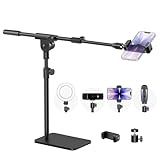
- Built with a robust 3.62 lb metal base (total stand weight: 5.07 lbs), this webcam stand eliminates the off-balance issues common with lightweight extendable arms. Its heavy-duty construction lowers the center of gravity, while the non-slip base absorbs vibration and prevents scratches—keeping your equipment rock-solid during use.
- Universal Compatibility: Equipped with a standard 1/4-inch universal thread, this overhead phone stand is compatible with a vast array of devices, including smartphones, Logitech webcams, LED lights, and even pico projectors. This webcam mount serves as an all-in-one mounting solution for content creators, streamers, and professionals who use multiple devices.
- Precision Angling: Featuring a fully adjustable universal ball head, the flexible phone holder allows for 180-degree rotation and multiple angle adjustments, helping you capture the perfect shot from any perspective. Whether shooting overhead videos or participating in video conferences, you can achieve the ideal viewing angle with ease.
- Versatile Application: From teachers and artists to chefs and streamers, this overhead phone stand works for live streaming, tutorials, baking, crafting, online classes, and video calls. This overhead phone stand is compatible with iPhone 16, Samsung Galaxy, Google Pixel, and more—with a 2.5–5.5" padded clamp that prevents scratches and holds your phone firmly, hands-free.
- Tool-Free Setup: Choose between two installations—use the boom arm for maximum flexibility, or remove it for a simple, compact setup. The detachable, tool-free design assembles in minutes without complex hardware, making the overhead camera mount portable and intuitive.
Does faceless or prerecorded streaming guarantee monetization?
No. YouTube expects monetized content to be original and authentic, and repetitive or mass-produced streams can be ineligible. Rights clearance is also your responsibility.
Will YouTube keep a complete archive of a continuous stream?
YouTube says streams under 12 hours are automatically archived. Do not assume an uninterrupted replay for longer broadcasts; check current YouTube guidance and plan around archive limits.
Quick Recap
Product prices and availability are accurate as of the date/time indicated and are subject to change. Any price and availability information displayed on Amazon at the time of purchase will apply.

