
The Tool Desk
Outbyte PC Repair FREERepair Windows errors before they cause bigger problemsFix Now →Outbyte Driver Updater FREEFix the driver behind crashes, sound loss and screen glitchesFind Drivers →iTechGuides is reader-supported. When you buy through links on our site, we may earn an affiliate commission. As an Amazon Associate I earn from qualifying purchases. Learn more
Some LG 34-inch monitors have built-in speakers, but the screen size alone does not tell you whether a particular model does. Check the full model number and the specification for your region. LG lists audio output rated 7 W × 2 for the UK versions of the 34WN650-W and 34WN750-B, while its US support listing describes the 34U530A-W as having built-in speakers. Other models may differ.
Do LG 34-inch monitors have built-in speakers?
It depends on the model. LG’s UK specifications list audio output rated 7 W × 2 for the 34WN650-W and 34WN750-B. LG’s US support listing identifies the 34U530A-W as a 34-inch monitor with built-in speakers; that listing does not state speaker wattage.
For the 34WN80C-B and 34WP500-B, the cited support listings do not establish whether speakers are built in. These examples are not a complete inventory of LG’s 34-inch range, and specifications can differ by region or product version. Look up the complete model number, including its suffix, on the relevant regional LG page or in the manual.
Quick wins for a faster PC:
Clear out junk files and repair common Windows errorsFree Scan →Fix the driver behind crashes, sound loss and screen glitchesFind Drivers →Repair Windows errors before they cause bigger problemsFix Now →What can you connect to an LG 34-inch monitor?
Documented connections on the 34WN650-W
LG’s UK specification for the 34WN650-W lists two HDMI inputs, one DisplayPort input and a headphone output. HDMI and DisplayPort are video-input options on this model; the headphone output provides a documented route for wired audio.
#1 Best Overall

- 21:9 UltraWide - The 21:9 UltraWide WQHD (3440 x 1440) monitor is great for work. The widescreen allows you to see everything you're working on, with multiple windows open, all on one screen.
- Color Gamut - Immerse yourself in a world of brilliant color from HDR10 that helps enhance picture quality and up to 99% sRGB color gamut expression to make games pop.
- OnScreen Control - You can customize the workspace by splitting the display or adjusting basic monitor options with just a few mouse clicks.
- Multi Task - OnScreen Control supports Picture-by-Picture (PbP) allowing you to configure your monitor to show content from two separate input sources. Play, watch, stream or work from multiple input sources at the same time, on one screen.
- Connections - Seamlessly connect to external devices or charge your laptop with the convenience of USB Type-C with up to 65W power delivery.
Check the exact model before choosing a cable
Ports are not the same across every LG 34-inch monitor. The 34WN80C-B product name identifies it as a USB-C monitor, but the cited support listing does not establish its full port specification or which USB-C functions it supports. For that model—and for the 34WP500-B—consult the exact regional product page or manual rather than assuming a particular connection is available.
Before buying a cable or adapter, confirm both ends of the connection: the monitor’s specified input and the source device’s output. A port name on one model should not be taken as evidence that another model has the same port or capabilities.
Rank #2

- Curved 21:9 UltraWide WQHD Display - The 21:9 UltraWide WQHD (3440×1440) display gives you room to work across multiple apps at once—reducing window switching and improving focus. The subtle 1800R curve follows your natural line of sight for comfortable long sessions, while the sleek design keeps your workspace open, clean, and distraction-free.
- Up to 99% sRGB Color Coverage - Up to 99% sRGB coverage and HDR10 support deliver balanced color and smooth tonal transitions across documents, media, and HDR content.
- Essential Connectivity - With DisplayPort, HDMI and headphone jack, it’s easy to connect essential gear and peripherals for a cleaner desk and smoother workflows.
- Smarter Control. Seamless Switching with LG Switch - LG Switch lets you adjust image preferences and brightness directly from your desktop and apply settings instantly with a hotkey. Split your screen into up to 11 layouts, launch video calls with a click, and keep your gaming and everyday setup fast, organized, and distraction-free.
- 120Hz Keeps Motion Super Smooth - With a 120Hz refresh rate and 5ms response time, this UltraWide keeps visuals smooth and clear. Perfect for video calls, streaming, and gaming.
Using external speakers
If your monitor has an audio output, it may let you connect wired external speakers, provided the monitor’s output and the speakers’ input are compatible. LG confirms a headphone output on the 34WN650-W, but that does not establish an audio output on every LG 34-inch monitor. Verify the ports listed for your exact model and the connection supported by the speakers before buying anything.
PC Slower Than It Used to Be?
A free scan shows the junk files, broken settings and background clutter dragging Windows down - then fixes them in one click.Free scan · Windows 10 & 11Outdated Drivers Are Slowing You Down
One free scan finds every outdated or missing driver and matches the right update for your exact hardware.Free scan · exact hardware matchModel examples at a glance
| Model and listing region | Speaker information established | Connection information established |
|---|---|---|
| 34WN650-W, UK | Audio output rated 7 W × 2 (LG specification) | Two HDMI inputs, one DisplayPort input and a headphone output (LG specification) |
| 34WN750-B, UK | Audio output rated 7 W × 2; MaxxAudio tuning (LG specification) | Detailed ports not stated in the cited specification |
| 34U530A-W, US | LG support listing describes built-in speakers; wattage not stated | Detailed connections not stated in the cited support listing |
| 34WN80C-B, US | Not established by the cited support listing | Product name identifies USB-C; full port details and functions not established by the cited support listing |
| 34WP500-B, US | Not established by the cited support listing | Detailed connections not established by the cited support listing |
The 7 W × 2 figures are model specifications, not a measure of perceived sound quality. The regional examples above should not be treated as interchangeable: confirm the exact SKU and current local specification when comparing models.
Quick Recap
Rank #4
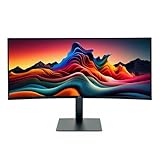
- IMMERSIVE ULTRAWIDE DISPLAY: 34-inch curved WQHD (3440 x 1440) screen delivers expansive viewing area and enhanced productivity for multitasking, gaming, and content creation
- HIGH PERFORMANCE: 120Hz refresh rate with 5ms response time ensures smooth, fluid motion and reduced blur for gaming and fast-paced content
- STUNNING VISUALS: HDR 10 support provides enhanced contrast, deeper blacks, and more vibrant colors for a superior viewing experience
- ERGONOMIC DESIGN: Adjustable stand allows for customizable height and tilt positioning to reduce neck strain and optimize viewing comfort during extended use
- VERSATILE CONNECTIVITY: Multiple ports including HDMI and Display Port enable easy connection to laptops, desktops, gaming consoles, and other devices
Rank #3

- Widescreen Workflows Made Effortless - Upgrade your desktop setup with a curved 34" 21:9 UltraWide QHD IPS display that lets you see more at once. Enjoy smooth 100Hz visuals, vibrant HDR color, and a sleek, narrow-bezel design—perfect for on-screen multitasking, creativity, and everyday comfort.
- Curved 21:9 UltraWide WQHD IPS Display - The 21:9 UltraWide WQHD (3440×1440) IPS display gives you room to work across multiple apps at once—reducing window switching and improving focus. The subtle 3800R curve follows your natural line of sight for comfortable long sessions, while the sleek design keeps your workspace open, clean, and distraction-free.
- Up to 99% sRGB Color Coverage - Up to 99% sRGB coverage and HDR10 support deliver balanced color and smooth tonal transitions across documents, media, and HDR content. The IPS screen keeps visuals consistent across wide viewing angles, helping maintain clarity and comfort during long work sessions.
- USB-C: All-in-One Connectivity - USB-C connectivity simplifies your setup by handling display, data, and up to 96W laptop charging through a single cable. With DisplayPort and HDMI also on board, it’s easy to connect laptops and peripherals for a cleaner desk and smoother workflows.
- Built-In Speakers with DepthSound - Built-in speakers with DepthSound deliver full, lush audio with enhanced bass, reducing the need for external speakers. Ideal for video calls, presentations, and media playback, they help keep desks cleaner while providing clear, room-filling sound for everyday work.
What to check before buying or connecting devices
- Find the complete monitor model number, including its suffix, and use the specification or manual for your region.
- Check whether that exact model lists built-in speakers or audio output; do not infer either from the 34-inch size.
- Match the monitor’s listed video input to an output on your computer or other source device.
- If you plan to use wired external speakers, confirm that the monitor has a suitable audio output and that the speakers accept a compatible connection.
Product prices and availability are accurate as of the date/time indicated and are subject to change. Any price and availability information displayed on Amazon at the time of purchase will apply.

