
What’s actually slowing this PC down?
Pick the symptom - the matching free tool is one click away.
Yes. Headless Chrome can embed a navigable PDF document outline (the feature readers usually call bookmarks). Request it with the Chrome DevTools Protocol (CDP) method Page.printToPDF and its experimental generateDocumentOutline: true parameter. Build a real h1/h2 heading hierarchy, wait until the page is ready, then verify the PDF in the viewer you support.
The simpler --headless --print-to-pdf command creates a PDF, but Chrome’s command-line reference does not state that it enables bookmarks. Use CDP when outline control matters.
What “bookmarks” means in a Headless Chrome PDF
In a PDF, bookmarks are entries in the document outline panel. They let a reader jump to sections and show a hierarchy. They are different from ordinary hyperlinks printed in the page content.
Chrome’s DevTools Protocol documents generateDocumentOutline on Page.printToPDF as experimental: “Whether or not to embed the document outline into the PDF.” Chromium’s implementation change from November 17, 2023 describes generating that outline from content headers. That makes semantic HTML headings the input you should design and test.
Recommended Free Tools
#1 Best Overall

- 🔎[READING FOCUS]: These Reading Strips can help students stop skipping words and lines - great for strengthening visual tracking skills and blocking distractions
- 📚[8 VIBRANT COLORS]: This bookmark set includes 8 guided reading strips in 8 distinct colors: red, blue, green, yellow, orange, pink, purple, and grey; Each color offers a soft tint that reduces visual stress and keeps readers focused
- 📓[VERSATILE USE]: Perfect for Book marks for reading, highlighted Reading strips, tools for kids, homework and study sessions; Whether at home, school, or on the go, these strips help improve focus and reading fluency
- 📖[SIZE & QUALITY]: Each strip measures 7.5 x 1.3 inches (19 x 3.2 cm), fits any book or paper; Made of durable, flexible, water-resistant PVC - bends without breaking, takes little space, easy to clean and built to last
- 💌[IDEAL FOR]: Beginning readers, students, teachers, parents, and anyone who struggles with line skipping or visual stress
Because the option is experimental, behavior can vary with the Chrome/Chromium version and with the client wrapper. Pin or otherwise control the browser version used in production, check the protocol schema for that version, and inspect a real output file.
Two ways to print a PDF
| Route | What it establishes | When to use it |
|---|---|---|
--headless --print-to-pdf |
Writes a PDF. The reviewed command-line documentation does not document a bookmark or outline switch. | Simple one-off capture when an outline is not a requirement. |
CDP Page.printToPDF |
Exposes PDF parameters, including experimental generateDocumentOutline. |
Automated jobs that need an explicit request for a document outline and other print controls. |
Chrome’s command-line reference also documents --no-pdf-header-footer and a --timeout maximum wait. A timeout is not a readiness signal: asynchronous content can still be missing when the limit is reached. Your automation should wait for the page’s own readiness condition before calling print.
Prepare HTML that can become a useful outline
Use a logical heading hierarchy
Give the document one meaningful h1, then use h2 for major sections and h3 for subsections. Do not use heading tags merely to obtain larger text; style headings with CSS instead. Chromium’s implementation record says the outline is generated from content headers, so malformed or decorative headings can produce an outline that is confusing even when the PDF opens correctly.
<main>
  <h1>Deployment guide</h1>
  <h2>Requirements</h2>
  <h2>Installation</h2>
    <h3>Linux</h3>
    <h3>Windows</h3>
  <h2>Operations</h2>
</main>
Make print content ready before capture
- Wait for the route or selector that proves the article has rendered.
- Wait for fonts and images that affect pagination if they are important to the printed result.
- Complete client-side data loading before invoking CDP.
- Use print CSS (
@media print) to remove navigation and set page breaks.
The available protocol and command-line references do not define every rule for skipped heading levels, duplicate headings, hidden headings, or malformed hierarchies. Treat those cases as version-specific behavior and inspect the generated outline.
Free tools Windows power users keep installed
One-click scans. No signup required.
Node.js example: CDP with Puppeteer
This complete example launches Chromium, loads a local HTML file or URL, waits for a selector, calls Page.printToPDF with the outline option, and writes the returned base64 data to disk. Install Puppeteer with npm install puppeteer; its bundled browser is convenient for a reproducible test, while production systems should pin the browser they deploy.
Rank #2

- What you will get: you will get 16 pieces guided reading strips, 8 colors, each color has 2 pieces; in transparent colorful color, convenient for reading and very practical
- 8 Different colors: 16 pieces come with eight colors, including blue, red, yellow, magenta, orange, green, purple, grey, just choose the color you like, various bright colors help you focused on reading
- Make reading easier:these Dyslexia Reading Strips are a simple and effective tool. Easily track print through transparent tinted window. Soft colors help your child stay focused while reading verbatim, reducing visual stress and making reading easier and more comfortable than ever before
- Size and High Quality: 7.5 x 2.8 inches/ 19 x 7 cm, extremely durable PVC material and well-made, and very flexible, so it does not take up much space
- Application: Highlight reading strips is suitable for beginners and children who have just learned to read, as well as people with reading difficulties, especially children and teachers. Different sizes can be applied to all kinds of books, newspapers and so on. It is more convenient to read and improves the reading ability
const fs = require('node:fs/promises');
const puppeteer = require('puppeteer');

(async () => {
  const browser = await puppeteer.launch({
    headless: true,
    args: ['--no-sandbox'] // Use only when your container policy requires it.
  });
  try {
    const page = await browser.newPage();
    await page.goto('https://example.com/article', {
      waitUntil: 'networkidle0',
      timeout: 90000
    });
    await page.waitForSelector('main h1', { timeout: 30000 });
    await page.evaluate(() => document.fonts && document.fonts.ready);

    const cdp = await page.target().createCDPSession();
    const result = await cdp.send('Page.printToPDF', {
      printBackground: true,
      preferCSSPageSize: true,
      displayHeaderFooter: false,
      generateDocumentOutline: true
    });
    await fs.writeFile('article.pdf', Buffer.from(result.data, 'base64'));
  } finally {
    await browser.close();
  }
})();
If your Puppeteer release rejects the parameter, that wrapper or the connected Chrome version may not expose the experimental field. Connect to a compatible Chrome build, update the client, or send the CDP command through another client that exposes the raw protocol. Confirm support by checking the Page domain protocol schema for the browser you deploy.
Direct CDP sequence for other languages
- Start Chrome or Chromium in headless mode with a remote-debugging endpoint.
- Connect an automation client to that endpoint.
- Navigate to the target page and wait for its content-ready condition.
- Send
Page.printToPDFwithgenerateDocumentOutline: trueand your print settings. - Decode the returned base64
datavalue and save it as a PDF. - Open the file in the target PDF viewer and verify outline entries and nesting.
The protocol method returns PDF bytes encoded in base64. A client that only offers a high-level “save as PDF” helper may omit experimental fields; verify its generated request or use a raw CDP session.
Command-line capture: useful, but not a bookmark guarantee
A basic capture looks like this:
google-chrome --headless --print-to-pdf=article.pdf https://example.com/articleTo suppress Chrome’s printed header and footer, add --no-pdf-header-footer:
google-chrome --headless --no-pdf-header-footer
  --print-to-pdf=article.pdf https://example.com/article
The documented --timeout option limits how long the command waits before capture. It does not replace an application-level readiness check, and the command-line material reviewed does not document a flag that requests a document outline. If bookmarks are required, prefer the CDP workflow.
Verification checklist
- Open the PDF in the reader used by your customers and show its bookmarks/outline pane.
- Confirm the expected
h1,h2, andh3entries appear. - Click several entries and ensure they land on the intended pages.
- Test a long document, headings near page breaks, and headings added after asynchronous rendering.
- Repeat after every Chrome upgrade; the option is experimental.
- Check both the visual PDF and its outline. A visually correct PDF can still have missing or poorly nested outline entries.
Troubleshooting
The PDF opens, but there are no bookmarks
Check that the request actually included generateDocumentOutline: true, that the client passed it to Page.printToPDF, and that the deployed Chrome version supports the field. Then inspect the HTML for real heading elements and verify the file in another PDF viewer.
Rank #3
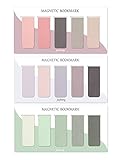
- ENOUGH QUANTITY: Three magnetic bookmarks (Misty, Ocean, Emerald). Five pieces for each style, 15 pieces in total. Various styles and colors are available for your choice. Enough quantity to meet your use and replacement needs.
- HIGH-QUALITY: Our magnetic bookmarks are made of paper and magnet materials. Advanced and elegant color, not easy to fade, durable, can be used for a long time.
- POWERFUL MAGNETISM: The bookmark's magnet is whole-sided, it is as big as paper. Powerful magnets don't fall easily from books.
- PERFECT GIFT: This is a perfect gift for your family or friends. You can use bookmarks to clip pages that you want to mark to continue reading next time; it can be used not only as a bookmark but also as a decoration for your book.
- WHAT YOU GET: 15 Pieces magnetic bookmarks, our worry-free 30-days and our 7*24 friendly customer service for peace of mind.
The outline is flat or incorrectly nested
Repair the heading structure: one document title in h1, sections in h2, and subsections in h3. Remove headings used only for visual styling. Because Chromium does not specify every malformed-hierarchy rule in the cited material, validate the exact content and browser version you ship.
Headings or data are missing from the PDF
The page was printed before client-side rendering completed. Wait for a specific selector, an application “ready” flag, network idle, and (where relevant) fonts or images. A generous command-line timeout alone cannot prove that the page is ready.
The Tool Desk
Outbyte Driver Updater FREEFix the driver behind crashes, sound loss and screen glitchesFind Drivers →Outbyte PC Repair FREERepair Windows errors before they cause bigger problemsFix Now →The request fails with an unknown parameter
Your browser or wrapper may predate the experimental option, or the wrapper may filter unknown fields. Check the browser’s protocol schema, upgrade or pin compatible versions, and use a raw CDP connection if necessary.
The PDF looks different from the screen
Print media styles, pagination, background settings, and paper-size preferences affect output. Add print CSS, set printBackground when needed, and use preferCSSPageSize only when your CSS defines the intended page size. Always inspect the final PDF, not just the browser tab.
Performance, reliability, and operational choices
Wait deliberately
Waiting for networkidle0 is useful for pages whose requests settle, but a page with analytics, polling, or long-lived connections may never become idle. In those cases, wait for a deterministic selector or application signal and use a bounded timeout.
Rank #4

- 【Automatic Stay-in-Place Design】These bookmarks automatically hold your place, ensuring you never lose track of where you left off. This is a very convenient and smart design, no worry about forgetting the pages you read.
- 【Practical and Chic】Not just a tool for marking pages, these book marks clips add a decorative touch to your reading materials, making them both practical and stylish.
- 【Slim and Secure Fit】The slim clip design ensures a secure hold without damaging your book's pages, making them perfect for any book size.
- 【High quality】Made from durable silicone, these book page holder are built to last. They are resistant to wear and tear, can be repeatedly inserted and used without damaging the book. Ensuring that they will stay with you through many books.
- 【Thoughtful Gift】Enhance your reading adventures with our page markers, whether for personal use or as a thoughtful gift, these bookmarks are sure to delight and inspire every reader!
Control browser versions
The outline field is experimental. Record the Chrome/Chromium version with each build, run a fixture document containing nested headings, and compare outline output after upgrades.
Keep capture failures observable
Log navigation errors, readiness timeouts, CDP errors, and the browser version. Preserve a failing HTML snapshot when privacy rules allow it. This separates page-readiness problems from protocol-support problems.
Choose the route by requirement
Use the command line for a straightforward PDF where bookmarks are not promised. Use CDP when your automation needs an explicit outline request, print parameters, and version-controlled verification.
Independent reader supportYour contribution helps us test, update, and keep practical guides available for everyone.Or skip the browser setup
For a one-call screenshot or PDF workflow, ScreenshotNeo provides a website screenshot API and MCP server. Its capture pipeline accepts cookie/consent banners and removes more than 60 known consent platforms, newsletter popups, and chat widgets before the shot; each step can be disabled. Bot checks/CAPTCHAs, blank pages, timeouts, failed loads, and cache hits are not billed, and response headers report the page verdict and billing status. Its MCP tools—take_screenshot, get_page_info, and capture_pdf—work with Claude, Cursor, and other MCP clients.
For PDF output, use the API’s PDF options for paper size, margins, landscape mode, and page ranges. See the ScreenshotNeo documentation for the current parameters.
curl -G "https://api.screenshotneo.com/v1/shot" -d access_key=YOUR_API_KEY --data-urlencode url=https://stripe.com -o shot.webpimport requests
r = requests.get("https://api.screenshotneo.com/v1/shot", params={"access_key": "YOUR_API_KEY", "url": "https://stripe.com"}, timeout=90)
open("shot.webp", "wb").write(r.content)const q = new URLSearchParams({ access_key: 'YOUR_API_KEY', url: 'https://stripe.com' });
const res = await fetch(`https://api.screenshotneo.com/v1/shot?${q}`);The Free plan includes 1,000 shots per month with no card. Paid plans start at $5 for 3,000 shots, and every feature is on every plan. Create a free ScreenshotNeo account.
Best Value

- On the back: A handy printed ruler in inches and centimeters
- Comes encased in a protective clear plastic sleeve
- Measures 2-1/2 by 7-1/8 inches high
- Warning: Choking hazard, small parts. Not for children under 3 years
Frequently Asked Questions
Are PDF bookmarks the same as clickable links?
No. Bookmarks are entries in the PDF document outline; links remain clickable elements in the page content.
Does every Puppeteer PDF helper support the outline option?
Not necessarily. The option is experimental and wrappers can expose different protocol fields. Confirm the wrapper and Chrome versions you deploy, or use a raw CDP session.
Can I guarantee identical outlines across Chrome releases?
No absolute guarantee is established. Pin versions, test representative heading hierarchies, and verify output after upgrades.
The Bottom Line
Headless Chrome can generate bookmarked PDFs, but the dependable path is a CDP Page.printToPDF call with generateDocumentOutline: true, semantic headings, an explicit readiness wait, and viewer-level verification.
Quick Recap
Product prices and availability are accurate as of the date/time indicated and are subject to change. Any price and availability information displayed on Amazon at the time of purchase will apply.

