
Quick wins for a faster PC:
Clear out junk files and repair common Windows errorsFree Scan →Scan for outdated or missing drivers - takes under a minuteDriver Scan →Possibly—but staying live around the clock is not a documented YouTube discovery boost. YouTube says recommendations are shaped by viewer interests, content performance, and satisfaction, and that it does not favor a particular video format. For an Indian regional-language channel, a continuous stream is best treated as an experiment: it may make the channel available on live discovery surfaces at more times, but it cannot guarantee impressions, viewers, or ranking gains.
What a 24/7 stream can—and cannot—do for discovery
An always-on stream can create more opportunities for someone to encounter your live content while browsing YouTube. That is different from YouTube automatically recommending it more because it has been running for a long time.
YouTube explains that its recommendations aim to match content to individual viewers and support long-term viewer satisfaction. Signals include what viewers watch, whether they choose a video and keep watching, and whether they respond positively. Its Search & discovery guidance says the system does not favor a particular format. Neither source identifies 24/7 uptime as a positive ranking signal. YouTube summarizes the principle this way: “Ultimately, YouTube’s recommendations are driven by what viewers watch and enjoy.” (YouTube’s Recommendation System; Search & discovery tips.)
The official guidance reviewed does not establish a special discovery effect for Indian regional-language channels running continuously, or a percentage lift in reach. Language alone does not establish how large or active a potential audience will be. YouTube also identifies topic interest, competition, and seasonality as factors that can affect impressions, so results can vary between subjects and over time (YouTube’s guidance on impressions and how they’re counted).
PC Slower Than It Used to Be?
A free scan shows the junk files, broken settings and background clutter dragging Windows down - then fixes them in one click.Free scan · Windows 10 & 11Outdated Drivers Are Slowing You Down
One free scan finds every outdated or missing driver and matches the right update for your exact hardware.Free scan · exact hardware match#1 Best Overall

- Authentic Spanish Layout for Natural spanish Typing – No more software hacks, sticker overlays, or relearning key positions. This spanish keyboard features the standard 105-key QWERTY layout (including dedicated umlaut keys: "ñ" y "ç") that spanish speakers know and trust. Type emails, documents, and messages in spanish with the muscle memory you've built. Perfect for native spanish speakers, expats, bilingual professionals, and spanish language learners who need an authentic typing experience.
- Laser-Etched Keycaps That Never Fade – Unlike cheap silk-screened or sticker letters that wear off after months of heavy use, our keycaps feature professional-grade laser etching(not fading). The crisp white characters are burned deep into the keycap surface, resisting thousands of keystrokes and accidental spills. Ideal for high-traffic environments like call centers, shared offices, student dorms, and libraries where keyboards take a daily beating.
- Reliable Wired USB Connection – Zero Lag, Zero Battery Anxiety – Say goodbye to Bluetooth dropouts, pairing frustrations, and dead batteries in the middle of important work. This wired USB keyboard plugs directly into your PC, desktop, or laptop for instant responsiveness. Whether you're on a video conference call with spanish, typing a client report, you get consistent, lag-free performance. No pairing, no charging, no interruptions
- Full-Size 105 Keys with Numeric Keypad – Work Faster – This full keyboard design gives you everything: dedicated number pad for spreadsheet work (accounting, data entry, billing), complete F-key row for software shortcuts, and a standard arrow cluster. No learning curve, no missing keys. Designed for Windows PC users who need maximum productivity for office work, remote jobs, academic research, and ERP systems common in spanish business environments.
- SPECIALLY DESIGNED FOR LEARNING AND PROFESSIONAL DEVELOPMENT: The keyboard is an ideal learning tool for spanish language students, as well as a powerful assistant for cross-border e-commerce customer service, translation, and content creators. Choosing a professional spanish keyboard is an investment in smoother communication, more efficient productivity, and a more focused learning experience.Plug-and-play simplicity means no IT support needed. A meaningful gift for parents or grandparents who prefer typing in spanish
Where viewers may find live content
YouTube’s Live destination
Viewers can browse current and upcoming streams in YouTube’s Live destination. Scheduling a stream can also give subscribers an upcoming listing in their feeds, where they may opt to be notified. These are ways to be findable and give interested viewers a reminder—not promises of recommendations or a specific audience size (Create a YouTube live stream with an encoder; Schedule a live stream).
Vertical live and the Shorts live feed
Vertical live streams can appear in the mobile app’s Shorts live feed; horizontal live streams do not appear there. YouTube’s setup guidance also says scheduled streams and Premieres do not appear in that vertical live feed. If you want to test this discovery surface, format and scheduling choices matter. Compare the experience and audience response with your usual horizontal streams rather than assuming one format is universally better (Get started with vertical live streams; Create a YouTube live stream with an encoder).
Rank #2

- High-tech keyboard with a stylish design and custom layout of English language alpha-numeric keys
- Upgrade your typing skills and experience enhanced efficiency with the EZ Keyboard Wireless USB Keyboard
- Designed with the actual order of the English alphabet for easy and efficient typing
- Ideal for children learning the English language, newcomers to English, and anyone who prefers operating a keyboard in correct alphabetical order
- Built to last with a full-featured keyboard, including a 10-Key pad Comes with a small USB device that seamlessly complements any PC system
How to test whether continuous streaming helps your channel
Make the experiment about your intended audience and content, not just the number of hours the stream stays online. Decide what viewers should get from it—such as a clearly described music, devotional, cultural, or community program—and compare its performance with relevant content on your own channel.
- Set a baseline. Record results for comparable uploads or scheduled streams before testing continuous streaming. Note the subject, language, format, and period so you can interpret differences fairly.
- Keep the promise clear. Make the title, description, and stream content accurately communicate the language, subject, and experience. Tags play a minimal role in discovery unless a subject is commonly misspelled, according to YouTube; they are not a substitute for a clear offer to viewers (Add tags to your YouTube videos).
- Track the right outcomes. In YouTube Studio, review available live metrics such as concurrent viewers, views, stream duration, average view duration, watch time, and subscribers gained. Check traffic sources to see how viewers reached the stream. Consider chat activity as an additional audience-response signal (Understand your live stream metrics).
- Compare like with like. Look at periods with similar topics and seasonal conditions where possible. A change in views may reflect shifts in subject interest, competition, or seasonality—not necessarily the stream’s continuous schedule.
- Decide whether to continue. Consider discovery alongside retention, subscriber outcomes, production workload, and whether viewers have a reason to return. YouTube’s public guidance does not provide a formula that predicts how many additional discoveries a 24/7 stream will generate.
If you compare vertical and horizontal streams, look at their eligible discovery surfaces, device experience, traffic sources, retention, and production suitability. If you compare continuous streams with scheduled streams or ordinary uploads, assess impressions and traffic sources alongside watch time, concurrent audience, subscriber outcomes, and workload. There is no universally winning schedule established by YouTube’s guidance.
Free tools Windows power users keep installed
One-click scans. No signup required.
Rank #3

- Format: Book
- Instrument: Electronic Keyboard
- Category: Electronic Keyboard
- Contributors: By Morton Manus, Willard A. Palmer, and Thomas Palmer
- Pub Date: 11/1987
Setup choices: production quality, scheduling, and equipment
YouTube documents mobile, webcam, and encoder methods for going live. It recommends professional-grade hardware encoders for higher-production-value events and advises creators to monitor audio and video quality continuously. An encoder may suit a production with those needs, but it is not required for every creator and is not a documented way to improve recommendations (Ways to live stream; Stream live on YouTube).
Scheduling can create an upcoming stream listing and notification opportunity for subscribers, but neither scheduling nor metadata guarantees broader reach. Choose a setup that supports the viewing experience you want to provide; evaluate discovery through the analytics rather than treating a particular device or encoder as a growth lever.
Rank #4
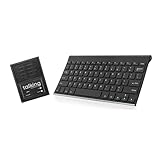
- ✅ 𝐖𝐢𝐫𝐞𝐥𝐞𝐬𝐬 𝐓𝐚𝐥𝐤𝐢𝐧𝐠 𝐊𝐞𝐲𝐛𝐨𝐚𝐫𝐝: Talking Keyboards wireless standard keyboard is perfect for adults and seniors who can type on a standard computer-sized keyboard. A great choice for laryngectomy, throat cancer, and post-operative patients.
- ✅ 𝐏𝐨𝐰𝐞𝐫𝐟𝐮𝐥 𝐒𝐩𝐞𝐞𝐜𝐡 𝐆𝐞𝐧𝐞𝐫𝐚𝐭𝐢𝐧𝐠 𝐃𝐞𝐯𝐢𝐜𝐞: Designed for vocally impaired and speech-limited persons of all ages. Talking Keyboards wireless standard keyboard works seamlessly without the need for a PC. It is a battery-powered, portable solution that speaks with an unlimited vocabulary.
- ✅ 𝐂𝐮𝐬𝐭𝐨𝐦𝐢𝐳𝐚𝐛𝐥𝐞 𝐏𝐡𝐫𝐚𝐬𝐞𝐬 𝐰𝐢𝐭𝐡 𝐐𝐮𝐢𝐜𝐤 𝐏𝐫𝐞𝐬𝐬: The wireless standard keyboard speaks 30 user-defined phrases with single key presses. Has the option to choose between male and female voices. Speech is instantly generated, making communication a breeze.
- ✅𝐔𝐬𝐞𝐫-𝐅𝐫𝐢𝐞𝐧𝐝𝐥𝐲 𝐚𝐧𝐝 𝐏𝐨𝐫𝐭𝐚𝐛𝐥𝐞: Our keyboard is ready to work straight out of the box. Lightweight and ultra-portable, it is designed for maximum convenience, ensuring you can communicate effortlessly, wherever and whenever.
- ✅𝐀𝐟𝐟𝐨𝐫𝐝𝐚𝐛𝐥𝐞 𝐀𝐀𝐂 𝐓𝐞𝐜𝐡𝐧𝐨𝐥𝐨𝐠𝐲: The wireless standard keyboard offers the most affordable keyboard augmentative communication (AAC) solution for children and adults. It focuses on simplicity and is highly compatible.
Or let it run in the cloud
If your experiment uses uploaded recordings rather than a live camera, StreamNeo can keep a YouTube channel live from the cloud: upload a recording or build a playlist, add your YouTube stream key once, and go live. Your computer and home connection do not have to stay on. It supports the uploaded quality up to 4K 60fps at one flat price per slot, can recover automatically if YouTube drops the stream, and gives the first day free with no card. The monthly option is $9.99 per month. StreamNeo plays uploaded videos; it does not stream from a camera, and it streams to YouTube only. See StreamNeo or start your free first day.
Quick Recap
Best Value

- [ERGONOMIC DESIGN] Experience unmatched comfort with our 78 Key Ultra Slim Language Keyboard, featuring ergonomic large buttons that bring you a quiet typing experience akin to modern laptops. This thoughtful design minimizes noise, allowing you to work for hours without discomfort or distraction.
- [PLUG AND PLAY] Say goodbye to installation hassle! Our wired USB keyboard connects swiftly via the universal USB 2.0 port and is compatible with all major operating systems. Simply plug it in and start typing; no additional drivers are required for immediate use!
- [DURABLE AND RELIABLE] Built to withstand the rigors of daily use, this keyboard is designed with exceptional durability, resisting small spills and lasting over 5,000,000 keystrokes. Its sturdy construction ensures it’s a reliable companion for both home and office environments.
- [COMPACT AND SPACE-SAVING] Enjoy a clutter-free workspace with our compact keyboard design that features 78 ultra-flat keys. Perfect for any desktop setup, this lightweight keyboard is easy to transport and fits seamlessly into your office or home environment, enhancing productivity without sacrificing space.
- [THOUGHTFUL GIFT OPTION] Delight your friends and family with a versatile and practical gift! Our Language Keyboard is perfect for both left and right-handed users, making it an ideal present for coworkers, students, or anyone who appreciates a comfortable and stylish typing experience.
Product prices and availability are accurate as of the date/time indicated and are subject to change. Any price and availability information displayed on Amazon at the time of purchase will apply.

