
PC Slower Than It Used to Be?
A free scan shows the junk files, broken settings and background clutter dragging Windows down - then fixes them in one click.Free scan · Windows 10 & 11Outdated Drivers Are Slowing You Down
One free scan finds every outdated or missing driver and matches the right update for your exact hardware.Free scan · exact hardware matchiTechGuides is reader-supported. When you buy through links on our site, we may earn an affiliate commission. As an Amazon Associate I earn from qualifying purchases. Learn more
There is no single best Kanban app for every team. Choose Trello for a simple personal or small-team board, Asana for structured cross-functional work, ClickUp for an all-in-one workspace, monday.com for highly visual customization, and Jira for software teams running Agile backlogs and sprints.
What Kanban software does
Kanban software represents work as cards arranged in columns such as “To do,” “Doing” and “Done.” Each card can hold an owner, due date, checklist, discussion and files. Compared with a physical board, an online board supports remote collaboration, automation and real-time progress tracking.
A physical board made with sticky notes remains a useful prototype. It lets a team test column names, policies and work-in-progress limits before committing to a subscription.
Best Kanban tools at a glance
| Tool | Best fit | Notable emphasis | Indicative paid entry | Free option |
|---|---|---|---|---|
| Trello | Individuals and small teams | Simple, intuitive boards with a low learning curve | About $5/user/month | Available |
| Asana | Enterprise and cross-functional teams | Board view plus structured ownership, automation and multiple project views | About $10.99/user/month | Available with plan limits |
| ClickUp | Teams wanting one broad work-management workspace | Many views and extensive feature coverage | About $7/user/month | Available |
| monday.com | Operations, marketing and mixed teams | Highly visual, customizable workflows | About $9/seat/month | Limited free tier |
| Jira | Software and Agile development teams | Backlogs, sprints and development-oriented workflows | About $7.91/user/month | Available for small teams |
Prices are 2026 editorial snapshots, not guarantees. Billing cadence, region, taxes, minimum seats and plan names can change, so check the vendor’s current pricing before subscribing.
Tool-by-tool recommendations
Trello: best simple Kanban board
Trello is the strongest starting point when the main requirement is an immediately understandable board. Its card-and-column model works well for personal planning, lightweight projects and small teams that do not need a formal backlog or complex reporting.
#1 Best Overall
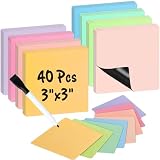
- 【Writable & Erasable】These writable and erasable magnetic sticky notes are designed for countless uses, write with a dry erase marker, wipe off, and reuse. Eco-friendly and reusable with no stains, they help reduce paper waste, save money, and offer a sustainable alternative to traditional notes. These magnet sheets are perfect for task lists, reminders, and planning, or ensuring deadlines are never missed.
- 【Magnetic Notes】These magnetic notes feature a full magnetic backing that securely sticks to magnetic - responsive metal and steel surfaces, such as refrigerators, office filing cabinets, lockers, whiteboards, fridge doors, and doors on cruise ships. These small dry erase labels are perfect for quick visual reminders, the full magnetic back ensures they won't fall off.
- 【Versatile】There are 40 notes (3"x 3") in 8 muted colors: mustard yellow, pear green, sage green, berry pink, dusty rose, blush pink, soft lavender and sky blue, plus 1 dry erase marker with an eraser cap. They're perfect for shopping lists, to-do lists, family chore reminders, kids' and mom's tasks, teacher plans, food menus, and quick notes. The white board accessories are also vibrant decor to hold photos, posters, postcards, doodles, light paper, printer paper, drawings, maps, and creative displays.
- 【Multi-Functional】The sticker set is perfect for tracking progress and expenses, organizing ideas, streamlining communication, summarizing lessons, creating templates, setting schedules and reminders, organizing tasks, planning deals, to-do lists, Scrum planning, meetings, brainstorming sessions, notes, planners, and temporary reminders on white boards. It's suitable for use at the desk, home, office, cubicles, classrooms, schools, colleges, dorm rooms, kitchens, and students' or kids' rooms.
- 【Notice】These magnetic sticky tags may not adhere to certain stainless steel or textile-covered refrigerators and whiteboards. However, if a regular magnet sticks to your fridge or whiteboard, these sticky strips will work just as well.
- Choose it when fast setup and adoption matter more than depth.
- Use the free tier to validate your workflow before paying.
- Expect the cited paid entry to be about $5 per user per month.
Trello becomes less compelling when a team needs extensive dependencies, detailed portfolio reporting or development-specific sprint management.
Asana: best for structured cross-functional work
Asana suits organizations coordinating marketing, operations, product and other departments. Its board view can sit alongside more structured project views, with task ownership and automation supporting repeatable processes.
Quick wins for a faster PC:
Fix the driver behind crashes, sound loss and screen glitchesFind Drivers →Clear out junk files and repair common Windows errorsFree Scan →- Choose it when several departments share work but need different ways to view the same project.
- Check free-plan limits carefully before inviting a large group.
- The cited paid entry is about $10.99 per user per month.
ClickUp: best all-in-one workspace
ClickUp is aimed at teams that want Kanban alongside a broad collection of work-management functions and views. It is a reasonable fit when replacing several separate tools is more important than keeping the interface minimal.
- Choose it when different groups need different views of shared work.
- Budget time for configuration so the many options do not create an inconsistent process.
- The cited paid entry is about $7 per user per month, and a free tier is available.
monday.com: best for visual workflow customization
monday.com is a strong candidate for operations, marketing and mixed teams that want to shape statuses, fields and layouts around their own process. Its visual presentation is useful when stakeholders need an at-a-glance view of progress.
Rank #2

- Value Pack: Includes 24 pcs 3x5 in dry erase sticky notes ,1 pen , 1 cleaning cloth; Ample sticky notes and cloths cover daily records, creative doodles, and more
- Sizes: 3x5 in dry erase labels sticker (approx. 12.7x7.6 cm / 0.65 mm thick), plus 10x10 in cloth dry erase (25x25 cm); Cut 3x5 whiteboard dry erase sticker into any shape—compact size for portability and storage
- Quality Craftsmanship: 3x5 in dry erase stickers feature a smooth white surface and premium adhesive; Unlike magnetic/paper labels, our dry erase sticky notes reusable securely to most clean, flat surfaces
- Easy to Use: Just peel off the back film and stick anywhere—no slipping; The dry erase labels surface allows repeated writing and erasing, making updates a breeze
- Versatile Uses: Whiteboard label stickers work on most smooth surfaces: fridges, mirrors, stainless steel, glass, etc; Good for daily schedules, to-do lists, labels, or capturing ideas—good for home, office, or school
- Choose it when tailoring the board to a nonstandard workflow is central.
- Confirm what the free tier includes; it is described as limited.
- The cited basic entry is about $9 per seat per month.
Jira: best for software development and Agile
Jira is the most natural choice for development teams that manage a product backlog and plan work in sprints. Its software-oriented workflow model is better aligned with engineering ceremonies than a general-purpose board.
- Choose it when backlog grooming, sprint planning and development tracking are core activities.
- Use the free tier for a small team, then reassess limits as the team grows.
- The cited paid entry is around $7.91 per user per month.
Other credible Kanban options
The right choice may be outside the five headline products:
- KanbanFlow: worth considering when explicit work-in-progress limits are the priority.
- Azure DevOps: a fit for teams deeply invested in Microsoft’s development ecosystem.
- Smartsheet: useful for spreadsheet-style planning and reporting.
- Wrike: aimed at professional-services and complex project environments.
- Zoho Sprints: an option for Agile teams in the Zoho ecosystem.
- Notion: combines documentation with a board for teams that want knowledge and tasks together.
- Linear: designed for fast software delivery with a focused product-development experience.
- Airtable: useful when a highly customizable database-like structure matters as much as the board.
How to compare Kanban tools
Compare capabilities against the workflow you actually operate, not against a universal ranking.
Setup and adoption
Count the time needed to create columns, statuses, templates, permissions and recurring automations. A smaller feature set often wins when most users need only cards, owners and due dates.
Rank #3

- Elevate your organizational game with Mr. Pen's 24-piece dry erase magnet set. Each square, measuring a substantial 4" x 4", gives you ample space to jot down notes, reminders, or doodles.
- Bursting with vibrancy, each magnet features a colorful margin in one of six delightful shades, bringing a splash of color to your refrigerator, whiteboard, or any other magnetic surface.
- These aren't just colorful; they are functional too! With a pristine white center, writing and erasing notes is a breeze, allowing you to reuse them time and time again.
- This magnet set serves as both a vibrant décor piece and a handy tool for homes, offices, and classrooms. Use them to leave messages, organize tasks, or create a visual schedule with a splash of color.
- Get creative with your displays, as these magnets can hold light paper items like photos or drawings, turning your fridge or whiteboard into a dynamic, colorful gallery.
Board and card flexibility
Check whether cards support the fields your process requires, whether one item can appear in different views, and whether teams can create templates without administrator help.
Work-in-progress controls
If limiting simultaneous work is part of your method, verify that the product provides native WIP limits or a practical equivalent. Do not assume every visual board enforces a limit simply because it displays columns.
Dependencies and planning
Projects with hand-offs need dependencies, milestones and ownership rules. Software teams may also require a dedicated backlog and sprint planning rather than a board alone.
Automation and integrations
List the events you want automated—such as assigning an owner, changing a status or notifying another system—and confirm that the required rules and integrations are included in your plan.
Rank #4

- Easel pad for work presentations, brainstorming sessions, classroom exercises, and more
- Includes 2 easel pads with 30 sheets of paper per pad (60 sheets total)
- Water-based microsphere adhesive on the back, unsuited to rough walls, easily to smooth surfaces like wood doors, glass, whiteboards,blackboards and metal
- Removes effortlessly from the pad, but remains sticky on surfaces; won't damage surfaces or leave an adhesive residue
- Bleed-through-resistant paper with no curling edges; for use with markers, pens, crayons, and other writing tools
Reporting and permissions
Managers may need cycle-time, throughput or portfolio reporting, while administrators may need granular roles, guest access and project-level permissions. Verify these separately; a polished board does not guarantee enterprise controls.
Mobile access, AI and plan limits
Test the mobile experience for the actions people perform away from a desk. Treat AI features as a secondary consideration until you know what data they use, which plans include them and whether they fit your organization’s policies. Free tiers commonly restrict users, storage, automation or reporting.
Recommended Free Tools
Which Kanban tool is best for common scenarios?
Best for a personal board or small team
Start with Trello. It minimizes setup and provides a free way to prove that a basic card-and-column workflow is enough. Move to ClickUp or Asana when you need substantially broader planning and reporting.
Best free Kanban board
Trello is the simplest free starting point. ClickUp offers broader functionality on a free tier, Jira is the better free fit for a small software team, and Asana can work when its free-plan limits match your group. monday.com’s free tier is more restricted.
Best Value

- 【Reusable Sticky Notes Set】:16 pcs 3"x3" reusable sticky notes in 8 different colors sticked on the foldclip holder, one dry erase markers and one greenzip pouch.
- 【Suitable for Any Smooth Surface】: With the pre-installed resticktec dots, it can be easily sticked on wall, blackboard, computer, desktop, refrigerator,mirrors, glass and etc.
- 【Eco-friendly and Save Paper】:Compared to traditional paper post it notes, our dry erase sticky notes use premium nano film that can be easily wiped off countless times, leaving no erasable residue,that are a great eco-friendly solution to the paper wasting in the throw-away world.
- 【Versatile Use】:Whether at home for to do lists or reminder , or at the office for creative brainstorming or classroom team projects, our dry erase sticky notes make you daily life more organized.
- 【Perfect Gift】: This set of sticky notes is an excellent gift for yourself, family, friends, students, teachers, as school or office supplies, back-to-school gifts and so on.
Best for cross-functional or enterprise work
Evaluate Asana first when multiple departments need shared ownership, structured projects and several views. ClickUp is an alternative when consolidating many work-management functions is the priority.
Best for software development
Choose Jira when backlogs and sprints are central. Also compare Linear and Azure DevOps if your team values a focused product-development workflow or Microsoft ecosystem integration.
The Tool Desk
Outbyte PC Repair FREERepair Windows errors before they cause bigger problemsFix Now →Outbyte Driver Updater FREEFix the driver behind crashes, sound loss and screen glitchesFind Drivers →Best for a highly customized visual process
Evaluate monday.com when operations or marketing needs custom statuses, fields and layouts. Airtable and ClickUp are alternatives when database-like flexibility or many additional views matter.
Quick Recap
A practical selection process
- Map the workflow: write down intake, active-work, review and completion states, plus any WIP rules.
- Identify required planning: decide whether you need only a board or also dependencies, a backlog, sprints, milestones and portfolio reporting.
- Separate must-haves from conveniences: include integrations, permissions, mobile actions and automation triggers that would otherwise create manual work.
- Pilot with real work: recreate one current project, invite representative users and measure whether updates remain timely and unambiguous.
- Calculate the growing cost: apply the vendor’s current per-user or per-seat price to every billable participant, then include taxes, minimums and paid add-ons.
- Document operating rules: define who owns intake, how cards enter each column, when WIP limits are exceeded and what “done” means.
When a physical Kanban board is the better first step
Use Kanban sticky notes or reusable workflow cards when a team is still discovering its process, works in one room, or wants a low-cost experiment. Sketch the columns, move representative tasks for a week and record where work stalls. Once remote access, history, automation or reporting becomes necessary, transfer the tested process to software rather than treating the physical accessories as a replacement for collaboration tools.
Product prices and availability are accurate as of the date/time indicated and are subject to change. Any price and availability information displayed on Amazon at the time of purchase will apply.

