
Choose based on the problem you need to solve—not the label on the device. Keep your computer’s built-in audio if it is quiet, loud enough for your headphones or speakers, and offers the connections you need. Choose a USB DAC or headphone amp for a specific playback limitation or a portable external setup; consider an internal sound card for desktop expansion, multichannel outputs, or particular processing features. For recording microphones or instruments, compare audio interfaces instead.
What’s the difference between a sound card and a USB DAC?
A DAC converts digital audio into an analog signal that headphones or speakers can play. A sound card is a broader category of computer-audio device: depending on the model, it may combine conversion with headphone amplification, audio inputs and outputs, and software processing. A USB DAC is an external device that can also function as a computer sound device, so the categories overlap. Compare the actual connections and features rather than relying on the product name. Cambridge Audio explains USB audio and DACs, while SoundGuys describes the overlapping roles of DACs, amplifiers, sound cards, and interfaces.
For example, ASUS describes its Xonar U7 MKII as a USB sound card and lists a DAC and headphone amplifier. It illustrates why “USB DAC” and “sound card” are not mutually exclusive labels; it is not a recommendation or a statement about current availability. See ASUS’s Xonar U7 MKII specifications.
Which option fits your setup?
Keep onboard audio for ordinary playback
For everyday listening and casual gaming, start with the audio built into your computer. If it is free of distracting noise, reaches a comfortable listening level, and has the ports you need, buying a separate device may not solve a real problem. SoundGuys notes that motherboard audio covers basic sound-card duties for many listeners. Read SoundGuys’ overview of sound cards.
Windows Errors? Fix Them Before They Spread
Repair common Windows errors and clear accumulated junk for a smoother, more stable PC - no reinstall needed.Free scan · no reinstallCrashes, No Sound, or Screen Glitches?
Random freezes, missing sound and display glitches usually trace back to one bad driver. Find and replace yours safely.Free scan · under a minute#1 Best Overall

- USB DAC Audio Converter:Computer or Game machine Audio Signal Through The USB Port .Covert Audio to Digital Optical, Coaxial or Analog Stereo RCA L/R,3.5mm Headphone Jack .Can Also Be Used As An External Sound Card
- USB to Optical Coaxial Converter:Support convert the Audio signal for the USB port to the digital optical spdif or coaxial.Work well with the sound bar and optical bluetooth headphone (5.1channel is incompatible,please set the audio output to PCM or LPCM)
- USB to Analog RCA L/R and 3.5mm headphone Converter:Support convert the Audio signal for the USB port to Analog RCA L/R and 3.5mm headphone.Support all the 3.5MM headphone and the2.0ch speaker
- Plug and Play:No driver required, plug-and-play for instant audio playing and compliant with all mainstream operating systems. no external power required.(Windows or ios system need to choose the right sound card
- Good Compatibility:Compatible with both Windows XP and Mac OS-X, For best playback in Windows. Compatible with PS3, PS4, PS5,which can be connected your headphones by USB DAC for playing games
Consider a USB DAC or headphone amp for a playback problem
If your current output has audible hiss or crackle, cannot reach a suitable volume with your headphones, or you need an external device for a laptop or portable setup, a USB DAC/headphone amp is one option. Check the actual headphone and output pairing: not every headphone needs an amplifier, and moving the hardware outside the computer does not guarantee that a particular noise problem will disappear. Confirm that your computer, console, or phone supports the device and whether it needs a vendor driver.
Choose an internal card for desktop-specific features
An internal PCIe sound card may suit a desktop user who needs its particular inputs or outputs, multichannel support, or processing. The computer needs a compatible slot, and the card’s software and drivers must work with your system. As a model-specific example—not a general standard—ASUS lists up to 7.1-channel output and a 150-ohm headphone amplifier for the Xonar AE. Those are manufacturer specifications, not independent performance results. See ASUS’s Xonar AE product page.
Rank #2

- Versatile Entry-Level: The Fosi Audio Q4 is an entry-level DAC and headphone amp, featuring USB, Optical, and Coaxial inputs, plus RCA and 3.5mm outputs. It drives headphones from 16Ω to 200Ω, enhances audio quality, and connects to speakers or amplifiers
- Plug-and-Play Convenience: Instant HiFi audio with no driver installation. Connect to TVs, computers, speaker systems, or DVD players. Compact design fits anywhere, offering ultimate audio freedom
- Bass and Treble Controls: Adjustable bass and treble knobs for fine-tuning sound. Natural feel with smooth volume adjustment. High-quality metal knobs for a premium experience. Optimize audio for any source
- Compact and High-Quality: Compact DAC converter with full metallic shell. Supports 24-bit/192kHz HD audio with low jitter. Includes output protection circuit for system safety
- Complete Accessories: Includes USB charging cable, optical cable, and PC-USB to Type-B cable. Ensures hassle-free setup and immediate use. Seamless connectivity for various devices. (Note: No microphone input.)
Use an audio interface for microphone or instrument recording
If you need to bring a microphone, guitar, or another analog source into the computer, look at audio interfaces with the right preamps, inputs, and number of simultaneous channels. Depending on the job, that could mean a microphone preamp and XLR input, or line and instrument inputs. A playback-focused DAC alone does not provide those recording connections. Audient explains audio-interface inputs and playback functions.
Check the headset’s connection before buying for gaming
A USB gaming headset with its own digital audio processing bypasses the PC’s sound card analog output path, so replacing that card may not fix a headset-specific issue. With an analog headset, the sound card’s output, controls, and processing may be relevant. Treat claims of a competitive advantage as product-specific rather than guaranteed. beyerdynamic discusses gaming audio and sound cards.
Rank #3

- The upgraded version of Fosi Audio Q4 adds microphone function, K5 Pro headphone DAC amp combo, next-generation audio converter with unrivaled internals, more outstanding performance, and richer audio details. Born for Gaming. K5 Pro stereo DAC headphone amplifier is perfect for your home gaming system, equivalent to an external sound card, suitable for PS5/Computers/PC/MAC/active speakers, etc
- K5 Pro USB DAC converts USB Type C/Optical/Coaxial signals to 3.5MM AUX and RCA signals with low distortion and great dynamic range. Unique design: 2-in-1 USB Type C interface charging port and audio input means K5 Pro is compatible with your phones(Note: Your audio source must be connected to the USB-A/C port.). RCA output can be connected to an amplifier or powered speakers on your desktop. 3.5 MM AUX and microphone interface can drive 16 Ohm to 300 Ohm headphones
- K5 Pro headphone DAC adopts the Texas Instruments NE5532 op-amp chip. The circuit design implementing this DAC has been optimized for a low-noise floor and clean sound. K5 Pro has noticeably improved on overall sound quality, so you can get immersed in your music even more easily. Volume button and on button are combined into one, long press to switch on
- Product Specifications: K5 Pro with master volume/bass/treble control and input mode switch. USB Type C rate: up to 24 bit/96 kHz, Optical/Coaxial sampling rate: up to 24 bit/192 kHz, THD ≤0.003%, SNR ≥110dB. Output power: 1000mw@16Ω, 500mw@32Ω, 300mw@64Ω, 150mw@128Ω, 80mw@300Ω
- What You Get: K5 Pro DAC amp x1, 3.5MM headphone splitter x1, 2-in-1 USB Type A/C to Type C cable x1, User Manual x1, Optical Cable x1
Compare the details that affect your decision
- The limitation: Identify whether the issue is noise, insufficient volume, missing ports, recording inputs, portability, or a specific software feature.
- Headphone and speaker match: Check the connector and available output level or power, and whether the device includes a headphone amp. Consider your headphones’ actual requirements rather than relying on impedance alone.
- Inputs and outputs: List what you need—such as microphone, instrument, or line inputs; stereo or multichannel outputs; a headphone jack; or optical, coaxial, or USB connections.
- Placement and compatibility: An internal card needs a compatible PCIe slot. A USB device needs to work with your actual computer, console, or phone; check its operating-system support and driver requirements.
- Software and processing: Confirm that any surround processing, EQ, controls, or channel count you want is actually included and supported. Maximum advertised bit depth or sample rate does not by itself show that you will hear better sound.
- System-wide value: If your current output already works, changing headphones or speakers may address your limitation more directly than changing the DAC or sound card. beyerdynamic recommends evaluating the current setup.
Do USB audio specifications prove a DAC will sound better?
No. A sample-rate or bit-depth figure tells you what a device claims to support; it does not establish audible superiority in your setup. Cambridge Audio’s USB-audio FAQ discusses USB Audio Class 1 and Class 2 and notes that resolution and driver behavior depend on the computer, operating system, and product. Its FAQ was originally published July 26, 2018 and revised December 3, 2025; its platform guidance is specific to Cambridge’s support context, so check compatibility for your own device and operating system. Read Cambridge Audio’s USB-audio FAQ.
The available evidence does not establish, through an independent apples-to-apples measurement or controlled listening comparison, that a typical USB DAC will outperform a typical internal sound card. Treat any sound-quality difference as dependent on the devices and setup rather than a category-wide guarantee.
Quick Recap
Best Value

- Distortion-Free HiFi Audio: Dual U.S. Chips for Studio-Grade Sound,Equipped with premium U.S.-made CX31993 and MAX97220 dual DAC chips, this USB-C to 3.5mm adapter delivers distortion-free audio with stunning clarity. The advanced DAC technology converts digital signals to analog with zero loss, preserving every detail of your original audio—from crisp highs to deep bass. Experience true-to-source sound, just like the artist intended.
- Improvement on Sound Quality:The usbc to headphone jack adapter adopts 8-Strand 4N high-purity single-crystal copper-silver plated wire cores,The fusion of single-crystal copper-silver plated wire fully leverages the advantages of copper and silver metals: Copper provides powerful low-frequency and cohesive mid-frequency, while silver enhances the high-frequency performance details, making the audio more vivid.
- Hi-Res Certified:BZINK usbc adapter is certified, and Obtained Hi Res Gold Label certification. This is not only the first choice for audiophiles but also for those who have special requirements for sound quality.This usb to 3.5mm headphone jack adapter adopted an advance DAC Chip, it is low power consumption, excellent and stable decoding performance, and maximum support for 32bit/384KHz audio sampling rate,offer high-definition audio, powerful noise reduction., you can get higher fidelity sound from it.
- More Everlasting Durability: 8-Strand 4N Single Crystal Copper Silver-Plated Upgraded Cable, in ear monitor Amplifier Adapter is robust in build quality. Aviation grade aluminum alloy casing material prevents scratches and rust, higher quality. Slim and portable, easy to carry around.
- Broad Compatibility with USB-A: This usb c to 3.5 mm adapter included a USB-A interface for maximum versatility. Works seamlessly with iPhones (USB C interface version), iPads, MacBooks, Android phones, laptops, desktops, and car stereos. Great for music, calls, livestreams, and content creation.
Rank #4
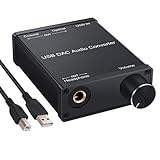
- USB DAC:Output to an amplifier,integrated sound card as a computer upgrade that can be connected to a decoder that will send back the best possible sound quality level.(5.1 channel is NOT compatible,please set the audio output to PCM or LPCM)
- HiFi Headphone Amplifier:Support most high impedance 16-300Ω headphones, SNR>100Db, THD+N=0.0003%, fully filter noise, enjoy high quality audio
- Plug and Play:No need power supply, easy to use. With a safe and reliable USB Type B port, you can enjoy the music on your computer conveniently
- Widely Compatible:Compatible with Windows XP and Mac OS-X system.The headphone amp is suitable for PS4, PS3, and you can connect your headset to the converter for gaming
- What You Get:USB DAC Audio Converter*1, 1.5m USB Cable*1, 6.35mm to 3.5mm Audio Adapter*1, User's Manual*1
Product prices and availability are accurate as of the date/time indicated and are subject to change. Any price and availability information displayed on Amazon at the time of purchase will apply.

