
Do these 3 things before closing this tab:
1Clear out junk files and repair common Windows errors2Fix the driver behind crashes, sound loss and screen glitches3Repair Windows errors before they cause bigger problemsOSHWA certification is a free, project-level self-certification that a specific open-hardware project follows the Open Source Hardware Association’s community definition. It is not an independent product test, a company-wide credential, or evidence that a device is safe or regulator-approved. Each registered project gets a unique ID, and certification must be renewed annually.
What OSHWA certification means
The Open Source Hardware Association (OSHWA) describes open source hardware as hardware whose design is publicly available so people can study, modify, distribute, make, and sell the design or hardware based on it. The goal is to give people control over technology while sharing knowledge and enabling commerce. See OSHWA’s definition.


Certification is a producer’s commitment that a particular project meets that community-written definition. The process is self-certification: the creator submits the Certification Mark License Agreement and agrees to follow OSHWA’s requirements and mark-use guidelines. OSHWA does not independently test the product. The OSHWA FAQ puts the scope plainly: “The certification works on a per-project basis. OSHWA does not certify individuals, companies, or organizations as open source hardware-compliant.”
What creators must open
OSHWA separates a project into hardware, software, documentation, and branding. Hardware and documentation are core to the definition; software requirements apply when the product uses software, while branding is optional. Creators must make their own contributions available and open all parts within their control. They must also provide design information and documentation in useful, modifiable forms, not merely describe the product or publish files that cannot practically be reused.
Free tools Windows power users keep installed
One-click scans. No signup required.
#1 Best Overall
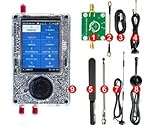
- What's included 1x PortaPack H4M (Rev10 + PortaPack H4M) 1x MicroUSB Cable 1x 20dB 50MHz - 6GHz LNA 1x SMA Male/Male Cable 1x 2.4/5/5.8GHz Blade Antenna 1x GSM/3G/4G Antenna 1x 40MHz - 6GHz Telescopic Antenna 1x 700MHz - 2700MHz Antenna
- Complete Development Kit – The PortaPack H4M+ with R10C (Mayhem Edition) is a versatile open-source hardware platform for electronics learning, research, and engineering projects. Perfect for labs, classrooms, and DIY enthusiasts.
- Wide Operating Range – Covers 1 MHz – 6 GHz with adjustable sample rates from 2 Msps to 20 Msps (quadrature). Provides stable and flexible performance for testing and experimentation.
- High-Definition Display & Intuitive Controls – Features a 3.2-inch 240×320 matte LCD touchscreen with clear visuals. Includes direction keys, a 360° rotating wheel, and quick selection button for smooth operation.
- Rich Accessories Included – Comes with a transparent shell, built-in speaker and rechargeable battery, multiple antennas, amplifier, and connection cables, offering a ready-to-use setup for hands-on development.
- Hardware: Publish original design files and make them easy to find from the product page or documentation.
- Software: License software necessary to the product’s operation under an OSI-approved license. If the project has no software, no software license is required.
- Documentation: Use terms that permit modification and commercial reuse. NonCommercial and NoDerivatives restrictions are incompatible with OSHWA’s definition.
- Version identification: Mark the product with its version or release date so people can match it to the corresponding design files.
OSHWA recommends hardware licenses including CERN-OHL-P-2.0, CERN-OHL-S-2.0, CERN-OHL-W-2.0, Solderpad, and TAPR. These are options, not interchangeable labels: the CERN-OHL v2 variants differ in reciprocity, while Solderpad is permissive. For documentation, OSHWA recommends CC0, CC BY, or CC BY-SA. Licensing has legal consequences that vary by jurisdiction and use; OSHWA recommends consulting a lawyer about specific legal questions. See its FAQ and guidance.
Can a project include closed components?
Some third-party components may remain closed when the creator cannot make them open. This is not a blanket exception: creators must disclose everything within their power, and a closed component cannot require an NDA for access. For third-party parts such as chips, OSHWA’s requirements say hardware needs fully accessible and shareable datasheets to count as open. Clearly identify which portions are open and which are not.
Rank #2

- 【Practical Design & Accessories】 Comes with a transparent protective shell, speaker and built-in battery, antenna, amplifier, and cable, ensuring a complete and ready-to-use setup for development and experimentation.
- 【Comprehensive Development Kit】 The PortaPack H4M+ HackRF R10C & Mayhem Edition is an advanced open-source hardware platform designed for electronic learning, testing, and research. Ideal for developers, educators, and DIY engineers.
- 【Clear Display & Easy Control】 Features a 3.2-inch 240×320 matte LCD touchscreen with bright colors and smooth navigation. Includes direction keys, a 360° rotating control wheel, and a quick selection button for precise operation.
- 【Practical Design & Accessories】 Comes with a transparent protective shell, speaker and built-in battery, antenna, amplifier, and cable, ensuring a complete and ready-to-use setup for development and experimentation.
- 【Built-In Applications & Learning Tools】 Includes multiple built-in tools for visualization, testing, GPS simulation, and data decoding — perfect for hands-on education, classroom demonstrations, and advanced DIY projects.
How to register and keep certification current
- Prepare the project materials. Gather the design files, documentation, licenses, and product version information. Ensure the files are accessible from the project’s product page or documentation.
- Check the project against OSHWA’s requirements. Confirm that creator-controlled contributions are open, software and documentation have suitable licenses, and any third-party closed components are identified and meet the program’s conditions.
- Submit the agreement and register the project. Apply through OSHWA’s certification process, agree to its requirements and mark-use guidelines, and register the unique project. Registration is free, according to the OSHWA FAQ.
- Use the mark only for the registered project. Make clear which product or parts it covers, and link users to the relevant registration and documentation.
- Renew each year. OSHWA’s requirements provide a one-year term from confirmed approval. The creator must request renewal annually and reaffirm compliance to continue using the mark.
- Register a new version when needed. Each unique project version has its own registration code and should point to documentation for that version. OSHWA leaves the substantial-change decision to the creator’s best judgment, but recommends re-registering when earlier documentation no longer completely describes the current release.
What the certification mark does—and does not—show
The mark is a legally binding, unique logo for projects that comply with OSHWA’s definition. The OSHWA directory lets users look up registered projects by hardware type, license, and country of origin. Use the project’s unique certification ID and linked documentation to check the specific registered version.
The mark does not give OSHWA or a creator exclusive control over the phrase “open source hardware” or the open gear logo. A creator may use the gear logo to express their own view of openness, but that alone does not show the project meets OSHWA’s definition. Certification also does not establish product safety, regulatory approval, or compliance with other standards.
What’s actually slowing this PC down?
Pick the symptom - the matching free tool is one click away.
What was changing for health hardware in 2025?
In a 2025 article, OSHWA described Open Healthware as a developing pathway built on its existing open-hardware certification to address the documentation and replicability needs of health-related devices. The article traces formal work to September 2024 and describes community development through 2025. It says OSHWA was preparing a website wireframe for community feedback; it does not establish that a final healthware certification had launched by September 2025.
The proposed approach aimed to cover a broad range of devices, from bandages to implantable devices. Community input identified a bill of materials and intended use as required source information, with legacy plans, quality-management-system testing data, and sterilization plans required when creators have them. OSHWA said the effort was not intended to assess safety, which remains the role of existing standards bodies. For current availability and requirements, consult OSHWA’s Open Healthware article and official program pages.
Quick Recap
Best Value

- Arduino Programming, Open Source: miniArm is built on the Atmega328 platform and is compatible with Arduino programming. The programs for miniArm are open-source, and learning tutorials and secondary development examples are available, making it easier for you to develop your robotic hand.
- High-Performance Hardware, Support Sensor Expansion: miniArm is equipped with a 6-channel knob controller, Bluetooth module, high-precision digital servos, and other high-performance hardware. Moreover, it provides multiple expansion ports for sensor integration, including ESP32 Cam, accelerometer, touch sensor, glowy ultrasonic sensor, etc., empowering users to engage in secondary development for sonic ranging and pose control capabilities.
- Versatile Control Options: miniArm supports app control, and users can utilize knob potentiometers for real-time knob control and offline action editing.
- Spark Your Creativity with miniArm: Expand the capabilities of miniArm with various sensors and unlock endless possibilities for your project.
- Starter Kit NO Glowing ultrasonic sensor, Touch sensor, Acceleration sensor, ESP32Cam Module.
Rank #4
Product prices and availability are accurate as of the date/time indicated and are subject to change. Any price and availability information displayed on Amazon at the time of purchase will apply.

