
What’s actually slowing this PC down?
Pick the symptom - the matching free tool is one click away.
A homemade pick and place machine for surface-mount technology (SMT) picks electronic components from feeders, aligns them with a nozzle and places them at planned locations on a printed circuit board (PCB). Building one means integrating a frame, motion control, vacuum pickup, vision, feeders, board holding and software—not simply assembling an XY gantry. OpenPnP is a documented open-source starting point, but each machine still needs a compatible design and configuration.
How an SMT pick and place machine works
The machine moves a toolhead between a parts supply and a PCB. A feeder presents a component; a nozzle picks it up using vacuum; the machine aligns the part, then places it at the location and orientation specified for the board. This is the electronics-assembly meaning of “pick and place”; the phrase is also used for other kinds of automated handling.
OpenPnP describes open-source hardware and software for SMT placement. Its software can run a builder’s own machine design or compatible commercial machines. The project describes itself as stable and widely used while still under active development; that is the maintainers’ status description, not independent reliability testing. OpenPnP’s official site explains the software and hardware approach.
What systems you need to integrate
OpenPnP’s hardware overview breaks a DIY machine into interconnected subsystems. Choose them as a design, not as an assortment of generic parts: the controller, mechanics, pickup hardware, vision, feeders and software must work together.
Recommended Free Tools
#1 Best Overall
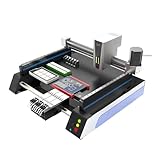
- Triple Vision Camera System:Equipped with three high-speed cameras, including dual bottom cameras for fast shooting. Supports recognition of various marks (solder pads, circles, vias, screen printing) and mark-free mode, ensuring precise component alignment and placement.
- Efficient High-Speed Performance:Adopts advanced S-curve motion control, 80% faster than similar models with max speed up to 3000 points per hour. Stable vibration and fully automatic operation greatly improve throughput for prototype and small-batch production.
- Automatic Head Replacement & Versatile Feeders:Dual mounting heads support passive automatic head change with up to 6 nozzle libraries for one-time mounting of diverse components. Compatible with visual bulk, automatic, manual and tray feeders; Feida supports code-scanning adding for efficiency.
- Stable Integrated Structure:Features sheet metal integrated welded body, avoiding loose aluminum profile structures. Built-in high-power suction nozzle motor with all-metal gears. Whole machine shipped ready to use, durable and compact.
- Wide Compatibility & Desktop Design:Supports 220V dual voltage for global use. Ideal for various SMD components including LEDs. Space-saving desktop design is perfect for labs, workshops and small-scale electronics manufacturing.
Frame, bed and PCB holding
The frame supports the motion system and keeps the toolhead, feeders, camera and PCB in a useful relationship. OpenPnP’s wiki says t-slot aluminum extrusion is the most common frame material for DIY pick and place machines; the page was edited by Jason von Nieda on December 26, 2022. The overview does not establish a universal frame size, stiffness target or tolerance. Work holding is also a distinct subsystem: the board needs to stay positioned during placement.
Motion and control
Motion requires motors, drivers, a controller and a mechanism that converts rotary movement into linear travel. OpenPnP’s overview identifies steppers and servos, motor drivers, motion controllers and rotary-to-linear mechanisms as relevant categories. Selection depends on the chosen machine design and software configuration; a controller should not be assumed compatible just because it can move axes.
Vacuum, nozzles and pickup
A pickup system can include a vacuum pump, solenoid valve, tubing, sensors and blow-off behavior. The nozzle must suit the components the machine is expected to handle. The cited project overview does not give a universally validated pump or nozzle specification, so follow the chosen design’s current documentation and the requirements of the parts being placed.
Rank #2

- SMT802A-S Automatic Low Price Pick and Place Machine Small Desktop LED Production Machine
Vision and alignment
Cameras, lenses and lighting support part and board alignment. Their placement, optics and calibration are design-specific; there is no universal accuracy or component-size capability established by the cited material. PixiePlacer, for example, documents both down-facing and up-facing cameras in its own design—not as a requirement for every homemade machine.
Do these 3 things before closing this tab:
1Fix the driver behind crashes, sound loss and screen glitches2Clear out junk files and repair common Windows errors3Scan for outdated or missing drivers - takes under a minuteFeeders and fixtures
Feeders present parts to the nozzle. OpenPnP documents multiple feeder designs, including strip and tape approaches. PixiePlacer documents parametric strip and automatic feeder variants, as well as a PCB holder. Feeder capacity, tape format and compatibility depend on the particular feeder implementation and machine.
Software and configuration
Software ties the physical systems together: a machine needs configuration that matches its motion hardware, vision arrangement, feeders and pickup behavior. OpenPnP offers ready-to-run software as well as hardware designs users can build and modify. Its support for custom machines does not eliminate the work of confirming compatibility and configuring a particular build.
Rank #3

- 2025 New SMT802B-F Pick and Place Machine Mini Desktop 2 Head 58 Feeders LED Equipment Chip Mounter SMT for Smt Assembly Line
How to choose a documented build path
Use a project’s documentation as a design-specific reference. Before buying parts, check that its BOM, mechanical design, electronics, firmware or configuration, and assembly instructions correspond to the same revision. PixiePlacer is one OpenPnP-based DIY example with documentation covering its BOM, frame and axes, cameras, nozzle changing, solder-paste dispensing, electronics, pneumatics, software and feeders. Its parts list is not a universal shopping list.
Compare projects against the questions that determine whether their documented design suits your needs:
- Mechanical design: What frame and work area does it document, and how is the PCB held?
- Motion and control: Which motion architecture and controller does it use, and how does that fit the software?
- Feeding: Which feeder types are documented, and what capacity and integration details are given?
- Pickup and vision: What vacuum, nozzle, camera, lens and lighting arrangements are specified?
- Build completeness: Are the BOM, assembly guide and machine configuration available and revision-aligned?
- Maturity: Does the project report a tested machine, or identify itself as a prototype with validation still pending?
- Cost scope: What does its estimate include or exclude, and when was it stated?
OpenPnP-based custom build
OpenPnP is a starting point when you want to build or modify hardware around its software. Its project page states an affordability goal of “under $1,000”; the page does not establish that as a verified current build price. Treat it as a maintainer-stated goal, not a budget quote. OpenPnP’s project page provides the project information.
Rank #4
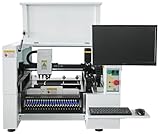
- SMT Aautomation Production Equipment Line SMT380 Manufactory Pick and Place Components Making Machine Desktop Assembly
PixiePlacer
PixiePlacer offers a concrete example of an OpenPnP-based machine with multiple subsystems documented. Use its BOM and instructions to understand that design, and verify every part against the current revision you intend to build before ordering. Do not transfer its part choices to another machine without checking compatibility. PixiePlacer’s repository contains its project documentation.
OrionPnP
OrionPnP is an open-source project intended to integrate with OpenPnP. Its maintainers describe it as a prototype under active development, say testing and validation are pending, and warn that BOM and schematic details may change. Its stated goal of placing at least 0402 parts is a target, not demonstrated capability. The project’s “around 800 EUR” estimate applies to its proposed complete machine, excludes printed parts, and is not a general DIY cost estimate. OrionPnP’s repository describes its status and design.
Opulo LumenPnP assembly documentation
Opulo’s documentation estimates about eight hours to assemble a particular documented build number, provided printed parts are ready. That is a conditional estimate for that build, not a general assembly-time forecast for homemade machines. Opulo’s build documentation gives the project-specific instructions.
Windows Errors? Fix Them Before They Spread
Repair common Windows errors and clear accumulated junk for a smoother, more stable PC - no reinstall needed.Free scan · no reinstallOutdated Drivers Are Slowing You Down
One free scan finds every outdated or missing driver and matches the right update for your exact hardware.Free scan · exact hardware matchBest Value

- ✔️【High Precision Placement】Features advanced vision alignment and high-accuracy stepper servo motors for precise SMD component placement — ideal for fine-pitch ICs and small resistors/capacitors.
- ✔️【High speed and stability】Double-head mounting design + stepper servo motor drive, the mounting speed reaches 3000CPH, supporting 8 hours of continuous stable operation.
- ✔️【Compact and Space-Saving Design】Desktop-grade area (53" x 31"), low-cost startup of professional SMT production line, home power supply (110V) driven, power consumption is only 230W
- ✔️【User-Friendly Interface】The fully graphical English operation interface allows novices to quickly get started without any programming experience. Just import the X, Y coordinate file and it will be ready for use.
- ✔️【Independent R&D Pneumatic Feeding System】The film collecting mechanism is similar to the Well-known Brand feeder, which is not easy to jam and convenient to replace the reels.
Plan purchases and assembly around the chosen design
- Choose the project and revision. Read its current build guide and BOM, then confirm that the mechanical, electronic and software instructions refer to the same revision.
- Check the integration points. Confirm the documented controller and motion system, feeder approach, vacuum and nozzle arrangement, camera setup, board fixture and software configuration.
- Resolve unspecified parts before ordering. If the documentation does not establish a pump, nozzle, camera or other specification for your intended components, do not substitute a guessed universal value. Seek a design-specific requirement or choose a documented alternative.
- Separate estimates from requirements. A project’s budget or assembly-time figure applies only within the stated scope and assumptions. Account separately for exclusions, such as printed parts where a project estimate omits them.
- Validate the machine against evidence. Distinguish a stated goal from a demonstrated result. Do not treat a prototype’s target as proof of placement accuracy, speed, yield or reliability.
What project pages do—and do not—establish
OpenPnP’s hardware overview is useful for understanding the breadth of a machine: frame and work holding, motion, vacuum and air, vision, feeders and software. A project-specific BOM can then show how one implementation addresses those needs. Neither a subsystem list nor a BOM alone demonstrates how accurately or reliably a machine places components.
The cited projects do not provide a controlled comparison of placement speed, accuracy, yield or reliability across machines. Compare their documentation, architecture, integration choices and stated maturity instead of ranking them on performance figures that have not been established on a comparable basis.
Quick Recap
Product prices and availability are accurate as of the date/time indicated and are subject to change. Any price and availability information displayed on Amazon at the time of purchase will apply.

