
Quick wins for a faster PC:
Clear out junk files and repair common Windows errorsFree Scan →Fix the driver behind crashes, sound loss and screen glitchesFind Drivers →To connect an anemometer to the Internet, match its output to a compatible controller or gateway, then give that device an Internet connection. An RS485/Modbus sensor needs a controller that can read its protocol; a LoRaWAN sensor needs a compatible gateway and network server. LoRaWAN is the radio link, not Internet access by itself.
Choose a connection path that matches your anemometer
Start by checking the sensor’s label and manual. Anemometers may provide RS485/Modbus, an analog signal, pulse or frequency output, or a native wireless protocol. The controller must support that exact output; the examples below cover RS485/Modbus and LoRaWAN, while other outputs need their own compatible input hardware.
| Path | What the sensor needs | What carries data onward | Best fit |
|---|---|---|---|
| Existing wired sensor | An output supported by a controller, such as RS485/Modbus | A matching controller or gateway, plus Internet backhaul | Keeping a compatible sensor already installed; check wiring, site distance, power, and enclosure needs. |
| LoRaWAN node | A LoRaWAN sensor, or a LoRaWAN node that supports the wired sensor’s interface | A gateway on the same regional frequency plan, a network server, and Internet backhaul | Sites where the radio coverage, reporting interval, power arrangement, and server access suit the installation. |
| Integrated LoRaWAN weather station | A compatible weather-station system with wind sensing and a LoRaWAN hub | A compatible LoRaWAN gateway and network server; a cloud platform may also be used | A new installation where an integrated wind-and-weather system is preferable to combining separate components. |
What to check before connecting anything
- Write down the anemometer’s make and model, output type, supply voltage, pinout, and protocol settings from its manual.
- Confirm that the controller or gateway supports the sensor input. For Modbus, check baud rate, parity, device address, and the model’s register map; do not assume another anemometer uses the same values.
- For LoRaWAN, confirm that the end device and gateway use a compatible regional frequency plan, and identify the network server where the device must be registered.
- Determine how the gateway will reach the Internet—typically Ethernet, Wi-Fi, or cellular, depending on the model and configuration.
- Plan outdoor mounting and power using the sensor and gateway instructions. Some devices have specific orientation, wiring, and weather-protection requirements.
Connect an RS485/Modbus anemometer
Read the sensor-specific settings
Use the anemometer’s manual to identify its supply requirements, RS485 wiring, Modbus RTU settings, address, and wind-speed registers. For example, the PCE-WS manual specifies a default address of 244 and lists wind speed in registers 30001 and 40001. Those are PCE-WS model details—not general Modbus defaults. The manual also specifies a maximum operating wind speed of 180 km/h.
Choose and configure a compatible controller
Connect the sensor to a controller or gateway with an RS485 input and support for the sensor’s Modbus settings. Set the communication parameters and read the documented register or registers. Verify that the returned value and units match the sensor documentation before sending data onward. A different sensor, controller, or software may use a different register convention or scaling, so follow the manuals for the exact combination.
What’s actually slowing this PC down?
Pick the symptom - the matching free tool is one click away.
#1 Best Overall

- All-in-1 Outdoor Sensor and Hyperlocal Weather Forecast: Urageuxy 7-in-1 wireless outdoor sensor that integrates a rain gauge, anemometer (wind speed/direction), UV sensor, light sensor, temperature, and humidity into a single, easy-to-mount unit. By syncing real-time outdoor conditions to the indoor display via Wi-Fi, this system delivers hyperlocal weather forecasts tailored specifically to your backyard, rather than relying on generic regional data
- High-Accuracy Sensors and Smart Technology: Equipped with advanced temperature, humidity, and pressure sensors, this weather station utilizes precision algorithms to provide not just current readings, but also trend analysis and weather predictions. Track rainfall changes and wind fluctuations with high accuracy. Whether you are a gardener managing irrigation, a traveler checking road conditions, or a homeowner monitoring microclimates, this device offers the scientific reliability needed for informed decision-making
- VA Display with Comprehensive Metrics and Customizable Alerts: Monitor your environment at a glance on the clear VA color display. View critical data including indoor/outdoor temperature (with feels-like and dew point), barometric pressure, wind speed/direction, rainfall totals, UV index, moon phase, and calendar. The display features 4-level adjustable brightness for day/night comfort and supports customizable alerts to notify you of extreme weather changes, ensuring you never miss critical conditions for your home or garden
- Extended Wireless Range and Easy Mounting: Experience stable data transmission with a 328FT (100M) wireless range, allowing you to place the outdoor sensor on a roof, fence, patio, or garden without worrying about signal loss. The sensor array is designed for easy mounting with a waterproof construction and easy to setup. The indoor display connects via 2.4GHz Wi-Fi, and the package includes a manual that simplifies the configuration process from unboxing to full operation. If you have any questions, please contact our Customer Service
- Smart Wi-Fi Connectivity and Live Data Sharing (Wunderground & PWS): Transform your local data into a global connection. The console features built-in Wi-Fi that supports direct data upload to popular live weather servers such as Weather Underground (Wunderground), PWS Weather, and Weather Cloud. Access your real-time data remotely on your PC or smart device to view, analyze, share, and compare your personal weather station data with your community, making this ideal for weather enthusiasts who value data transparency and historical tracking
Send the reading to an online destination
Connect the controller or gateway to the Internet using a connection supported by that model, then configure its application or service to forward readings to the dashboard or system you intend to use. Confirm the data at the controller first, then at the gateway or receiving service, and finally in the dashboard. This boundary-by-boundary check helps distinguish a sensor-reading problem from an Internet or application problem.
Connect through LoRaWAN
Understand the radio path
A LoRaWAN sensor sends radio messages to a compatible gateway. The gateway passes them to a LoRaWAN network server, which makes the device data available to an application or dashboard. The gateway itself needs Internet backhaul; radio coverage from the sensor to the gateway does not establish Internet access.
Rank #2
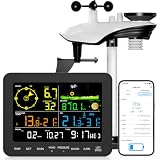
- 𝗪𝗶𝗙𝗶 + 𝗪𝗲𝗮𝘁𝗵𝗲𝗿𝘀𝗲𝗲𝗱 𝗔𝗽𝗽 + 𝟮𝟰/𝟳 𝗔𝗜 𝗙𝗼𝗿𝗲𝗰𝗮𝘀𝘁 & 𝗔𝗹𝗲𝗿𝘁𝘀: Connect via WiFi to our Weatherseed app for AI-driven 24/7 weather monitoring and forecasts. Receive instant alerts for critical changes in temperature, humidity, and barometric pressure directly on your smartphone, empowering decisions for home, agricultural planting, garden, or outdoor activities (Only 2.4G WiFi)
- 𝗖𝗹𝗲𝗮𝗿 𝗗𝗶𝘀𝗽𝗹𝗮𝘆 𝗘𝗮𝘀𝘆 𝗥𝗲𝗮𝗱𝗶𝗻𝗴: This weather station is designed for effortless viewing, featuring a high-contrast display and user-friendly interface. Specially enlarged, bold fonts make key data—such as temperature and humidity—easy to read at a glance. Ideal for middle-aged and elderly users with declining vision, it allows them to track weather conditions without eyestrain. A nice choice to surprise your father on this Father's Day.
- 𝗨𝗽 𝘁𝗼 𝟮-𝗬𝗲𝗮𝗿 𝗗𝗮𝘁𝗮 𝗦𝘁𝗼𝗿𝗮𝗴𝗲 & 𝗗𝗼𝘄𝗻𝗹𝗼𝗮𝗱: Supports storing and downloading 2-year of comprehensive weather data with Excel export capability. Users can analyze long-term trends through intuitive charts, including temperature/humidity variations, severe weather frequency, and seasonal patterns - ideal for both weather enthusiasts and professional agricultural applications (Note:The data can be exported up to 2 years. Every time can choose up to 30 days.)
- 𝗣𝗿𝗲𝗰𝗶𝘀𝗶𝗼𝗻 𝗥𝗮𝗶𝗻 𝗠𝗼𝗻𝗶𝘁𝗼𝗿: Professional-grade accuracy of ±1mm (for rainfall <15mm) and ±7% (15-9999mm). Weatherseed APP provides precise rainfall monitoring with accurate data recorded every hour, day, week, month and year, delivering reliable hydrometric data for critical weather monitoring. The wireless signal ensure full coverage for farms, orchards, pastures and residential areas
- 𝗘𝗳𝗳𝗼𝗿𝘁𝗹𝗲𝘀𝘀 𝗜𝗻𝘀𝘁𝗮𝗹𝗹𝗮𝘁𝗶𝗼𝗻 & 𝗕𝗲𝗴𝗶𝗻𝗻𝗲𝗿-𝗙𝗿𝗶𝗲𝗻𝗱𝗹𝘆: Simply mount the outdoor sensor with the bracket(perfect for rooftops, boats), and Wirelessly transmit and sync it to the display. The outdoor sensor is recommended to follow the installation instructions in the manual, which can greatly avoid inaccurate wind direction and temperature. Connect to your WiFi in 3 steps via the app - no technical skills needed. Ideal for first-time users and DIY enthusiasts
Register and match the devices
Use a LoRaWAN end device that either measures wind directly or can read the wired sensor’s output. Dragino’s WSC1-L documentation describes an example that reads RS485/Modbus weather sensors and sends data over LoRaWAN. The end device must be registered with a LoRaWAN network server, and the device and gateway must match the applicable regional frequency plan. The WSC1-L documentation gives a 20-minute default uplink period; check the current instructions for the exact device and its configurable reporting behavior.
Provide gateway Internet backhaul
Configure the gateway’s supported upstream connection. Dragino’s MS48-LR documentation describes Ethernet/WAN, Wi-Fi client mode, or optional 3G/4G hardware as Internet-access options for that product. Availability and setup depend on the exact gateway configuration. Check its status interface to verify that the selected interface is actually providing Internet connectivity; an IP address alone does not prove that data is reaching the network server.
The Tool Desk
Outbyte Driver Updater FREEFix the driver behind crashes, sound loss and screen glitchesFind Drivers →Outbyte PC Repair FREEClear out junk files and repair common Windows errorsFree Scan →Rank #3

- Precision Monitoring: Measure wind speed and wind temperature with high accuracy. This professional anemometer features a wide measurement range of 0.3~40 m/s (0.9~131 ft/s) for wind speed and 14°F~113°F (-10°C~45°C) for temperature, displaying real-time, maximum, minimum, and average values on a clear screen.
- Remote Control: Connect the anemometer to your smartphone via WiFi for seamless remote monitoring. View live data, check historical trends, and customize settings directly from the companion APP from anywhere, making long-term or unattended monitoring effortless.
- 5 Units & Beaufort Scale: Switch instantly between 5 wind speed units (m/s, ft/min, Knots, Km/h, Mph) and 2 temperature units (°F/°C) to suit your professional needs. The intuitive Beaufort Scale bar provides a quick, visual representation of wind force for immediate assessment.
- Usability & Portability: Designed for field use with a bright backlight for low-light conditions and an adjustable auto-shutdown function to conserve battery life. The included protective case, wrist lanyard, and screwdriver ensure easy transport and setup wherever your work takes you.
- Complete Ready-to-Use Kit: Get everything you need in one box: 1x 866B-APP-WIFI Anemometer, 2x Batteries, 1x Lanyard, 1x Screwdriver, 1x Protective Case, and 1x User Manual. Start measuring right out of the box.
Mount, power, and verify the installation
- Install according to the sensor manual. Follow the specified orientation, location, and mounting requirements. The PCE-WS manual says, “The wind sensor must be fixed on a vertical position.”
- Check wiring before applying power. Follow the pinout and power instructions for both sensor and controller. Dragino warns, for its example weather sensors, not to power the sensors while connecting cables and to check wiring before powering on.
- Confirm readings locally. Check that the controller or node receives plausible values and that units and scaling agree with the sensor documentation.
- Trace the data path. Verify the reading at the gateway or network server, then in the destination application. If it disappears between stages, investigate that connection rather than changing unrelated sensor settings.
- Check retention and reporting needs. Confirm how often the device reports, whether readings are buffered during outages, and where historical data is stored. These capabilities vary by product and cloud service.
When an integrated weather station may be simpler
If you are building a new installation rather than reusing an anemometer, an integrated LoRaWAN weather station can combine wind measurements with other weather sensors and a hub. Milesight’s WTS Series is one example, with a LoRaWAN hub and solar equipment; its manual describes remote management through compatible gateway and cloud products. The manufacturer states a line-of-sight transmission range of up to 15 km in rural areas, which is not a guarantee for a particular site, and local storage of more than 19,000 historical records. Check compatibility, radio region, mounting, power, and data-retention requirements for the exact setup.
Quick Recap
Best Value

- New WiFi-Enabled Anemometer: This smart wind meter connects seamlessly to the app for remote wind speed and temp monitoring on your phone. With an optional gateway, it integrates into your smart home ecosystem—supporting up to 64 devices simultaneously
- Advanced App Features: Our anemometer's app displays real-time, max, min and average wind speed, logs data every 3 seconds, and provides statistical charts. Set custom wind speed and temperature alerts, plus customizable auto-shutoff to extend battery life
- Professional Wind Speed Measuring Device: Featuring dual high-precision sensors with fast response time, it measures wind speed from 0.3 to 40 m/s (accuracy of ±5%) and temperature from 14℉ to 113℉ (accuracy of ±3.6℉), delivering precise, reliable readings
- User-Friendly Functions: Features 5 wind units (m/s, km/h, ft/min, knots, mph), a °C/°F temperature toggle, and 11 built-in languages (follows your phone's system). Backlit LCD with auto-off function; clear LED indicator shows device connection status
- Application Scenarios: Compared to ordinary anemometers, it enhances professionalism and convenience—ideal for outdoor adventures, boating, farming, construction, meteorological monitoring and home use, meeting precise measurement needs in various scenarios
Rank #4

- 【Multiple Thermometers & Weather Instruments】Urageuxy Wireless weather station with a built-in wind vane, anemometer, outdoor thermometer hygrometer, indoor thermometer hygrometer, and time date&week to make sure your weather stations have a wealth of current data, check your weather forecast and current conditions anytime
- 【Wi-Fi Sync with Weather Websites】Urageuxy wireless weather station indoor console with enhanced built-in WiFi supports 2.4G router and data uploads to weather underground, pwsweather, and weathercloud on PC or Smart devices, allowing you to access current data to view, save, analyze, share and compare data from local personal weather stations
- 【Easy to Read】Wireless WiFi Weather Station with 5.0 inch easy-to-read color display. Bright color display console powered up with adapter and easy to read in day and night
- 【Easy to Setup and Installation】The WiFi weather station is equipped with easy-to -follow manual for effortless configuration. Water proof easy-to mount wind vane and wind cup is conveniently and flexible to set up in garden, lawn, patio or on roof/fence. Additional one remote thermo-hygro sensor, supporting 7 more(not included)
- 【More Function and Application】Optional imperial/metric units of measurement. High low alarms, Min/Max records. Weather Data calibration. Wirelessly receive readings for indoor/outdoor temperature and humidity, wind speed/direction to your home weather station. WiFi weather stations can also serve as personal weather stations for homes, farms, baby/children's rooms, warehouses, gardens, offices, greenhouses, etc
Common connection problems
- No readings from a wired sensor: Recheck supply voltage, RS485 wiring, device address, baud rate, parity, and the register map against the sensor manual.
- Readings arrive but look wrong: Check register selection, units, scaling, and whether the controller interprets the register values as the sensor documentation specifies.
- A LoRaWAN device is not visible in the application: Verify device registration on the intended network server, regional frequency compatibility, gateway radio coverage, and the route from gateway to server.
- The gateway appears connected but data is not online: Check the gateway’s Internet/backhaul status and the configured forwarding path. A local IP address is not, on its own, proof of working Internet access.
- Remote data stops during a network outage: Check whether the exact device stores readings locally and how many it can retain; do not assume every sensor or gateway buffers data.
Product prices and availability are accurate as of the date/time indicated and are subject to change. Any price and availability information displayed on Amazon at the time of purchase will apply.

