
Do these 3 things before closing this tab:
1Fix the driver behind crashes, sound loss and screen glitches2Repair Windows errors before they cause bigger problems3Scan for outdated or missing drivers - takes under a minuteFor guided school and college IoT projects, Arduino Cloud for Schools is the clearest education-focused choice in the available vendor information: it combines classroom tools, lessons, project sharing, and cloud dashboards. For coursework centered on collecting sensor data and analyzing it with MATLAB, ThingSpeak is a strong alternative. Neither is a universal winner for Indian institutions; the right fit depends on learner level, hardware, connectivity, class management, and current local terms.
What counts as an IoT platform for education?
An education IoT platform connects project hardware—such as a microcontroller and sensors—to software for collecting, viewing, sharing, or analyzing device data. It is different from a general digital learning-content service. For example, the Ministry of Education describes DIKSHA as a school learning-content platform with online and offline access; the evidence here does not establish it as a device-to-cloud IoT project service.
India’s broader education context includes ICT labs and smart classrooms under Samagra Shiksha, alongside digital infrastructure initiatives. The Ministry’s education technology information and NDEAR explain the wider infrastructure and ecosystem context. They do not certify or select a commercial IoT platform, so institutions still need to assess each vendor against their own requirements.
Compare the leading education options
| Platform | Best suited to | Education and project features | Cost and limits to verify |
|---|---|---|---|
| Arduino Cloud for Schools | K–12 classes and higher-education courses seeking guided, hands-on projects. | Low-code web editing, templates, step-by-step lesson plans, data collection and analysis, visual dashboards, and project and report sharing. Physical projects require hardware and sensors. | The vendor’s school-plan page lists US$20 per member per year, five Things per member, six months of data retention, and a 30-day trial. These are vendor-listed terms, not an India-specific quote; confirm current pricing, taxes, billing, plan limits, and procurement conditions. |
| ThingSpeak | College-level or advanced school work focused on sensor data, cloud visualization, and MATLAB analysis. | Stores device data, produces visualizations, and supports MATLAB processing and analysis without requiring learners to set up their own server or web application. MathWorks says it integrates with Arduino, Raspberry Pi, and other hardware. | MathWorks describes free education-related, Student, Academic, and commercial Standard license categories. Message, channel, update-rate, and price details depend on the current license; check the current comparison and eligibility before planning a class. |
Arduino Cloud for Schools: a guided classroom route
Arduino explicitly presents Cloud for Schools for K–12—including middle and high school—and says it can also suit higher education. Its combination of guided material, low-code editing, dashboards, and sharing makes it the more directly classroom-oriented option when an instructor wants learners to build physical projects without beginning with a self-managed server.
Free tools Windows power users keep installed
One-click scans. No signup required.
#1 Best Overall

- All-in-One Starter Kit for Beginners: Part of the Powered by Arduino program, this kit includes an original Arduino UNO R4 WiFi, 300+ high-quality components, 50+ hands-on projects (30 basic, 13 fun, and 8 IoT), and 100+ free video lessons co-created with renowned educator Paul McWhorter. Designed for beginners ages 8+, it provides a complete, step-by-step path to learn Arduino, electronics, coding, and IoT. RoHS compliant for added safety and quality, it also makes a thoughtful gift for tech enthusiasts, students, and aspiring makers for birthdays, holidays, and special occasions
- Powerful Arduino Uno R4 WiFi Board: Upgraded from the Arduino Uno R3, the Arduino Uno R4 WiFi features a 32-bit processor, more memory, and built-in WiFi and Bluetooth, enabling connection to third-party apps for more interactive and practical projects.
- 300+ Components for Endless Possibilities: With 300+ components and sensors, this kit is perfect for portable projects. It features step-by-step tutorials, open-source code, and compatibility with other Arduino boards like Uno R3 and Nano, offering endless customization and learning opportunities.
- Engaging Projects for Every Skill Level: Featuring 50 projects (30 basic, 13 fun, 8 IoT) with IoT app integration like Arduino IoT Cloud , this kit supports Arduino C++ programming, making it perfect for students, teachers, and engineers to learn, code, and create at any skill level.
- Dedicated Support for Beginners: Alongside online resources and video tutorials, SunFounder provides technical support and troubleshooting forums to help beginners solve programming challenges with ease.
The vendor’s school plan lists shared spaces and role permissions, access to a course library, Google Classroom integration, six months of data retention, and five Things per member. Arduino’s plans page lists US$20 per member per year for the School plan and a 30-day trial. Because these are changeable vendor terms and do not settle Indian taxes, currency conversion, or institutional purchasing, obtain a current quote before budgeting.
The Explore IoT Kit is an education product that combines learning content, hardware such as Arduino boards and sensors, software, and teacher management. Arduino materials describe guided and sustainability-themed projects. Check the specific kit revision, included parts, and compatibility with the Cloud plan you intend to use; do not assume that a generic electronics kit includes Arduino’s school content.
Rank #2
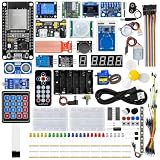
- All-in-one STEM Learning Kit: This complete starter kit is designed for beginners, students, and makers, containing a variety of electronic modules and sensors to help you learn programming, electronics, robotics, and IoT projects step-by-step.
- Includes introductory tutorials: The kit includes detailed tutorials, wiring diagrams, sample code, and project courses to help users quickly get started with open-source platforms and ESP32 development. Ideal for self-study, school courses, and STEM education.
- Learn Wi-Fi IoT Development: Unlike traditional introductory kits, this learning kit fully utilizes the powerful Wi-Fi capabilities of the ESP32 microcontroller. Users can build real-world web-based control systems and monitor sensor data in real-time via a browser on a smartphone, tablet, or computer. Through progressive projects, users will learn how to: create web control interfaces, remotely control LEDs, motors, and other modules to display real-time sensor data online, build smart home prototypes, and understand the fundamentals of IoT communication.
- Rich Components and Smart Modules: Includes a variety of commonly used modules, such as: ultrasonic sensors, RFID modules, servo motors, MPU6050 angle sensors, OLED displays, temperature and humidity sensors, PIR motion sensors, and dozens of other sensors, allowing users to build dozens of creative DIY projects out of the box.
- Main Functions and Projects: This kit allows users to create a variety of interactive projects, including over twenty different types: RFID smart access control systems, servo motor control, real-time environmental temperature and humidity monitoring, MPU6050 sensor 3D real-time animation, a Snake game, motion detection alarm systems, smart home systems, IoT wireless projects, and more.
ThingSpeak: a data-and-analysis route
MathWorks describes ThingSpeak for education as a way for students to store device data, visualize it, and run MATLAB code for processing and analysis. It can reduce setup work because a class need not first create its own server or web application. Its stated hardware integrations include Arduino, Raspberry Pi, and other devices, but a course should still check that its chosen board and project setup work with the intended workflow.
MathWorks identifies four license categories: a free option for education-related use with limits on messages, channels, and update rate; a lower-cost Student option with faster updates; Academic licensing for classes or research groups with higher channel limits; and Standard for commercial use. Do not treat those descriptions as a current quota or price schedule. Confirm eligibility, current limits, retention, and procurement with MathWorks before designing assignments around a particular allowance.
Rank #3
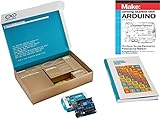
- ✔ The Best Arduino Starter Kit for Beginners & Hobbyists – This all-in-one Arduino Kit includes everything needed to learn coding, electronics, and robotics with step-by-step guides. Perfect for students, educators, and makers of all levels.
- ✔ Complete Arduino Kit with Sensors & Modules – Experiment with LEDs, motors, an LCD display, and multiple sensors (temperature, motion, ultrasonic, and more) to bring DIY projects to life. Ideal for STEM learning and Arduino programming.
- ✔ High-Quality, 100% Compatible Arduino Starter Kit – Every component is tested for reliability and is fully compatible with the Arduino IDE, making programming simple for beginners and advanced users alike.
- ✔ STEM Learning Made Fun with Hands-On Projects – This Arduino Kit is perfect for students, teachers, and hobbyists who want to explore electronics, automation, IoT, and robotics through real-world applications.
- ✔ The Ultimate Gift for Tech Enthusiasts & DIYers – Whether you're a beginner, a STEM student, or an engineer, this Arduino Starter Kit provides an exciting introduction to the world of electronics and coding.
How to choose for an Indian school or college
- Set the learning goal. Choose Arduino Cloud for Schools when guided projects, classroom collaboration, and a visual low-code path are central. Consider ThingSpeak when the course emphasizes time-series sensor data, cloud visualization, and MATLAB analysis.
- Match the platform to learners and teaching style. Decide whether students need step-by-step activities and templates or are ready to focus on coding, data analysis, and engineering workflows.
- Specify the hardware before selecting a plan. List the microcontrollers, sensors, cables, and replacement parts each project needs. Confirm compatibility and local availability in India, including whether a kit’s exact revision contains what the lessons require.
- Check classroom management. Confirm how teachers create classes or shared spaces, enroll students, manage permissions, see project work, and share results. For Arduino, verify the current plan’s school features and Google Classroom integration against the institution’s setup.
- Test access conditions. Check required browser and device access, school network rules, language fit, and what happens when internet connectivity is unreliable. The cited vendor descriptions do not establish that either platform supports a complete offline IoT workflow.
- Review cost and procurement locally. Compare current free limits, per-member or academic licensing, taxes, currency, institutional terms, support, and any hardware costs. Vendor list prices alone do not establish the total cost for an Indian school.
- Get privacy and security approval. Ask what student and account data is collected, how accounts are administered, where data is stored, and what retention and school approval terms apply. The available platform information does not establish a comparative answer on privacy or data residency.
Where Blynk and AWS IoT fit
Indian college or skills-course documents mention combinations such as Arduino with ThingSpeak, Blynk, and AWS IoT. Those appearances show that the names occur in course material; they do not demonstrate equivalent education-specific features, current availability on comparable terms, or regulator endorsement. The available evidence does not establish a like-for-like education and India-pricing comparison for Blynk and AWS IoT, so treat them as options to investigate against a specific syllabus rather than as ranked alternatives.
Independent reader supportYour contribution helps us test, update, and keep practical guides available for everyone.What the evidence does—and does not—establish
The cited vendor pages establish the described product features and plan categories, not comparative classroom performance, measured learning outcomes, market share, or a definitive India ranking. They also do not settle India-specific procurement, latency, data residency, local support, or comparative privacy terms. Schools and colleges should make those checks with vendors and local suppliers before adoption.
Quick Recap
Best Value

- 30+ Guided Electronics Projects: Start with LEDs and build toward LCD1602 displays, RFID access, motion detection, distance sensing, motor control and environmental monitoring for STEM learning, coding clubs, classrooms and hobby projects
- 200+ Components Across 63 Types: Includes an ELEGOO UNO R3 controller, LCD1602, RC522 RFID, RTC, HC-SR501 PIR sensor, ultrasonic sensor, DHT11, GY-521, MAX7219, keypad, joystick, relay, SG90 servo, stepper motor, breadboard and more
- Begin Without Soldering: Pre-soldered modules, a solderless breadboard, organized storage case and small-parts box reduce setup time and help beginners move from lesson to lesson while keeping LEDs, ICs, wires and sensors easy to find
- Learn, Modify and Create: Program the ELEGOO UNO R3 board with Arduino IDE using the included PDF tutorial and example code, then adjust sensor thresholds, timing, display text and motor behavior to turn guided lessons into original projects
- Flexible Power and Project Setup: Includes a 9 V, 1 A power supply, breadboard power module, 9 V battery and USB cable to support controller, breadboard and module experiments without sourcing basic setup accessories separately
Rank #4

- Complete Project-Based Learning Path – Build 13 progressive projects (LED blink → button control → PIR motion sensor → music playback → motorized doors/windows → SK6812 RGB lighting → fan control → LCD display → gas alarm → temperature/humidity monitor → RFID door unlock → Morse code access → WiFi control → mobile APP remote control). Each project builds on the previous one, ensuring you understand both the electronics and the programming logic behind every smart home feature.
- Master Two Industry-Standard Languages – Learn to code in both Arduino C++ and MicroPython with 13 detailed tutorials for each language. Compare how the same hardware behaves under different programming approaches – a valuable skill for any aspiring engineer. Perfect for classrooms teaching multiple coding languages or self-learners who want flexibility.
- Build a Real WiFi-Controlled Smart Home – Assemble the wooden house structure and integrate sensors to create a functioning smart home system. Control lights, fans, door servos, and RGB lighting directly from your mobile APP (iOS/Android) . Experience how IoT works in real life – from manual control to automated responses based on temperature, humidity, motion, and gas detection.
- Comprehensive Online Wiki with No Guesswork – Our detailed online tutorials (also accessible via the packaging) include wiring diagrams, full code explanations, and step-by-step assembly guides for every project. Whether you're a complete beginner or a teacher preparing lessons, the structured content eliminates confusion and helps you succeed from project 1.
- Everything You Need to Get Started – (TIPS: Batteries are NOT Included)This kit includes the ESP32 development board, expansion board, wooden house parts, all sensors and modules (DHT11, PIR motion, gas sensor, RFID, SK6812 RGB, servo motors, fan, LCD1602, etc.), and connection cables. NOTE: 6x AA batteries are required (NOT Included). The kit is unassembled – you'll build it yourself following our online tutorials, making the learning experience truly hands-on.
Product prices and availability are accurate as of the date/time indicated and are subject to change. Any price and availability information displayed on Amazon at the time of purchase will apply.

