
Outdated Drivers Are Slowing You Down
One free scan finds every outdated or missing driver and matches the right update for your exact hardware.Free scan · exact hardware matchWindows Errors? Fix Them Before They Spread
Repair common Windows errors and clear accumulated junk for a smoother, more stable PC - no reinstall needed.Free scan · no reinstallAn analog telephone adapter (ATA) connects a traditional analog phone or another compatible analog telephony device to an IP-based phone system. The device plugs into the ATA’s phone-facing FXS port; the ATA connects to the network, where compatible VoIP service or call control handles calls. The adapter alone does not provide telephone service.
What is an analog telephone adapter?
An ATA is a bridge between analog telephony equipment and an IP telephony environment. Cisco describes its ATA 191 as a “2-port handset-to-Ethernet adapter.” Its user guide explains that an ATA lets you connect an analog device, such as a phone or fax machine, to your network. Cisco ATA 191 data sheet · Cisco ATA 191 user guide
The ATA provides the connection between the analog device and the IP network. You still need compatible VoIP service or a phone system, such as a PBX, to manage calls. SIP is one signaling and session-management protocol used in IP telephony; Cisco documents SIP support for its ATA product. Cisco ATA 191 data sheet
How do I connect an analog phone to VoIP?
- Connect the phone’s cable to an FXS port on the ATA. FXS is the phone-facing interface for standard analog phones.
- Connect the ATA to your network using Ethernet.
- Set up the ATA to work with your VoIP provider or PBX. Confirm that the system supports the particular ATA and its configuration; compatibility is not universal.
The precise setup and configuration steps depend on the ATA and the phone system. Cisco’s ATA 191 user guide describes connecting an analog device to the network, while its product documentation identifies the device’s phone-facing ports. Cisco ATA 191 user guide · Cisco ATA 191 data sheet
#1 Best Overall

- Supports 2 SIP profiles through 2 FXS ports and a single 10/100Mbps port
- TLS and SRTP security encryption technology to protect calls and accounts
- Automated provisioning options include TR-069 and XML config files
- LED indicators - POWER, NET, PHONE1, PHONE2 Supports 3-way voice conferencing Failover SIP server automatically switches to secondary server if main server loses connection
- Supports T.38 Fax for creating Fax-over-IP
What do FXS and FXO ports do?
- FXS: Connects an analog phone or other analog device to the ATA.
- FXO: Connects toward a traditional PSTN telephone line. Some ATAs offer both kinds of port.
For example, Grandstream describes the HT813 as having one FXS port and one FXO port for a PSTN line. That is a model-specific configuration, not a feature of every ATA. Grandstream HT813 product page
Quick Recap
Best Value

- VERSATILE: IP phone adapter brings traditional analog devices into the IP world
- AUDIO: Clear, natural-sounding voice quality via advanced preprocessing, high-performance echo cancellation, voice activity detection, and comfort noise generation
- SECURITY: Supports the latest encryption with Transport Layer Security (TLS), Secure Hash Algorithm (SHA-2) and new Secure Real-time Protocol (sRTP) cipher suites
- HARDWARE: Two RJ-11 FXS ports and one 10/100 Mbps RJ-45 Ethernet port
- PEACE OF MIND: 1-year limited hardware warranty
Rank #4
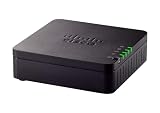
- VERSATILE: IP phone adapter brings traditional analog devices into the IP world
- AUDIO: Clear, natural-sounding voice quality via advanced preprocessing, high-performance echo cancellation, voice activity detection, and comfort noise generation
- SECURITY: Supports the latest encryption with Transport Layer Security (TLS), Secure Hash Algorithm (SHA-2) and new Secure Real-time Protocol (sRTP) cipher suites
- HARDWARE: Two RJ-11 FXS ports and one 10/100 Mbps RJ-45 Ethernet port
- PEACE OF MIND: 1-year limited hardware warranty
Rank #3

- Supports 2 SIP profiles and 2 FXS ports
- Strong AES encryption with security certificate per unit
- Supports T.38 Fax for reliable Fax-over-IP
- High performance NAT router
- 3-way voice conferencing per port
Rank #2

- Single Port Connectivity: Supports 1 SIP profile through a single FXS port and a single 10/100Mbps port
- Advanced Security Features: TLS and SRTP security encryption technology to protect calls and accounts
- Flexible Provisioning Options: Automated provisioning options include TR-069 and XML config files
- Multi-Party Conferencing: Supports 3-way voice conferencing for enhanced communication capabilities
- Reliable Failover Protection: Failover SIP server automatically switches to secondary server if main server loses connection
What should I check before choosing an ATA?
- VoIP or PBX compatibility: Check that the intended provider or phone system supports the specific ATA. Cisco’s ATA 191 multiplatform version, for example, lists the call-control systems it is designed to work with; that does not establish compatibility with every provider or PBX. Cisco ATA 191 data sheet
- Number of analog devices: Match the number of FXS ports to the devices you need to connect. Cisco’s ATA 191 data sheet specifies two RJ-11 FXS ports and one Ethernet port. Those are specifications for that model, not a general ATA standard. Cisco ATA 191 data sheet
- Need for a PSTN line: If you need to connect to a traditional phone line, check whether the ATA has an FXO port, as the Grandstream HT813 does. Grandstream HT813 product page
- Specialized equipment: Fax machines, paging devices, and other analog equipment may have requirements beyond basic phone connectivity. Confirm that both the ATA and phone system support the features you need. Cisco lists phones, fax machines, and overhead paging devices as possible connected equipment. Cisco ATA 191 user guide · Cisco ATA 191 data sheet
Product prices and availability are accurate as of the date/time indicated and are subject to change. Any price and availability information displayed on Amazon at the time of purchase will apply.

