
Recommended Free Tools
You can free space on a Samsung Galaxy without uninstalling apps by reviewing large files, moving files off internal storage, clearing an app’s cache when appropriate, and emptying Trash only when you no longer need its contents. How much space you recover depends on what is stored on your phone; Samsung’s guidance does not establish that this process will free 10GB.
Check what is using storage before deleting anything
First note the phone’s current free-space figure, then open Settings > Device care > Storage. Samsung’s US instructions describe this route, but menu names and availability can vary by Galaxy model, carrier, and software version. If those labels do not appear, look in Settings for Storage or Device care. Samsung’s Device care guidance
Use the breakdown to identify the largest categories, then inspect the files behind them in My Files or the relevant app. A large category is a clue, not a reason to delete everything in it: confirm what each file is and whether you still need it.
Review large files, downloads, and duplicates
To preserve installed apps, start with personal files you can recognize. Samsung’s storage guide recommends reviewing large files and duplicates, and managing items in Recycle bin. Samsung’s storage guide
#1 Best Overall

- 【Important】: Default format of the usb flash drive 128gb is exFAT as this is the format recognized by the smartphones and tablets. These 128gb thumb drives are only compatible with C-Port enabled mobile phones & computers only. While formatting the usb flash drive dual type c usb 3.0 OTG keep a check on the drive format
- 【Easy to Use】: Directly plug the 2-in-1 USB flash drive and play, no need to install any software. The jump drive is easy to be recognized by computer, laptop, notebook, PC, car audio, speaker, smart TV, vidoe projector etc
- 【Fast Speed】: High-speed USB 3.0 flash drive for fast data transfer, backwards compatible with USB 2.0 easy to complete the storage and transport functions. USB 3.0 and Class A chip help you transfer a 4G movie from the thumb drive to your smartphone in about 40 seconds, and reverse transfer in 2 mins to save memory for your smartphone with Type C port.Save your time
- 【Good Compatibility】: Dual connectors USB type C + USB 3.0. Support windows 7 / 8 / 10 / XP / 2000 / ME / NT Linux and Mac OS, compatible withUSB 3.0 & USB 2.0 backwards USB1.1. Support videos formats: AVI, M4V, MKV, MOV, M P4, MPG, RM, RMVB, TS, WMV, FLV, 3GP; AUDIOS: FLAC, APE, AAC, AIF, M4A, MP3, WAV
- 【OTG Function】:Support nearly all mobile phones which support OTG function,and very easy to operate
- Large videos: Check for old recordings or exported clips that you can back up or move elsewhere.
- Downloads: Remove files you have already used and do not need to keep on the phone.
- Duplicates: Compare copies before removing one; a file with a familiar name may not be identical to another.
- Trash: Review its contents separately before emptying it, since doing so removes a recovery option.
Move files off internal storage
Moving eligible files to a compatible microSD card or backing them up with a cloud-sync service can reclaim internal storage while keeping the files available elsewhere. Samsung names Google Drive, Microsoft OneDrive, and Dropbox as compatible options for devices with low storage, but its guidance does not establish current plan prices or quotas. Samsung’s low-storage guidance
Most Galaxy phones offer an SD card option, according to Samsung, but support depends on the model. Check your exact phone’s specifications before buying or inserting a card. Adding a card alone does not free internal space: move eligible files to it, and confirm the transfer finished before deleting the original. Samsung’s storage guide
Rank #2

- Dual Connectors: The USB-C port can only work on phones/tablets with OTG function. Please make sure your smartphone with OTG function and reversible type-c interface. The other end is USB 3.0 port connecting regular USB devices.[Not for iPhone]
- Important: Default format of the drive is EXFAT as this is the format recognized by the smartphones and tablets. These drives are only compatible with C-Port enabled mobile phones & computers only. While formatting the drive keep a check on the drive format
- Fast Speed: High-speed USB 3.0 flash drive for fast data transfer, backwards compatible with USB 2.0,easy to complete the storage and transport functions. You can use it to transfer your computer file or access files from Type-C devices, store and share your photos, videos and music in a simple and reliable way
- Easy to Use: Plug and play, no need any drive. Used as laptop notebook tablets phones accessories, compatible with Samsung Galaxy Note 8,Galaxy S8,Google Nexus 5X and 6P,Google Pixel XL,New Macbook Pro and more
- Package includes: 1 pc 256G USB C & USB Multi-function Flash Drive
Clear cache, not app data, unless you intend to reset the app
If one app is using a lot of space, inspect its storage details in Settings. On many Galaxy phones, this is under Settings > Apps > [app] > Storage, though wording can vary. Clearing cache removes temporary data, which the app may recreate later. It may therefore provide only temporary or limited relief.
Clear data is different: Samsung says it resets the app and deletes its stored settings and files. Avoid that option unless you understand what will be removed and are prepared to set the app up again. Samsung’s cache and data guide
The Tool Desk
Outbyte Driver Updater FREEScan for outdated or missing drivers - takes under a minuteDriver Scan →Outbyte PC Repair FREERepair Windows errors before they cause bigger problemsFix Now →Rank #3

- The flash drive for USB Type C devices
- Easily transfer files between smartphones, tablets and computers
- Free up space on your Android smartphone (mobile device requires USB Type C port and on the go (OTG) support)
- Retractable design with a reversible USB Type C connector and a traditional USB connector
- High speed USB 3.1 performance of up to 150MB/s read speeds (USB Type C port with USB 3.1, Gen. 1/USB 3.0 support required; Based on internal testing; performance may be lower depending upon host device)
Understand why “Other” can be large
Samsung describes “Other” as including data from installed apps, such as system files, cached data, and temporary files. It cannot be deleted directly as a single storage category. You may be able to reduce some of it by reviewing individual apps and clearing cache, but deleting app data can reset an app. Samsung’s explanation of Other storage
Empty Trash only after checking its contents
Deleted Gallery items may remain in Recycle bin for 30 days before automatic permanent deletion, according to Samsung Canada. Emptying the bin sooner can release space, but it also removes the recovery path for those files. Check the bin carefully before choosing to empty it. Samsung’s Trash and Recycle bin guidance
Rank #4
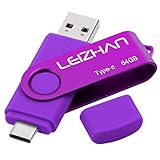
- Type C Pen drive is 64GB storage capacity. Dual Interface: USB 3.0 and Type-C (USB-A and USB-C ), quickly transfer data between your computers, OTG enabled USB Type-C smartphone & tablets, car audio system, consoles and more, it also compatible with Macs
- Photostick for Samsung Galaxy S10e, note 10, S10+, S10, S9+, S9, Note 9,Samsung Galaxy 8,Samsung Galaxy S8, Note 8, huawei P30, P20 ,P9, honor 8, Google Pixel 2/ 2XL Nexus 5X, Nexus 6P, Nokia N1, LG G5 G6, HTC U11, One Plus MacBook, New MacBooks, MacBook Pro, ChromeBook Pixel, Le 2PRO, Le MAX, MICROSOFT 950XL, and other TYPE C supported devices
- Our USB C Pen drive can help extra storage for your mobile device for photos, music, videos and other files.If it as a gift, you can storage some pictues,music,movies and good memory into it before you give this gift to them.Give them a big surprise
- High-speed USB 3.0 flash drive for fast data transfer, backwards compatible with USB 3.0 and USB 2.0. Important Note : all flash drives work with OTG-enabled smartphone, most Type C phone can connect flash drive automatically, some early version mobile (like S9+, S9, S8, Note 10, Note 9 and earlier) need to work with OTG adapter/USB connector
- Package Contents.64GB photo stick for Type-C phone,User Manual and our best wishes
Measure the space you actually recovered
- Record the free-space figure in the storage overview before cleanup.
- Review and remove only files you recognize and no longer need, or move them to a confirmed destination.
- Clear an app’s cache only if you accept that temporary data may need to be recreated; do not choose Clear data as a substitute.
- Return to the storage overview and record the new free-space figure. The difference is what this cleanup recovered on your phone.
The 10GB figure in the original headline is not established by Samsung’s support material as a typical or guaranteed result. Your recovery depends on the files, app data, and Trash contents actually present on your device.
Quick Recap
Best Value

- Dual Connectors: The USB-C port can only work on phones/tablets with OTG function. Please make sure your smartphone with OTG function and reversible type-c interface. The other end is USB 3.0 port connecting regular USB devices
- Important: Default format of the drive is exFAT.Different phones may have different requirements for file formats, so format them if necessary. These drives are only compatible with C-Port enabled mobile phones & computers only. While formatting the drive keep a check on the drive format
- Fast Speed: High-speed USB 3.0 flash drive for fast data transfer, backwards compatible with USB 2.0,easy to complete the storage and transport functions. You can use it to transfer your computer file or access files from Type-C devices, store and share your photos, videos and music in a simple and reliable way
- Easy to Use: Plug and play, no need any drive. Used as laptop notebook tablets phones accessories, compatible with Samsung Galaxy Note 8,Galaxy S8,Google Nexus 5X and 6P,Google Pixel XL,New Macbook Pro and more
- Package includes: 1 pc 64G USB C & USB Multi-function Flash Drive
Product prices and availability are accurate as of the date/time indicated and are subject to change. Any price and availability information displayed on Amazon at the time of purchase will apply.
Quick wins for a faster PC:
Clear out junk files and repair common Windows errorsFree Scan →Fix the driver behind crashes, sound loss and screen glitchesFind Drivers →
