
What’s actually slowing this PC down?
Pick the symptom - the matching free tool is one click away.
To transfer data and apps to the Fairphone (Gen. 6), start the new phone’s setup and choose Copy apps & data. From there, you can copy from an Android phone by cable or wirelessly, follow the setup flow for an iPhone, or restore a Google Account backup. Check important apps—especially WhatsApp—before erasing the old phone, because a standard transfer may not include every app’s private data or chat history.
Before you start
- Charge both phones; Fairphone recommends at least 50% battery on each for Android migration.
- Connect to stable Wi-Fi, make sure you can unlock the old phone, and have the Google Account credentials for any backup you plan to restore.
- Back up the old phone before transferring. If you use a cable between Android phones, match it to the ports: USB-C to USB-C is common, while an older Micro-USB phone needs a Micro-USB-to-USB-C cable or adapter. See Fairphone’s Android transfer guidance.
- If you are moving from an iPhone, turn off iMessage before you begin to help avoid problems receiving text messages, as advised in Fairphone’s Fairphone (Gen. 6) Getting Started guide.
Transfer from an Android phone
Start the Fairphone’s setup wizard and continue to Copy apps & data. Fairphone supports both wired and wireless Android transfers. It describes cable transfer as usually the fastest and most reliable option; wireless transfer may take longer.
Use a cable
- At Copy apps & data, connect the old Android phone to the Fairphone with a compatible cable.
- Unlock the old phone and accept the prompt to copy data.
- Follow the Fairphone’s on-screen instructions to choose what to transfer and complete setup.
Transfer without a cable
- At Copy apps & data, select No cable, then Copy without cable.
- On the old phone, open the Google app and search for set up my device.
- Follow the prompts on both phones and finish the transfer.
Fairphone lists apps, contacts, messages, photos, and settings among the items that can usually transfer from Android. That does not guarantee that every app’s internal data—such as game progress or chat histories—will move; check those apps separately. Details are in Fairphone’s Android transfer instructions.
Transfer from an iPhone
The Fairphone (Gen. 6) setup flow supports migration from an iPhone. Fairphone’s guide calls the wired option “the most reliable method.” The precise prompts and data offered may depend on the iOS version and setup flow, so use the selection shown on your devices rather than assuming all apps or app data will transfer.
Quick wins for a faster PC:
Fix the driver behind crashes, sound loss and screen glitchesFind Drivers →Repair Windows errors before they cause bigger problemsFix Now →#1 Best Overall

- Designed to Be Repaired, Not Replaced: The Fairphone Gen. 6+ is built around a 12-part modular design, so you can swap the battery, screen, speaker, or cameras yourself with just a screwdriver instead of replacing the whole phone. It's backed by a hardware warranty of up to five years and software support through 2033.
- Smooth Performance, Serious Durability: Powered by Snapdragon 7s Gen 4 and 12GB RAM, keeping apps fast and multitasking smooth. The 120Hz OLED display makes scrolling feel buttery, not choppy, and Gorilla Glass 7i plus IP55 splash-resistant means it can handle what your last phone couldn't. There's 256GB built in (expandable up to 2TB), so you're never trading photos for space.
- Less Noise, More You: Fairphone Moments lets you switch between full Android and a distraction-free mode with up to five essential apps of your choice. Working, traveling, or spending time with the people who matter - you decide what shows up on your screen, and what stays out of reach.
- US Carrier Compatibility: This Android smartphone supports AT&T and T-Mobile, and supported MVNOs on those networks. It is not supported on Verizon or Verizon-network MVNOs. 5G speeds require a 5G-enabled SIM/eSIM and supporting data plan, and availability varies by carrier and location.
- Google's Gemini AI Assistant, Built In: Use Gemini Live to identify what's in front of your camera, summarize the group chats you're behind on, or plan your day. Not interested in AI? You can easily toggle it off. Your phone, your call.
Use a compatible cable
- During setup, choose the option to transfer from an iPhone or iPad and connect the phones using a cable compatible with both devices.
- When the iPhone asks, tap Trust.
- Select the data offered in the setup flow and follow the prompts. Fairphone’s guide gives contacts, photos, and calendars as examples of selectable items.
Transfer wirelessly
If you do not have a compatible cable, choose the iPhone/iPad switching option during setup and follow the wireless instructions on screen. Fairphone qualifies this route as copying only some data.
Restore a Google Account backup
If the old Android phone has a Google Account backup, you can restore it while setting up the Fairphone. At Copy apps & data, choose the option indicating that the other device is unavailable, sign in to the same Google Account used for the backup, and follow setup. Fairphone explains this process in its backup restore instructions.
Rank #2

- Designed to Be Repaired, Not Replaced: The Fairphone Gen. 6+ is built around a 12-part modular design, so you can swap the battery, screen, speaker, or cameras yourself with just a screwdriver instead of replacing the whole phone. It's backed by a hardware warranty of up to five years and software support through 2033.
- Smooth Performance, Serious Durability: Powered by Snapdragon 7s Gen 4 and 12GB RAM, keeping apps fast and multitasking smooth. The 120Hz OLED display makes scrolling feel buttery, not choppy, and Gorilla Glass 7i plus IP55 splash-resistant means it can handle what your last phone couldn't. There's 256GB built in (expandable up to 2TB), so you're never trading photos for space.
- Less Noise, More You: Fairphone Moments lets you switch between full Android and a distraction-free mode with up to five essential apps of your choice. Working, traveling, or spending time with the people who matter - you decide what shows up on your screen, and what stays out of reach.
- A Phone That Matches Your Values: The Fairphone contains 51% fair and recycled materials by total weight, is assembled using renewable energy, and supports living wages for factory workers. Robust everyday performance, without pretending the supply chain doesn't matter.
- US Carrier Compatibility: This Android smartphone supports AT&T and T-Mobile, and supported MVNOs on those networks. It is not supported on Verizon or Verizon-network MVNOs. 5G speeds require a 5G-enabled SIM/eSIM and supporting data plan, and availability varies by carrier and location.
If you have already completed Fairphone setup, Fairphone says you must factory-reset the phone to restore an earlier backup during setup. A reset erases data on the Fairphone, so save anything on it that you want to keep before proceeding.
Move anything that did not transfer
Fairphone’s Manual Data Transfer Options describes alternatives for common categories:
Rank #3
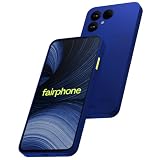
- Designed to Be Repaired, Not Replaced: The Fairphone Gen 6+ is built around a 12-part modular design, so you can swap the battery, screen, speaker, or cameras yourself with just a screwdriver instead of replacing the whole phone. It's backed by a hardware warranty of up to five years and software support through 2033.
- Smooth Performance, Serious Durability: Powered by Snapdragon 7s Gen 4 and 12GB RAM, keeping apps fast and multitasking smooth. The 120Hz OLED display makes scrolling feel buttery, not choppy, and Gorilla Glass 7i plus IP55 splash-resistant means it can handle what your last phone couldn't. There's 256GB built in (expandable up to 2TB), so you're never trading photos for space.
- Less Noise, More You: Fairphone Moments lets you switch between full Android and a distraction-free mode with up to five essential apps of your choice. Working, traveling, or spending time with the people who matter - you decide what shows up on your screen, and what stays out of reach.
- A Phone That Matches Your Values: The Fairphone contains 51% fair and recycled materials by total weight, is assembled using renewable energy, and supports living wages for factory workers. Robust everyday performance, without pretending the supply chain doesn't matter.
- US Carrier Compatibility: This Android smartphone supports AT&T and T-Mobile, and supported MVNOs on those networks. It is not supported on Verizon or Verizon-network MVNOs. 5G speeds require a 5G-enabled SIM/eSIM and supporting data plan, and availability varies by carrier and location.
- Contacts: Sync the same Google Account on both phones, or import contacts stored on a SIM through the Contacts app.
- Photos and videos: Back them up with Google Photos on the old phone and sign in to the same account on the Fairphone, or copy the DCIM folder using a computer.
- Music and other files: Copy the Music or relevant folders through a computer, or use cloud storage and download the files on the Fairphone.
- Calendar: Sync with the same Google Account. Fairphone also describes enabling Google Calendar sync on Android or adding the Google Account on an iPhone.
- WhatsApp: Use WhatsApp’s own chat transfer or backup process. Fairphone documents backing up Android chats to Google Drive, then restoring after installing WhatsApp and verifying the phone number. For iPhone, its guidance points to WhatsApp’s Transfer chat history → Transfer to Android flow.
Copy files through a computer
Use a USB cable that supports data transfer; some cables charge only and cannot copy files. Fairphone notes that macOS has limited built-in support for Android file transfers and names OpenMTP as an example of a third-party transfer app in its computer connection guidance.
Independent reader supportYour contribution helps us test, update, and keep practical guides available for everyone.Check the Fairphone before wiping the old phone
Open the apps and files you care about on the Fairphone and confirm that their content is present before you reset, trade in, or erase the old phone. In particular, verify WhatsApp chats and app-specific data such as game progress. If an app is missing, Fairphone says you can install apps through the Google Play Store when using a Google Account; see its app installation guidance.
Quick Recap
Best Value

- Unlocked for GSM Carriers like T-Mobile and not compatible with Verizon, Sprint, and US Cellular. Dual SIM (nano-SIM + eSIM) both 5G enabled
- Android 15 (Software updates until 2033)
- 6.31" inch, Full HD LTPO P-OLED, 1116x2484 resolution, 431ppi, Gorilla Glass 7i
- 10-120 Hz refresh rate, 240 Hz touch screen sample rate
- 256GB UFS3.1 storage, microSD up to 2TB external storage capacity, 8GB LPDDR5 RAM
Rank #4

- Unlocked for GSM Carriers like T-Mobile and not compatible with Verizon, Sprint, and US Cellular. Dual SIM (nano-SIM + eSIM) both 5G enabled
- Android 15 (Software updates until 2033)
- 6.31" inch, Full HD LTPO P-OLED, 1116x2484 resolution, 431ppi, Gorilla Glass 7i
- 10-120 Hz refresh rate, 240 Hz touch screen sample rate
- 256GB UFS3.1 storage, microSD up to 2TB external storage capacity, 8GB LPDDR5 RAM
Product prices and availability are accurate as of the date/time indicated and are subject to change. Any price and availability information displayed on Amazon at the time of purchase will apply.

