
Start with a restart and basic charging checks before resetting or arranging repair. First identify your exact Razr+ generation: Motorola has separate support for 2023, 2024, 2025 and 2026 models, and instructions, menus, compatible accessories and service options can vary by model and region. Use the support page and guide for your device, not a button sequence or menu path assumed to fit every Razr+.
Identify your Razr+ before troubleshooting
“Razr+” refers to multiple generations. Find the model name or number in your phone’s settings, on its packaging or receipt, or through Motorola’s support tools, then choose that exact device and your region on Motorola Support. The detailed steps below are specifically drawn from Motorola’s Razr+ 2025 guidance; other generations may have different instructions.
Separate a possible software problem from power, charging, screen, hinge or liquid damage. Try the reversible checks first. A reset or software reinstallation is a later option because it can erase data.
If the Razr+ will not turn on or the screen is black
Try a forced restart and charging
- For the Razr+ 2025, hold the Power button for 5–7 seconds to restart. If needed, continue holding it for up to 30 seconds, following Motorola’s instructions for that model.
- Connect the phone to a known-good charger compatible with your exact generation and let it charge. Check the device-specific guide if you are unsure which charger to use.
- If there is no battery icon or visible response, call the phone from another device. If it rings while the display remains blank, Motorola says a screen problem may be involved.
If these checks fail, Motorola lists external reset and its PC Software Fix tool among later options for the 2025 model. Follow the exact model guide and preserve or back up data where possible before reset or recovery steps that may erase it. Software Fix can update or reinstall system software; it is not a substitute for service if the screen or other hardware is damaged. See Motorola’s repair and software support options.
Recommended Free Tools
#1 Best Overall
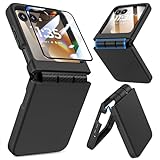
- Made for Motorola Razr 2024/2025/2026: Custom fit that hugs every curve of your phone, with spot-on cutouts for buttons and ports—just make sure you’ve got the right model before you grab one
- Tough Where It Matters: Built for Motorola Razr 2024/2025/2026 with a shock-absorbing TPU inner shell and a solid PC outer layer that handles daily bumps and scrapes, with extra hinge coverage where foldables can use a little more care
- Screen Protector Friendly: Works perfectly with tempered glass designed for Moto Razr 2024/2025/2026’s curved screen, leaving zero gaps or lifting at the edges, so your display stays smooth, protected, and bubble-free
- Clicks On, Stays Put: Snaps right into place on your Motorola Razr 2024/2025/2026 without any glue, won’t shift around in your pocket or bag, and the matte finish adds grip without looking shiny or cheap—just clean, sleek, and fingerprint-resistant
- We’ve Got Your Back: If your case for Motorola Razr 2024/2025/2026 doesn’t fit like a glove or you run into any issue, our fast and friendly support team is ready to help—no hassle, no long waits, just a real solution
If the phone will not charge
- Try the supplied charger or another charger confirmed compatible with your exact Razr+ generation.
- Remove the case temporarily in case it blocks the cable or prevents a secure connection.
- Inspect the cable and plug for visible damage. Try a known-good cable and charging setup before concluding that the phone’s port or battery has failed.
Motorola notes that warmth while TurboPower is charging can be normal. If charging still fails after these checks, contact support: the problem may require diagnosis of the port, battery or another hardware component.
If the phone gets hot
Charging and demanding use can make a phone warm, but not every heat concern should be dismissed as normal. Motorola’s general heat guidance—not a Razr+-specific temperature limit—describes device temperature safeguards and recommends checking for system updates and running hardware diagnostics in Device Help. No Razr+-specific numerical safe-temperature threshold is established here, so do not use a guessed number to decide whether the phone is safe.
Rank #2

- ATTENTION: Only Design for Motorola Razr 2026/2025/2024/Motorola Razr 60/50. (Note: Not suitable for Moto Razr+ 2026 /Moto Razr+ 2025 /Moto Razr+ 2024)
- Compatible with Mag safe: Particularly designed for Motorola Razr 2026/2025/2024/60/50, the phone case is compatible with Mag safe chargers and other Qi Wireless chargers without signal influence. Built-in strong magnet, the phone case will not fall off no matter how it rotates with super adsorption capacity. The perfectly aligned magnetic attraction makes wireless charging faster and more stable
- Drop Protection: Our Motorola Moto Razr 2026/2025/2024/60/50 phone case case has passed rigorous Military Drop Testing, guaranteeing extreme protection for your device. Made with a combination of premium polycarbonate and shock-absorbing TPU bumpers, this case features 4 built-in corner airbags to absorb impact
- Slim and Perfect Grip: The slim Moto Razr 2026/2025/2024/60/50 case design makes insert pocket easily,ergonomic soft TPU frame edges with side contrast anti slip strip provides an ideal grip and reduce your phone slipping out
- Precise Cutting: Precise clipping ensures easy access to all buttons and ports,reserving phone stylus openings to avoid frequent removal of the case. Besides, raised screen bezel and raised camera bezel to provide extra protection for your Motorola Moto Razr 2026/2025/2024/60/50
- If the phone is warm during charging or heavy use, check for available system updates and run the relevant Device Help diagnostics.
- If it is dangerously hot or too hot to handle, stop using it and contact Motorola Support from another device.
If the Razr+ freezes, restarts, or runs slowly
- Check for a system update using the instructions for your generation.
- Start the phone in safe mode using Motorola’s model-specific instructions. If the problem stops in safe mode, a third-party app may be involved.
- If crashes continue, consult Motorola’s guidance for Software Fix, its PC tool for updating or reinstalling system software. Back up data before recovery steps that can erase it.
For persistent slowness, Motorola’s general guidance also discusses resetting settings. That changes settings including Battery, Display and Storage; review the device-specific instructions and understand those changes before proceeding. Menus and steps may differ across Razr+ generations.
If you are concerned about the crease, screen, or hinge
Owner reports describe concerns such as a visible crease or hinge trouble, but individual reports do not establish how common a fault is or what caused it. No Razr+-wide defect rate is established here. A crease by itself does not identify a fault; visible display failure, lines, dead pixels, touch problems, or a damaged protector are reasons to ask Motorola about the exact model and its warranty status.
What’s actually slowing this PC down?
Pick the symptom - the matching free tool is one click away.
Rank #3

- Made for Motorola Razr 2026/2025/2024: Custom fit that hugs every curve of your phone, with spot-on cutouts for buttons and ports-just make sure you've got the right model before you grab one.
- Compatible with MagSafe: This case inner features a built-in N52 enhanced strong magnetic ring. Snap on magnetic power banks, magnetic car mounts, or magnetic wallets-secure and smooth without worry of shifting or slipping.
- Screen Protector Friendly: Including built-in screen protectors for Motorola Razr 2026/2025/2024. Full edge touch natural, stays clear and easy snap-on installation - just smooth, reliable screen coverage.
- Slim & Secure Hinge Guard: This for Razr 2026/2025/2024 case offer 360 degree all-around protection. The internal hinge spring automatically snaps back that opens and closes with your phone-offering long-lasting protection without getting in the way.
- Skin-friendly Touch and Packaging: This case for Razr 2026/2025/2024 uses a variety of oil spray effect, different colors bring different touch that smoother and more comfortable. The packaging includes Case*1 and Cleaning Sets*1.
Do not peel off the foldable’s factory screen protector, press on a damaged display, or try to bend or repair a damaged hinge. Check the support page for your exact model and region before attempting any physical repair.
Independent reader supportYour contribution helps us test, update, and keep practical guides available for everyone.Choose a repair route based on the fault and warranty
Motorola distinguishes software, hardware, and physical or liquid damage and recommends troubleshooting before service. Check your warranty and regional service eligibility through Motorola’s support and repair page before choosing a route.
Quick Recap
Best Value

- [ONLY Compatible with Motorola Razr 2026/2025/2024 Case]: NOT Fit for Razr Ultra, Razr Plus or Razr+. The case is exclusively designed for Moto Razr 2026, Moto Razr 2025 and Moto Razr 2024 case
- [9H Privacy Tempered Glass Front Screen Protector]: The Moto Razr 2026 case/2025 case comes with a durable anti-spy 9H tempered glass front screen protector that shields your privacy from prying eyes, protects your phone's front screen from scratches and impacts, and keeps 99% of the original screen sensitivity
- [Hinge Protection Cover & Anti-slip Edge]: The case's rugged hinge cover with spring-assisted closure automatically covers the Razr 2026/2025 flip hinge to prevent dust and scratches. And anti-slip stripes act like tiny "speed bumps" for your fingers, enhancing grip on your phone to prevent slips and drops
- [ 360° Rotatable Belt-Clip & Kickstand]: The 2026/2025 Razr case’s belt-clip features an elastic locking design that secures the case firmly and enables easy removal by pressing it down. The Razr2026/2025 case built-in hidden stand makes it easy to free your hands and supports wireless charging when it is closed
- [Full Body Protection]: The case for Razr 2026/2025 incorporates a rugged PC back cover and TPU shock-absorbing frame to withstand drops and shocks. Moreover, the raised screen and camera bezels protect your phone from dust and scratches, while the enhanced shockproof angle disperses over 99% of falls and shocks
Rank #4

- Strong Magnetic Attraction: Compatible for Magnetic chargers and other Qi Wireless chargers without signal influence. The Moto Razr 2026/Razr 2025/Razr 2024 magnetic case has built-in 38 super N52 magnets. Its magnetic attraction reaches 2400 gf
- Military Grade & Hinge Protection: This Moto Razr 2026/Razr 2025/Razr 2024 clear case backplane is made with rigid polycarbonate and flexible shockproof TPU bumpers around the edge and features 4 built-in corner Airbags to absorb impact. The Moto Razr 2026/Razr 2025/Razr 2024 case features a hinge design and adopts auto-rebound technology to ensure touch sensitivity remains unaffected while maintaining the device's foldability
- Crystal Clear & Anti Yellow: Using high-grade Bayer's ultra-clear TPU and PC material, allowing you to admire the original sublime beauty for Moto Razr 2026/Razr 2025/Razr 2024 while won't get oily when used. The Nano antioxidant layer effectively resists stains and sweat
- Screen & Camera Raised Edges: The tiny design of 2.5 mm lips over the camera, 1.5 mm bezels over the screen, and 0.5 mm raised corner lips on the back provides extra and comprehensive protection, can minimize and reduce scratches
- Compatibility & Secure Grip: This clear case is only designed for (iPhone Moto Razr 2026/Razr 2025/Razr 2024 6.9 inch). Precise cut and design allow easy access to all ports, buttons, cameras, sensors, and other features. The clear case can totally achieve a great grip feeling
- Likely software issue: Try the model-specific update and safe-mode checks before reset or reinstallation. Back up first if an action may erase data.
- Suspected hardware or physical/liquid damage: Contact Motorola for model-specific service advice rather than attempting to fix the screen, hinge, port or water damage yourself.
- Mail-in repair: Motorola’s surfaced support page estimates 3–5 business days for mail-in repair. This is an estimate, not a guarantee; confirm current timing, location and eligibility with Motorola.
- DIY repair: Motorola describes online iFixit kits with tools and genuine parts for some model-dependent repairs, commonly screen or battery work. Availability, compatibility and difficulty depend on the model, region and damage. DIY damage may affect the standard warranty; physical or liquid damage is generally outside that warranty on the surfaced page, though separate protection-plan terms may apply.
Product prices and availability are accurate as of the date/time indicated and are subject to change. Any price and availability information displayed on Amazon at the time of purchase will apply.

