
Outdated Drivers Are Slowing You Down
One free scan finds every outdated or missing driver and matches the right update for your exact hardware.Free scan · exact hardware matchWindows Errors? Fix Them Before They Spread
Repair common Windows errors and clear accumulated junk for a smoother, more stable PC - no reinstall needed.Free scan · no reinstallTo build a graphical application for Windows CE, you need more than an application IDE: the device’s OS image must include a compatible display driver and board-support components, while an era-matched development environment builds and deploys the application. For Windows Embedded Compact 7, Microsoft’s documented pairing is Platform Builder with Visual Studio 2008; older CE releases use different tools, so match the toolchain to the OS version and the device vendor’s SDK.
How the Windows CE display toolchain fits together
Display enablement has three connected parts. Platform Builder is used to create or customize the operating-system image, including hardware-specific components. Visual Studio-based tools build and debug the application. A target SDK, emulator, or connection to the actual board provides the path to run and test the result.
- Prepare the device image. The image needs the appropriate display driver and OEM adaptation components for the board and panel. Platform Builder is the OS-building environment in the Compact 7 workflow.
- Build the UI application. Choose a programming model supported by the CE generation, target image, and SDK. Options documented across these tool generations include native Win32/C++, .NET Compact Framework, and Silverlight for Embedded.
- Deploy and debug. Use the matching SDK and device connection instructions to send the application to an emulator or target. Vendor workflows may use USB or Ethernet.
Microsoft describes Platform Builder and Visual Studio 2008 as an integrated environment for building, developing, downloading, and debugging code for an embedded device in its Windows Embedded Compact 7 IDE build-process documentation.
Choose tools by Windows CE generation
| Target generation or workflow | Documented tools | What the documentation establishes |
|---|---|---|
| Windows Embedded Compact 7 | Platform Builder and Visual Studio 2008 | Integrated environment for building, downloading, and debugging embedded-device code; OS builds can include drivers, OEM adaptation components, and applications. Source: Microsoft. |
| Windows CE 3.0 era | Platform Builder 3.0 and eMbedded Visual Tools 3.0 | Platform Builder created a custom CE configuration; eMbedded Visual Tools served as the application-development environment. Source: Microsoft MSDN Magazine (2001). |
| Visual Studio 2005 smart-device workflow | Visual Studio 2005 | Microsoft documentation describes managed development with the .NET Compact Framework and native development with Visual C++, plus emulator, debugging, and CAB packaging workflows. Source: Microsoft Smart Device Development. |
| Compact 7 richer UI workflow | Visual Studio, Platform Builder, Silverlight for Embedded, and Expression Blend | Microsoft’s walkthrough combines these tools for a richer UI design and implementation workflow. Source: Microsoft Learn (2012). |
These are generation-specific examples, not interchangeable alternatives. The device’s Windows CE/Compact release, vendor SDK, and image determine which IDE, libraries, and deployment methods will work. A Visual Studio version alone does not supply a board’s display driver or make an application compatible with an arbitrary image.
#1 Best Overall

- Power for any Application A dual core 1 GHz processor, 2GB of Flash memory and up to 32GB of additional SD memory can power multiple complex ERP applications — simultaneously.
- Proven Rugged Construction for your Most Challenging Environments Every day, MC9000 Series devices deliver reliable performance, despite drops on concrete, subzero cold, extreme heat, dust and exposure to splashing liquids.
- Switch Operating Systems With our Premium MC9200 model, you can switch between Windows and Android for complete OS flexibility.
- Government-grade Security Government-grade FIPS 140-2 Level 1 certification secures Wi-Fi and Bluetooth wireless communications, without impacting device or application performance.
- No matter what type of barcodes you use in your facility, there is a scan engine option that will deliver rapid-fire capture — even if the codes are dirty, damaged or poorly printed. The extraordinary range of the 1D/2D SE4850 enables the capture of barcodes from 3 in./7.62 cm to as far as 70 ft./21.4 m away — up to 60% closer and 35% farther than the competition.
Select an application UI technology
Native Win32 or C++
Native development is an option in documented Windows CE workflows, including Visual C++ smart-device development in Visual Studio 2005. It is a fit when the target SDK and OS image support the required native APIs. Hardware display support still comes from the driver and board components in the image, not from the UI code itself.
.NET Compact Framework
Managed applications can use the .NET Compact Framework; Windows Forms and System.Drawing are relevant UI options where the target image and SDK support them. Confirm framework availability on the actual device image before choosing this route. Microsoft’s Visual Studio 2005 smart-device documentation covers managed application development and emulator/debugging workflows at Smart Device Development.
Rank #2

- Intel XScale PXA255 400MHz processor and Windows CE v. 4.2 operating system
- Integrated bar code scanner (laser or linear imager)
- Ruggedized (IP54 & 4' drop)
- 802.11g wireless LAN compatibility
- 64MB flash ROM, 64MB SDRAM
Silverlight for Embedded
For a richer designed interface on Compact 7, Microsoft documents a workflow combining Visual Studio and Platform Builder with Silverlight for Embedded and Expression Blend. This is a Compact 7-specific documented path, not a general claim that every Windows CE device supports Silverlight. Check the image, SDK, and vendor documentation for support.
Check the board, display driver, and SDK before coding
A desktop emulator can help with application development, but it cannot establish that the physical board’s display is configured correctly. The OS image must contain the board-appropriate display driver and OEM adaptation pieces, and the selected UI framework must be present or supported by the device image.
Rank #3
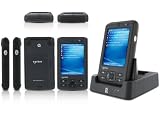
- 5.00 x 2.94 x 0.81 inches, 6.3 oz
- 65K colors TFT LCD, 3.5, 16 bit-per-pixel, 240x320 resolution. Glass analog resistive touch.
- Intel PXA270 @ 624 MHz CPU
- 128MB SDRAM, 256MB FLASH
- IEEE® 802.11 b/g Wireless and Bluetooth v2.0 + EDR Class 2
- Confirm the exact OS generation installed or intended for the target; tool versions differ across CE generations.
- Obtain the vendor SDK and BSP guidance for the specific module or board. The SDK aligns application builds with the target, while the BSP and image provide hardware integration.
- Verify display support in the image. A missing or mismatched display driver can prevent the application UI from driving the panel properly.
- Use the vendor’s connection procedure. Toradex documents Windows Embedded Compact application deployment to target modules over USB or Ethernet and provides development-tool information for supported CE/Embedded Compact versions: Windows Embedded Compact Application Development and Windows Embedded Compact Development Tools.
Deploy and debug on an emulator or target
Start with the emulator if the selected SDK and workflow provide one, then validate on the actual target. Hardware testing is necessary to check the real panel and board-specific driver behavior; emulator success alone does not prove the target image has correct display support.
- Build with the target SDK in the Visual Studio environment appropriate to the CE generation.
- Connect using the documented transport for the target, such as the USB or Ethernet procedure provided by the module vendor.
- Download and debug the application using the supported device tools. For Compact 7, Microsoft’s documented integrated environment is Platform Builder with Visual Studio 2008.
- Validate on the physical display and investigate image, driver, BSP, or SDK compatibility if the UI does not appear or behave correctly.
For Visual Studio 2005 smart-device projects, Microsoft also documents CAB packaging alongside emulator and debugging capabilities; that packaging detail belongs to that workflow and should not be assumed for every CE version or vendor deployment process. See Microsoft Smart Device Development.
Quick Recap
Best Value

- REFURBISHED - Symbol / Motorola MC9190-G30SWEYA6WR Barcode Scanner
- Product Specifications - Wi-Fi (802.11a/b/g) - 2D Imager Scanner - Gun Grip - Windows CE 6.0 - 256MB RAM/1GB ROM - 53 key standard Keypad - Bluetooth - VGA Color LCD
- STOCK - We are one of the largest suppliers for Symbol / Motorola products and spare parts
- WARRANTY - We provide 3 months warranty on all of our products
Rank #4

- DURABLE HANDHELD ENTERPRISE DESIGN: Built for professional environments, this rugged mobile computer provides a reliable handheld solution for warehouses, manufacturing facilities, logistics operations, and inventory teams requiring efficient data management
- INTEGRATED BARCODE SCANNING & DATA ENTRY: Capture barcode information and enter data directly from one device. The integrated scanner and keypad support inventory updates, product identification, receiving, order processing, and asset tracking workflows.
- WIRELESS CONNECTIVITY FOR BUSINESS USE: WiFi and Bluetooth capabilities provide convenient communication with compatible systems and applications. Designed to support mobile teams working across warehouses, distribution centers, and operational areas.
- PRACTICAL SOLUTION FOR BUSINESS OPERATIONS: Suitable for warehouses, manufacturing facilities, distribution centers, retail environments, and field applications. Helps organizations manage inventory records, track assets, and improve data collection processes.
Product prices and availability are accurate as of the date/time indicated and are subject to change. Any price and availability information displayed on Amazon at the time of purchase will apply.

