
Recommended Free Tools
This DIY macropad adds physical buttons for common Klipper printer actions, so you can pause a print, raise the nozzle slightly, or load filament without opening a web interface. It uses a DFRobot Beetle RP2040 board to send button presses to Klipper over USB, where configured macros perform the printer actions.
What you need for the Klipper macropad
The documented build combines a small microcontroller, illuminated buttons, addressable LEDs, and a printed enclosure:
- DFRobot Beetle RP2040 development board: the controller that connects the buttons and LEDs to Klipper over USB.
- DFRobot illuminated push buttons with connectors: the physical controls assigned to printer actions.
- SK6812 individually addressable RGB LED strip: visual feedback that can respond to printer status.
- 3D-printable enclosure: a case for arranging and protecting the controls.
The project description does not specify a measured total cost or a standard number of buttons; the controls are intended to provide access to a handful of functions. See Cameron Coward’s Hackster News coverage for the project overview and the linked 3D Printer Macro Pad: 7 Steps (with Pictures) for a step-by-step build reference.
How a button press controls the printer
The control path is: button press → RP2040 over USB → Klipper macro → printer action. The board runs firmware generated for the RP2040 by Klipper. In the printer configuration, you define the button and LED pins and connect each button to the macro it should invoke. When a button is pressed, Klipper runs that macro; the action depends on how the macro is configured.
#1 Best Overall
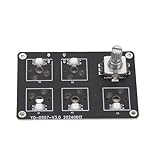
- [CUSTOMIZABLE EXPERIENCE] Unlock your creativity with our 5 Keys Macro Keypad, designed specifically for Lab 3D printers. Featuring fully programmable keys and hot swappable switches, this mechanical keyboard allows you to customize your typing experience with ease, enhancing both comfort and efficiency for all your projects.
- [EASY SWITCH CUSTOMIZATION] With a hot swappable design, all key switches on this macro keypad can be effortlessly removed and replaced without the need for soldering. Choose your preferred switch types to suit your unique tactile feedback and actuation force preferences, making this product as versatile as you are.
- [COMPATIBILITY YOU CAN COUNT ON] The mainboard of this macro keypad is a seamless fit for Lab 3D printers, but it does require a 3D printed housing which is not included. This adaptability allows you to create a personalized housing that perfectly conforms to the mainboard, ensuring an optimal setup for your workspace.
- [ENHANCED CONTROL WITH KNOB KEY] Take advantage of the integrated rotatable knob on the keypad, which not only adds functionality but also supports voice control configurations. This feature is particularly useful for office professionals and who rely on quick access functions to maintain their workflow and efficiency.
- [VIBRANT RGB LIGHTING] Illuminate your workspace with stunning 6-color RGB lighting that enhances the visibility of each key, particularly in low-light conditions. Whether you are gaming late into the night or working on intricate designs, this visual customization will not only brighten your space but also optimize your typing experience.
The SK6812 strip adds an optional feedback path: the LEDs can reflect printer status. That is different from assigning a button to an action—the buttons issue commands, while the LEDs can show information about the printer.
What you can do with the macropad
The documented examples are a pause button, a control to raise the nozzle slightly, and a filament-loading button. They are examples of how to map physical inputs to Klipper macros, not fixed functions built into the RP2040. Other actions are possible when the appropriate Klipper macros and pin mappings are configured.
Rank #2
- [Customizable Functionality]Easily program the five keys for macros, enhancing productivity with tailored controls.
- [RGB Lighting]Equipped with vibrant RGB lights for a customizable gaming or workspace environment.
- [User-Friendly Design]Simple plug-and-play setup; perfect for 3D printer enthusiasts and productivity boosters.
- [Versatile Application]Ideal for various applications; enhances efficiency in 3D printing, gaming, and productivity tasks.
- [Complete Package]Includes mainboard, buttons, screws, data cable, and user manual for straightforward installation.
This makes the macropad useful when the printer does not have convenient onboard controls and you want frequently used actions within reach. It provides a physical alternative to opening the printer’s web interface for those mapped operations; it does not replace Klipper or configure the printer’s macros for you.
Independent reader supportYour contribution helps us test, update, and keep practical guides available for everyone.What to check before building
- Firmware: the documented design is for Klipper. The project does not establish compatibility with other printer firmware.
- Klipper setup: you need an existing Klipper printer configuration and the ability to define pins and macros.
- Pin assignments: the button and LED pins must match the wiring and board configuration.
- Enclosure and wiring: the case is a printed part, and the controls, board, and LED strip need to be laid out and connected to suit your build.
If you want a plug-in controller that works independently of firmware configuration, this project is not presented as that kind of product. Its flexibility comes from connecting physical controls to the macros you choose, which also means setup depends on your Klipper configuration.
Quick Recap
Best Value

- PROGRAMMABLE KEYS: Fully programmable mechanical keypad keys support customized typing setups for comfort and efficiency
- HOT SWAPPABLE SWITCHES: Removable and replaceable keys allow switch changes without soldering for tactile feedback or actuation force preferences
- HOUSING REQUIREMENT: Mainboard is designed to pair with a 3D printed housing for Bambu Lab 3D printers; housing is not included
- ROTARY KNOB: Integrated rotatable knob supports voice control configurations and quick access functions for office work and gaming
- RGB LIGHTING: Six color RGB light illuminates each key for visual customization and use in low light gaming or late night work sessions
Rank #4
- Customizable Experience: This mechanical keyboard features fully programmable keys and hot swappable switches, allowing users to personalize their typing setup for comfort and efficiency
- Hot Swappable Design: All keys are removable and replaceable without soldering, enabling easy customization of switch types to match individual preferences for tactile feedback or actuation force
- Compatibility: This keypad mainboard needs to be paired with a 3D printed housing (not included); Fit for Bambu Lab 3D printers, allowing you to design a custom housing that conforms to the mainboard
- Knob Key: This keypad mainboard includes a rotatable knob that supports voice control configurations, enhancing efficiency for office workers and game players who require quick access functions
- RGB Lighting: 6 color RGB light illuminates each key, providing both visual customization and improved visibility in low light environments for gaming or late night work sessions
Rank #3
- Customizable Macro Keys--- Programmable keys allow you to assign shortcuts, commands, or complex macros for your 3D printer or computer tasks. The hot-swappable mechanical switches enable easy customization without soldering, letting you choose your preferred switch type for optimal tactile feedback and typing efficiency. This personalization enhances workflow speed whether for 3D printing controls or daily computing.
- Rotary Knob Functionality--- Features a versatile rotary knob that can be configured for various controls, including volume adjustment, scrolling, or even specific voice command triggers to boost productivity. This added functionality is ideal for office workers, , and content creators who need quick and precise input options beyond standard keys.
- Vibrant RGB Backlighting--- Equipped with 6-color RGB lighting for each key, providing not only a stylish and customizable look but also practical visibility in low-light environments. The lighting enhances usability during late-night work sessions, gaming, or in dimly lit rooms, making key identification easy and accurate.
- Broad Compatibility--- Designed to work seamlessly with 3D printers, this keypad mainboard pairs with a 3D printed housing (not included) for a tailored fit. It also functions as a standalone macro pad for computers, supporting various operating systems for gaming, programming, office work, and other applications requiring quick key access.
- Complete and User-Friendly Package--- Includes everything needed for setup: mainboard, 6 buttons, 6 screws, USB data cable, and a user manual. The simple installation process and clear instructions make it accessible for both tech enthusiasts and beginners looking to expand their keyboard functionality.
Product prices and availability are accurate as of the date/time indicated and are subject to change. Any price and availability information displayed on Amazon at the time of purchase will apply.

